
1. הקדמה
Thank you for choosing the Goshyda Portable Multimedia 1080P Projector. This compact and versatile device is designed to provide a personal cinema experience, supporting various multimedia inputs for entertainment, presentations, and more. Please read this manual carefully before using the projector to ensure proper operation and to maximize its lifespan.

Image 1.1: The Goshyda YG300 Mini Portable Projector in a home entertainment setting.
2. מידע בטיחות
- ספק כוח: Use only the specified 5V 2A power adapter or a compatible power bank. Incorrect voltage עלול לגרום נזק למכשיר.
- אוורור: אין לחסום את פתחי האוורור. יש לוודא זרימת אוויר מספקת סביב המקרן כדי למנוע התחממות יתר.
- סְבִיבָה: Avoid exposing the projector to water, moisture, dust, or extreme temperatures. Operate in a clean, dry environment.
- ניקוי: נתק את החשמל לפני הניקוי. השתמש במטלית רכה ויבשה. אין להשתמש בחומרי ניקוי נוזליים או בתרסיס.
- פירוק: אל תנסה לפרק או לתקן את המקרן בעצמך. יש לפנות לכל תיקון וטיפול באנשי מקצוע מוסמכים.
- הגנת עיניים: אל תסתכל ישירות לתוך עדשת המקרן כאשר ה-lamp פועל.
3. תכולת החבילה
אנא בדקו את תוכן האריזה בעת פתיחת הקופסה. אם חסרים פריטים או פגומים, צרו קשר עם הקמעונאי שלכם.
- Goshyda Portable Projector
- שְׁלַט רָחוֹק
- כבל AV
- מתאם מתח
- מדריך למשתמש (מסמך זה)

Image 3.1: Included accessories with the Goshyda Portable Projector.
4. המוצר נגמרview
4.1. תכונות המקרן
- 1080P Resolution Support: מספק תמונות ברורות ומפורטות.
- עיצוב קומפקטי ונייד: Weighing approximately 290g, it is easy to carry.
- Multi-Port Connectivity: Includes USB, HDMI, AV, memory card slot, and audio output.
- רמקולים מובנים: מספק אודיו משולב לנוחות.
- כוח גמיש: Can be powered by a 5V 2A wall charger or power bank.

Image 4.1: Visual representation of the projector's main features.
4.2. Projector Ports and Controls
Familiarize yourself with the various ports and controls on your projector.
- עֲדָשָׁה: Front-facing projection lens.
- טבעת מיקוד: מכוונן את בהירות התמונה.
- כניסת חשמל (DC IN): Connects to the 5V 2A power adapter.
- יציאת HDMI: For connecting devices via HDMI cable.
- יציאת USB: לחיבור התקני אחסון USB.
- יציאת AV: For connecting devices via AV cable.
- חריץ כרטיס MicroSD: For inserting a memory card.
- פלט שמע: לחיבור רמקולים חיצוניים או אוזניות.
- לחצני שליטה: On the top panel for basic navigation and selection.

תמונה 4.2: צד view of the projector highlighting its connectivity ports.

Image 4.3: Close-up of the projector lens.
5. התקנה
5.1. חיבור חשמל
- Connect the provided power adapter to the DC IN port on the projector.
- חבר את מתאם החשמל לשקע חשמל רגיל.
- Alternatively, for portable use, connect a 5V 2A power bank to the DC IN port.

Image 5.1: Powering the projector via wall adapter or power bank.
5.2. מיקום והקרנה
Place the projector on a stable, flat surface. The optimal projection distance is between 1 to 2.5 meters, allowing for a screen size of up to 60 inches.
- For a 24-inch screen, place the projector approximately 0.8 meters away.
- For a 47-inch screen, place the projector approximately 1.2 meters away.
- For a 60-inch screen, place the projector approximately 1.6 meters away.
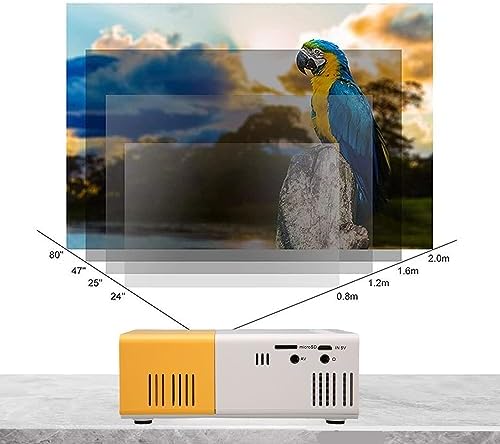
Image 5.2: Projection distance guidelines for various screen sizes. Note: Maximum recommended projection size is 60 inches.
5.3. התאמת פוקוס
After placing the projector and powering it on, rotate the focus ring located around the lens until the projected image appears clear and sharp.
6. הוראות הפעלה
6.1. הפעלה/כיבוי
- הפעלה: לחץ על לחצן ההפעלה במקרן או בשלט הרחוק.
- כיבוי: לחץ שוב על לחצן ההפעלה. המקרן יכבה.
6.2. בחירת מקור קלט
Use the 'Source' button on the remote control or the projector's control panel to cycle through available input sources (HDMI, USB, AV, MicroSD).
6.3. ניווט בתפריט
Use the arrow buttons on the remote control or projector to navigate through menus. Press 'OK' or 'Enter' to confirm selections. Use the 'Return' or 'Back' button to go back to the previous menu.
7. קישוריות
המקרן מציע אפשרויות קישוריות מרובות עבור מגוון מכשירים.

Image 7.1: Connectivity options for the Goshyda projector.
7.1. חיבור HDMI
Connect devices such as laptops, TV Sticks, game consoles (e.g., for Xbox One), or Blu-ray players using an HDMI cable. Select 'HDMI' as the input source.
7.2. חיבור USB
הכנס כונן הבזק מסוג USB ליציאת ה-USB כדי להפעיל מדיה files directly. Select 'USB' as the input source and navigate through your files.
7.3. AV Connection
Use the provided AV cable to connect older devices like DVD players. Select 'AV' as the input source.
7.4. Smartphone/Tablet Connection
To connect directly to your smartphone or tablet, you will need an appropriate adapter (e.g., Micro USB to HDMI, Type-C to HDMI, or a dedicated HD multimedia interface device), depending on your device's operating system (OS X or Android) and available ports. These adapters are sold separately.
7.5. פלט שמע
Connect external speakers or headphones to the audio output port for enhanced sound.
8. תחזוקה
- ניקוי עדשות: Use a soft, lint-free cloth specifically designed for optical lenses to gently wipe the projector lens. Do not use abrasive materials or harsh chemicals.
- ניקוי חיצוני: Wipe the projector's exterior with a soft, dry cloth.
- אִחסוּן: כאשר המקרן אינו בשימוש למשך תקופות ממושכות, יש לאחסן אותו במקום קריר ויבש, הרחק מאור שמש ישיר ומאבק.
9. פתרון תקלות
| בְּעָיָה | סיבה אפשרית | פִּתָרוֹן |
|---|---|---|
| אין כוח | Power adapter not connected or faulty; insufficient power supply. | Ensure the 5V 2A power adapter is securely connected and plugged into a working outlet. Try a different power source or power bank. |
| אין תמונה | Incorrect input source selected; cable not connected properly; device not outputting signal. | Select the correct input source (HDMI, USB, AV). Check all cable connections. Ensure the connected device is powered on and outputting a signal. |
| התמונה מטושטשת | המיקוד לא מותאם; המקרן קרוב/רחוק מדי מהמסך. | Rotate the focus ring to sharpen the image. Adjust the projection distance within the recommended range (1-2.5m). |
| אין קול | Volume too low or muted; external speakers not connected; audio format not supported. | Increase the volume on the projector and the source device. Check if external speakers are properly connected. Ensure the audio format is supported. |
10. מפרטים
| תכונה | פְּרָט |
|---|---|
| מותג | Goshyda |
| מספר דגם | Goshyda89pkbg17g0 |
| רזולוציית תצוגה | 1920 x 1080 (תמיכה ב-1080P) |
| בְּהִירוּת | 200 לומן |
| יחס גובה-רוחב | 4:3 |
| מרחק הקרנה | 1 - 2.5 מטרים |
| גודל הקרנה | עד 60 אינץ' |
| טכנולוגיית קישוריות | HDMI, USB, AV, MicroSD, Audio Out |
| קלט כוח | 5V 2A |
| סוג תצוגה | LCD |
| מידות המוצר | 12L x 8.5W x 4.6H cm (Approx. 4.7 x 3.3 x 1.8 inches) |
| גורם צורה | נייד |
| סוג הרכבה | הר שולחן |
11. אחריות ותמיכה
For warranty information and customer support, please refer to the documentation provided with your purchase or contact your retailer directly. Keep your proof of purchase for warranty claims.