
1. הקדמה
This manual provides detailed instructions for the installation, operation, and maintenance of your TP-Link Deco X50-Outdoor AX3000 Whole Home Mesh WiFi 6 Unit. The Deco X50-Outdoor is designed to extend your mesh WiFi network to outdoor and indoor spaces, providing robust and stable wireless connectivity. Please read this manual thoroughly before using the device to ensure proper setup and optimal performance.
2. מידע בטיחות
יש להקפיד תמיד על אמצעי הזהירות הבסיסיים הבאים כדי להפחית את הסיכון לשריפה, התחשמלות ופציעה:
- אל תחשוף מכשיר זה למים או לחות.
- אל תנסה לפרק, לתקן או לשנות את המכשיר.
- השתמש רק במתאם החשמל שסופק עם המכשיר.
- Ensure the device is installed in a stable location to prevent it from falling.
- הרחק את המכשיר ממקורות חום ומאור שמש ישיר.
- For outdoor installation, ensure all cable connections are properly sealed to prevent water ingress.
3. תכולת החבילה
ודא שהחבילה שלך מכילה את הפריטים הבאים:
- 1 x TP-Link Deco X50-Outdoor Unit
- 1 x מתאם חשמל
- 1 x כבל Ethernet
- Mounting Kit (includes mounting bracket, screws, and wall plugs)
- מדריך התקנה מהירה

Image: The retail packaging for the TP-Link Deco X50-Outdoor unit, showing the device and its key features.
4. המוצר נגמרview
The Deco X50-Outdoor is a cylindrical, white unit designed for both outdoor and indoor use. It features an IP65 rating for waterproof and dustproof protection, making it suitable for various weather conditions.
4.1 פריסת מכשיר

תמונה: חזית view of the TP-Link Deco X50-Outdoor unit, showcasing its sleek, cylindrical design and 'deco outdoor' branding.

Image: The bottom of the Deco X50-Outdoor unit, revealing the port cover and the attachment point for the mounting bracket.
4.2 יציאות וכפתורים
Under the protective cover at the bottom of the unit, you will find the following:
- יציאת PoE: Used for Power over Ethernet (PoE) connection, providing both power and data through a single Ethernet cable.
- יציאות LAN (2): For connecting wired devices or for backhaul connection to other Deco units.
- יציאת חשמל: For connecting the included power adapter when not using PoE.
- לחצן איפוס: A small button to reset the device to factory settings.

תמונה: תקריב view of the PoE and AC power supply ports located at the base of the Deco X50-Outdoor unit, with labels indicating their functions.
5. התקנה
Follow these steps to set up your Deco X50-Outdoor unit. It is recommended to use the TP-Link Deco app for a guided setup process.
5.1 הורידו את אפליקציית דקו
- Scan the QR code in the Quick Installation Guide or search for "TP-Link Deco" in the App Store or Google Play.
- הורד והתקן את אפליקציית Deco בטלפון החכם או הטאבלט שלך.
5.2 התקנה פיזית
The Deco X50-Outdoor can be mounted on a pole, wall, or placed on a tabletop.
- בחר מיקום: Select a location that provides optimal WiFi coverage and is within range of your existing Deco network (if extending). For outdoor use, ensure it's protected from direct impact and accessible for power/Ethernet.
- הַרכָּבָה:
- הר מוט: Use the provided straps to secure the mounting bracket to a pole.
- קיר קיר: Drill holes, insert wall plugs, and screw the mounting bracket to the wall.
- משטח שולחן: Simply place the unit on a flat, stable surface.
- חבר חשמל:
- שימוש במתאם חשמל: Connect the provided power adapter to the power port and plug it into an electrical outlet.
- שימוש ב-PoE: Connect an Ethernet cable from a PoE-enabled switch or injector to the PoE port on the Deco unit.
- Connect to Existing Network (Optional): If you are using the Deco X50-Outdoor as a satellite unit, it will connect wirelessly to your main Deco unit. For a wired backhaul, connect an Ethernet cable from one of the LAN ports to your main Deco unit or network switch.

Image: The Deco X50-Outdoor unit securely mounted on an outdoor pole, demonstrating a typical installation scenario.
5.3 התקנה מונחית אפליקציה
- פתחו את אפליקציית Deco והתחברו באמצעות שם המשתמש שלכם ב-TP-Link. אם אין לכם אחד, צרו חשבון.
- Tap the "+" icon in the top right corner to add a new Deco unit.
- Select your Deco model (X50-Outdoor) and follow the on-screen instructions to complete the setup. The app will guide you through connecting the unit and integrating it into your existing Deco mesh network.
6. הפעלה
Once set up, your Deco X50-Outdoor unit will automatically integrate into your mesh network, providing seamless WiFi coverage. You can manage your network using the TP-Link Deco app.
6.1 Deco App Features
אפליקציית דקו מאפשרת לך:
- View התקנים מחוברים ומצבם.
- הגדר רשת אורחים.
- ניהול בקרות הורים.
- תעדוף התקנים לקבלת ביצועים אופטימליים (QoS).
- Access HomeShield Security features.
- עדכן קושחה.
- Monitor network health and usage.
6.2 מצב מחוון LED
The LED on your Deco unit indicates its status:
- ירוק מלא: דקו עובד כמו שצריך.
- ירוק פועם: דקו מתחיל.
- אדום מלא: יש בעיה ב-Deco (למשל, אין חיבור לאינטרנט).
- אדום פועם: דקו מנותק מיחידת דקו הראשית.
- כחול אחיד: דקו מוכן להתקנה.
- כחול פועם: Deco is pairing via Bluetooth.
7. תחזוקה
Regular maintenance ensures the longevity and optimal performance of your Deco X50-Outdoor unit.
7.1 עדכוני קושחה
Keep your Deco's firmware updated to benefit from the latest features, security enhancements, and bug fixes. You can check for and install updates via the Deco app.
7.2 ניקוי
Wipe the device with a soft, dry cloth. Do not use liquid cleaners or chemical sprays.
7.3 שיקולים סביבתיים
Despite its outdoor rating, avoid placing the unit in locations where it is constantly submerged in water or exposed to extreme physical impact.
8. פתרון תקלות
If you encounter issues with your Deco X50-Outdoor, try the following solutions:
8.1 אין חיבור לאינטרנט
- Check the LED status. If solid red, ensure your main Deco unit has an internet connection.
- Verify that the Ethernet cable (if used) is securely connected.
- Restart your modem, main Deco unit, and then the X50-Outdoor unit.
8.2 Deco X50-Outdoor Disconnected
- Ensure the unit is within range of your main Deco or another satellite Deco.
- בדוק את חיבור החשמל.
- Try relocating the unit to a closer position to the main Deco.
8.3 מהירות WiFi איטית
- Ensure the unit is placed in an open area, free from obstructions.
- בדוק אם קיימים עדכוני קושחה.
- Use the Deco app to run a network optimization test.
8.4 איפוס להגדרות היצרן
If issues persist, you may need to perform a factory reset. With the Deco unit powered on, use a pin to press and hold the Reset button until the LED turns solid red (approximately 1 second), then release. The unit will restart with factory default settings.
9. מפרטים
Technical details for the TP-Link Deco X50-Outdoor unit:
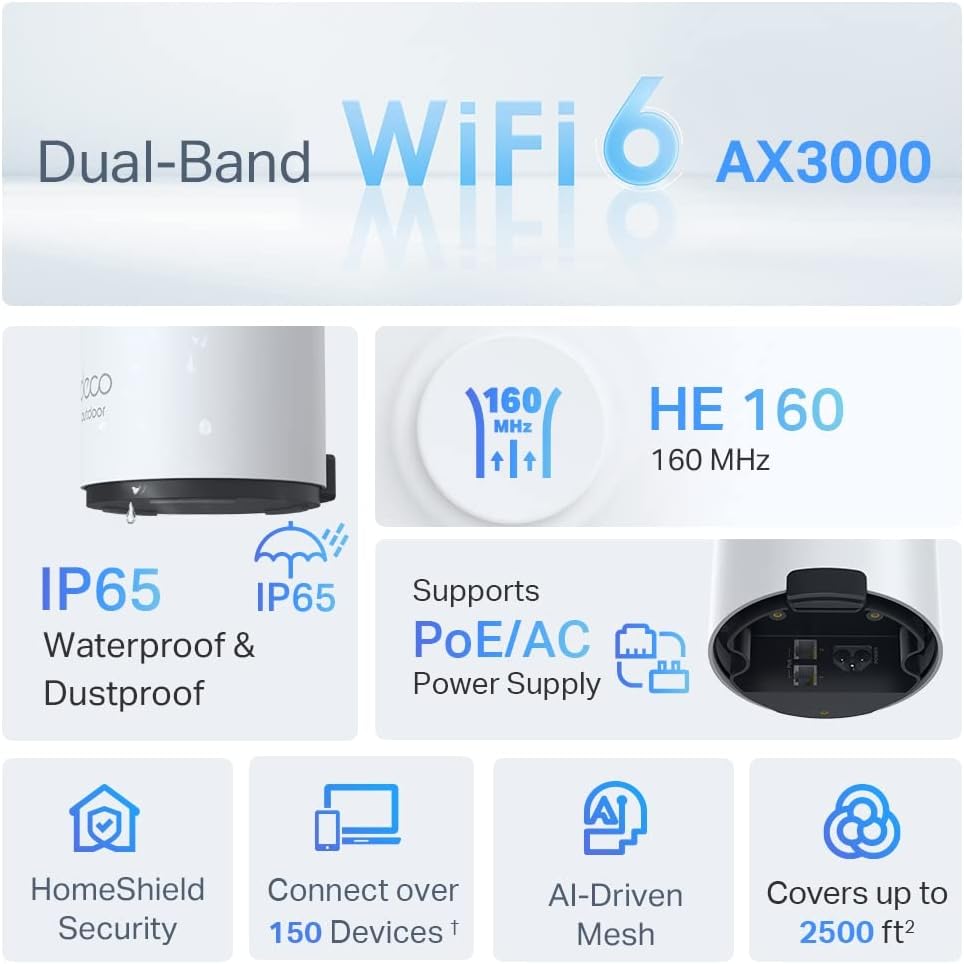
Image: An infographic highlighting key features of the Deco X50-Outdoor, including Dual-Band WiFi 6, AX3000 speeds, IP65 rating, PoE/AC power support, HomeShield Security, support for over 150 devices, AI-Driven Mesh, and up to 2500 sq ft coverage.
| תכונה | פְּרָט |
|---|---|
| שם הדגם | AX3000 Outdoor Whole Home Mesh WiFi 6 Unit |
| תקן אלחוטי | Wi-Fi 6 (802.11ax) |
| מחלקה להקת תדרים | Dual-Band |
| קצב העברת נתונים | Up to 2402 Mbps (5 GHz) + 574 Mbps (2.4 GHz) |
| טווח קישוריות | Up to 2000 Square Feet (per unit) |
| נמלים | 2 x Gigabit Ethernet Ports (Auto-sensing WAN/LAN) |
| ספק כוח | PoE (802.3at) or AC Power Adapter (240V AC) |
| עמידות בפני מזג אוויר | IP65 (עמיד למים ולאבק) |
| פרוטוקול אבטחה | WPA, WPA2, WPA3 |
| שיטת בקרה | TP-Link Deco App |
| משקל פריט | 0.9 קילוגרם |
10. אחריות ותמיכה
למידע על אחריות ותמיכה טכנית, אנא עיינו באתר הרשמי של TP-Link webלאתר או לפנות לשירות הלקוחות שלהם.
- רשמי של TP-Link Webאֲתַר: www.tp-link.com
- תמיכה טכנית: בקרו במדור התמיכה ב-TP-Link webאתר לשאלות נפוצות, מדריכים לפתרון בעיות ופרטים ליצירת קשר.