
1. הקדמה
The HOGA W10 Advanced Window Cleaning Robot is designed to provide intelligent and efficient automatic cleaning for various smooth surfaces, including windows, doors, walls, and mirrors. This manual provides essential information for the safe and effective operation, maintenance, and troubleshooting of your device.
2. הוראות בטיחות
Read all safety instructions carefully before using the HOGA W10 Window Cleaning Robot. Failure to follow these instructions may result in electric shock, fire, or serious injury.
- חיבור חשמל: Always ensure the robot is connected to a power source during operation. The internal battery is for backup during power outages only, allowing the robot to remain on the glass for at least 30 minutes.
- חבל בטיחות: Always attach the safety rope to a secure anchor point before placing the robot on any window, especially for high-rise cleaning. This prevents the robot from falling in case of power loss or suction failure.
- מצב פני השטח: Do not use the robot on cracked, damaged, or uneven glass surfaces. Ensure the surface is free from large debris that could scratch the glass or damage the robot.
- תנאי מזג האוויר: Avoid using the robot in rainy, windy, or extremely cold conditions.
- ילדים וחיות מחמד: הרחיקו ילדים וחיות מחמד מהרובוט הפועל.
- פתרון ניקוי: Use only recommended cleaning solutions. Do not spray flammable liquids near the robot.
- תַחזוּקָה: בצעו תחזוקה שוטפת כמתואר במדריך זה כדי להבטיח ביצועים ובטיחות מיטביים.
3. תכולת החבילה
Carefully unpack your HOGA W10 Window Cleaning Robot and check that all items are present and in good condition. If any items are missing or damaged, contact customer support.

Image: The HOGA W10 Window Cleaning Robot and its accessories, including the main unit, power cord, cleaning cloths, spray bottle, remote control, safety rope, and user manual.
- יחידת רובוט ראשית
- כבל מתח ומתאם
- 5 מטליות ניקוי מיקרופייבר
- Spray Bottle (empty)
- שְׁלַט רָחוֹק
- חבל בטיחות עם קרבינר
- מדריך למשתמש
- Ultrasonic Nozzle Replacement Kit (if applicable)
4. המוצר נגמרview
The HOGA W10 features advanced technology for efficient window cleaning.
תכונות עיקריות:
- ניקוי אוטומטי חכם: Designed for both indoor and outdoor glass, high windows, and tiled walls.
- עוצמת יניקה גבוהה: 3000 PA suction ensures secure attachment to surfaces.
- Smart Frame Detection: Automatically detects window frames to prevent collisions.
- Automatic Path Planning: Optimizes cleaning routes for thorough coverage.
- שְׁלַט רָחוֹק: תפעול נוח מרחוק.
- סוללת גיבוי: Internal battery provides power for up to 30 minutes during power interruptions.
- חבל בטיחות: Additional safety measure for high-altitude cleaning.

Image: Illustration of the HOGA W10 robot's features including remote control, backup battery, smart frame detection, and automatic path planning.

Image: The HOGA W10 robot illustrating its strong suction power, indicated by arrows pulling it towards the glass surface.
5. התקנה
- חברו מטליות ניקוי: Securely attach two clean microfiber cleaning cloths to the bottom of the robot. Ensure they cover the cleaning pads completely.
- חבר חשמל: Plug the power adapter into the robot and then into a power outlet. Ensure the connection is secure.
- חבר חבל בטיחות: Fasten the safety rope's carabiner to a sturdy object indoors, such as a heavy piece of furniture or a window frame anchor. Ensure the rope is long enough to reach the entire cleaning area but not excessively loose.
- הכנת תמיסת ניקוי: Fill the provided spray bottle with your preferred window cleaning solution.
- הכן משטח: For heavily soiled windows, it is recommended to pre-clean the surface to remove large dirt particles. Lightly spray the window surface or the cleaning cloths with cleaning solution.
6. הוראות הפעלה
Follow these steps to operate your HOGA W10 Window Cleaning Robot.
הפעלת הרובוט:
- רובוט מקום: Hold the robot firmly against the glass surface. Press the power button on the robot or the remote control to activate suction. The robot will adhere to the glass.
- התחל לנקות: Once the robot is securely attached, press the 'Start' button on the remote control. The robot will begin its automatic cleaning path.
מצבי ניקוי:
The robot features automatic path planning. You can also manually control its direction using the remote control's arrow buttons.
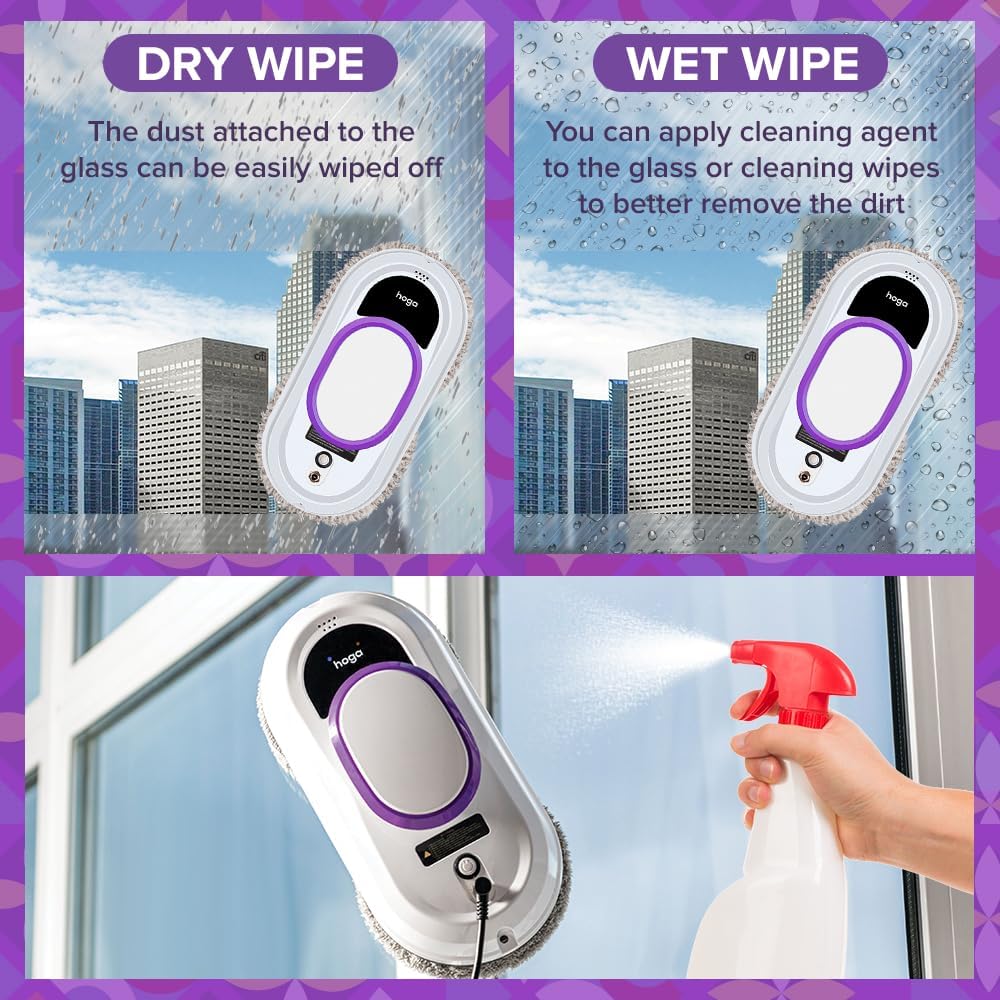
Image: The HOGA W10 robot illustrating two cleaning methods: dry wiping for dust and wet wiping with cleaning agent for dirt removal.
- מגבון יבש: For light dust, the robot can be used with dry cloths.
- Wet Wipe: For heavier dirt, lightly spray the cleaning cloths or the window surface with cleaning solution before operation.
Stopping the Robot:
Press the 'Stop' button on the remote control or the robot's power button. The robot will stop and remain attached to the surface. Carefully remove it by holding it firmly and detaching it from the glass.
7. תחזוקה
Regular maintenance ensures the longevity and optimal performance of your HOGA W10 Window Cleaning Robot.
מטליות ניקוי:

תמונה: תקריב view of the HOGA W10 robot's microfiber cleaning pads, which are essential for effective cleaning.
- After each use, remove the microfiber cleaning cloths.
- כבסו את הבגדים ביד או במכונה עם חומר ניקוי עדין. אין להשתמש באקונומיקה או במרכך כביסה.
- Allow cloths to air dry completely before reuse or storage.
Robot Body and Sensors:
- Wipe the robot's body with a soft, dry cloth to remove any dust or residue.
- Clean the edge detection sensors and suction vents with a dry cotton swab to ensure proper function.
אִחסוּן:
אחסנו את הרובוט ואת אביזריו במקום קריר ויבש, הרחק מאור שמש ישיר וטמפרטורות קיצוניות.
8. פתרון תקלות
If you encounter issues with your HOGA W10, refer to the following troubleshooting guide:
| בְּעָיָה | סיבה אפשרית | פִּתָרוֹן |
|---|---|---|
| Robot does not stick to glass | Insufficient power; Surface too dirty or wet; Suction vents blocked; Robot not placed flat. | Ensure power cord is securely connected. Clean the window surface. Clear any obstructions from suction vents. Place the robot flat against the glass. |
| Robot leaves streaks | Dirty cleaning cloths; Too much cleaning solution; Incorrect cleaning solution. | Replace or wash cleaning cloths. Use less cleaning solution. Use a suitable window cleaning solution. |
| הרובוט עוצר באופן בלתי צפוי | Power interruption; Edge sensor error; Internal battery low. | Check power connection. Ensure edge sensors are clean. Allow robot to charge fully before use. |
| השלט רחוק לא עובד | Dead batteries in remote; Obstruction between remote and robot. | Replace remote control batteries. Ensure clear line of sight to the robot. |
9. מפרטים
| יַצרָן | Hoga |
| מספר דגם | HGRWC01 |
| מידות המוצר (L x W x H) | 29.5 x 12 x 14.8 ס"מ |
| מִשׁקָל | 2.26 ק"ג |
| סוג סוללה | סוללת ליתיום-פולימר אחת (כלולה) |
| הרכב סוללה | ליתיום-יון |
| סוג כוח | AC |
| תכונות מיוחדות | Lightweight, Professional |
| זמינות חלקי חילוף | 2 שנים |
10. אחריות ותמיכה
HOGA provides a 2-year availability for spare parts for the W10 Window Cleaning Robot. For any product inquiries, technical support, or warranty claims, please refer to the contact information provided with your purchase or visit the official HOGA webאֲתַר.