
1. הקדמה
Thank you for choosing the ShanWan Q13 Mobile Game Controller. This device is designed to enhance your mobile gaming experience by providing a console-like control scheme for a wide range of games and platforms. It offers ergonomic design, adjustable features, and broad compatibility for both iOS and Android devices.
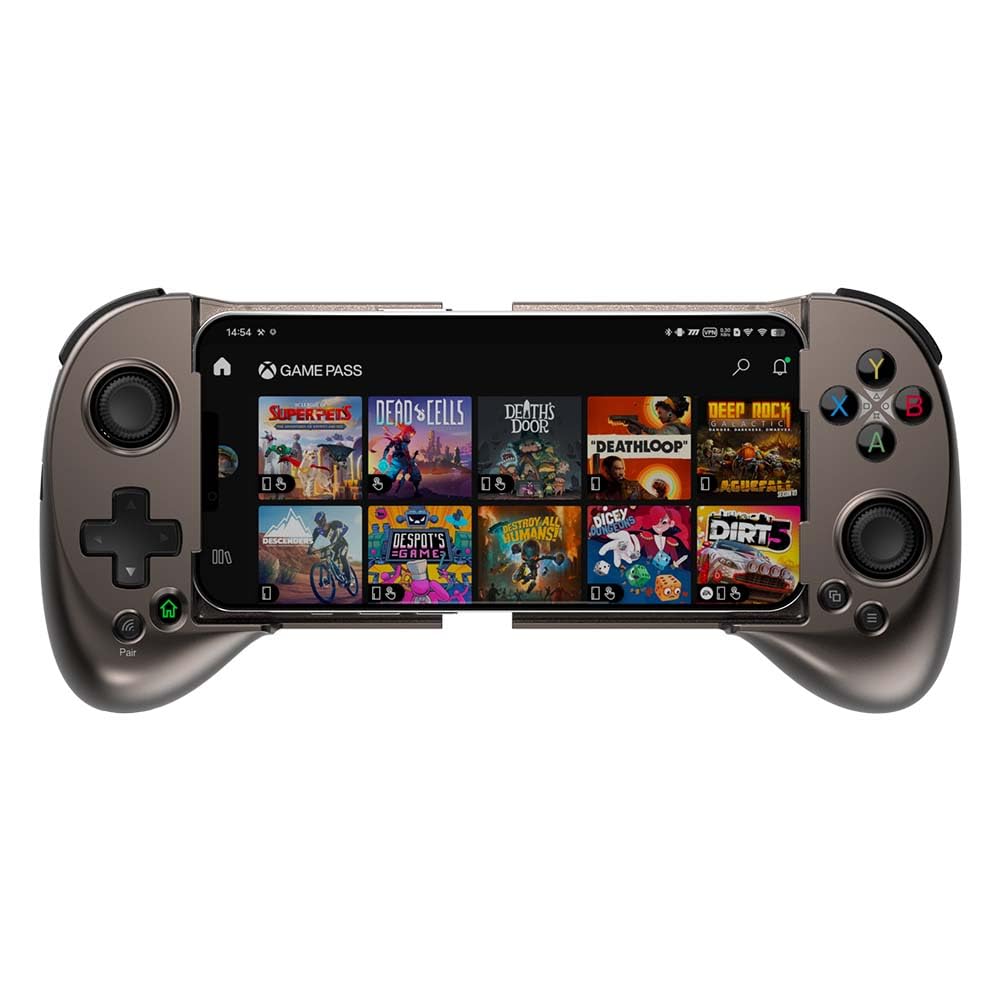
Image: The ShanWan Q13 Mobile Game Controller with a smartphone securely mounted, ready for gaming.
2. תכולת החבילה
אנא ודא שכל הפריטים המפורטים להלן כלולים בחבילה שלך:
- 1 x ShanWan Q13 Mobile Game Controller
- כבל טעינה 1 x USB-C
- מדריך למשתמש אחד (מסמך זה)
- 2 x Joystick Grip Caps (e.g., paw print design)
- 1 x Lightning Port Adapter (for iPhone pass-through charging)
- 1 x USB-C Port Adapter (for Android pass-through charging)
3. המוצר נגמרview
The ShanWan Q13 controller features an ergonomic and flexible design for comfortable handheld gaming. It is designed to accommodate smartphones with adjustable dimensions.
תכונות עיקריות:
- עיצוב ארגונומי: Flexible design for a comfortable handheld grip during extended gaming sessions.
- עיצוב מתכוונן: Can be adjusted to fit smartphones from 5.079 to 7.007 inches in length.
- Configurable Buttons: Includes an M button and 4 programmable buttons on the back for custom macros.
- חיבור אלחוטי Bluetooth: Provides latency-free gameplay.
- תאימות רחבה: Compatible with iOS MFi/Apple Arcade, PS Remote Play, Xbox Game Pass Ultimate, Steam Link, and GeForce NOW.
- Adjustable Joysticks: Joysticks can be rotated to choose and switch preferred heights (Min 3.8mm to Max 6.3mm).
- Linear Trigger Buttons: Provide multi-stage performance for precise control in games.
- עיצוב ידידותי למארזים: The left side features a sunken design to accommodate phone cameras and cases.
- חיי סוללה ארוכים: Built-in rechargeable battery offers approximately 25 hours of gameplay on a single charge.

Image: The controller's broad compatibility with cloud and mobile gaming services.
4. התקנה
4.1. טעינת הבקר
- Locate the USB-C charging port on the controller (often discreetly placed on one of the handgrips).
- Connect the provided USB-C charging cable to the controller and a compatible USB power source.
- The LED indicator will show charging status. A full charge typically takes under 2 hours and provides over 25 hours of gameplay.

Image: The controller's long-lasting battery, providing over 25 hours of gameplay.
4.2. הכנסת הטלפון החכם
- Gently extend the controller's sides to create space for your smartphone.
- Carefully place your smartphone into the central slot, ensuring it is securely held by the rubber grips on the top and bottom. The controller's design is case-friendly, allowing most phones to fit without removing their cases.
- Ensure the phone's camera area is clear and not obstructed by the controller's design.

Image: The adjustable design accommodates various phone sizes and is designed to be case-friendly.
4.3. זיווג Bluetooth
- לשימוש בפעם הראשונה: לחץ והחזק את זוּג button for 1 second to power on and enter pairing mode. The LED indicator will flash rapidly.
- For subsequent use: לחץ והחזק את בַּיִת button for 1 second to connect back to the last paired device and power on.
- On your smartphone, navigate to הגדרות > בלוטות'.
- Look for "DUALSHOCK 4 Wireless Controller" or a similar name in the list of available devices and select it to pair.
- לאחר הצימוד המוצלח, נורית ה-LED בבקר תידלק באופן קבוע.

Image: Instructions for initial pairing and subsequent connections using the power and home buttons.
5. הוראות הפעלה
5.1. משחקיות כללית
Once your smartphone is securely mounted and the controller is paired, launch your desired game. The controller's buttons and joysticks will provide precise input for an enhanced gaming experience.

Image: The controller integrated into a mobile gaming setup.
5.2. Adjustable Joysticks
The joysticks on the ShanWan Q13 controller are adjustable. You can rotate the joystick caps to select your preferred height, ranging from a minimum of 3.8mm to a maximum of 6.3mm. This allows for personalized comfort and control precision.

Image: Visual representation of the adjustable joystick heights.
5.3. Configurable M1-M4 Buttons
The controller features four configurable M1-M4 buttons on the back. These buttons can be assigned complex in-game macros, allowing for quick execution of multiple actions with a single press. Refer to the in-game settings or the ShanWan Controller app (if available) for detailed mapping instructions.

Image: The rear configurable buttons for advanced gameplay.
5.4. טעינת מעבר
To ensure uninterrupted gameplay, the controller supports pass-through charging for your smartphone. Use the provided Lightning or USB-C adapter to connect your phone to a power source while it is mounted in the controller. This allows you to charge your phone simultaneously with playing.
5.5. תאימות מעלview
The ShanWan Q13 is designed for broad compatibility across various gaming platforms:
- משחקי ענן: PS Remote Play, Xbox Game Pass Ultimate, Steam Link, GeForce NOW.
- משחקים ניידים: MFi Arcade games and hundreds of popular mobile titles including Fortnite, Minecraft, Genshin Impact, Brawlhalla, Asphalt 9: Legends, Cyberpunk 2077, Destiny 2, Gear 5, and Halo Collection emulators.
Video: Official demonstration of the ShanWan Mobile Game Controller's compatibility with various platforms like Xbox, PS Remote, and Steam Link.
6. תחזוקה
- ניקוי: השתמשו במטלית רכה ויבשה לניקוי הבקר. הימנעו משימוש בכימיקלים חזקים או בחומרים שוחקים.
- אִחסוּן: יש לאחסן את הבקר במקום קריר ויבש, הרחק מאור שמש ישיר וטמפרטורות קיצוניות.
- טיפול בסוללה: To prolong battery life, avoid fully discharging the controller frequently. Charge it regularly, even if not in use for extended periods. The controller automatically shuts off after 15 minutes of inactivity to save power.
7. פתרון תקלות
| בְּעָיָה | סיבה אפשרית | פִּתָרוֹן |
|---|---|---|
| הבקר לא נדלק. | סוללה חלשה. | טען את הבקר באמצעות כבל ה-USB-C המצורף. |
| לא ניתן לצמד דרך בלוטות'. | Controller not in pairing mode; Bluetooth off on phone; interference. | Ensure controller is in pairing mode (rapidly flashing LED). Check phone's Bluetooth settings. Move closer to the phone and away from other wireless devices. |
| Buttons/joysticks unresponsive in game. | Game does not support controllers; incorrect mapping; connection issue. | Verify game supports external controllers. Check in-game controller settings for mapping. Re-pair the controller. |
| Phone not charging via pass-through. | Incorrect adapter; loose connection; power source issue. | Ensure correct Lightning/USB-C adapter is used and securely connected. Verify power source is active. |
8. מפרטים
- דֶגֶם: שאלה 13
- מותג: שאנואן
- קישוריות: בלוטות' 5.0
- תְאִימוּת: iOS (MFi/Apple Arcade), Android (Cloud/Emulators)
- Adjustable Phone Size: 5.079 עד 7.007 אינץ'
- Joystick Height: מתכוונן מ-3.8 מ"מ עד 6.3 מ"מ
- חיי סוללה: Approximately 25+ hours (normal use)
- זמן טעינה: מתחת ל-2 שעות
- יציאת טעינה: USB-C
- מידות המוצר: 9.4 x 5.4 x 2.3 אינץ'
- משקל פריט: 10.55 אונקיות
9. אחריות ותמיכה
For warranty information and technical support, please refer to the documentation included with your purchase or visit the official ShanWan webאתר. שמור את הוכחת הרכישה שלך עבור כל תביעת אחריות.
יַצרָן: שאנואן