
VYSER F2 Projector
VYSER F2 Projector User Manual
Model: F2 Projector
1. הקדמה
This manual provides detailed instructions for the setup, operation, and maintenance of your VYSER F2 Projector. Please read this manual thoroughly before using the projector to ensure proper functionality and to maximize your viewing experience. The VYSER F2 Projector is a versatile device designed for various entertainment and presentation needs, offering high-definition projection with multiple connectivity options.
2. מה בקופסה
Upon unboxing your VYSER F2 Projector, please verify that all the following items are included:
- VYSER F2 Projector
- שְׁלַט רָחוֹק
- מדריך למשתמש (מסמך זה)
- כבל HDMI
- כבל חשמל
3. המוצר נגמרview
Familiarize yourself with the components and ports of your VYSER F2 Projector.

Figure 3.1: VYSER F2 Projector with key features highlighted.
3.1 חזית View
- עדשת פוקוס: מכוונן את בהירות התמונה המוקרנת.
- מקלט IR: מקבל אותות מהשלט הרחוק.
3.2 צד ואחורי Viewיציאות ובקרות (s)
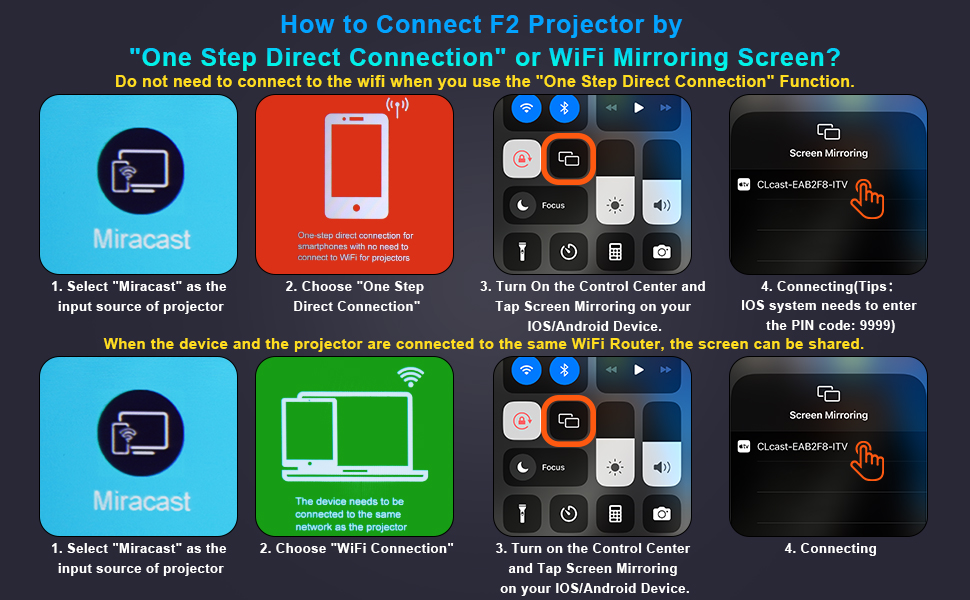
Figure 3.2: Multiple connection options on the VYSER F2 Projector.
- יציאות HDMI (x2): Connect to devices like laptops, TV sticks, gaming consoles (e.g., PS5/Xbox).
- יציאות USB (x2): חבר כונני USB להפעלת מדיה.
- יציאת AV: חברו למכשירים ישנים יותר באמצעות כבל AV.
- פלט שמע 3.5 מ"מ: חבר רמקולים חיצוניים או אוזניות.
- קלט כוח: חבר את כבל החשמל.
- Cooling Windows: ודא אוורור מתאים לפיזור חום.
- בקרות על הסיפון: Buttons for power, menu, input source, and navigation.
3.3 360 Degree View של המקרן
Video 3.1: A comprehensive 360-degree view of the VYSER F2 Projector, showcasing its design and various ports from all angles.
4. התקנה
Follow these steps to set up your VYSER F2 Projector for the first time.
4.1 מיקום
Place the projector on a stable, flat surface. Ensure there is adequate ventilation around the projector to prevent overheating. The projection distance can range from 5-15 feet, allowing for an adjustable screen size of 50-300 inches.
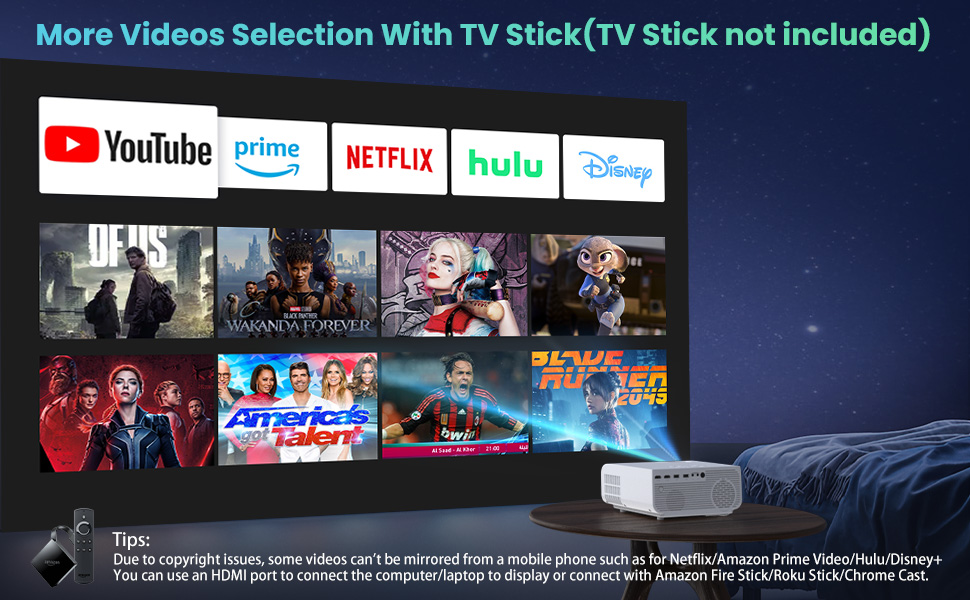
Figure 4.1: Adjustable display size from 50 to 300 inches.
The projector can be placed on a table, mounted on a tripod, or ceiling-mounted. Use the adjustable foot at the bottom of the projector to fine-tune the projection angle if needed.
4.2 חיבור מתח
- Connect the power cable to the Power Input port on the projector.
- חבר את הקצה השני של כבל החשמל לשקע חשמל.
- Press the Power button on the projector or remote control to turn it on.
4.3 תיקון מיקוד ותיקון טרפז
- התאמת מיקוד: Rotate the focus lens ring on the front of the projector until the image appears clear and sharp.
- תיקון אבן מפתח: Use the keystone correction dial (usually on top or side) to adjust the image shape if it appears trapezoidal. The projector supports ±15° keystone correction.
5. הוראות הפעלה
Learn how to connect your devices and utilize the various features of your projector.
5.1 חיבור התקנים
The VYSER F2 Projector offers multiple ways to connect your devices:
- HDMI: For high-definition video and audio from laptops, gaming consoles, TV boxes, etc.
- USB: להפעלת מדיה files ישירות מכונן הבזק מסוג USB.
- AV: For connecting older devices with AV output.
5.2 Wireless Connectivity (Screen Mirroring)
The projector supports 5G/2.4G WiFi for seamless screen mirroring from your smartphone or tablet.
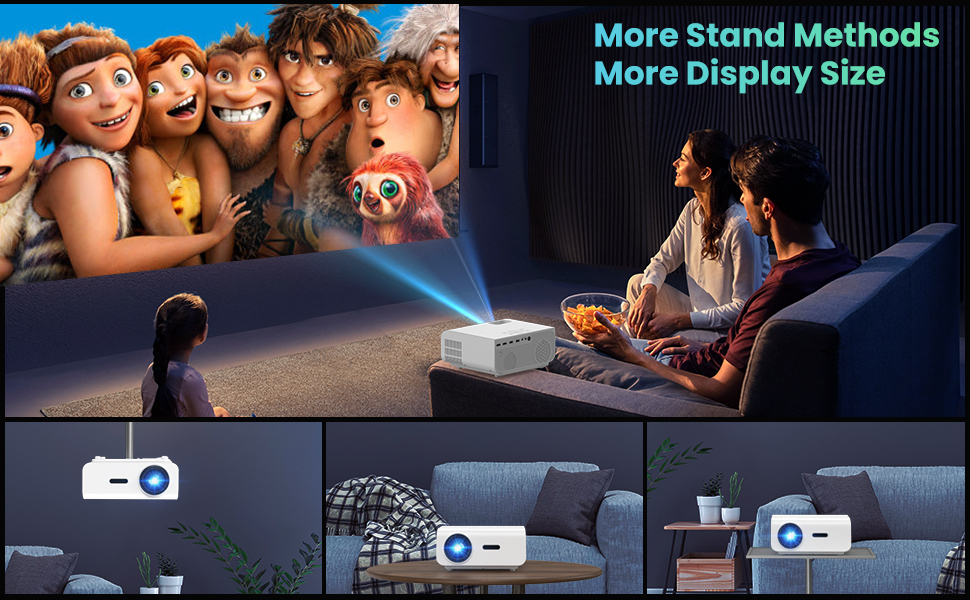
Figure 5.1: 5G/2.4G WiFi Screen Mirroring for various devices.
One-Step Direct Connection: This feature allows direct connection to your phone without needing a WiFi network. Ideal for outdoor use or when a router is unavailable.
Video 5.1: Demonstration of the F2 Projector's One-Step Direct Connection with WiFi and Bluetooth, showing quick setup for phone mirroring.
For detailed steps on screen mirroring, refer to the on-screen instructions by selecting "Miracast" from the input source menu.
Note: Due to copyright restrictions, some streaming services (e.g., Netflix, Amazon Prime Video, Hulu, Disney+) may block screen mirroring. For these services, it is recommended to use an HDMI connection with a compatible device like a Fire TV Stick, Roku Stick, or laptop.
5.3 חיבור בלוטות'
The projector features Bluetooth 5.1 for connecting to external Bluetooth speakers or headphones, enhancing your audio experience.

Figure 5.2: Bluetooth connection for external audio devices.
To connect: Navigate to the Bluetooth settings on the projector, enable Bluetooth, and select your desired audio device from the list of available devices. (Note: The projector connects to Bluetooth speakers, not directly to smartphones/tablets via Bluetooth for audio input).
5.4 ניווט בתפריט
Use the remote control or the on-board buttons to navigate the projector's menu. Options typically include input source selection, picture settings (brightness, contrast, color), sound settings, and system settings.
6. תחזוקה
תחזוקה נאותה מבטיחה את אורך החיים והביצועים האופטימליים של המקרן שלכם.
- ניקוי עדשות: השתמש במטלית רכה ונטולת סיבים המיועדת במיוחד לעדשות אופטיות כדי לנקות בעדינות את עדשת המקרן. הימנע מחומרים שוחקים או כימיקלים חזקים.
- הסרת אבק: Regularly clean the cooling vents to prevent dust buildup, which can affect performance and lifespan. Use a soft brush or compressed air.
- אִחסוּן: כאשר המקרן אינו בשימוש למשך תקופות ממושכות, יש לאחסן אותו במקום קריר ויבש, רצוי באריזתו המקורית או בנרתיק מגן.
- כבה כראוי: Always turn off the projector using the power button and allow it to cool down before unplugging or moving it.
7. פתרון תקלות
אם נתקלת בבעיות עם המקרן שלך, עיין בשלבי פתרון הבעיות הנפוצים הבאים:
| בְּעָיָה | סיבה / פתרון אפשרי |
|---|---|
| אין תמונה או הודעת "אין אות" |
|
| תמונה מטושטשת |
|
| תמונה טרפזית |
|
| אין צליל או צליל נמוך |
|
| Screen mirroring issues (e.g., Netflix not working) |
|
| Projector overheating or shutting down |
|
8. מפרטים
Key technical specifications for the VYSER F2 Projector:
| תכונה | פְּרָט |
|---|---|
| מותג | VYSER |
| דֶגֶם | מקרן F2 |
| רזולוציה מקורית | 1920 x 1080 (רזולוציה מקורית 1080P) |
| בְּהִירוּת | 12000 Lux (350 ANSI Lumens) |
| יחס ניגודיות | 10000:1 (implied from image comparison) |
| גודל הקרנה | 50-300 אינץ' |
| מרחק הקרנה | 5-15 רגל |
| טכנולוגיית קישוריות | Wireless (5G/2.4G WiFi), Bluetooth 5.1, HDMI (x2), USB (x2), AV, 3.5mm Audio Out |
| תיקון קיסטון | ±15° ידני |
| משקל פריט | 4.11 פאונד |
| צֶבַע | White-White |
9. אחריות ותמיכה
VYSER is committed to providing excellent customer service and technical support for your projector.
- שירות לקוחות לכל החיים: Enjoy lifetime customer service and technical support for your VYSER F2 Projector.
- For any inquiries, technical assistance, or warranty claims, please contact VYSER customer support through the platform where you purchased the product or refer to the official VYSER webאתר ליצירת קשר.
Ask a question about this manual
Ask about setup, troubleshooting, compatibility, parts, safety, or missing instructions. Manuals+ will review the question and use this page’s manual context to help answer it.