
1. הקדמה
This manual provides essential information for the safe assembly, operation, and maintenance of your tectake Galway Industrial Wood TV Stand. Please read these instructions carefully before beginning assembly and retain them for future reference. Proper assembly and care will ensure the longevity and stability of your furniture.
2. מידע בטיחות
כדי להבטיח שימוש בטוח במוצר זה, אנא הקפידו על ההנחיות הבאות:
- Always assemble the unit on a soft, clean surface to prevent scratches and damage.
- ודא שכל הברגים והאביזרים מהודקים היטב לפני השימוש. יש לבדוק מעת לעת ולהדק מחדש לפי הצורך.
- Do not overload the TV stand. Refer to the 'Product Specifications' section for maximum weight capacities.
- Place the TV stand on a level and stable surface to prevent tipping. Use the adjustable feet to compensate for uneven floors.
- הרחיקו חלקים קטנים וחומרי אריזה מהישג ידם של ילדים במהלך ההרכבה כדי למנוע סכנת חנק.
- אין לעמוד או לטפס על מעמד הטלוויזיה.
- If wall anchoring is provided or recommended, ensure it is properly installed to prevent tip-over accidents, especially in households with children.
3. תכולת החבילה
Before beginning assembly, carefully unpack all components and verify that all parts listed below are present and undamaged. If any parts are missing or damaged, please contact tectake customer support immediately.

Note: A detailed parts list with labels is typically included in the physical instruction manual. Please refer to that document for specific part identifiers.
| רְכִיב | כַּמוּת |
|---|---|
| לוח עליון | 1 |
| לוח תחתון | 1 |
| לוחות צד | 2 |
| Inner Shelf Panels | 2 |
| פאנל אחורי | 1 |
| דלת ארון | 1 |
| רגלי מסגרת מתכת | 4 |
| רגליים מתכווננות | 4 |
| Assembly Hardware (screws, dowels, hinges, magnetic catch) | 1 סט |
| הוראות הרכבה | 1 |
4. הוראות הרכבה
Follow these steps for quick and easy assembly. It is recommended to assemble the unit on a soft, clean surface to prevent scratches. Two people are recommended for assembly.
- הכנת סביבת העבודה: Clear a spacious area and lay down a blanket or cardboard to protect the furniture pieces and your floor.
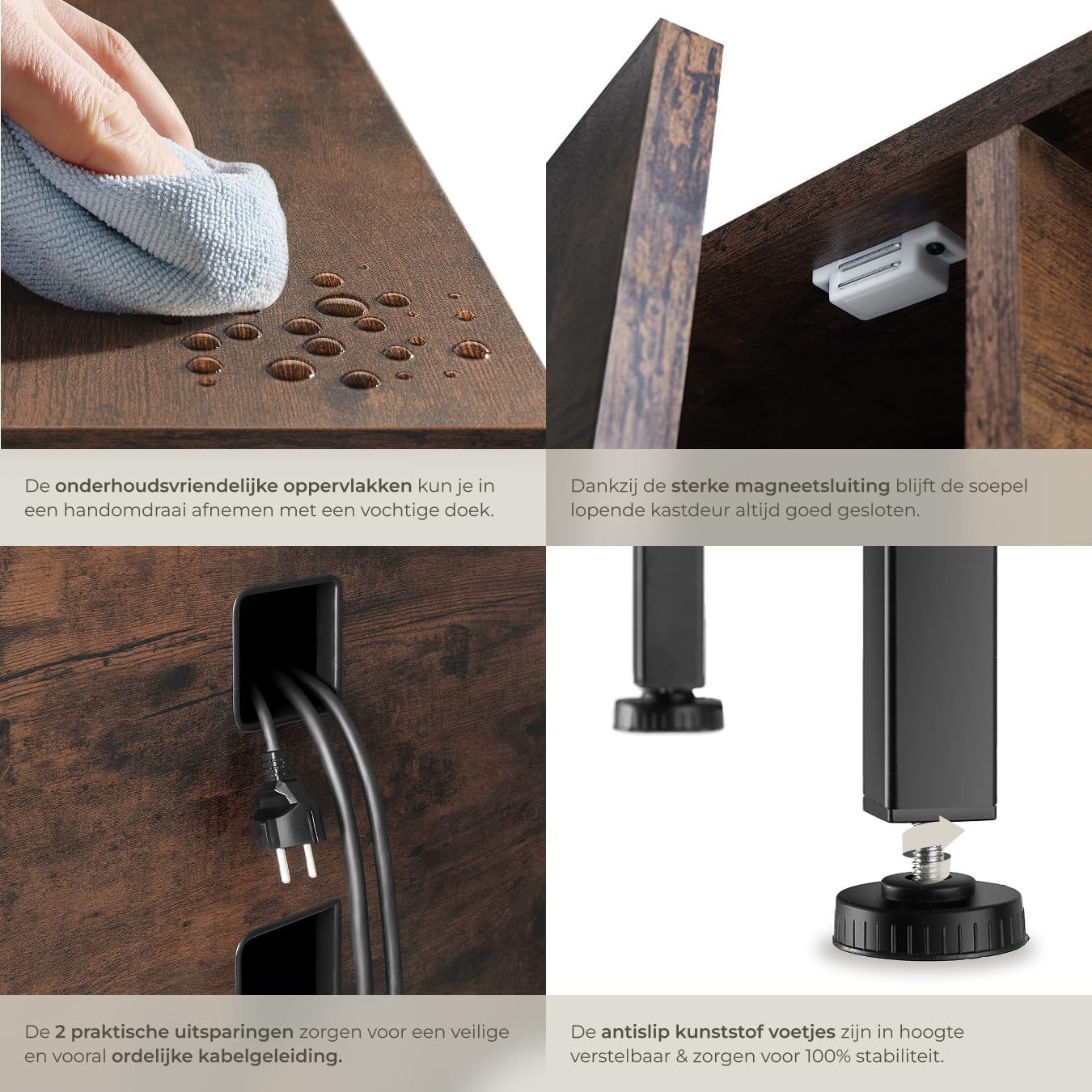
- חבר רגליים מתכווננות: Screw the adjustable plastic feet into the bottom of the metal frame legs. Ensure they are finger-tight for now; final adjustments will be made later.
- הרכיבו את המסגרת: Connect the metal frame components using the provided screws. Do not fully tighten all screws until the entire frame is assembled to allow for minor adjustments.
- חברו את לוחות הצד: Secure the wooden side panels to the metal frame using the designated hardware.
- Install Inner Shelves: Slide and secure the inner shelf panels into their respective positions within the frame.
- חברו את הפאנלים העליונים והתחתונים: Fasten the top and bottom wooden panels to the assembled frame.
- התקנת הפאנל האחורי: Attach the back panel to the rear of the unit. Ensure the cable management cutouts are correctly oriented.
- הר דלת ארון: Attach the hinges to the cabinet door and then to the main unit. Install the magnetic catch to ensure the door closes securely.
- הידוק ויישור סופיים: Once all components are in place, fully tighten all screws. Place the TV stand in its desired location and adjust the feet to ensure it is perfectly level and stable.


5. שימוש
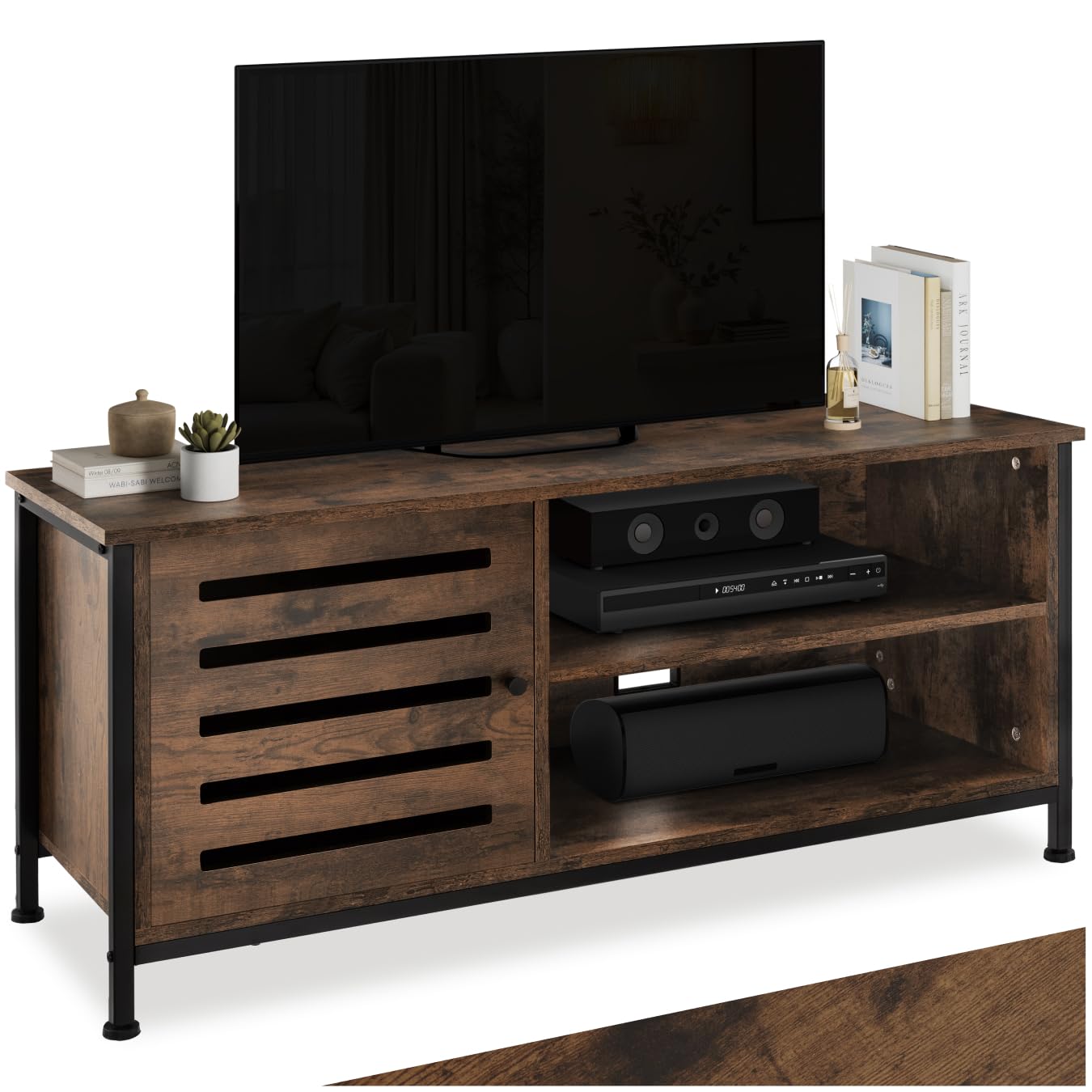
Your tectake Galway TV stand is designed to provide a stable and organized platform for your television and media devices.
- הצבת הטלוויזיה שלך: Carefully place your television on the top surface of the stand. Ensure the TV's base is fully supported and does not overhang the edges. Refer to the specifications for the maximum weight capacity of the top panel.
- Organizing Media Devices: Utilize the open compartments for your cable box, gaming console, soundbar, or other electronic devices. The enclosed cabinet provides discreet storage for items you wish to keep out of sight.
- ניהול כבלים: Use the integrated cable cutouts on the back panel to route and organize power cords and signal cables. This helps to keep your entertainment area tidy and reduces cable clutter.
6. טיפול ותחזוקה
כדי לשמור על המראה ועל אורך חיי מעמד הטלוויזיה שלכם, בצעו את הוראות הטיפול הפשוטות הבאות:
- ניקוי: נגב משטחים עם רך, דamp מטלית. הימנעו משימוש בכימיקלים חזקים, חומרי ניקוי שוחקים או פוליש שעלולים לפגוע בגימור.
- דליפות: נגבו מיד כל נזילה בעזרת מטלית יבשה כדי למנוע נזק מלחות.
- חום ולחות: Avoid placing hot items directly on the surface. Use coasters or protective pads. Keep the unit away from direct sunlight and excessive moisture.
- בדיקת חומרה: בדקו מעת לעת את כל הברגים והחיבורים כדי לוודא שהם נשארים מהודקים היטב. הדקו מחדש במידת הצורך.

7. פתרון תקלות
If you encounter any issues with your TV stand, please refer to the following common problems and solutions:
- היחידה לא יציבה/רועדת:
פִּתָרוֹן: Ensure the TV stand is placed on a level surface. Adjust the height of the plastic feet until the unit is stable and all feet are firmly on the ground. Double-check that all assembly screws are fully tightened. - דלת הארון לא נסגרת כראוי:
פִּתָרוֹן: Check the alignment of the hinges and the magnetic catch. Loosen hinge screws slightly, adjust the door position, and re-tighten. Ensure the magnetic catch is securely installed and aligned with its counterpart on the door. - חלקים חסרים או פגומים:
פִּתָרוֹן: If you find any parts missing or damaged upon opening the package, do not proceed with assembly. Contact tectake customer support with your product model number and a description of the issue for assistance. - קושי במהלך ההרכבה:
פִּתָרוֹן: Review the assembly instructions carefully, paying close attention to diagrams. Ensure you are using the correct hardware for each step. If problems persist, consider seeking assistance from another person.
8. מפרט מוצר
Here are the detailed specifications for your tectake Galway Industrial Wood TV Stand:
| תכונה | פְּרָט |
|---|---|
| מספר דגם | 404714 |
| מותג | tectake |
| מידות כוללות (L x W x H) | 110 x 41.5 x 50.5 ס"מ (43.3 x 16.3 x 19.9 אינץ ') |
| מִשׁקָל | 23.3 קילוגרם (51.4 פאונד) |
| חוֹמֶר | Particle Board (Melamine coated), Alloy Steel (Frame), Plastic (Feet) |
| צֶבַע | חוּם כֵּהֶה |
| קיבולת משקל מקסימלית | 50 קילוגרם (110 פאונד) |
| מספר תאים | 3 (2 open, 1 enclosed) |
| תכונות מיוחדות | Adjustable feet, Cable management cutouts |
| נדרשת הרכבה | כֵּן |
| סִגְנוֹן | תעשייתי מודרני |
9. אחריות ותמיכה
tectake products are manufactured to high-quality standards. For information regarding warranty coverage, please refer to the warranty card included with your purchase or visit the official tectake webאֲתַר.
If you require assistance with assembly, have questions about product features, or need to report a missing/damaged part, please contact tectake customer support. Have your model number (404714) and purchase information ready when contacting support for faster service.
You can typically find contact information on the tectake webבאתר או על גבי קבלת הרכישה שלך.