
1. הקדמה
This manual provides detailed instructions for the installation, operation, and maintenance of the Supermicro X13SEI-F Server Motherboard. This motherboard is designed for high-performance server applications, supporting Intel Xeon processors with an LGA4677 socket and DDR5 memory.
Please read this manual thoroughly before attempting to install or operate the motherboard to ensure proper setup and to prevent damage to the components.
2. מידע בטיחות
יש להקפיד על אמצעי הזהירות הבאים כדי למנוע פציעות ונזק לציוד:
- Always disconnect the power cord from the power supply before installing or removing any components.
- Wear an anti-static wrist strap when handling the motherboard and other components to prevent electrostatic discharge (ESD).
- Ensure the installation environment is dry and free from static electricity.
- אין לחשוף את לוח האם ללחות או לטמפרטורות קיצוניות.
- יש להחזיק את לוח האם בקצוותיו כדי להימנע ממגע עם רכיבים רגישים.
- Refer to the power supply unit's manual for specific safety guidelines related to power connections.
3. תכולת החבילה
Verify that all items are present and in good condition. If any items are damaged or missing, contact your vendor.
- Supermicro X13SEI-F Server Motherboard
- מגן קלט / פלט
- כבלי SATA (הכמות עשויה להשתנות)
- Quick Reference Guide / User Manual (this document)
- Driver CD/DVD or USB drive (or download instructions)
4. המוצר נגמרview
The Supermicro X13SEI-F is a high-performance server motherboard featuring the LGA4677 socket, designed to support Intel Xeon Scalable processors. It offers robust memory capabilities with 8 DDR5 DIMM slots, supporting up to 4800MHz memory speed. The board also includes multiple PCIe slots for expansion.
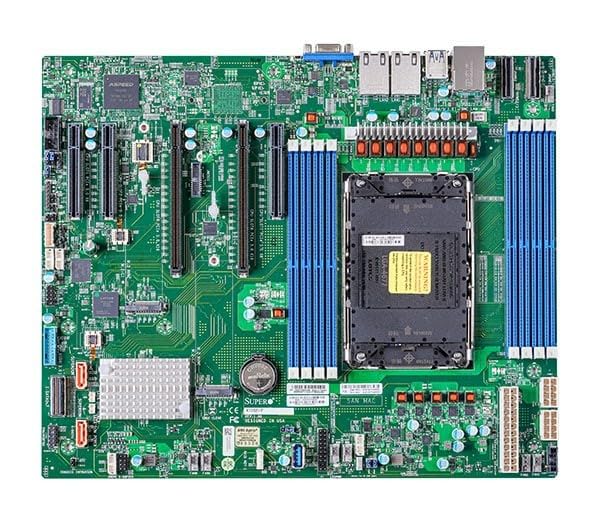
Figure 1: Supermicro X13SEI-F Server Motherboard. This image displays the overall layout of the motherboard, including the CPU socket, DIMM slots, and various connectors.
4.1 תכונות עיקריות
- שקע מעבד: LGA4677 for Intel Xeon Scalable Processors
- ערכת שבבים: אינטל C621
- זֵכֶר: 8x DDR5 DIMM slots, up to 4800MHz
- חריצי הרחבה: Multiple PCIe slots (specific configuration depends on model variant)
- אִחסוּן: Support for various storage interfaces (SATA, NVMe - specific details in specifications)
- רשת: Integrated LAN controllers
5. התקנה והתקנה
Before beginning installation, ensure your system case is compatible with the motherboard's form factor and that you have all necessary components.
התקנת מעבד 5.1 (LGA4677)
- אתר את שקע ה-LGA4677 בלוח האם.
- Carefully open the CPU socket retention mechanism according to the instructions provided with your CPU or motherboard.
- Align the CPU with the socket, ensuring the triangular mark on the CPU matches the mark on the socket. Do not force the CPU into the socket.
- הורד בעדינות את המעבד לתוך השקע.
- Close the CPU socket retention mechanism until it locks securely.
- התקן את מקרר המעבד בהתאם להוראות היצרן.
5.2 התקנת זיכרון RAM (DDR5)
- Locate the 8 DDR5 DIMM slots on the motherboard.
- פתחו את קליפסי הקיבוע בשני קצוות חריץ ה-DIMM.
- יישר את החריץ במודול זיכרון DDR5 עם המפתח בחריץ ה-DIMM.
- Insert the memory module firmly into the slot until the retention clips snap into place. Ensure both clips are closed.
- For optimal performance, refer to the motherboard's manual for recommended memory population order.
5.3 התקנת כרטיס PCIe
- Identify the appropriate PCIe slot for your expansion card (e.g., GPU, RAID card).
- Remove the corresponding expansion slot cover from your chassis.
- Align the PCIe card with the slot and press down firmly until it is fully seated.
- Secure the card with a screw or retention clip to the chassis.
5.4 התקנת התקן אחסון
- כונני SATA: Connect SATA data cables from the motherboard's SATA ports to your SATA hard drives or SSDs. Connect power cables from the PSU to the drives.
- NVMe M.2 Drives: Locate the M.2 slots. Insert the M.2 drive at an angle, then push it down and secure it with the provided screw or retention mechanism.
5.5 חיבורי חשמל
- חבר את מחבר החשמל ATX בעל 24 הפינים מספק הכוח שלך לשקע החשמל הראשי בלוח האם.
- Connect the 8-pin (or 4+4 pin) EPS 12V CPU power connector(s) to the corresponding sockets near the CPU.
- ודא שכל חיבורי החשמל מאובטחים.
5.6 חיבורי לוח קדמי
Connect the front panel cables (Power LED, HDD LED, Power Switch, Reset Switch, USB, Audio) from your chassis to the corresponding headers on the motherboard. Refer to the motherboard's silkscreen labels or the detailed manual for exact pin configurations.
6. הוראות הפעלה
6.1 אתחול ראשון
- After completing all hardware installations, connect the monitor, keyboard, and mouse.
- Connect the power cord to the power supply and turn on the power switch on the PSU.
- לחץ על כפתור ההפעלה במארז שלך.
- The system should power on, and you should see the BIOS/UEFI POST screen.
6.2 הגדרת BIOS/UEFI
כדי להיכנס לכלי השירות להגדרת BIOS/UEFI, לחצו על DEL or F2 key repeatedly during the POST process. Within the BIOS/UEFI, you can configure:
- סדר אתחול
- זמן ותאריך מערכת
- CPU and memory settings
- Storage configurations (RAID, AHCI)
- בקרת מהירות מאוורר
- הגדרות אבטחה
שמור שינויים לפני היציאה מה-BIOS/UEFI.
6.3 התקנת מערכת הפעלה
Insert your operating system installation media (USB drive or DVD) and set it as the primary boot device in the BIOS/UEFI. Follow the on-screen instructions to install your preferred operating system. After installation, install all necessary drivers from the Supermicro website or the provided driver media.
7. תחזוקה
7.1 ניקוי
- Regularly clean dust from the motherboard and system components using compressed air.
- ודא שהמערכת כבויה ומנותקת מהחשמל לפני הניקוי.
- הימנעו משימוש בחומרי ניקוי נוזליים ישירות על רכיבים.
7.2 עדכוני קושחה
Periodically check the Supermicro website for updated BIOS/UEFI firmware. Firmware updates can improve system stability, performance, and compatibility. Follow the specific instructions provided by Supermicro for updating the firmware to avoid system damage.
8. פתרון תקלות
סעיף זה מספק פתרונות לבעיות נפוצות שאתה עשוי להיתקל בהן.
8.1 אין חשמל / אין POST (בדיקה עצמית בעת הפעלה)
- בדוק את חיבורי החשמל: Ensure the 24-pin ATX and 8-pin EPS 12V power connectors are securely seated.
- Verify PSU: בדוק את יחידת ספק הכוח (PSU) באמצעות מערכת אחרת או בודק PSU.
- החזרת הרכיבים למקומם: Reseat the CPU, RAM modules, and any expansion cards.
- נקה CMOS: Refer to the motherboard manual for instructions on how to clear the CMOS (Complementary Metal-Oxide-Semiconductor) settings, which can resolve boot issues.
- תצורה מינימלית: Try booting with only the CPU, one RAM stick, and the necessary power connections.
8.2 אין פלט תצוגה
- חיבור צג: Ensure the monitor is properly connected to the graphics output (either integrated or discrete GPU) and is powered on.
- כרטיס מסך: If using a discrete graphics card, ensure it is fully seated in its PCIe slot and has all necessary power connectors from the PSU.
- גרפיקה משולבת: If your CPU supports integrated graphics, try connecting the monitor to the motherboard's video output to rule out a discrete GPU issue.
8.3 Operating System Not Booting
- סדר אתחול: Check the BIOS/UEFI settings to ensure the correct boot device (e.g., SSD, HDD) is selected as the primary boot option.
- Drive Connections: Verify that your storage drives are properly connected (data and power).
- התקנת מערכת הפעלה: If the OS is newly installed, ensure the installation process completed successfully and all drivers are installed.
9. מפרטים
| תכונה | פְּרָט |
|---|---|
| מותג | סופר מיקרו |
| שם הדגם | MBD-X13SEI-F-B |
| שקע מעבד | LGA 4677 |
| מעבדים תואמים | Intel Xeon Scalable |
| סוג ערכת שבבים | אינטל C621 |
| טכנולוגיית זיכרון RAM | DDR5 |
| מהירות זיכרון | 4800 מגה-הרץ |
| חריצי זיכרון RAM | 8x DDR5 DIMM slots |
| מידות המוצר (LxWxH) | 16 x 12 x 5 אינץ' |
| משקל פריט | 3.19 פאונד |
| תאריך זמין ראשון | 20 בינואר 2023 |
Note: Specifications are subject to change without notice. For the most current information, please refer to the official Supermicro product page.
10. אחריות ותמיכה טכנית
10.1 מידע אחריות
Supermicro products are covered by a limited warranty. For detailed warranty terms and conditions, including duration and coverage, please visit the official Supermicro website or consult the warranty card included with your product. Keep your proof of purchase for warranty claims.
10.2 תמיכה טכנית
For technical assistance, driver downloads, BIOS updates, and further product information, please visit the official Supermicro support webאֲתַר:
https://www.supermicro.com/support
Before contacting support, please have your motherboard model number (MBD-X13SEI-F-B) and serial number ready.