
1. הקדמה
תודה על הרכישהasing the Klipsch Reference Premiere RP-1400SW 14-inch High Excursion Subwoofer. This subwoofer is designed to deliver powerful and accurate low-frequency sound, enhancing your home theater or music listening experience. This manual provides essential information for proper setup, operation, and care of your new subwoofer.

Figure 1.1: Klipsch Reference Premiere RP-1400SW Subwoofer (Grille Removed)
2. מידע בטיחות חשוב
Please read all safety instructions before operating this product. Keep these instructions for future reference.
- מקור כוח: Connect the subwoofer only to a power supply of the type described in the operating instructions or as marked on the appliance.
- אוורור: יש לוודא אוורור נאות. אין לחסום פתחי אוורור. יש להתקין בהתאם להוראות היצרן.
- חוֹם: אין להתקין ליד מקורות חום כלשהם כגון רדיאטורים, אוגרי חום, תנורים או מכשירים אחרים (כולל ampמחצבים) המייצרים חום.
- מים ולחות: אין להשתמש במכשיר זה ליד מים או לחות.
- ניקוי: נקה רק עם מטלית יבשה.
- שֵׁרוּת: הפנה כל טיפול לצוות שירות מוסמך. שירות נדרש כאשר המכשיר ניזוק בכל דרך שהיא, כגון כבל או תקע חשמל פגומים, נוזל נשפך או חפצים נפלו לתוך המכשיר, המכשיר נחשף לגשם או לחות, אינו פועל כרגיל , או הושמט.
- חפץ כבד: This subwoofer is heavy (85 lbs). Exercise caution when moving to prevent injury.
3. מה בקופסה
ודא שכל הרכיבים קיימים:
- Klipsch Reference Premiere RP-1400SW Subwoofer
- כבל חשמל
- מדריך הוראות (מסמך זה)
4. התקנה
4.1 מיקום סאב
The Klipsch RP-1400SW features a front-firing driver and Aerofoil front slot port, allowing for flexible placement within your room. Experiment with different locations to find the optimal bass response for your listening environment. Generally, corner placement can enhance bass output, while placement along a wall can provide a more balanced sound. The shock-absorbing rubber feet help isolate the subwoofer from the floor.

Figure 4.1: Front-Firing Driver and Aerofoil Front Slot Port

Figure 4.2: Subwoofer Design Features (Rounded Corners, Shock-Absorbing Feet)
4.2 חיבורים
Your RP-1400SW subwoofer offers both wired and wireless connectivity options.

Figure 4.3: Subwoofer Rear Panel Connections and Controls
- Wired Connection (RCA/LFE):
Connect an RCA cable from the LFE output of your AV receiver to the LFE input on the subwoofer's rear panel. If your receiver does not have an LFE output, use a standard RCA stereo cable to connect the receiver's pre-out (subwoofer output) to both the left and right RCA inputs on the subwoofer.
- Wireless Connection (Optional WA-2 Kit):
For wireless operation, you can connect your subwoofer with a Klipsch WA-2 Wireless Subwoofer Kit (sold separately). This allows for flexible placement without the need for long RCA cables. Refer to the WA-2 kit's instructions for pairing and setup.

Figure 4.4: Wireless Connectivity with Optional WA-2 Kit
- חיבור חשמל:
Once audio connections are made, plug the supplied power cord into the subwoofer's power inlet and then into a suitable wall outlet.
5. הפעלת הסאב-וופר שלך
5.1 בקרות מעלview
The rear panel of your subwoofer features several controls to fine-tune its performance:

Figure 5.1: Easy-to-Use Controls on Rear Panel
- GAIN (Volume): מתאים את עוצמת הפלט של הסאב-וופר. התחל עם הגדרה נמוכה והגבר בהדרגה עד שהבס יתמזג בצורה חלקה עם הרמקולים הראשיים שלך.
- LOW-PASS (Crossover): This control sets the upper frequency limit for the subwoofer. If using an AV receiver with LFE output, set this to LFE (or bypass if available on your receiver). If connecting via stereo RCA, adjust this to blend with your main speakers' low-frequency cutoff.
- פאזה (0°/180°): מתאים את הפאזה של פלט הסאב-וופר ביחס לרמקולים הראשיים שלך. נסה את שתי ההגדרות כדי למצוא את זו שמספקת את הבס החזק והקוהרנטי ביותר.
- POWER (ON/AUTO/OFF):
- עַל: Subwoofer remains continuously on.
- אוטומטי: Subwoofer automatically turns on when an audio signal is detected and enters a low-power standby mode after a period of inactivity.
- OFF הסאב-וופר כבוי.
The 1/2-watt standby mode in AUTO setting ensures exceptional efficiency and reduces energy costs.
5.2 Initial Power On and Adjustment
- ודא שכל החיבורים מאובטחים.
- Set the GAIN control to its minimum position.
- Set the LOW-PASS control to LFE if using an AV receiver, or to a suitable frequency (e.g., 80Hz) if connecting via stereo RCA.
- Set the PHASE switch to 0°.
- Set the POWER switch to AUTO.
- Play some audio with significant bass content. Gradually increase the GAIN control until the subwoofer output blends with your main speakers.
- Experiment with the PHASE switch (0° vs. 180°) to determine which setting provides the most impactful and seamless bass response in your listening position.
For optimal performance, consider using your AV receiver's automatic room correction system (if available) after initial setup.
5.3 Product Video: Reference Premiere Subwoofers
Video 5.1: An official Klipsch video showcasing the features and design of the Reference Premiere Subwoofers, including the RP-1400SW. This video highlights advanced acoustics, balanced performance, front-firing Cerametallic woofers, high-efficiency Class D amplifier, front-firing slot port, detailed design, and easy-to-use controls.
6. תחזוקה
To ensure the longevity and optimal performance of your Klipsch RP-1400SW subwoofer, follow these simple maintenance guidelines:
- ניקוי: Dust the cabinet regularly with a dry, soft cloth. Avoid using abrasive cleaners, solvents, or strong detergents, as these can damage the ebony vinyl finish.
- מיקום: Avoid placing the subwoofer in direct sunlight or near heat sources, which can cause discoloration or damage to the cabinet.
- אוורור: ודא שהחלק האחורי amplifier panel has adequate airflow. Do not block the heat sink.
- סוֹרָג: The durable woven cloth grille can be gently cleaned with a soft brush or vacuum cleaner attachment to remove dust.
7. פתרון תקלות
If you experience issues with your subwoofer, consult the following table for common problems and solutions:
| בְּעָיָה | סיבה אפשרית | פִּתָרוֹן |
|---|---|---|
| אין צליל מהסאב-וופר |
|
|
| בס חלש או מעוות |
|
|
| סאב וופר מזמזם או רועש |
|
|
אם הבעיה נמשכת לאחר ניסיון פתרונות אלה, אנא פנו לתמיכת הלקוחות של Klipsch.
8. מפרטים
Key technical specifications for the Klipsch Reference Premiere RP-1400SW Subwoofer:
| תכונה | פְּרָט |
|---|---|
| מספר דגם | RP-1400SW |
| מותג | קליפש |
| סוג רמקול | סאב וופר |
| קוטר וופר | 14 אינץ' |
| סוג מנהל התקן שמע | Dynamic Driver (Cerametallic) |
| רמקול כוח פלט מרבי | 600 וואט |
| כוח RMS | 500 וואט |
| תגובת תדר | 20Hz - 1kHz (approximate, based on A+ content) |
| טכנולוגיית קישוריות | Wired RCA, LFE, and WA-2 Wireless Port |
| מצב פלט שמע | סטריאו, סראונד סאונד |
| סוג הרכבה | קומה עומדת |
| חומר המארז | עֵץ |
| צֶבַע | הָבְנֶה |
| מקור כוח | חשמלי עם כבלים |
| מידות פריט (D x W x H) | 25.67" D x 20" W x 21.34" H |
| משקל פריט | 85 פאונד |
| UPC | 743878047424 |
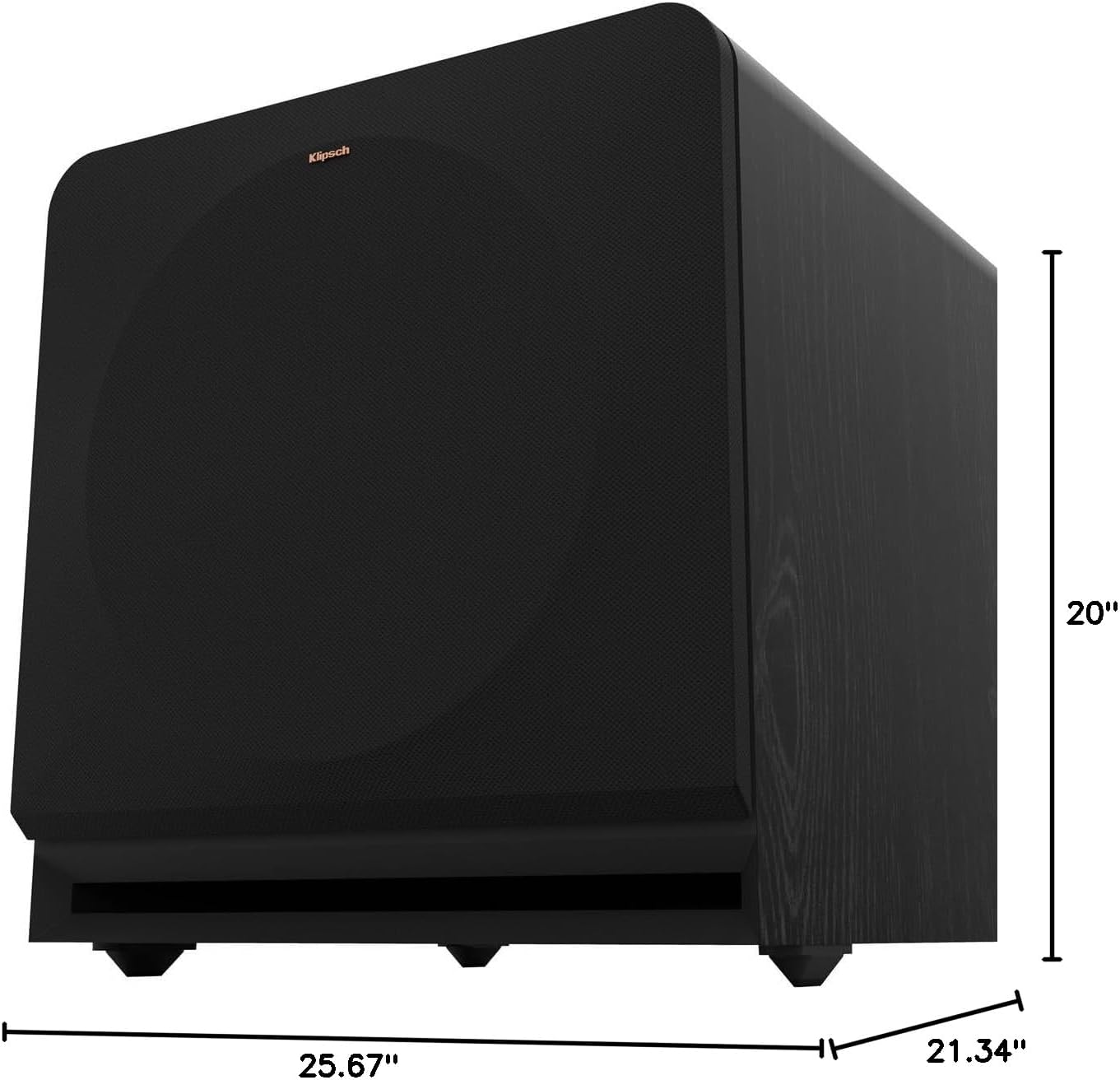
Figure 8.1: Subwoofer Dimensions
9. אחריות ותמיכה
9.1 מידע אחריות
The Klipsch Reference Premiere RP-1400SW Subwoofer comes with a limited warranty:
- אֶלֶקטרוֹנִיקָה: שנתיים (2).
- Woofer, Cabinet, and Non-Electrical Mechanics: חמש (5) שנים
Please retain your proof of purchase for warranty claims. For full warranty terms and conditions, refer to the official Klipsch webאתר או צור קשר עם תמיכת הלקוחות.
9.2 תמיכת לקוחות
For further assistance, technical support, or warranty inquiries, please visit the official Klipsch website or contact their customer service department. Contact details can typically be found on the Klipsch webבאתר תחת הקטע "תמיכה" או "צור קשר".