
מָבוֹא
This manual provides detailed instructions for the Docooler F520 Wireless Business Headset. Please read this manual carefully before use to ensure proper operation and to maximize the product's lifespan. Keep this manual for future reference.
The Docooler F520 is a versatile wireless headset designed for business, sport, and everyday use. It features Bluetooth 5.3 for stable connectivity, a retractable earbud for convenience, and a high-definition microphone with noise reduction for clear calls.
תוכן החבילה
The Docooler F520 package includes:
- 1 x Docooler F520 Wireless Headset
- 1 x כבל טעינה USB
- 2 x Silicone Ear Caps (various sizes)
- 1 x מדריך למשתמש
המוצר נגמרview
The Docooler F520 headset is designed for comfort and functionality, featuring a collar clip design and a retractable earbud.

תמונה: ראשי view of the Docooler F520 Wireless Headset, showcasing its compact design and retractable earbud.

Image: Diagram illustrating the dimensions and key components of the F520 headset, including the button to retract earbud, LED indicator, Type-C USB port, volume buttons, and microphone.
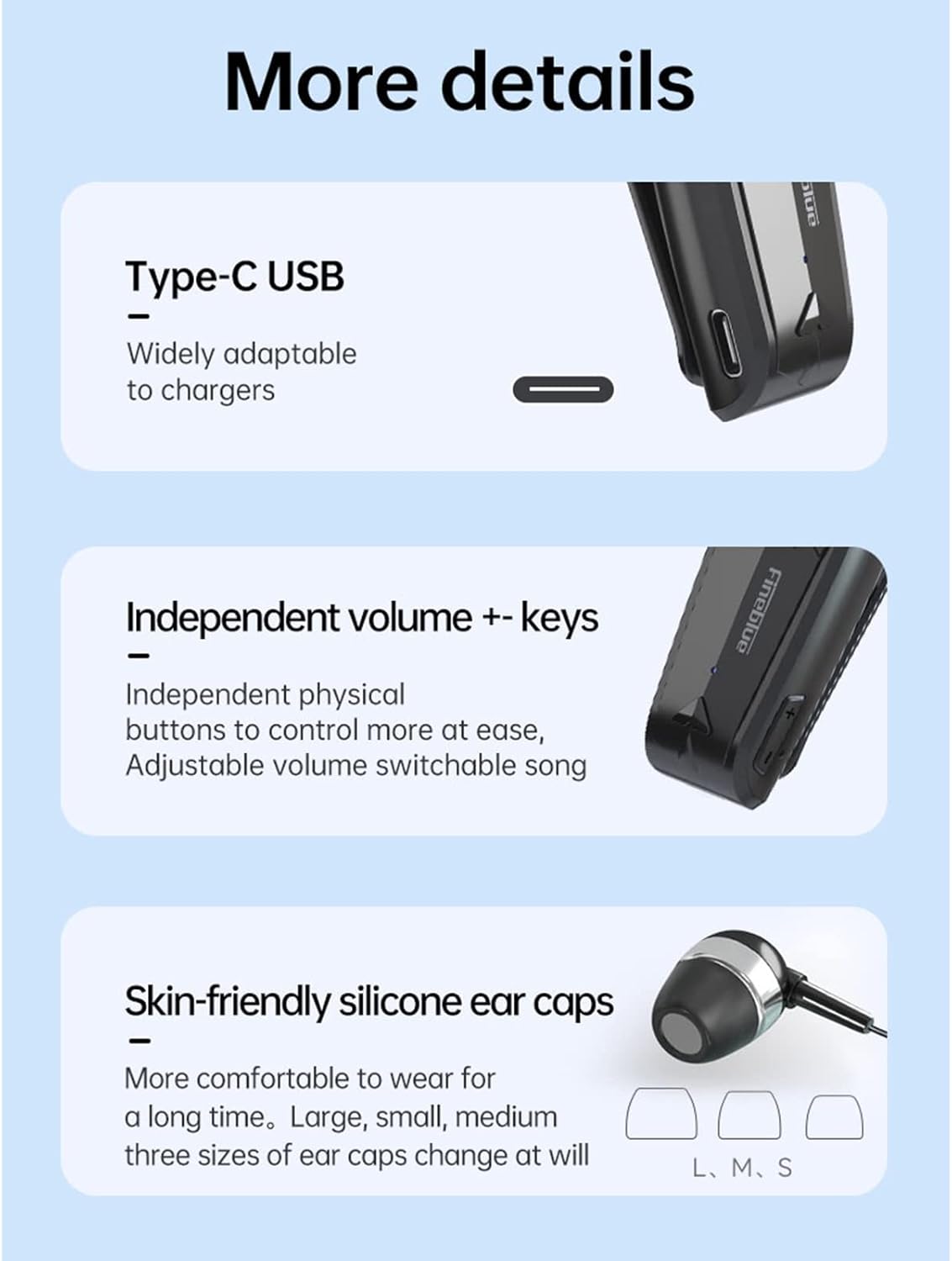
תמונה: מפורט view highlighting the Type-C USB charging port, independent volume control buttons, and the three sizes of skin-friendly silicone ear caps (L, M, S) included for comfortable wear.
הגדרה
טעינת האוזניות
Before first use, fully charge the headset. Connect the provided USB charging cable to the Type-C port on the headset and to a compatible USB power source (e.g., computer USB port, wall adapter). The LED indicator will illuminate during charging and change color or turn off when fully charged (refer to specific LED behavior in the diagram).
- זמן טעינה: בערך 2 שעות.
- חיי סוללה: Up to 10 hours talk time, 14 hours music time (at 70% volume), 120 hours standby time.
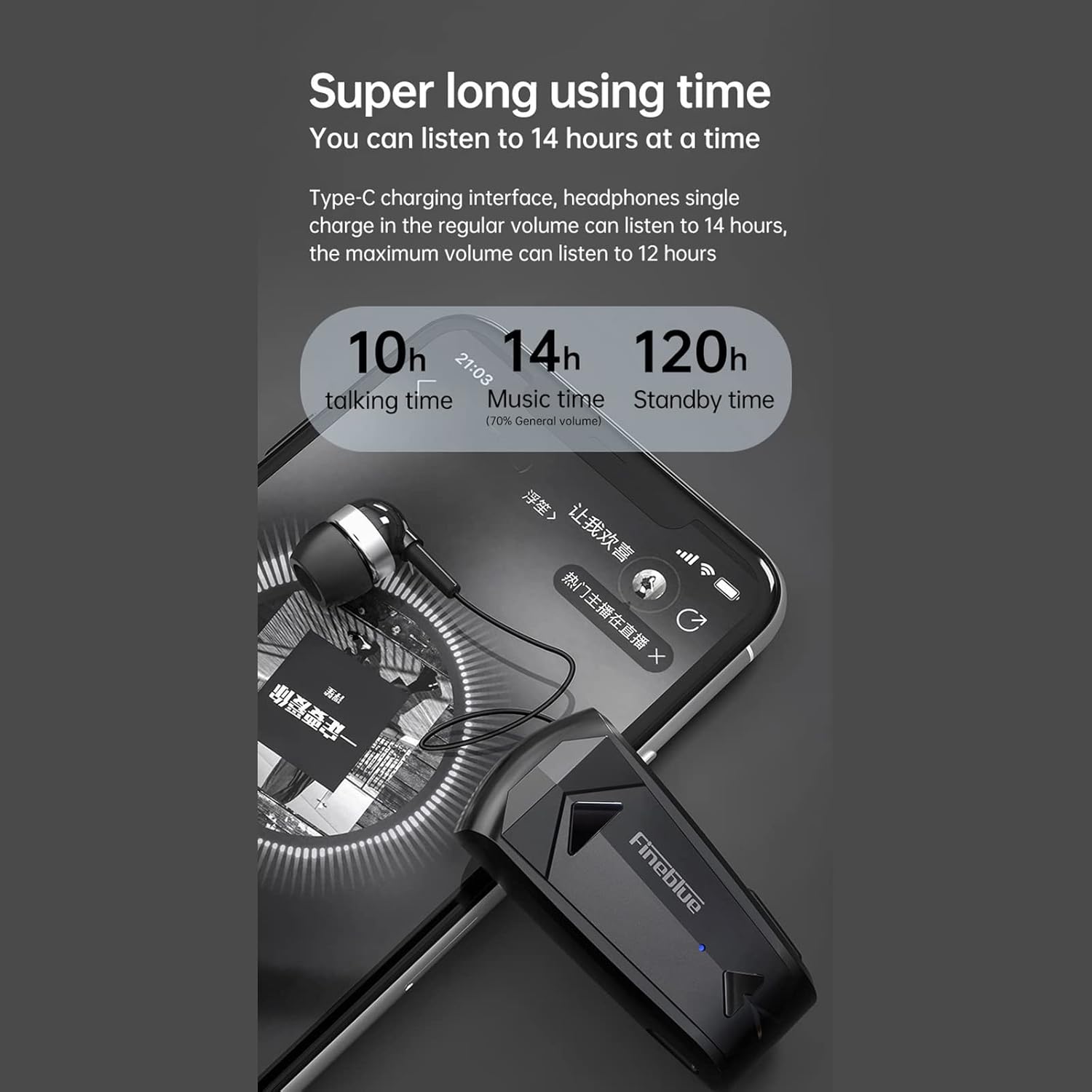
Image: Diagram illustrating the impressive battery life of the F520 headset, showing 10 hours of talk time, 14 hours of music time, and 120 hours of standby time.
Bluetooth
The F520 headset utilizes advanced Bluetooth 5.3 technology for a stable, fast, and energy-efficient wireless connection.

Image: Visual representation of the Bluetooth 5.3 chip, emphasizing lower power consumption and smoother performance for enhanced wireless connectivity.
- הפעלה: Press and hold the Multi-function Button (MFB) for approximately 3 seconds until the LED indicator flashes, indicating the headset is in pairing mode.
- אפשר Bluetooth: בטלפון החכם או במכשיר אחר התומך ב-Bluetooth, עבור להגדרות ה-Bluetooth וודא ש-Bluetooth מופעל.
- חפש מכשירים: Your device will automatically search for nearby Bluetooth devices.
- לְחַבֵּר: Select "F520" from the list of available devices. Once connected, the LED indicator will change (e.g., slow blue flash) and you will hear an audible confirmation.
חיבור מרובה נקודות: The F520 supports connecting to two smartphones simultaneously. After pairing with the first device, disable Bluetooth on the first device, then pair with the second device. Re-enable Bluetooth on the first device, and the headset should connect to both.
הוראות הפעלה
The F520 headset features intuitive physical buttons for easy control of calls, music, and voice assistant functions.

Image: Diagram illustrating the functions of the physical buttons on the F520 headset, including power, call control, music playback, volume adjustment, and voice assistant activation.
- הפעלה/כיבוי:
לחץ והחזק את לחצן הרב-תכליתי (MFB) למשך 3 שניות. - מענה / סיום שיחות:
לחץ על ה-MFB פעם אחת. - דוחה שיחות:
לחץ פעמיים על ה-MFB. - חיוג חוזר למספר האחרון:
לחץ פעמיים על ה-MFB. - הפעל/השהה מוזיקה:
לחץ על ה-MFB פעם אחת. - להחליף שיר:
Long press the Volume + button for 2 seconds for the next song.
Long press the Volume - button for 2 seconds for the previous song. - התאם את עוצמת הקול:
Click the Volume + button to increase volume.
Click the Volume - button to decrease volume. - Voice Assistant (Siri):
Long press the MFB for 2 seconds to activate your device's voice assistant. - Retract Earbud:
Press the dedicated button on the side of the headset to automatically retract the earbud cable, keeping it organized and tangle-free.
Call Quality and Noise Reduction
The F520 features a built-in high-definition microphone with multiple noise reduction technologies to enhance call audio transmission, ensuring clear sound and high-quality conversations.

Image: Diagram illustrating the intelligent noise reduction feature, showing how ambient noise is reduced for clearer voice calls. It also highlights effective wind noise reduction for speeds up to 60km/h.
Single-Ear Design for Safe Travel
The monaural design allows you to enjoy audio while remaining aware of your surroundings, which is beneficial for driving, riding, or general travel safety.

Image: A person wearing the F520 headset, demonstrating its single-ear design which allows for privacy while also maintaining environmental awareness, promoting safer travel.
תַחזוּקָה
ניקוי
Wipe the headset with a soft, dry, lint-free cloth. Do not use abrasive cleaners, solvents, or harsh chemicals. Avoid getting moisture into any openings.
אִחסוּן
Store the headset in a cool, dry place away from direct sunlight, extreme temperatures, and humidity. When not in use for extended periods, ensure the earbud cable is retracted to prevent damage.
פתרון בעיות
- האוזניות לא נדלקות: ודא שהאוזניות טעונות במלואן. חבר אותן לחשמל ונסה שוב לאחר מספר דקות.
- לא ניתן להתאים למכשיר: Make sure Bluetooth is enabled on your device and the headset is in pairing mode (LED flashing). Try restarting both the headset and your device. Ensure the headset is not already connected to another device.
- אין צליל או עוצמת קול נמוכה: Check the volume levels on both the headset and your connected device. Ensure the headset is properly paired and selected as the audio output device.
- איכות שיחה ירודה: Ensure the microphone is not obstructed. Move closer to your connected device to ensure a strong Bluetooth signal. Avoid environments with strong electromagnetic interference.
- Earbud cable not retracting: Gently press the retraction button. If it's stuck, ensure there are no obstructions. Do not force the cable.
מפרטים
| תכונה | פְּרָט |
|---|---|
| מותג | דוקולר |
| שם הדגם | F520 |
| מספר דגם | LLS9325159902624XR |
| חוֹמֶר | ABS+PC+UV |
| גרסת בלוטות' | V5.3 |
| קיבולת סוללה | 80mAh |
| זמן השמעת מוסיקה | Approx. 14 hours (70% volume), 12 hours (100% volume) |
| זמן דיבור | כ. 10 שעות |
| זמן המתנה | כ. 120 שעות |
| זמן טעינה | כ. 2 שעות |
| אורך חוט | כ. 35 ס"מ |
| מִשׁקָל | 18.5 גרם |
| עמידות במים | אֲטִימוּת |
| שיטת בקרה | Voice, Physical Buttons |
| מכשירים תואמים | מכשירים התומכים בבלוטות' |
| מיקום אוזניים | בתוך האוזן |
| גורם צורה | בתוך האוזן |
| הפחתת רעשי שיחות | כֵּן |
| בידוד רעשים פסיבי | אַף לֹא אֶחָד |
| טכנולוגיית קישוריות | אלחוטי (Bluetooth) |
| שימושים ספציפיים | Travel, Business, Sport |
מידע בטיחות
- Do not disassemble, repair, or modify the headset. This may void the warranty and cause damage.
- Keep the headset away from extreme temperatures (hot or cold), direct sunlight, and high humidity.
- הימנעו מהאזנה ממושכת בעוצמות גבוהות כדי למנוע נזק אפשרי לשמיעה.
- הרחק את המכשיר מילדים וחיות מחמד.
- יש להשליך את המוצר ואת הסוללה שלו באחריות בהתאם לתקנות המקומיות. אין להשליך עם הפסולת הביתית.
אחריות ותמיכה
For warranty information, technical support, or any inquiries regarding your Docooler F520 Wireless Business Headset, please refer to the documentation provided at the time of purchase. You may also contact Docooler customer service through their official website or authorized retailers for assistance.