
United LED24HS82A11
מדריך למשתמש לטלוויזיה חכמה אנדרואיד מוכנה ל-HD בגודל 24 אינץ' UNITED LED24HS82A11
Model: LED24HS82A11
מָבוֹא
This user manual provides comprehensive instructions for the setup, operation, maintenance, and troubleshooting of your UNITED LED24HS82A11 24-inch HD Ready Smart Android TV. Please read this manual thoroughly before using your television to ensure proper and safe operation.
The UNITED LED24HS82A11 is a versatile 24-inch HD Ready Smart TV powered by Android 11, offering a wide range of entertainment options. It features pre-installed applications, built-in Chromecast and Airplay for seamless content streaming, and full internet connectivity via Wi-Fi and Ethernet. It also supports DVB/T2/S2/C, MPEG-4, and HEVC Main 10 for various broadcasting standards.
מידע בטיחות
יש להקפיד תמיד על אמצעי הזהירות הבאים כדי למנוע שריפה, התחשמלות או פציעה:
- אל תחשוף את הטלוויזיה לגשם או לחות.
- אל תחסום פתחי אוורור.
- ודא שכבל החשמל אינו צבט או נדחף עליו.
- נתק את הטלוויזיה מהחשמל במהלך סופות ברקים או כאשר אינה בשימוש למשך תקופות ארוכות.
- הפנה כל טיפול לצוות שירות מוסמך.
הגדרה
1. פירוק והתקנת מעמד
Carefully remove the TV and all accessories from the packaging. Place the TV face down on a soft, clean surface to prevent screen damage.
Attach the two stand feet to the bottom of the TV using the provided screws. Ensure they are securely fastened.

איור 1: צד view of the UNITED LED24HS82A11 TV, illustrating its slim profile and potential port locations.
2. חיבור כבלים
- כּוֹחַ: חבר את כבל החשמל לשקע החשמל של הטלוויזיה ולאחר מכן לשקע בקיר.
- אנטנה/כבל: Connect your antenna or cable TV coaxial cable to the "RF In" port.
- התקני HDMI: חברו התקנים חיצוניים כמו נגני Blu-ray, קונסולות משחקים או ממירים ליציאות ה-HDMI.
- אתרנט (אופציונלי): עבור חיבור אינטרנט קווי, חבר כבל Ethernet מהנתב שלך ליציאת ה-LAN של הטלוויזיה.
3. אשף ההתקנה הראשונית
Once powered on, the TV will guide you through the initial setup process. Follow the on-screen prompts to:
- בחר את השפה המועדפת עליך.
- התחבר לרשת ה-Wi-Fi שלך (אם אינך משתמש ב-Ethernet).
- Sign in with your Google account (optional, but recommended for full Smart TV features).
- סרוק אחר ערוצי טלוויזיה זמינים (אנטנה/כבלים).
פועל
שלט רחוק מעלview
Familiarize yourself with the buttons on the remote control for easy navigation and control of your TV's functions.
פונקציות טלוויזיה בסיסיות
- הפעלה/כיבוי: לחץ על כפתור ההפעלה בשלט או בטלוויזיה.
- בקרת עוצמת הקול: השתמש בכפתורי הגברת/הנמכת עוצמת הקול.
- בחירת ערוץ: השתמשו בלחצני הערוצים למעלה/למטה או בלוח המקשים המספרי.
- מקור קלט: Press the "Source" or "Input" button to switch between HDMI, TV, and other inputs.
Smart TV Features (Android 11)
Your TV runs on Android 11, providing access to a vast ecosystem of apps and services.

Figure 2: The UNITED LED24HS82A11 TV showcasing its Android TV home screen, featuring popular streaming applications like YouTube, Prime Video, and Netflix.
- מסך הבית: Navigate the home screen to access pre-installed apps (Netflix, YouTube, Prime Video), recommended content, and settings.
- חנות Google Play: Download additional apps, games, and content from the Google Play Store.
- Chromecast Built-in: Cast content directly from your compatible smartphone, tablet, or computer to the TV. Look for the Cast icon in supported apps.
- Airplay: For Apple devices, use Airplay to stream videos, photos, and music from your iPhone, iPad, or Mac to the TV.
- קישוריות לאינטרנט:
- Wi-Fi: Go to Settings > Network & Internet to connect to your wireless network.
- אתרנט: If an Ethernet cable is connected, the TV will automatically use the wired connection.
תַחזוּקָה
ניקוי הטלוויזיה
- תמיד נתקו את הטלוויזיה מהחשמל לפני ניקוי.
- השתמש במטלית רכה ונטולת סיבים כדי לנגב בעדינות את המסך. עבור סימנים עקשניים,ampen the cloth slightly with water or a screen cleaner specifically designed for electronics.
- נגב את הטלוויזיהasinנגבו בעזרת מטלית רכה ויבשה. הימנעו משימוש בחומרי ניקוי שוחקים או ממסים.
עדכוני תוכנה
Your TV may receive software updates to improve performance and add new features. You can check for updates via Settings > Device Preferences > About > System update.
פתרון בעיות
אם נתקלת בבעיות עם הטלוויזיה שלך, עיין בבעיות הנפוצות ובפתרונות הבאים:
| בְּעָיָה | סיבה / פתרון אפשרי |
|---|---|
| אין כוח | בדוק אם כבל החשמל מחובר היטב לטלוויזיה ולשקע בקיר. נסה שקע אחר. |
| אין תמונה / אין קול | Ensure the correct input source is selected (e.g., HDMI 1, TV). Check cable connections. For TV channels, perform a channel scan. |
| לא ניתן להתחבר ל-Wi-Fi | אמת את סיסמת ה-Wi-Fi שלך. הפעל מחדש את הנתב ואת הטלוויזיה. ודא שהטלוויזיה נמצאת בטווח קליטה של אות ה-Wi-Fi שלך. |
| השלט רחוק לא עובד | בדוק והחלף את הסוללות. ודא שאין חסימות בין השלט לחיישן ה-IR של הטלוויזיה. |
| אפליקציות לא נטענות / ביצועים איטיים | Check your internet connection speed. Clear app cache (Settings > Apps > [App Name] > Clear cache). Restart the TV. |
מפרטים
Below are the technical specifications for the UNITED LED24HS82A11 TV:
| תכונה | מִפרָט |
|---|---|
| מותג | מְאוּחָד |
| מספר דגם | LED24HS82A11 |
| גודל מסך | 24 אינץ' |
| טכנולוגיית תצוגה | LED |
| הַחְלָטָה | 768p (1366 x 768 פיקסלים) |
| קצב רענון | 60 הרץ |
| מַעֲרֶכֶת הַפעָלָה | אנדרואיד 11 |
| קישוריות | Wi-Fi, Ethernet, HDMI, RF, USB |
| תכונות מיוחדות | Flat Screen, Chromecast Built-in, Airplay, Pre-installed Apps (Netflix, YouTube, Prime Video) |
| יחס גובה-רוחב | 16:9 |
| מידות המוצר (L x W x H) | 12D x 60.5W x 43.2H סנטימטרים |
| רכיבים כלולים | 1 mini AV adapter cable, 1 remote control with 2 AAA 1.5V batteries |
| שיעור יעילות אנרגטית | F |
| צריכת חשמל (SDR) | 21.0 W |
| צריכת חשמל (HDR) | 21.0 W |
| צריכת חשמל (המתנה) | 0.3 W |

Figure 3: The energy efficiency label for the UNITED LED24HS82A11 TV, indicating an 'F' energy class rating and 21 kWh per 1000 hours of operation.
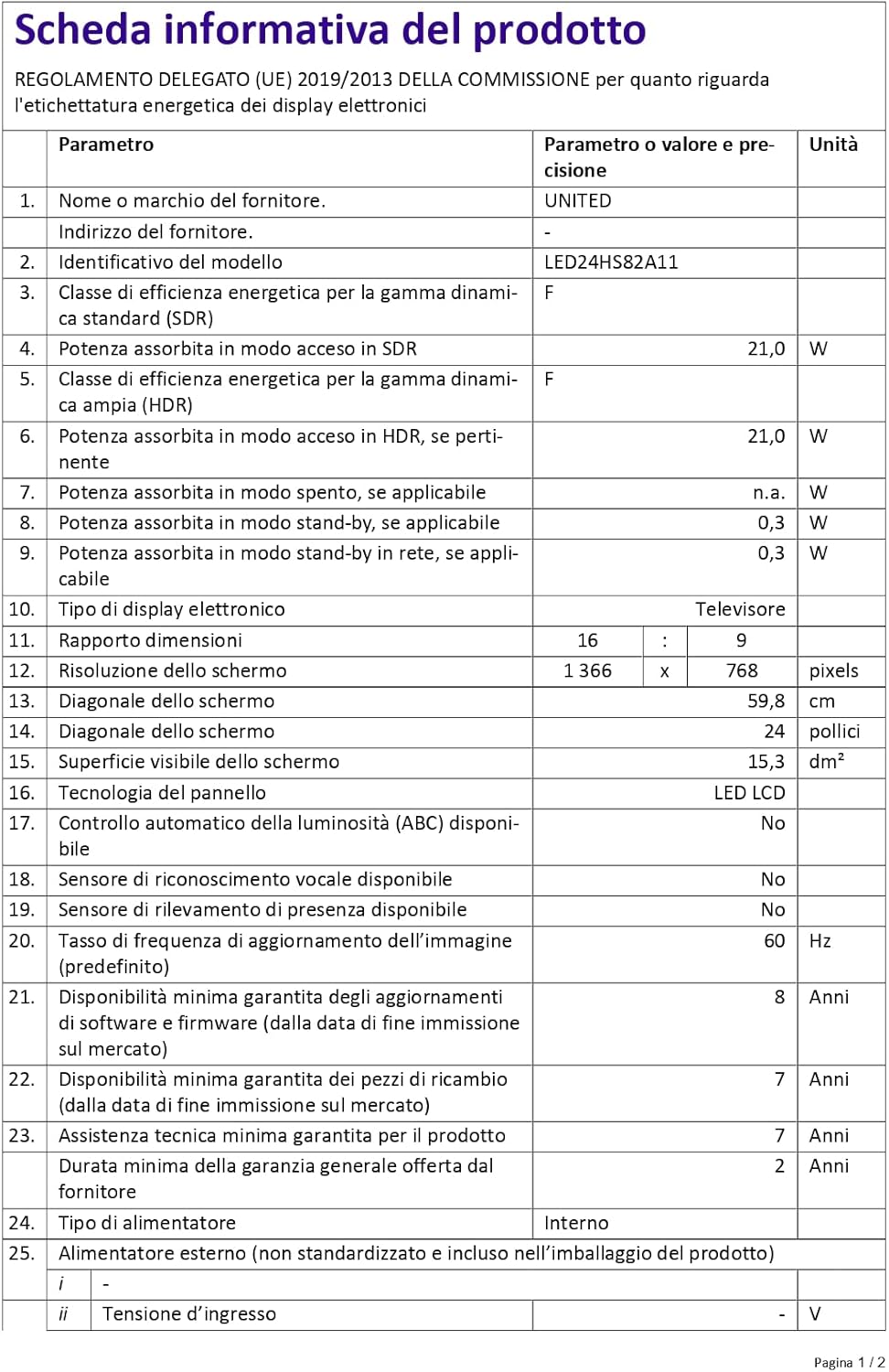
Figure 4: A detailed product information sheet for the UNITED LED24HS82A11 TV, providing comprehensive technical specifications and compliance details.
למידע נוסף, אנא עיינו במאגר הנתונים הרשמי של EPREL: https://eprel.ec.europa.eu/qr/1087921
אחריות ותמיכה
Your UNITED LED24HS82A11 TV comes with the following support and warranty provisions:
- Minimum General Warranty: 2 שנים
- זמינות סיוע טכני: 7 שנים
- עדכוני תוכנה מובטחים עד: 8 Years from market placement date
- זמינות חלקי חילוף: 7 Years from market placement date
For technical support or warranty claims, please contact your retailer or the manufacturer's authorized service center. Keep your proof of purchase for warranty validation.
Ask a question about this manual
Ask about setup, troubleshooting, compatibility, parts, safety, or missing instructions. Manuals+ will review the question and use this page’s manual context to help answer it.