
מָבוֹא
Thank you for choosing the sonoro Primus Internet Radio with Bluetooth. This manual provides essential information for setting up, operating, and maintaining your device to ensure optimal performance and longevity. Please read it thoroughly before use.
הוראות בטיחות חשובות
- מקור כוח: השתמשו רק במתאם החשמל המצוין. ודאו שהעוצמהtage תואם לספק הכוח המקומי שלך.
- אוורור: אין לחסום פתחי אוורור. יש לשמור על מרווח מספיק סביב היחידה לזרימת אוויר תקינה.
- מים ולחות: Do not expose the unit to rain, moisture, dripping, or splashing. Keep liquids away from the device.
- חוֹם: אין להתקין ליד מקורות חום כלשהם כגון רדיאטורים, אוגרי חום, תנורים או מכשירים אחרים (כולל ampמחצבים) המייצרים חום.
- ניקוי: נתקו את המכשיר מהחשמל לפני ניקויו. השתמשו במטלית יבשה בלבד.
- שֵׁרוּת: אל תנסה לתת שירות למוצר זה בעצמך. הפנה את כל השירות לאנשי שירות מוסמכים.
- מוצר לייזר: This product contains a Class 1 laser. Do not open the casing.
תוכן החבילה
אנא ודאו שכל הפריטים נמצאים:
- sonoro Primus Internet Radio Unit
- מתאם מתח
- שלט רחוק (עם סוללות)
- מדריך למשתמש (מסמך זה)
הגדרה
1. פריקה והשמה
Carefully remove the unit from its packaging. Place the sonoro Primus on a stable, flat surface, ensuring adequate ventilation around the device. Avoid placing it near strong magnetic fields or direct sunlight.
2. חיבור חשמל
Connect the provided power adapter to the AC IN port on the rear of the unit. Plug the other end into a suitable wall outlet. The unit will enter standby mode.
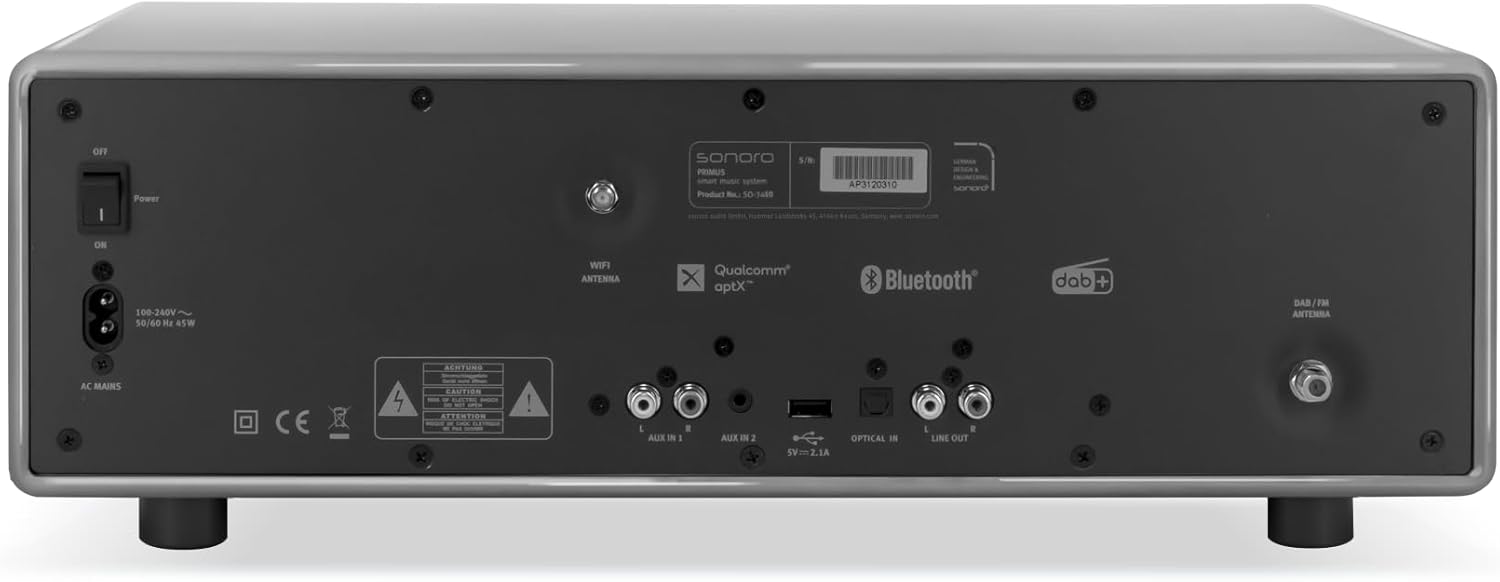
תְמוּנָה: Rear panel of the sonoro Primus, highlighting the power input and other connectivity options like AUX-in, Optical-in, and antenna connections.
3. חיבור אנטנה
For optimal FM and DAB+ reception, connect the included antenna to the appropriate antenna input on the rear panel. Extend the antenna fully for best signal quality.
4. הפעלה ראשונית
Press the Power button on the front panel or the remote control to turn on the unit. Follow the on-screen instructions for initial setup, including language selection and network configuration.

תְמוּנָה: חֲזִית view of the sonoro Primus, displaying the central screen, control knobs, and various buttons for media playback and source selection.
הוראות הפעלה
בקרות בסיסיות
The sonoro Primus features intuitive controls on the front panel and a comprehensive remote control. Key controls include:
- לחצן הפעלה: Turns the unit on/off or into standby mode.
- ידית עוצמת הקול: כוונון עוצמת הקול הראשית.
- כפתור כוונון/בחירה: ניווט בתפריטים ובחירת אפשרויות.
- כפתורי מקור: Selects input sources (Internet Radio, DAB+, FM, Bluetooth, CD, AUX-in, Optical-in).
- בקרות השמעה: Play/Pause, Skip Forward/Backward for CD and streaming.
Internet Radio and Podcasts
Access over 25,000 internet radio stations and numerous podcasts worldwide. Ensure your device is connected to a stable Wi-Fi network. Navigate through the menu using the Tune/Select knob to find and save your favorite stations.
DAB+ and FM Radio
Switch to DAB+ or FM mode using the source buttons. The unit will automatically scan for available stations. You can manually tune or save presets for quick access to your preferred channels.
קישוריות בלוטות'
To connect a Bluetooth device (smartphone, tablet, laptop):
- Select the Bluetooth source on the sonoro Primus.
- הפעל Bluetooth במכשיר החיצוני שלך.
- חפש "sonoro Primus" in your device's Bluetooth settings and pair.
- לאחר החיבור, תוכל להזרים אודיו באופן אלחוטי ליחידה.
השמעת תקליטור
Insert an audio CD into the CD slot. The unit will automatically detect and begin playback. Use the playback controls to manage your music.
Streaming Services (Spotify Connect, Amazon Music, Deezer)
The sonoro Primus supports various streaming services. To use Spotify Connect, Amazon Music, or Deezer, ensure your device is connected to Wi-Fi and you have an active subscription to the respective service. Follow the instructions within the service's app to connect to your sonoro Primus.
AUX-in and Optical-in
Connect external audio devices using the AUX-in (3.5mm jack) or Optical-in ports on the rear panel. Select the corresponding source on the unit to play audio from these inputs.
תַחזוּקָה
ניקוי היחידה
To clean the exterior of the unit, unplug it from the power source. Use a soft, dry, lint-free cloth. Do not use abrasive cleaners, waxes, or solvents as they may damage the finish.
טיפול בנגן תקליטורים
Handle CDs by their edges to avoid fingerprints. If a CD is dirty, wipe it gently with a soft, dry cloth from the center outwards. Do not use solvents or abrasive cleaners on CDs.
עדכוני תוכנה
Periodically check for software updates via the unit's menu (if available). Updates can improve performance and add new features. Ensure a stable internet connection during updates.
פתרון בעיות
| בְּעָיָה | סיבה אפשרית | פִּתָרוֹן |
|---|---|---|
| אין כוח | כבל חשמל לא מחובר; שקע החשמל פגום. | בדוק את חיבור כבל החשמל; נסה שקע אחר. |
| אין קול | Volume too low; wrong input source selected; mute activated. | Increase volume; select correct input source; deactivate mute. |
| קליטת רדיו גרועה | Antenna not properly connected or extended; interference. | Adjust antenna position; move unit away from other electronic devices. |
| התאמת Bluetooth נכשלה | Device too far; Bluetooth not enabled on external device; unit not in pairing mode. | Ensure devices are close; enable Bluetooth; put sonoro Primus in pairing mode. |
| תקליטור לא מתנגן | התקליטור הוכנס בצורה שגויה; התקליטור מלוכלך או שרוט; פורמט דיסק אינו נתמך. | הכנס מחדש את התקליטור בצורה נכונה; נקה או החלף את התקליטור; ודא שמדובר בתקליטור שמע. |
| בעיות חיבור Wi-Fi | Incorrect password; router too far; network interference. | Verify Wi-Fi password; move unit closer to router; restart router. |
אם הבעיה נמשכת, אנא פנו לתמיכת הלקוחות.
מפרטים
- מותג: sonoro
- דֶגֶם: e60a53a9-4d44-4a55-b129-3386e8f3e186
- טכנולוגיית טיונר: FM, DAB+
- מצב פלט אודיו: סטריאו
- פורמטי שמע נתמכים: MP3, AAC, WAV
- תצורת רמקול: 2.1 (Two coaxial speakers and a powerful 5.25 inch subwoofer)
- קישוריות: Optical, Auxiliary, Bluetooth, WLAN
- מכשירים תואמים: Laptop, MP3 player, Smartphone, Tablet
- מקור כוח: חשמלי עם כבלים
- סוג תצוגה: LCD או LED
- רכיבים כלולים: Power adapter, Remote control (with Lithium-metal batteries)
- מידות (חבילה): 52.6 x 33.2 x 27.4 ס"מ
- משקל (חבילה): 9.45 ק"ג
- צֶבַע: Chalk Grey (Note: Other colors may be available for different models)
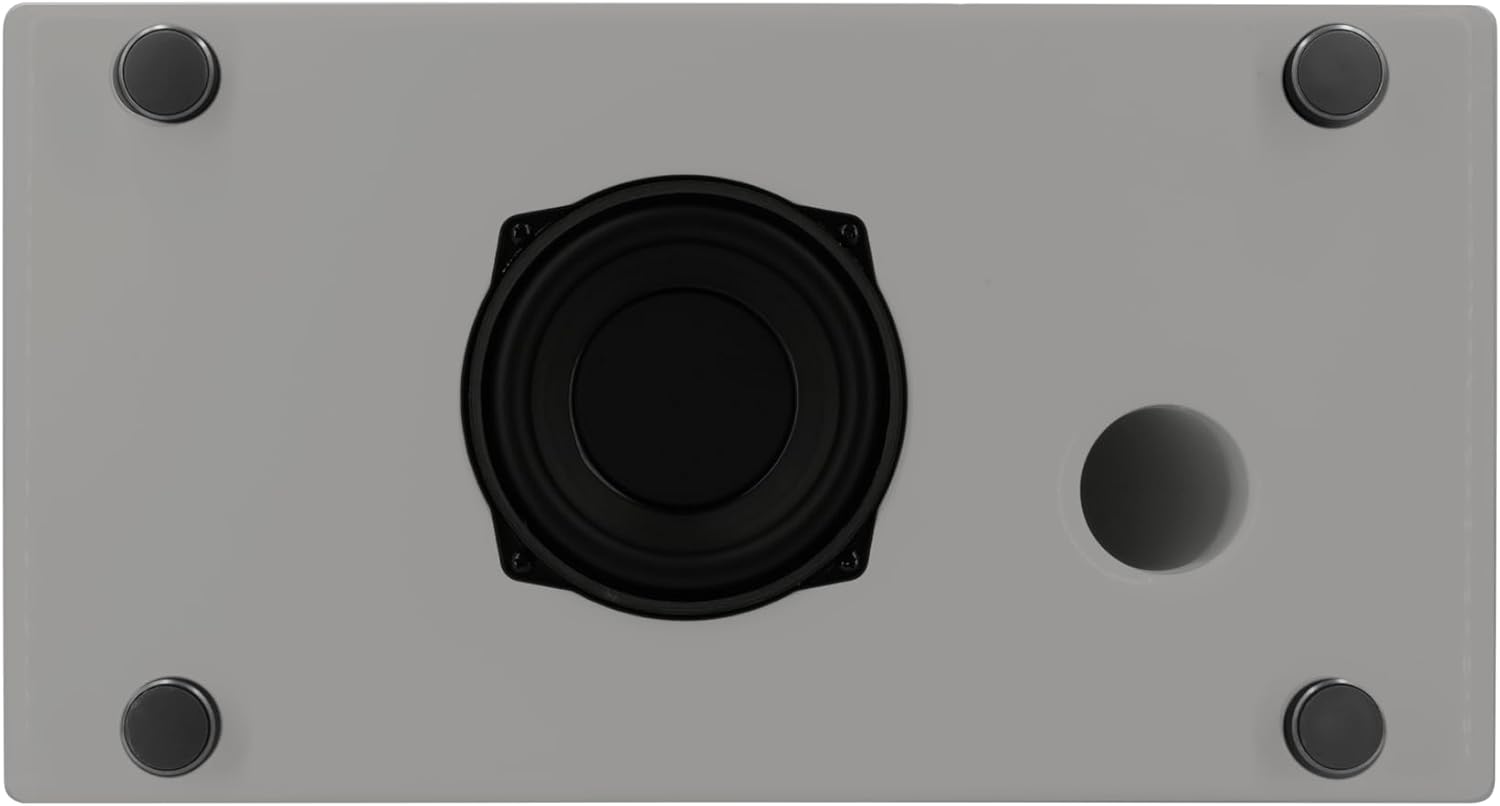
תְמוּנָה: Underside of the sonoro Primus, revealing the integrated 5.25-inch subwoofer for enhanced bass performance.
אחריות ותמיכה
The sonoro Primus comes with a standard manufacturer's warranty. Please refer to the warranty card included in your package for specific terms and conditions. For technical support, service, or warranty claims, please contact sonoro audio GmbH customer service through their official webהאתר או פרטי הקשר שסופקו עם הרכישה.
יַצרָן: sonoro audio GmbH
תאריך זמין ראשון: 2 בינואר 2023