
Cecotec Conga 11090 Spin Revolution Home&Wash
מדריך למשתמש של שואב אבק רובוטי Cecotec Conga 11090 Spin Revolution Home&Wash
דגם: 08105
1. הקדמה
Thank you for choosing the Cecotec Conga 11090 Spin Revolution Home&Wash Robot Vacuum Cleaner. This advanced robot is designed to provide comprehensive cleaning for your home, combining powerful vacuuming with effective mopping capabilities and an automatic self-emptying and mop-washing station. Please read this manual carefully before using the product to ensure proper operation, maintenance, and safety.
2. הוראות בטיחות חשובות
יש להקפיד תמיד על אמצעי זהירות בסיסיים בעת שימוש במכשירי חשמל כדי להפחית את הסיכון לשריפה, התחשמלות או פציעה.
- קרא את כל ההוראות לפני השימוש במכשיר.
- אין לאפשר לילדים להפעיל את הרובוט. יש לפקח על ילדים וחיות מחמד בזמן שהרובוט פועל.
- ודא את עוצמת הקולtage תואם את כרךtage המצוין על תווית הדירוג.
- אין להשתמש ברובוט על משטחים רטובים או באזורים עם מים עומדים.
- הרחק שיער, בגדים רפויים, אצבעות וכל חלקי הגוף מפתחים וחלקים נעים.
- אין להרים חפצים גדולים, חפצים חדים או נוזלים בעזרת הרובוט.
- כבו את הרובוט ונתק את תחנת הטעינה מהחשמל לפני ביצוע כל תחזוקה או ניקוי.
- השתמש רק באביזרים ואביזרים המומלצים על ידי היצרן.
- Store the robot and charging station indoors in a cool, dry place.
- אין להפעיל את הרובוט אם הוא נפל, ניזוק, הושאר בחוץ או נפל למים.
3. תכולת החבילה
ודא שכל הרכיבים נמצאים בחבילה:
- 1 x שואב אבק רובוטי
- 1 x מברשת צד
- 2 x Rotating Mops
- 1 x Self-emptying Base with 2 Tanks (1 x Clean Water Tank, 1 x Dirty Water Tank)
- שקית אבק אחת
- 1 x כבל חשמל
- 1 x Self-cleaning Brush
- 1 x Multifunction Brush
- 1 x מדריך הוראות

4. המוצר נגמרview
The Conga 11090 Spin Revolution Home&Wash is an intelligent cleaning solution featuring advanced navigation and comprehensive cleaning capabilities.
שואב אבק 4.1 רובוט
- ניווט חכם: Equipped with iTech Laser Eye technology for precise mapping and obstacle avoidance.
- יניקה עוצמתית: Delivers up to 5000 Pa suction power for effective dirt and debris removal.
- Spin Revolution Mopping: Features two rotating mops for deep scrubbing and floor cleaning.
- חיי סוללה ארוכים: Provides up to 140 minutes of cleaning autonomy.


4.2 Self-Emptying and Mop-Washing Station
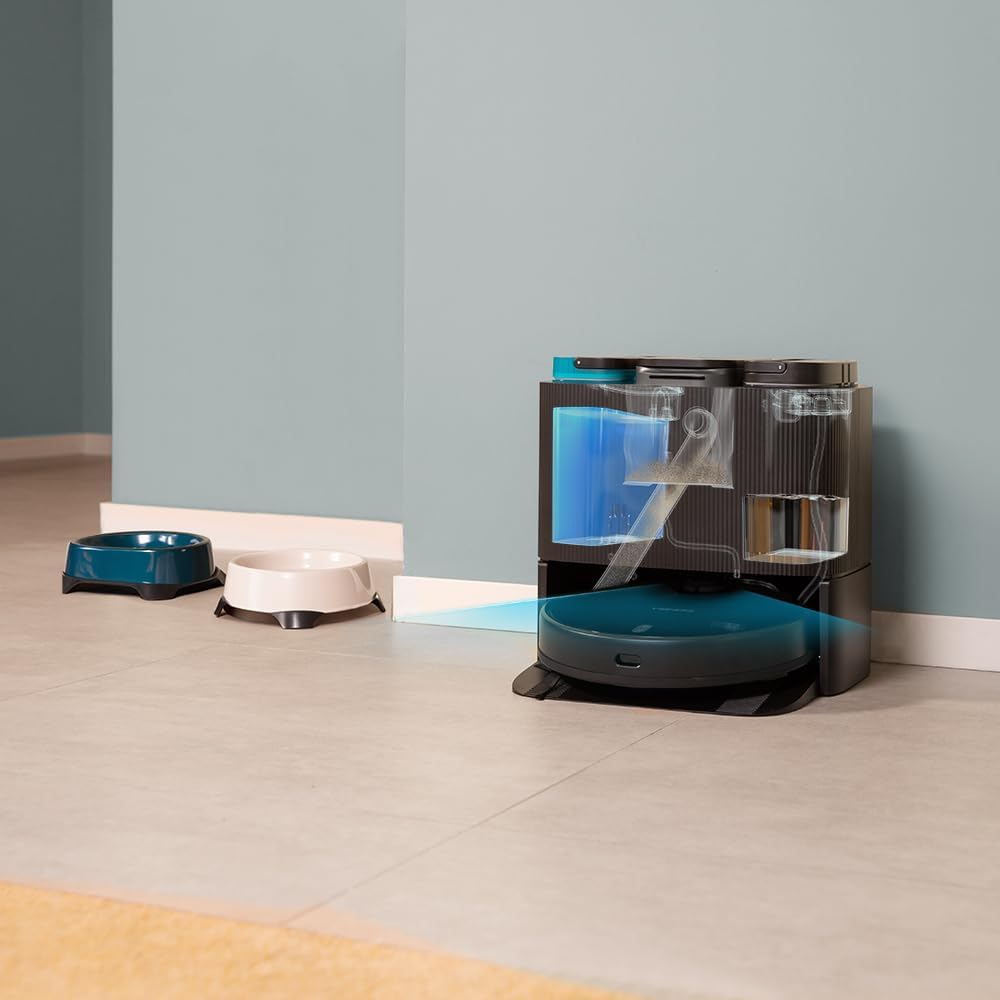
- איסוף אבק אוטומטי: The robot automatically empties its dustbin into a 2L dust bag in the station.
- שטיפת סמרטוטים אוטומטית: The station cleans the robot's mopping pads with clean water from its 2.8L tank and collects dirty water in a 2.4L tank.
- עיצוב נוח: Reduces manual intervention for a truly hands-free cleaning experience.


5. התקנה
5.1 פריקה ומיקום
- הסר בזהירות את כל הרכיבים מהאריזה.
- Choose a suitable location for the self-emptying station. Ensure there is at least 1.5 meters of clear space in front of the station and 0.5 meters on either side.
- Plug the power cable into the station and connect it to a power outlet.
5.2 טעינה ראשונית
Place the robot onto the charging contacts of the self-emptying station. Ensure the robot is properly aligned. The robot will begin charging automatically. For first use, it is recommended to fully charge the robot before operation.
5.3 התקנה וחיבור של אפליקציה
Download the "CECOTEC" app from your smartphone's app store (iOS or Android). Follow the in-app instructions to connect your robot to your home Wi-Fi network (2.4 GHz) and Bluetooth. The app provides enhanced control and mapping features.

6. הפעלת הרובוט
6.1 התחלת מחזור ניקוי
- באמצעות כפתור הרובוט: לחץ על כפתור ההפעלה ברובוט כדי להתחיל מחזור ניקוי כללי.
- דרך האפליקציה: Open the CECOTEC app. You can select various cleaning modes such as "Clean All", "Spot Clean", "Zone Clean", or schedule cleanings.

6.2 מיפוי וניווט
The robot uses its iTech Laser Eye to create a detailed map of your home during its first cleaning cycle. This map can be viewed and customized in the app. You can set virtual walls, restricted zones, and specific cleaning areas.

6.3 Automatic Self-Maintenance
During and after cleaning cycles, the robot will automatically return to its station to empty its dustbin and wash its mopping pads. The frequency of these actions can be configured in the app.
7. תחזוקה
תחזוקה שוטפת מבטיחה ביצועים אופטימליים ומאריכה את תוחלת החיים של שואב האבק הרובוטי שלכם.
7.1 ניקוי הרובוט
- מברשת ראשית: Remove the main brush and clean it regularly using the provided self-cleaning brush to remove tangled hair and debris.
- מברשת צד: Check and clean the side brush for any tangled hair or debris. Replace if worn.
- רפידות לניגוב: Although the station washes them, it is recommended to manually remove and rinse the mopping pads periodically.
- חיישנים: Wipe all sensors (cliff sensors, laser sensor) with a clean, dry cloth to ensure proper navigation.

7.2 Maintaining the Self-Emptying Station
- שקית אבק: Replace the dust bag in the station when it is full. The app will notify you.
- מיכלי מים: Regularly empty the dirty water tank and refill the clean water tank. Clean both tanks to prevent mold or odor buildup.
- Washing Tray: Clean the washing tray where the mops are cleaned to remove any residue.

8. פתרון תקלות
אם נתקלתם בבעיות עם הרובוט שלכם, עיינו בבעיות הנפוצות ובפתרונות הבאות:
| בְּעָיָה | סיבה אפשרית | פִּתָרוֹן |
|---|---|---|
| הרובוט לא נדלק. | Low battery; power cable not connected. | Place robot on charging station; ensure power cable is securely connected. |
| הרובוט לא מוצא עמדת טעינה. | Station is blocked; robot is too far. | Ensure clear space around station; manually place robot closer to station. |
| ביצועי ניקוי גרועים. | Brushes tangled; dustbin full; mops dirty. | Clean main/side brushes; empty dustbin/replace bag; clean mopping pads. |
| רובוט נתקע לעתים קרובות. | Obstacles; dark surfaces; dirty sensors. | Clear obstacles; use virtual walls in app; clean sensors. |
| בעיות חיבור לאפליקציה. | Incorrect Wi-Fi password; 5GHz network; Bluetooth off. | Verify Wi-Fi password; ensure 2.4GHz network; enable Bluetooth; restart robot and router. |
9. מפרטים
| תכונה | פְּרָט |
|---|---|
| מותג | Cecotec |
| שם הדגם | Conga 11090 Spin Revolution Home&Wash |
| מספר דגם | 08105 |
| צֶבַע | שָׁחוֹר |
| מידות מוצר (רובוט) | 34.3 x 34.5 x 10.8 ס"מ |
| משקל המוצר | 11.25 ק"ג |
| כרך ידtage | 120 וולט |
| רמת רעש | 75 dB |
| זמן הפעלה | Up to 2 hours and 20 minutes (140 minutes) |
| קיבולת שקית אבק (תחנה) | 2 ליטר |
| קיבולת מיכל מים נקיים (תחנה) | 2.8 ליטר |
| Dirty Water Tank Capacity (Station) | 2.4 ליטר |
| תכונות מיוחדות | Wireless, Automatic Shut-off, iTech Laser Eye Navigation |
| מכשירים תואמים | Smartphones (via CECOTEC App) |
10. אחריות ותמיכה
Cecotec products are manufactured to high-quality standards. For warranty information, please refer to the warranty card included in your product packaging or visit the official Cecotec website. For technical support, troubleshooting assistance, or spare parts, please contact Cecotec customer service or the retailer from whom you purchased the product.
תמיכה מקוונת: בקר ב חנות המותגים Cecotec באמזון למידע נוסף על המוצר ומשאבי תמיכה.
Ask a question about this manual
Ask about setup, troubleshooting, compatibility, parts, safety, or missing instructions. Manuals+ will review the question and use this page’s manual context to help answer it.