
1. הקדמה
This manual provides essential information for the installation, operation, and maintenance of your Montech Titan Gold 850W ATX 3.0 Power Supply. This high-end power supply is designed for gaming systems, featuring 80 Plus Gold and Cybenetics Gold certifications, fully modular cabling, and readiness for PCIe 5.0 with a new 12VHPWR connector. Please read this manual thoroughly before installation and use to ensure proper functionality and safety.

Figure 1: Montech Titan Gold 850W Power Supply and its retail packaging.
2. מידע בטיחות
Always observe the following safety precautions to prevent injury or damage to your power supply and system components:
- ודא שספק הכוח מנותק משקע החשמל AC לפני ההתקנה או הטיפול.
- אין לפתוח את ספק הכוח גasinז. נפח גבוהtagקיימים בפנים, ואין חלקים הניתנים לתחזוקה על ידי המשתמש.
- התקן את ספק הכוח באזור מאוורר היטב, הרחק ממקורות חום, אור שמש ישיר ולחות.
- השתמש רק בכבלים המודולריים המצורפים לספק כוח זה. שימוש בכבלים שאינם תואמים עלול לגרום נזק.
- Ensure all connectors are securely seated before powering on the system.
3. תכולת החבילה
ודא שכל הפריטים נמצאים בחבילה:
- Montech Titan Gold 850W Power Supply Unit
- סט כבלים מודולרי (כולל כבל 12VHPWR)
- כבל מתח AC
- ברגי הרכבה
- אזיקוני כבלים/רצועות ולקרו
- מדריך למשתמש (מסמך זה)

Figure 2: Included modular cables and accessories for the power supply.
4. התקנה והתקנה
בצע את השלבים הבאים כדי להתקין את ספק הכוח שלך:
- הכן את מארז המחשב שלך: Ensure your PC case is compatible with ATX power supplies.
- התקן את ספק הכוח: Secure the power supply into the designated PSU bay in your PC case using the provided mounting screws. Ensure the fan is oriented correctly for optimal airflow (typically facing downwards if your case has a bottom vent).
- חיבור כבלים מודולריים: Identify the necessary cables for your motherboard, CPU, graphics card(s), and storage devices. Connect these cables to the corresponding ports on the power supply. The fully modular design allows you to connect only the cables you need, reducing clutter.
- חיבור לרכיבים: Route the connected cables through your case's cable management channels and connect them to your motherboard (24-pin ATX, 8-pin EPS/CPU), graphics card(s) (PCIe, including the 12VHPWR for compatible GPUs), and storage drives (SATA, Molex).
- חיבורים מאובטחים: Double-check all connections to ensure they are firm and properly seated.

איור 3: מעלview of the modular cable connection ports on the power supply.
5. הוראות הפעלה
לאחר ההתקנה, בצע את השלבים הבאים כדי להפעיל את ספק הכוח שלך:
- חבר מתח AC: Plug the AC power cord into the power supply's AC inlet and then into a wall outlet or surge protector.
- מתג הפעלה: Locate the main power switch on the rear of the power supply and flip it to the 'ON' (I) position.
- הפעלת המערכת: Press the power button on your PC case to start your computer.
- Smart Zero Fan Feature: This power supply includes a 'Smart Zero Fan' switch. When enabled (ON), the fan will remain off under low load conditions for silent operation. The fan will automatically activate when the load increases to maintain optimal temperatures. If disabled (OFF), the fan will operate continuously.

Figure 4: Rear panel with main power switch and Smart Zero Fan control.
6. תחזוקה
To ensure the longevity and optimal performance of your power supply, periodic maintenance is recommended:
- ניקוי אבק: Regularly clean dust from the power supply's fan intake and exhaust vents using compressed air. Ensure the power supply is turned off and unplugged before cleaning.
- בדיקת כבלים: Periodically check all modular cable connections for looseness or damage. Re-seat any loose cables.
- תנאים סביבתיים: Maintain a clean, dry, and cool environment for your PC to prevent excessive heat and dust buildup.

איור 5: למעלה view of the power supply, highlighting the fan grill for cleaning.
7. פתרון תקלות
אם נתקלת בבעיות באספקת החשמל שלך, עיין בבעיות הנפוצות ובפתרונות הבאות:
- אין כוח:
- ודא שכבל החשמל AC מחובר היטב הן לספק הכוח והן לשקע בקיר.
- Verify the main power switch on the PSU is in the 'ON' (I) position.
- Check all modular cable connections, especially the 24-pin ATX and 8-pin EPS/CPU cables, for secure seating.
- בדוק את שקע הקיר עם מכשיר אחר כדי לוודא שיש לו חשמל.
- המערכת נכבית באופן בלתי צפוי:
- This could indicate an overload or overheating. Ensure your system's power consumption does not exceed the PSU's 850W capacity.
- Check for proper ventilation around the PSU and inside the PC case. Clean any dust buildup.
- Ensure the 'Smart Zero Fan' is functioning correctly or try disabling it to force continuous fan operation.
- Fan Not Spinning (under low load):
- If the 'Smart Zero Fan' feature is enabled, the fan will not spin under low loads. This is normal operation. The fan will activate when the system load increases.
- If the fan never spins even under high load with 'Smart Zero Fan' disabled, contact customer support.
8. מפרטים
Detailed technical specifications for the Montech Titan Gold 850W Power Supply:
| תכונה | מִפרָט |
|---|---|
| מותג | מונטק |
| שם הדגם | Titan Gold 850W (TIS0124) |
| מהtage | 850 וואט |
| פלט וואטtage | 750 Watts (Note: Product title states 850W, specifications list 750W. Please verify with manufacturer if discrepancy is critical.) |
| הסמכת יעילות | 80 Plus Gold, Cybenetics Gold |
| גורם צורה | ATX |
| עיצוב ספק כוח | מודולרי מלא |
| סוג מחבר | ATX, PCIe 5.0 (12VHPWR) |
| שיטת קירור | Air (1 Fan) |
| משקל פריט | 7.52 פאונד |
| תאריך ראשון זמין | 13 בדצמבר 2022 |
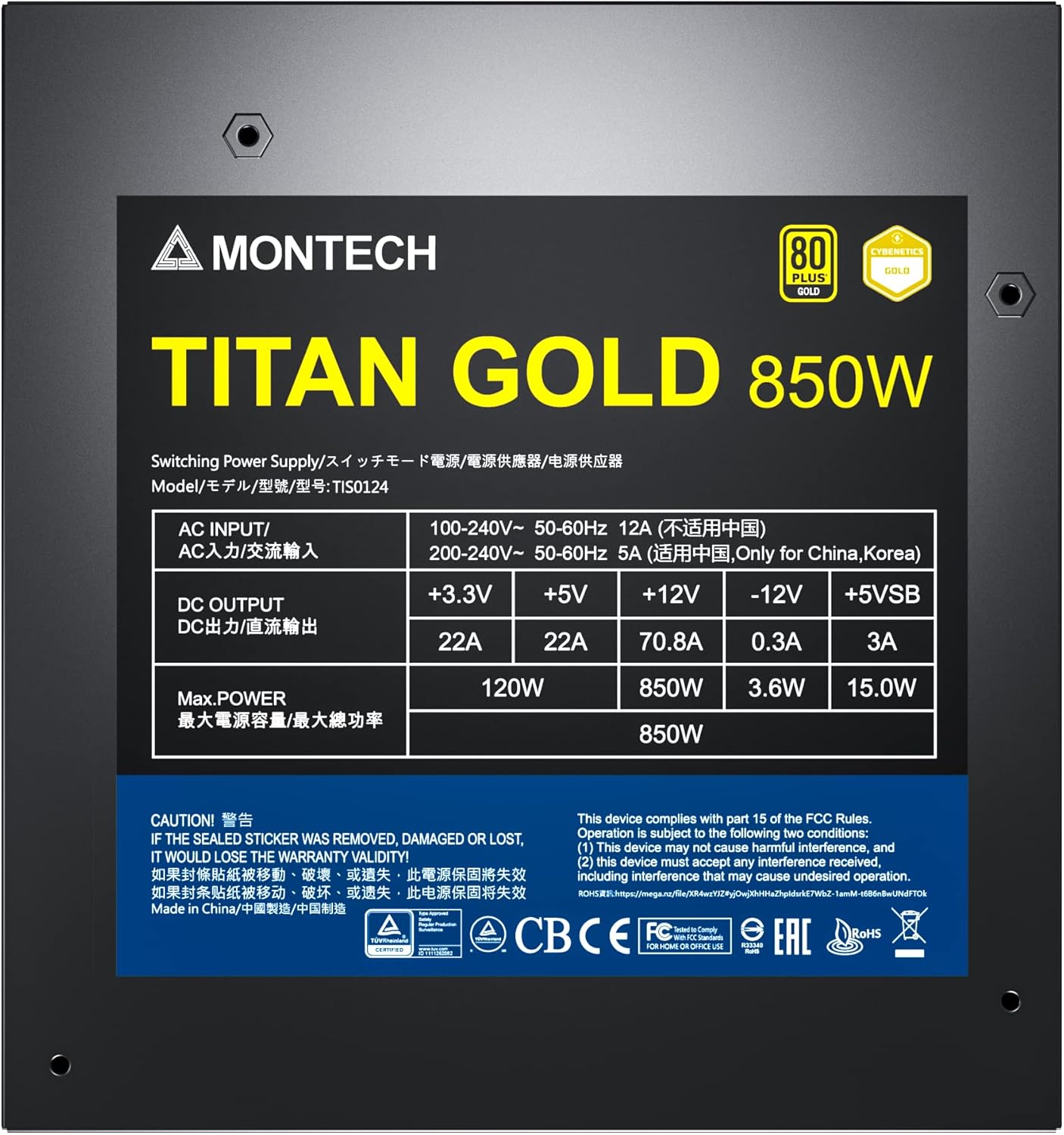
Figure 6: Product label displaying electrical specifications and certifications.
9. אחריות ותמיכה
The Montech Titan Gold 850W Power Supply comes with a אחריות לשנה, ensuring long-term reliability and peace of mind. For technical support, warranty claims, or further assistance, please visit the official Montech webלאתר או לפנות למחלקת שירות הלקוחות שלהם.
אנא שמור את הוכחת הרכישה שלך לצורך אימות האחריות.