
1. התקנה
1.1 תכולת החבילה
- 2 x OMAIC Universal Remote Controls
1.2 התקנת סוללה
To install batteries, slide open the battery compartment cover on the back of the remote control. Insert two AAA batteries, ensuring correct polarity (+ and -) as indicated inside the compartment. Close the cover securely.

Description: This image illustrates the open battery compartment of the remote control, highlighting where to correctly insert two AAA batteries. Batteries are not included with the remote control.
1.3 Initial Setup (No Programming Required)
The OMAIC Universal Remote Control is designed for immediate use with most Hisense Smart TVs. No additional programming or pairing is required. Simply install the batteries, and the remote is ready to operate your television.
2. הוראות הפעלה
2.1 פונקציות בסיסיות
The remote control features a standard layout for easy navigation and control of your Hisense TV. Refer to the diagram below for button identification and their corresponding functions.

Description: This image provides a detailed layout of the remote control, with labels for each button, including Power, Input, Number Pad, CC (Closed Caption), Settings, All Apps, D-pad, OK, Back, Home, Exit, Volume, Channel, Mute, Playback controls, and Sleep.
| לַחְצָן | פוּנקצִיָה |
|---|---|
| כּוֹחַ | מפעיל או מכבה את הטלוויזיה. |
| קֶלֶט | Changes the TV input source. |
| לחצני מספרים (0-9) | Enters channel numbers or input numbers. |
| CC | מפעיל או מבטל כתוביות סמויות. |
| D-pad (Up/Down/Left/Right) | Navigation buttons for menus and selections. |
| OK | מאשר את הבחירה. |
| בְּחֲזָרָה | Returns to the previous menu or application. |
| בַּיִת | מציג את מסך הבית. |
| יְצִיאָה | Exits the current application or menu. |
| VOL +/- | מכוונן את עוצמת הקול מעלה או מטה. |
| CH +/- | מעלה או מוריד ערוצים. |
| לְהַשְׁתִיק | משתיק או משחזר את הצליל. |
| בקרות השמעה | Controls media playback (Play, Pause, Stop, Rewind, Fast Forward). |
| לִישׁוֹן | Adjusts the sleep timer setting. |
2.2 כפתורי קיצור
The remote includes dedicated shortcut buttons for quick access to popular streaming services:
- נטפליקס
- סרטון פריים
- YouTube
- Google Play
Description: This image focuses on the lower section of the remote control, clearly showing the dedicated buttons for Netflix, Prime Video, YouTube, and Google Play, allowing for instant access to these streaming platforms.
2.3 Infrared Technology
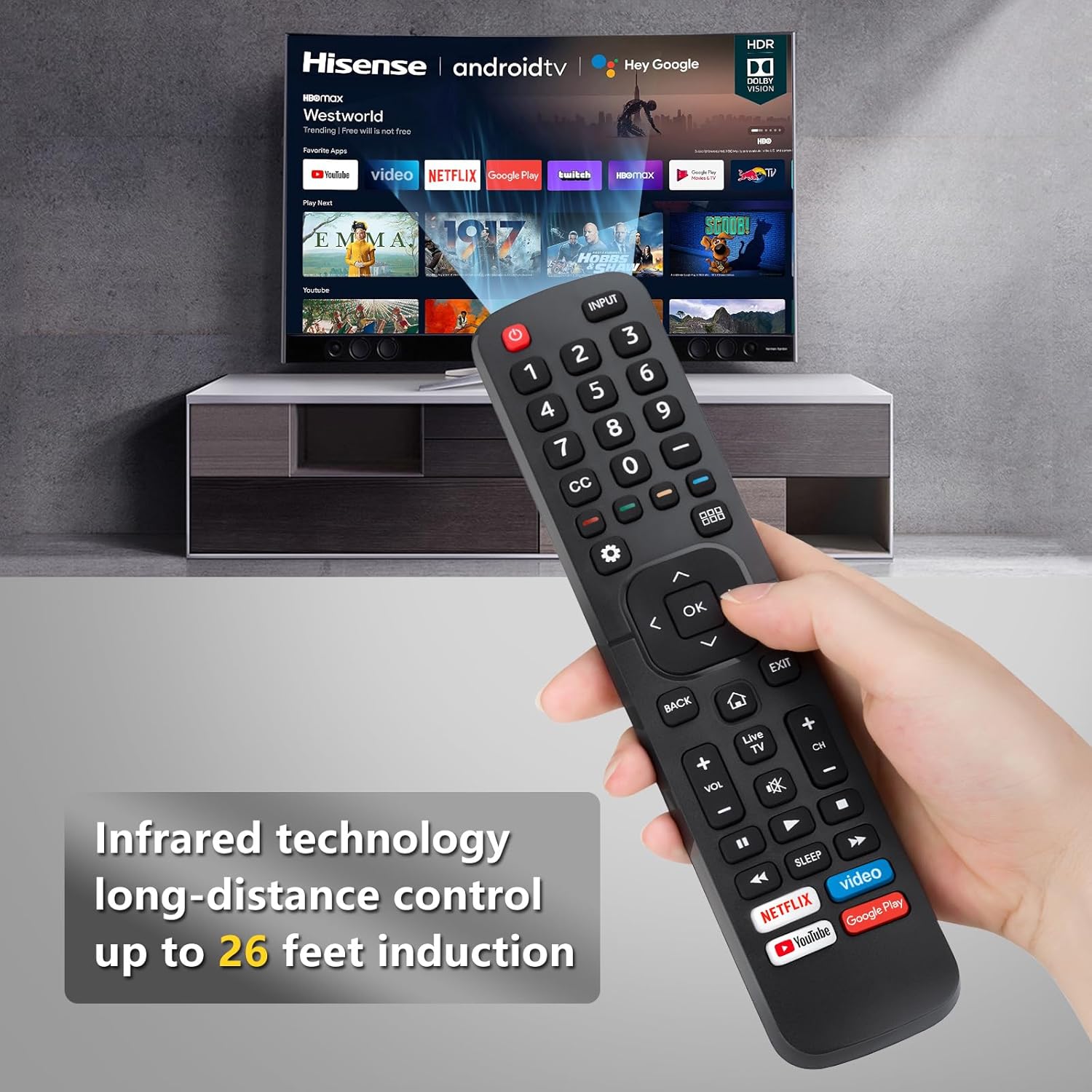
This remote control operates using infrared (IR) technology, providing a long-distance control range of approximately 8-10 meters (32 feet). Ensure a clear line of sight between the remote and your TV's IR receiver for optimal performance.

Description: This image visually represents the effective operating distance of the infrared remote control, indicating a range of up to 32 feet for controlling the television.
2.4 סרטון הדגמת מוצר
Watch this video for a visual demonstration of the remote control's functionality with Hisense TVs.
Description: This video demonstrates the OMAIC replacement remote control (model EN2A27) in use with a Hisense Smart TV, showcasing its various functions and ease of operation.
3. תאימות
This universal remote control is compatible with a wide range of Hisense Smart TVs, including but not limited to the following series and remote models:
- Hisense TV Series: H9, H8, H5510G, H65, H55, H9G, A60, H5500F Series, etc.
- דגמי שלט רחוק תואמים: EN2A27, EN2A127H, EN2A27HT, EN2AN27H, EN2AS27H, EN2B27, EN2C27, EN2D27, EN2G27, EN33922A, EN33924HS, EN33925A, EN33926A, EN33927A, EN2BN27H, ERF2A60.
Note: This remote control does not support voice control functions.
4. תחזוקה
כדי להבטיח את אורך החיים והביצועים המיטביים של השלט רחוק, יש לפעול לפי הנחיות התחזוקה הבאות:
- ניקוי: נגבו את השלט בעזרת מטלית רכה ויבשה. הימנעו משימוש בחומרי ניקוי נוזליים או בחומרים שוחקים.
- החלפת סוללה: החלף סוללות כאשר תגובת השלט רחוק הופכת איטית או מפסיקה לעבוד. החלף תמיד את שתי הסוללות בו זמנית בחדשות מאותו סוג (AAA).
- אִחסוּן: יש לאחסן את השלט במקום קריר ויבש, הרחק מאור שמש ישיר וטמפרטורות קיצוניות.
- הימנע מטיפות: הגן על השלט מפני נפילות ופגיעות, אשר עלולות לגרום נזק לרכיבים הפנימיים.
5. פתרון תקלות
If you encounter issues with your OMAIC Universal Remote Control, refer to the following common troubleshooting steps:
- השלט לא מגיב:
- ודא שהסוללות מותקנות כהלכה עם קוטביות נאותה.
- החליפו סוללות ישנות בסוללות AAA חדשות.
- בדוק אם יש חסימות בין השלט למקלט ה-IR של הטלוויזיה.
- טווח פעולה קצר:
- ודא שהסוללות טריות.
- Verify there are no strong light sources (like direct sunlight) interfering with the IR signal.
- כפתורים ספציפיים שלא עובדים:
- Clean the remote's surface and buttons to remove any dirt or debris that might be causing sticking.
- Confirm your TV model is listed as compatible. While universal, some advanced functions on specific TV models might not be fully supported.
6. מפרטים
- מותג: OMAIC
- משקל פריט: 6.4 אונקיות
- מידות חבילה: 9.53 x 4.53 x 1.3 אינץ'
- תכונה מיוחדת: אוּנִיבֶרְסָלִי
- מספר מרבי של מכשירים נתמכים: 1 (לכל שלט רחוק)
- מכשירים תואמים: טֵלֶוִיזִיָה
- טכנולוגיית קישוריות: אינפרא אדום (IR)
7. אחריות ותמיכה
OMAIC is committed to providing quality replacement remote controls and excellent customer service. If you have any questions or concerns regarding your order or the product's functionality, please contact our professional after-sale service team directly. We aim to respond within 12 hours on working days to assist you.
For support, please refer to the contact information provided with your purchase or visit the OMAIC store on Amazon.