
מָבוֹא
The Solid State Logic SSL 12 is a high-performance 12-in/8-out USB audio interface designed for professional recording and mixing environments. It features studio-quality audio conversion, robust preamps, and flexible monitoring options to enhance your audio production workflow. This manual provides essential information for setting up, operating, maintaining, and troubleshooting your SSL 12 interface.

איור 1: חזית view of the Solid State Logic SSL 12 USB Audio Interface.
הגדרה
Follow these steps to set up your SSL 12 audio interface:
- התקנת תוכנה: Before connecting the hardware, download and install the latest drivers and SSL 360° software from the official Solid State Logic website. This software is essential for full control and functionality of your interface.
- התחבר למחשב: Connect the SSL 12 to your computer using the provided USB cable. The interface is bus-powered via USB.
- הפעלה: Press the power button located on the rear panel of the unit. The power indicator LED on the front panel will illuminate.
- חיבור מיקרופונים/כלי נגינה: Use XLR or 1/4-inch TRS cables to connect your microphones or instruments to the combo inputs (1-4) on the rear panel. For instruments, use the dedicated 1/4-inch instrument inputs (INST 1, INST 2) on the front panel for optimal impedance matching.
- Connect Monitors/Headphones: Connect your studio monitors to the 1/4-inch TRS outputs (1-4) on the rear panel. Plug your headphones into the dedicated 1/4-inch headphone outputs (A, B) on the front panel.
- ADAT and MIDI Connections (Optional): If expanding your setup, connect ADAT compatible devices to the ADAT IN port and MIDI devices to the MIDI IN/OUT ports on the rear panel.

Figure 2: SSL 12 with various cables connected for a typical studio setup.
הוראות הפעלה
Understanding the controls and connections of your SSL 12 is crucial for effective operation.
פקדי לוח קדמי

איור 3: למעלה view of the SSL 12, highlighting front panel controls.
- ערוצי 1-4: Each channel features a GAIN knob to adjust input level, a +48V button for phantom power (for condenser microphones), and a LINE button to switch between microphone/instrument and line-level inputs. The LED meters provide visual feedback on input levels.
- כפתורי 4K מדור קודם: These buttons activate the '4K' mode, which emulates the sound characteristics of the classic SSL 4000 series console, adding harmonic enhancement and a high-frequency boost.
- רמת צג: The large blue knob controls the overall output level to your main studio monitors.
- Headphone Outputs (A & B): Two independent headphone outputs with individual level controls allow for separate monitoring mixes.
- טוקבק: The built-in talkback microphone allows communication with artists in a separate recording space. Use the TALK button to activate, CUT to mute, and ALT to switch between alternative monitor outputs.
חיבורי לוח אחורי
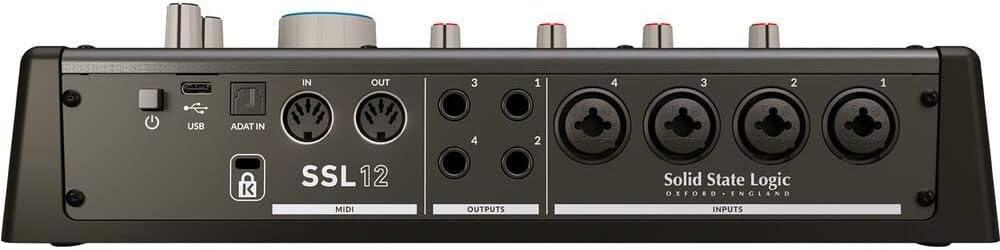
איור 4: אחורי view of the SSL 12, showing input and output connections.
- כניסות 1-4: Combo XLR/TRS jacks for connecting microphones and line-level sources.
- יציאות 1-4: 1/4-inch TRS balanced outputs for connecting studio monitors or other outboard gear.
- MIDI In/Out: Standard 5-pin DIN connectors for connecting MIDI controllers or other MIDI-enabled devices.
- ADAT In: Optical input for expanding your input count with an ADAT-compatible device, providing up to 8 additional channels.
- USB: USB-C port for connection to your computer.
- כּוֹחַ: מתג הפעלה/כיבוי ליחידה.
תַחזוּקָה
כדי להבטיח את אורך החיים והביצועים האופטימליים של ה-SSL 12 שלך, פעל לפי הנחיות התחזוקה הבאות:
- ניקוי: Use a soft, dry cloth to clean the exterior of the unit. Avoid abrasive cleaners or solvents. For stubborn dirt, a slightly damp cloth can be used, ensuring no moisture enters the unit.
- הגנה מפני אבק: Keep the unit covered when not in use to prevent dust accumulation, which can affect internal components and ventilation.
- אוורור: ודאו זרימת אוויר מספקת סביב היחידה. אין לחסום פתחי אוורור.
- ניהול כבלים: סדרו את הכבלים בצורה מסודרת כדי למנוע עומס על המחברים וניתוקים מקריים.
- עדכוני תוכנה: בדוק באופן קבוע את הלוגיקה של מצב מוצק website for firmware and software updates to ensure compatibility and access to the latest features and bug fixes.
פתרון בעיות
If you encounter issues with your SSL 12, refer to the following common problems and solutions:
- אין כוח: Ensure the USB cable is securely connected to both the interface and your computer. Verify the power button on the rear panel is in the 'On' position. Try a different USB port or cable.
- אין פלט קול: Check that your monitors and headphones are correctly connected and powered on. Verify the Monitor Level and Headphone Level knobs are turned up. Ensure the correct output device is selected in your computer's sound settings and your Digital Audio Workstation (DAW).
- אין אות קלט: Confirm that microphones/instruments are properly connected to the correct inputs. Check the GAIN knob for the respective channel is turned up. Ensure +48V phantom power is enabled for condenser microphones. Verify the correct input is selected in your DAW.
- Audio Clipping/Distortion: Reduce the GAIN on the input channel. Ensure your input source is not sending an excessively hot signal. Check your DAW's input levels. The 32-bit float converters offer high dynamic range, but extreme input levels can still cause clipping.
- בעיות אחזור: Adjust the buffer size in your DAW's audio settings. Lower buffer sizes reduce latency but require more processing power. Ensure your computer meets the minimum system requirements.
- התוכנה לא מזהה את הממשק: Reinstall the SSL 360° software and drivers. Try connecting the interface to a different USB port. Restart your computer.
מפרטים
| תכונה | מִפרָט |
|---|---|
| מותג | לוגיקה של מצב מוצק |
| מספר דגם | 726705X1 |
| טכנולוגיית קישוריות | USB |
| מספר ערוצים | 14 (12-in, 8-out) |
| מקסימום S.ample Rate | 192 KHz |
| עומק קצת | 32 סיביות |
| Mic Gain | 62dB |
| מכשירים תואמים | Headphone, Personal Computer |
| תוכנה נתמכת | SSL 360 degrees (DAW) |
| מַעֲרֶכֶת הַפעָלָה | Windows (and macOS, though not explicitly listed in provided data, it's standard for audio interfaces) |
| משקל פריט | 1.43 קילוגרם |
| UPC | 878076001678 |
אחריות ותמיכה
The Solid State Logic SSL 12 USB Audio Interface comes with a אחריות לשנה מתאריך הרכישה. אחריות זו מכסה פגמי ייצור ומבטיחה שהמוצר שלך יתפקד כמתוכנן בשימוש רגיל.
For technical support, warranty claims, or additional product information, please visit the official Solid State Logic webאתר או צרו קשר עם מחלקת שירות הלקוחות שלהם. שמרו את הוכחת הרכישה שלכם לכל שאלה הקשורה לאחריות.