
1. הקדמה
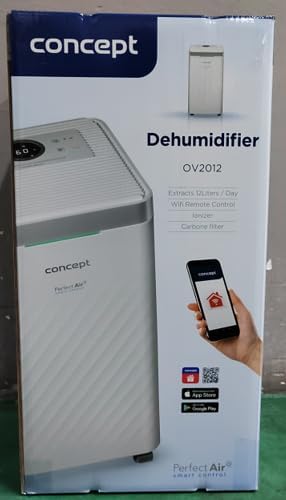
The Concept OV2012 is a versatile appliance designed to improve indoor air quality by combining dehumidification with air purification. This device effectively reduces excess humidity, which can contribute to mold growth and discomfort, while simultaneously filtering airborne pollutants. It features a triple filtration system, intuitive touch controls, and smart app connectivity for convenient operation.

איור 1: חזית view of the Concept OV2012 Dehumidifier.
2. מידע בטיחות
אנא קרא בעיון את כל הוראות הבטיחות לפני השימוש במכשיר. אי הקפדה על הוראות אלה עלולה לגרום להתחשמלות, שריפה או פציעה חמורה.
- ודא את אספקת החשמל כרךtage תואם לתווית הדירוג שעל המכשיר.
- אל תפעיל את היחידה עם כבל חשמל או תקע פגומים.
- הרחיקו את המכשיר ממים ונוזלים אחרים. אין לטבול אותו במים.
- אין לחסום פתחי כניסת או יציאת אוויר. יש לוודא מרווח מספיק סביב היחידה לזרימת אוויר תקינה.
- נתקו את המכשיר מהחשמל לפני ניקוי, תחזוקה או כאשר הוא אינו בשימוש למשך תקופות ממושכות.
- מכשיר זה אינו מיועד לשימוש על ידי אנשים (כולל ילדים) בעלי יכולות פיזיות, חושיות או שכליות מופחתות, או חסרי ניסיון וידע, אלא אם כן הם קיבלו השגחה או הדרכה.
- Do not use the appliance in areas where flammable gases or vapors are present.
3. רכיבי המוצר
Familiarize yourself with the main parts of your Concept OV2012 dehumidifier.
- לוּחַ בַּקָרָה: Touch-sensitive interface for setting modes and functions.
- יציאת אוויר: Where processed air is released.
- כיסוי כניסת אוויר/מסנן: Located at the rear, provides access to the air filters.
- מיכל מים: אוסף מים מעובה.
- יציאת ניקוז רציפה: Port for attaching a hose for continuous water drainage.
- 360° Rolling Wheels: להזזה קלה של היחידה.

איור 2: אחורי view of the dehumidifier, showing air intake and water tank.
4. לוח בקרה ותצוגה
The OV2012 features an intuitive touch control panel with a digital display and LED indicators.
איור 3: מפורט view של לוח בקרת המגע.
- לחצן הפעלה: מפעיל או מכבה את היחידה.
- בחירת מצב: Cycles through operating modes (Automatic, Continuous, Laundry Drying, Fan).
- Humidity Slider/Buttons: מכוונן את רמת הלחות הרצויה.
- כפתור טיימר: Sets the delayed on/off time (up to 24 hours).
- מהירות מאוורר: Adjusts fan speed (usually two levels).
- כפתור יינון: מפעיל או מבטל את פונקציית היינון.
- מחוון לחות LED: משנה צבע בהתאם ללחות החדר הנוכחית:
- אָדוֹם: High humidity (RH > 70%)
- יָרוֹק: Satisfactory humidity (70% ≥ RH ≥ 50%)
- כְּחוֹל: Low humidity (RH < 50%)
5. הגדרה ראשונית
- פריקת אריזה: הוצא בזהירות את מסיר הלחות מאריזתו. שמור את האריזה לאחסון או הובלה עתידיים.
- מיקום: Place the unit on a firm, level surface. Ensure there is at least 20 cm of clear space around all sides for optimal airflow. The 360° rolling wheels allow for easy positioning.
- חיבור חשמל: חבר את כבל החשמל לשקע חשמל מוארק.
- מיכל מים: ודא שמיכל המים מוכנס כהלכה לתוך היחידה.
6. מצבי הפעלה
The OV2012 offers four distinct operating modes to suit various needs:
- מצב אוטומטי: The dehumidifier automatically maintains the humidity level you select. The unit will cycle on and off to achieve and sustain the target humidity.
- פעולה רציפה: Ideal for long-term drying of very wet areas. In this mode, the unit runs continuously regardless of the ambient humidity. It is recommended to use the continuous drainage hose in this mode.
- מצב ייבוש כביסה: Accelerates the drying of laundry and helps prevent moisture buildup in the room, reducing the risk of mold.
- Fan Mode (Air Purification without Dehumidification): In this mode, the compressor is off, and only the fan and filtration system operate to purify the air without removing moisture.
Using the Concept Home Mobile Application
The OV2012 can be controlled remotely via the Concept Home mobile application, available for iOS and Android devices. This app allows you to:
- הפעל או כבה את היחידה.
- Select desired operating modes.
- Check the current air status in the room.
- Create a precise operating schedule for the dehumidifier.

Figure 4: The Concept Home mobile application for remote control.
7. ניקוז מים
ניקוז מיכל מים
When the 2.2-liter water tank is full, the unit will automatically shut off, and an indicator light will illuminate. Carefully remove the water tank, empty it, and reinsert it securely to resume operation.
ניקוז רציף
For continuous operation without needing to empty the water tank, attach the included hose to the continuous drainage outlet. Direct the hose to a suitable drain, ensuring it is sloped downwards for proper water flow. This allows the unit to operate uninterrupted.
8. תחזוקה וניקיון
תחזוקה שוטפת מבטיחה ביצועים אופטימליים ואורך חיים של מסיר הלחות שלכם.
מערכת סינון
The OV2012 features a triple filter system:
- מסנן אבק: Captures coarse impurities like dust particles, hair, fur, and pollen. This filter should be cleaned regularly.
- מסנן פחם פעיל: Absorbs toxic, suffocating, and foul-smelling gases and vapors, such as formaldehyde, benzene, and cigarette smoke. This filter requires periodic replacement (Optional accessory: Carbon filter - 42394390).
- יינון: Refreshes and purifies the air by increasing negatively charged ions, neutralizing odors and absorbing positively charged particles, viruses, and bacteria.
To clean the dust filter, remove the rear filter cover, gently remove the filter, and clean it with a vacuum cleaner or rinse it with water. Ensure it is completely dry before reinserting. Replace the activated carbon filter as recommended by the manufacturer or when you notice a decrease in odor removal effectiveness.

Figure 5: Illustration of the triple filtration system.
ניקוי מיכל המים
Periodically clean the water tank with mild detergent and warm water to prevent mold and bacterial growth. Rinse thoroughly and dry before reinserting.
ניקוי חיצוני
נגב את החלק החיצוני של היחידה בעזרת חומר רך, דamp בַּד. אין להשתמש בחומרי ניקוי שוחקים או ממסים.
9. מדריך לפתרון בעיות
אם נתקלתם בבעיות עם מסיר הלחות שלכם, עיינו בבעיות הנפוצות ובפתרונות הבאים:
| בְּעָיָה | סיבה אפשרית | פִּתָרוֹן |
|---|---|---|
| היחידה לא נדלקת | אין אספקת חשמל; מיכל מים מלא או מוכנס בצורה שגויה. | Check power cord connection; Empty and reinsert water tank correctly. |
| אין ייבוש לחות | Room temperature too low; Air filters clogged; Humidity setting too high. | Ensure room temperature is above 5°C; Clean or replace filters; Lower the desired humidity setting. |
| היחידה רועשת | היחידה אינה על משטח ישר; מסנן אוויר סתום. | Place unit on a flat, stable surface; Clean or replace air filters. |
| Water tank full indicator remains on after emptying | Water tank not fully inserted; Sensor malfunction. | Push the water tank firmly into place; If problem persists, contact customer support. |
אם הבעיה נמשכת לאחר ניסיון פתרונות אלה, אנא צור קשר עם תמיכת הלקוחות.
10. מפרט טכני
| תכונה | מִפרָט |
|---|---|
| מספר דגם | OV2012 |
| Dehumidification Performance (max) | 12 liters/day (at 30°C, 80% RH) |
| נפח מיכל מים | 2.2 ליטר |
| צריכת חשמל | 210 W (Note: Product description also mentions 245W, refer to product label for exact value) |
| רמת רעש | ≤ 45 dB |
| מידות (ב x D x H) | 250 x 250 x 460 מ"מ (25 x 25 x 46 ס"מ) |
| משקל פריט | 10.82 ק"ג |
| אורך כבל | 1.8 מ' |
| מצבי הפעלה | 4 (Automatic, Continuous, Laundry Drying, Fan) |
| מערכת סינון | Dust filter, Activated Carbon filter, Ionizer |
| לִשְׁלוֹט | Touch control, Mobile App (Concept Home) |
| תכונות מיוחדות | Automatic Shut-off, Timer, 360° wheels, LED Humidity Indicator |

איור 6: מידות המוצר.
11. אחריות ותמיכת לקוחות
For warranty information, please refer to the warranty card included with your product or contact your local Concept distributor. For technical support, spare parts, or service inquiries, please contact Concept customer service. Contact details may be found on the product packaging or the official Concept webאֲתַר.
Example contact information from product packaging (may vary by region):
- CZ: Zavolejte nám +420 465 471 400, www.my-concept.cz
- SK: Zavolajte nám +421 326 583 465, www.my-concept.sk
- PL: Zadzwoń do nas +48 71 339 04 44, www.my-concept.pl