
מָבוֹא
Thank you for choosing the Ledwood Apollo S TWS Earphones. This manual provides detailed instructions on how to set up, operate, maintain, and troubleshoot your new wireless earbuds. Please read this manual carefully before use to ensure optimal performance and longevity of your device.
תוכן החבילה
- Ledwood Apollo S TWS Earphones (Left and Right)
- נרתיק טעינה אלחוטי
- כבל טעינה USB
- מדריך למשתמש
המוצר נגמרview
The Ledwood Apollo S TWS Earphones feature a sleek design and provide a seamless wireless audio experience. The compact charging case not only protects your earbuds but also provides additional battery life on the go. The case includes a digital screen to display the current battery level.
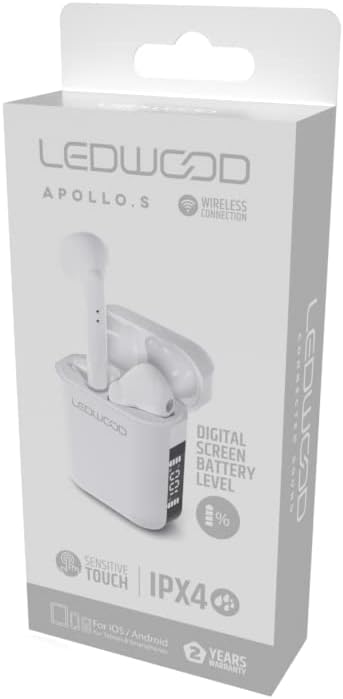
Image showing the Ledwood Apollo S TWS Earphones inside their charging case, highlighting the compact design and in-ear style.
הגדרה
1. טעינת האוזניות והמארז
- Place both earphones into the charging case. Ensure they are properly seated.
- חברו את כבל הטעינה מסוג USB ליציאת הטעינה במארז ואת הקצה השני למתאם חשמל מסוג USB (לא כלול) או ליציאת USB של מחשב.
- The digital screen on the charging case will display the current battery level during charging.
- Allow the earphones and case to fully charge before first use. The earphones will indicate full charge (e.g., LED indicator changes color or turns off).
2. צימוד עם המכשיר שלך
- ודאו שהאוזניות טעונות ומונחות במארז הטעינה.
- פתחו את מארז הטעינה. האוזניות ייכנסו אוטומטית למצב צימוד (מסומן על ידי נוריות LED מהבהבות על האוזניות).
- בטלפון החכם או במכשיר התומך ב-Bluetooth שלך, עבור אל הגדרות ה-Bluetooth.
- חפש available devices and select "Ledwood Apollo S" from the list.
- Once connected, the earphones will provide an audio confirmation, and the LED indicators will stop flashing.
- אם הצימוד נכשל, כבו את ה-Bluetooth במכשיר, החזרו את האוזניות למארז, סגרו את המארז וחזרו על השלבים.
הוראות הפעלה
The Ledwood Apollo S earphones feature sensitive touch controls for easy management of calls and music playback.
מגע בפקדים
- הפעל/השהה: הקשה אחת על אחת האוזניות.
- הרצועה הבאה: הקש פעמיים על האוזניה הימנית.
- רצועה קודמת: הקש פעמיים על האוזניה השמאלית.
- מענה/סיום שיחה: נגיעה אחת על כל אחת מהאוזניות במהלך שיחה נכנסת או שיחה פעילה.
- דחה שיחה: לחץ והחזק את כל אחת מהאוזניות למשך 2 שניות במהלך שיחה נכנסת.
- הפעל את Assistant Voice: הקש שלוש פעמים על כל אחת מהאוזניות.
- הגבר קול: לחץ והחזק את האוזניה הימנית.
- להנמיך קול: לחץ והחזק את האוזניה השמאלית.
תַחזוּקָה
ניקוי
- נקו באופן קבוע את האוזניות ואת מארז הטעינה בעזרת מטלית רכה, יבשה ונטולת סיבים.
- אין להשתמש בחומרי ניקוי שוחקים, אלכוהול או ממסים כימיים.
- ודאו שמגעי הטעינה הן באוזניות והן בנרתיק נקיים וללא לכלוך כדי לשמור על טעינה תקינה.
אִחסוּן
- כאשר אינן בשימוש, אחסנו את האוזניות בנרתיק הטעינה שלהן כדי להגן עליהן ולשמור עליהן טעונות.
- יש לאחסן את המכשיר במקום קריר ויבש, הרחק מטמפרטורות קיצוניות ואור שמש ישיר.
פתרון בעיות
- אוזניות לא מתחברות: Ensure both earphones are charged. Place them back in the case, close it, then reopen to re-enter pairing mode. Check your device's Bluetooth settings.
- אין צליל מאוזניה אחת: Try resetting the earphones by placing them in the case, closing it, and then taking them out again. Re-pair with your device.
- בעיות טעינה: Clean the charging contacts on both the earphones and the case. Ensure the charging cable is securely connected and the power source is functional.
- ווליום נמוך: כוונן את עוצמת הקול הן במכשיר המחובר והן באמצעות פקדי המגע של האוזניות.
מפרטים
| שם הדגם | אפולו ס |
| מספר דגם | LD-APOLLO-S-BLK |
| טכנולוגיית קישוריות | אלחוטי (Bluetooth) |
| שיטת בקרה | מגע, בקרת עוצמת קול |
| סִגְנוֹן | בתוך האוזן |
| רמת עמידות במים | IPX4 (עמיד בפני התזות) |
| תכונות מיוחדות | Fast Charging, Digital Screen Battery Level |
| חוֹמֶר | עֵץ |
| יַצרָן | לדווד |
אחריות ותמיכה
The Ledwood Apollo S TWS Earphones come with a אחריות לשנה מיום הרכישה, כיסוי פגמי ייצור. אנא שמור את הוכחת הרכישה שלך לצורך תביעות אחריות.
For technical support, troubleshooting assistance, or warranty inquiries, please contact Ledwood customer service through their official webהאתר או הקמעונאי שבו המוצר נרכש.
For more information, visit the official Ledwood webאֲתַר: www.ledwood.com (הערה: זהו מציין מיקום URL as no specific support link was provided).