
1. הקדמה
This manual provides detailed instructions for the installation, operation, and maintenance of your ASUS TUF Gaming GeForce RTX 4080 OC Edition Graphics Card. Please read this manual thoroughly before using the product to ensure proper functionality and to prevent damage.
2. מידע בטיחות
WARNING: Always disconnect the power supply from your computer before installing or removing any components. Failure to do so may result in personal injury or damage to your system.
- ודא שספק הכוח (PSU) שלך עומד בדרישות המינימום של הספק.tage requirements for this graphics card.
- טפחו בכרטיס המסך בקצוותיו כדי להימנע ממגע עם רכיבים רגישים.
- ענדו רצועת כף יד אנטי-סטטית או געו לעתים קרובות בחפץ מתכת מוארק כדי לפרוק חשמל סטטי.
- Install the graphics card in a well-ventilated computer case to prevent overheating.
3. תכולת החבילה
ודא שכל הפריטים נמצאים באריזת המוצר שלך:
- ASUS TUF-RTX4080-O16G-GAMING Graphics card
- Collection card; TUF Velcro Hook & Loop
- TUF Graphics card holder; Speedsetup Manual
- כבל מתאם
- כרטיס תודה
4. המוצר נגמרview
The ASUS TUF Gaming GeForce RTX 4080 OC Edition Graphics Card is designed for high-performance gaming and demanding applications. It features NVIDIA's Ada Lovelace architecture, offering significant improvements in performance and power efficiency.

חֲזִית view of the ASUS TUF Gaming GeForce RTX 4080 OC Edition Graphics Card, showcasing its triple Axial-tech fan design.
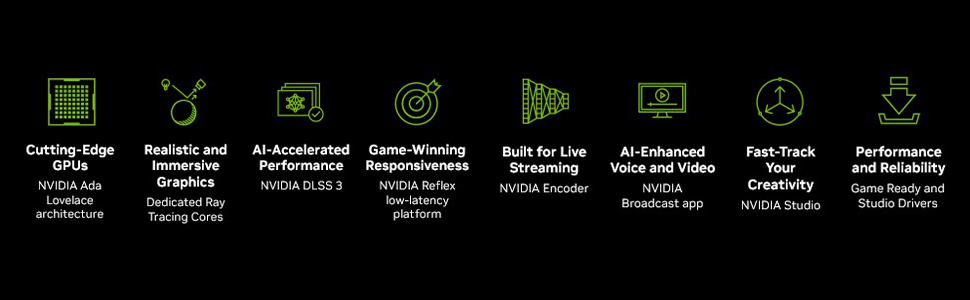
מֵעַלview of NVIDIA Ada Lovelace architecture features, including streaming multiprocessors, Tensor Cores, and RT Cores.
תכונות עיקריות:
- מעבדי הזרמת NVIDIA Ada Lovelace: Up to 2x performance and power efficiency.
- ליבות טנזור דור רביעי: Up to 2X AI performance.
- ליבות RT דור שלישי: Up to 2X ray tracing performance.
- Axial-tech fans: Scaled up for 23% more airflow.
- מיסבי מאוורר כפולים: Last up to twice as long as conventional designs.
- קבלים ברמה צבאית: Rated for 20K hours at 105C, enhancing GPU power rail durability.
- שלד חיצוני ממתכת: Adds structural rigidity and vents to increase heat dissipation.
- GPU Tweak III software: מספק כוונון ביצועים אינטואיטיבי, בקרות תרמיות וניטור מערכת.

אֲחוֹרִי view showing the display output interfaces, including DisplayPort and HDMI ports.
5. התקנה
בצע את השלבים הבאים כדי להתקין את כרטיס המסך שלך:
- הכן את המערכת שלך: כבה את המחשב ונתק את כבל החשמל. פתח את מארז המחשב.
- אתר את חריץ ה-PCIe: מצא חריץ PCI Express x16 פנוי בלוח האם שלך.
- הסר את כיסויי החריץ: Remove the necessary expansion slot covers from your computer case. Note that this card is large (13.7"L x 5.9"W) and may require multiple slots.
- התקן כרטיס מסך: Carefully align the graphics card with the PCIe slot and press it down firmly until it is securely seated.
- אבטח את הכרטיס: חברו את כרטיס המסך למארז בעזרת ברגים.
- חבר חשמל: Connect the appropriate power cables from your power supply to the graphics card. Ensure all connections are secure.
- סגירת מקרה: סגור את מארז המחשב וחבר מחדש את כבל החשמל.
- חיבור תצוגה: חבר את הצג/ים שלך ליציאות DisplayPort או HDMI של כרטיס המסך.
Video demonstrating the installation and features of the ASUS TUF Gaming RTX 4080 graphics card.
6. Software Installation & Configuration
After physical installation, install the necessary drivers and utility software:
- התקנת דרייבר: הורד את מנהלי ההתקן העדכניים ביותר של NVIDIA GeForce מה-NVIDIA הרשמי. webאתר (www.nvidia.com/drivers). פעל לפי ההוראות שעל המסך להתקנה.
- ASUS GPU Tweak III: Install the ASUS GPU Tweak III software from the ASUS support webאתר (www.asus.com/support/Download-Center/). This utility allows for performance tweaking, thermal control, and system monitoring.
7. הפעלת כרטיס המסך
Your ASUS TUF Gaming GeForce RTX 4080 OC Edition is designed for optimal performance and cooling. Here are some operational aspects:
מערכת קירור:
The card features advanced cooling technologies to maintain stable temperatures during heavy loads.

Close-up of the Axial-tech fan, designed for increased airflow and reduced noise.

Illustration of optimized fan rotation for enhanced cooling efficiency.

View of the large heatsink, contributing to efficient heat dissipation.
RGB Lighting (Aura Sync):
The card features customizable ARGB lighting via ASUS Aura Sync. You can synchronize lighting effects with other Aura Sync compatible components in your system.

Example of customizable ARGB lighting on the graphics card.
AI Features and Technologies:
The NVIDIA GeForce RTX 4080 leverages AI for enhanced performance and new capabilities.
הצגת וידאוasing NVIDIA's AI technologies, including generative AI and DLSS, and their applications in gaming and creative workflows.
8. תחזוקה
תחזוקה שוטפת מסייעת להבטיח את אורך החיים והביצועים האופטימליים של כרטיס המסך שלך:
- הסרת אבק: Periodically clean dust from the fans and heatsink using compressed air. Ensure the fans are not spinning during cleaning.
- עדכוני דרייבר: Keep your graphics drivers updated to the latest version for performance improvements and bug fixes.
- ניטור טמפרטורה: Use GPU Tweak III or other monitoring software to keep an eye on GPU temperatures, especially during intensive tasks.
9. פתרון תקלות
אם נתקלת בבעיות עם כרטיס המסך שלך, נסה את שלבי פתרון הבעיות הבאים:
- אין פלט תצוגה:
- ודא שכבל הצג מחובר היטב הן לכרטיס המסך והן לצג.
- ודא שכרטיס המסך מותקן במלואו בחריץ ה-PCIe.
- Check that all power connectors are properly attached to the graphics card.
- בדוק עם כבל תצוגה או מסך אחר במידת האפשר.
- חוסר יציבות/קריסות מערכת:
- ודא שמנהלי ההתקן של הגרפיקה שלך מעודכנים.
- Monitor GPU temperatures. Overheating can cause instability.
- Verify your power supply unit (PSU) is sufficient for the graphics card's power requirements.
- ביצועים גרועים:
- ודא שמנהלי ההתקן של הגרפיקה שלך מעודכנים.
- בדוק את ההגדרות במשחק; הפחת את איכות הגרפיקה במידת הצורך.
- סגור יישומי רקע מיותרים.
10. מפרטים
| תכונה | מִפרָט |
|---|---|
| מעבד גרפי | NVIDIA GeForce RTX 4080 |
| מותג | ASUS |
| גודל זיכרון RAM גרפי | 16 ג'יגה-בייט |
| מהירות שעון GPU | 4000 מגה-הרץ |
| ממשק פלט וידאו | DisplayPort, HDMI |
| סוג זיכרון RAM גרפי | GDDR6X |
| מכשירים תואמים | PC |
| רזולוציית תצוגה מקסימלית | 7680x4320 |
| ממשק כרטיס מסך | PCI Express |
| מהירות שעון זיכרון | 4000 מגה-הרץ |
| מספר המעריצים | 3 |
| מידות פריט L x W | 13.7 אינץ' אורך x 5.9 אינץ' רוחב |
| מעבד וידאו | NVIDIA |
| שם הדגם | Gaming GeForce RTX 4080 16GB GDDR6X OC Edition Graphic Card |
| משקל פריט | 4.2 פאונד |
11. אחריות ותמיכה
Your ASUS TUF Gaming GeForce RTX 4080 OC Edition Graphics Card comes with a 3-year warranty. For warranty claims, technical support, or further assistance, please visit the official ASUS support webלאתר או לפנות לשירות הלקוחות שלהם.
תמיכה של ASUS Webאֲתַר: www.asus.com/support/