
1. הקדמה
Thank you for choosing the Bolyguard LY54-K24M 4G Trail Camera. This camera is designed for outdoor surveillance, offering high-quality 24MP images and 1080p HD video recording. Its 4G connectivity allows for remote transmission of photos and videos, while its 30-meter night vision and IP66 waterproof rating ensure reliable performance in various conditions.
מה יש בקופסה
- Bolyguard LY54-K24M 4G Trail Camera
- כבל USB
- תושבת הרכבה
- רצועת הרכבה
- שְׁלַט רָחוֹק
- אַנטֶנָה
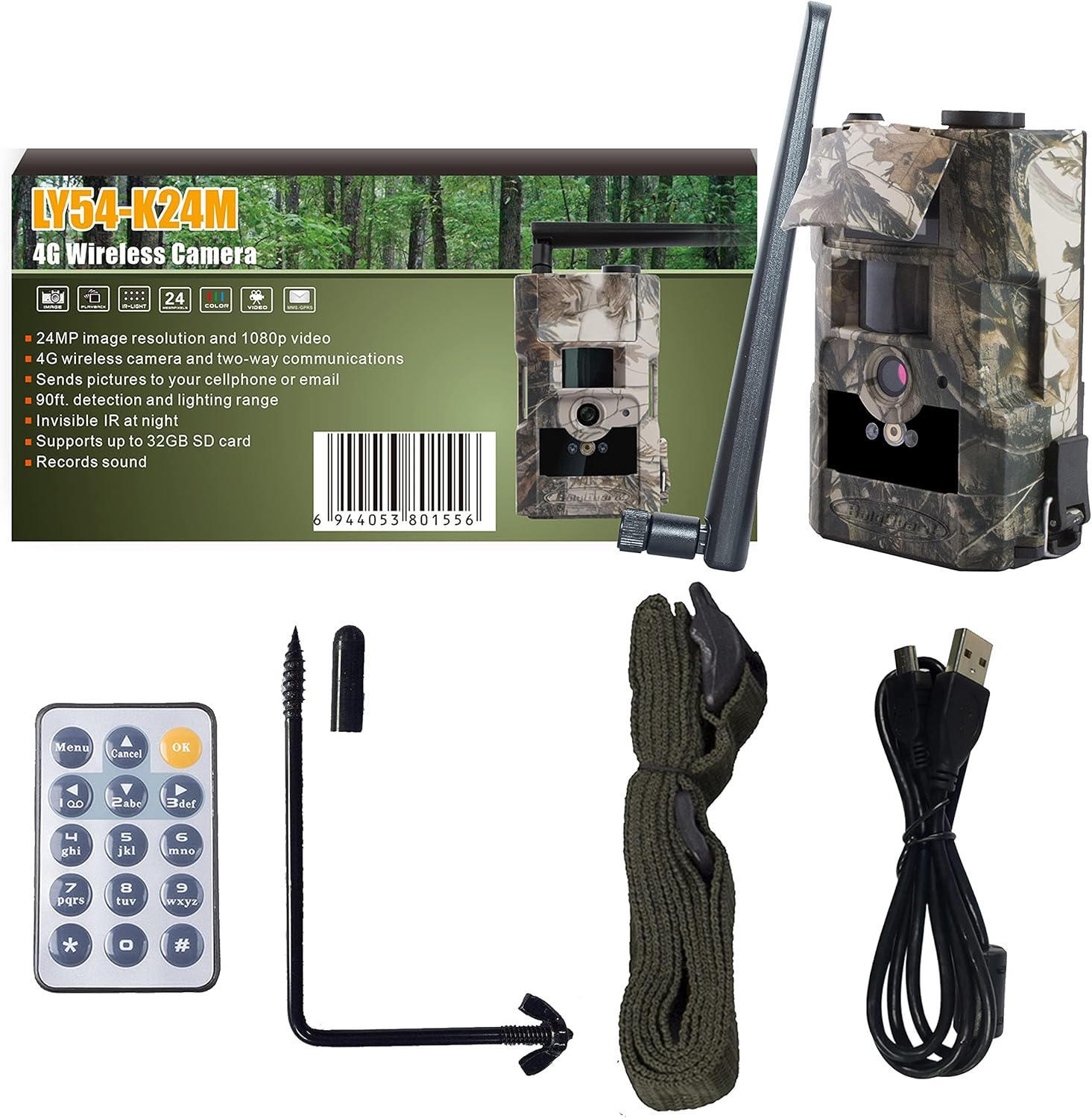
Image 1.1: Package contents of the Bolyguard LY54-K24M 4G Trail Camera.
2. התקנה
2.1 התקנת סוללה וכרטיס SD
- פתח את תא הסוללות של המצלמה.
- Insert the required batteries (not included) according to the polarity indicators.
- Insert a compatible SD card (up to 32GB, not included) into the SD card slot. Ensure it is inserted correctly until it clicks into place.
2.2 חיבור אנטנה
Screw the provided antenna firmly into the antenna port on the top of the camera. Ensure it is securely attached for optimal signal reception.
2.3 הרכבת המצלמה
Use the included mounting strap or bracket to secure the camera to a tree or other stable surface. Position the camera to cover the desired surveillance area.
2.4 תצורה ראשונית
To configure the camera settings, connect the camera to a computer using the supplied USB cable. Ensure the SD card is inserted into the camera. Use the BolyGuard configuration software (BMC CONFIG) to adjust parameters such as date/time, capture mode, resolution, and 4G transmission settings.

Image 2.1: Configuring the camera settings using the BolyGuard software on a laptop.
3. הוראות הפעלה
3.1 הפעלה/כיבוי
Locate the power switch on the camera. Slide it to the 'ON' position to power on the camera. Slide it to 'OFF' to power it down.
3.2 מצבי צילום
The camera supports various capture modes, including photo, video, and photo+video. These can be configured via the BMC CONFIG software. The camera will automatically capture images or videos when motion is detected within its sensor range.
3.3 4G Communication
The LY54-K24M can send captured photos and videos via 4G network to mobile phones or computers. Supported reception modes include GPRS email (recommended), MMS email, and Molnus cloud service. Configure these settings in the BMC CONFIG software, including APN settings for your SIM card provider.
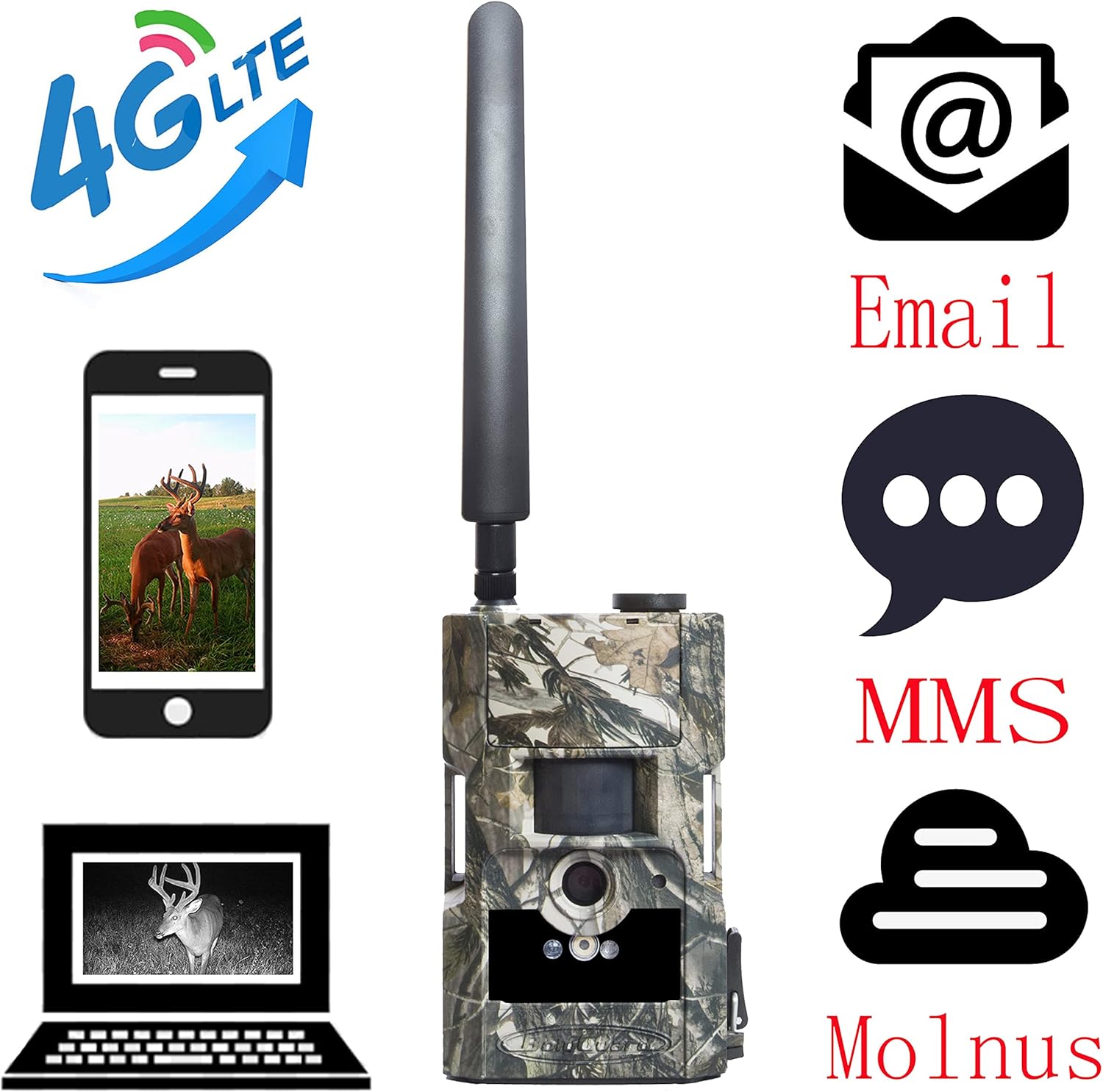
Image 3.1: 4G communication options for the Bolyguard LY54-K24M camera.
3.4 ראיית לילה
The camera features 30-meter night vision using 28 invisible 940nm LED lights. This allows for clear image and video capture in low-light or complete darkness without disturbing wildlife. The camera automatically switches to night vision mode when ambient light levels are low.

תמונה 3.2: דוגמהamples of day and night vision captures.
3.5 שימוש בשלט רחוק
The included remote control can be used to access the camera's menu, change basic settings, and manually trigger photo or video capture from a short distance. Refer to the remote control's specific buttons for their functions.
4. תחזוקה
4.1 ניקוי
Regularly clean the camera lens and PIR sensor window with a soft, dry cloth to ensure optimal image quality and motion detection. Avoid using abrasive cleaners or solvents.
4.2 החלפת סוללה
Replace batteries when the low battery indicator appears or when performance degrades. Always use fresh, high-quality batteries of the specified type.
4.3 ניהול כרטיסי SD
Periodically format the SD card using the camera's menu or a computer to maintain optimal performance and prevent data corruption. Back up important files לפני העיצוב.
4.4 הגנת מזג האוויר
Although the camera is IP66 rated for water and dust resistance, ensure all ports and compartments are securely closed to prevent moisture ingress, especially during heavy rain or snow.
5. פתרון תקלות
5.1 המצלמה לא נדלקת
- בדוק אם הסוללות מוכנסות כהלכה עם הקוטביות הנכונה.
- Ensure batteries have sufficient charge. Replace with new ones if necessary.
- ודא שמתג ההפעלה נמצא במצב 'פועל'.
5.2 No Images/Videos Captured
- Ensure the SD card is properly inserted and not full.
- Check the camera's settings to confirm it is in the desired capture mode (photo/video).
- Verify the PIR sensor is not obstructed and sensitivity settings are appropriate for the environment.
5.3 4G Transmission Issues
- Confirm the SIM card is active and has sufficient credit/data.
- Check the APN settings in the BMC CONFIG software to match your network provider.
- Ensure the camera has good 4G signal strength in its location.
- Verify email or Molnus settings are correctly configured.
5.4 איכות תמונה/וידאו ירודה
- נקה את עדשת המצלמה.
- Check the resolution settings in the camera's configuration.
- Ensure the camera is stable and not subject to vibrations during capture.
6. מפרטים
| תכונה | מִפרָט |
|---|---|
| מספר דגם | LY54-K24M |
| חיישן תמונה | 5 MP Color-CMOS |
| רזולוציית תמונה | 24 מגה פיקסל |
| רזולוציית וידאו | 1080p HD |
| טווח ראיית לילה | 30 meters (28 x 940nm LEDs) |
| קישוריות | 4G, USB |
| אִחסוּן | תומך בכרטיס SD של עד 32GB |
| דירוג עמיד למים | IP66 |
| מקור כוח | מופעל על סוללה |
| מידות (L x W x H) | 8 x 3 x 10 ס"מ |
| מִשׁקָל | 470 גרם |
7. אחריות ותמיכה
The Bolyguard LY54-K24M 4G Trail Camera comes with a one-year warranty from the date of purchase. This warranty covers manufacturing defects under normal use. For technical support, troubleshooting assistance, or warranty claims, please refer to the contact information provided with your purchase or visit the official Bolyguard webאֲתַר.

Image 7.1: Bolyguard one-year warranty information.