
RHYTHM 8RZ234SR04
RHYTHM D234 8RZ234SR04 Radio Alarm Clock User Manual
Model: 8RZ234SR04
1. הקדמה
תודה על הרכישהasing the RHYTHM D234 8RZ234SR04 Radio Alarm Clock. This digital alarm clock features a radio-controlled timekeeping function, an electronic sound alarm with snooze, a thermometer, a hygrometer, and a calendar display. Its compact design and clear LCD make it suitable for various indoor environments. Please read this manual thoroughly before use to ensure proper operation and to maximize the clock's features.
2. מידע בטיחות
- אין לחשוף את היחידה לטמפרטורות קיצוניות, לאור שמש ישיר או לחות גבוהה.
- הימנעו מהפלת היחידה או מחשיפתה לפגיעות חזקות.
- אל תנסה לפרק או לשנות את היחידה. פעולה זו תגרום לביטול האחריות.
- הרחק סוללות מהישג ידם של ילדים. אם נבלע, פנה לטיפול רפואי מיידי.
- השלך סוללות משומשות בהתאם לתקנות המקומיות.
- השתמשו רק בסוג הסוללה שצוין (סוללות AA).
3. תכולת החבילה
ודא שכל הפריטים נמצאים בחבילה:
- RHYTHM D234 8RZ234SR04 Radio Alarm Clock
- מדריך למשתמש (מסמך זה)
4. המוצר נגמרview
The RHYTHM D234 8RZ234SR04 features a clear LCD display and easily accessible front-facing control buttons for intuitive operation.
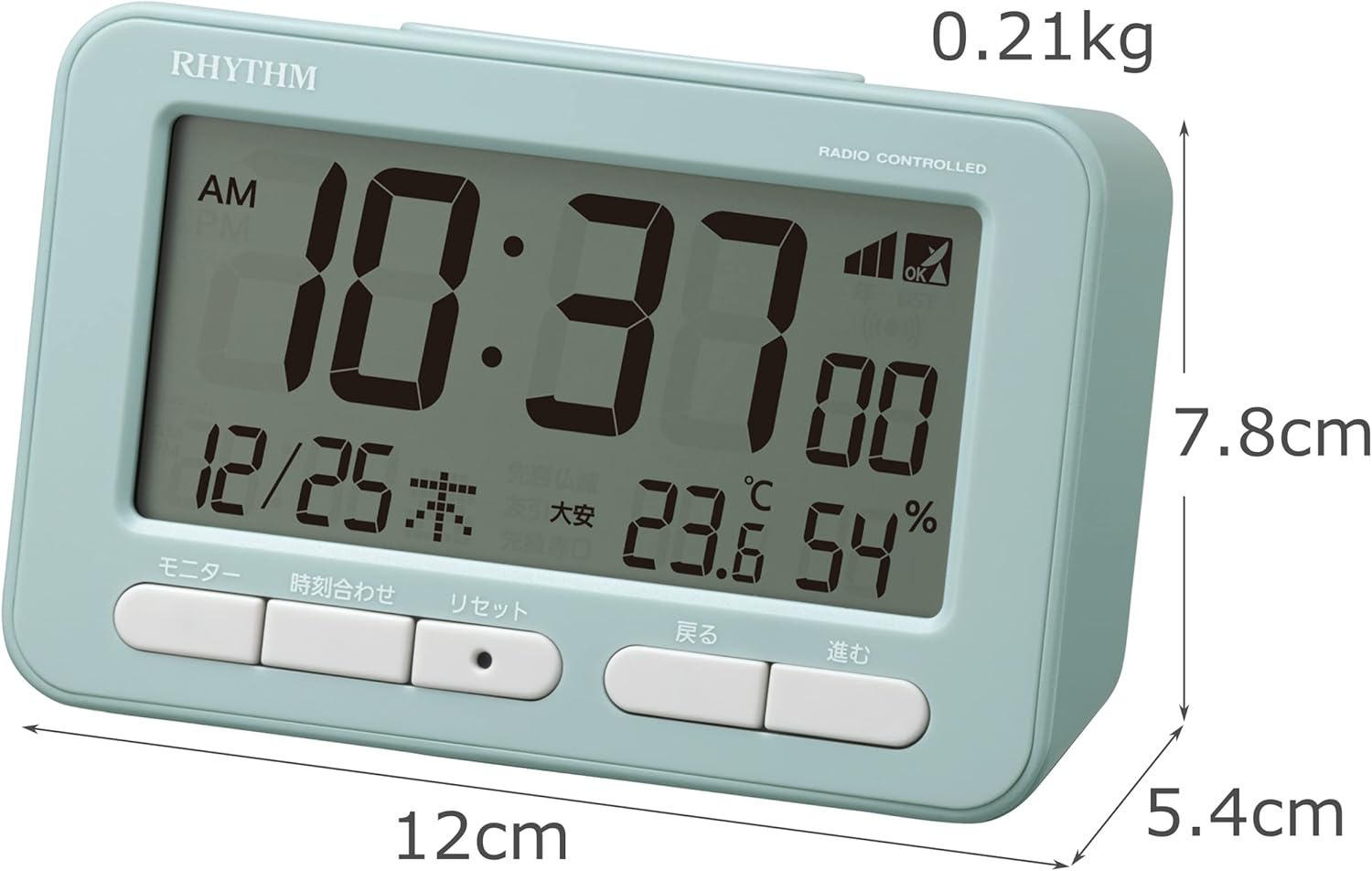
איור 4.1: חֲזִית view of the RHYTHM D234 8RZ234SR04 Radio Alarm Clock, showing its dimensions (7.8cm H x 12cm W x 5.4cm D) and weight (0.21kg).

איור 4.2: מְפוֹרָט view of the clock's large LCD display and the front control buttons, including 'Monitor', 'Time Set', 'Reset', 'Back', and 'Forward'.
פרטי תצוגה:
- זְמַן: Displays current time in AM/PM or 24-hour format.
- תַאֲרִיך: Shows month, day, and day of the week.
- טֶמפֶּרָטוּרָה: Displays current ambient temperature in Celsius.
- לַחוּת: Shows current ambient humidity percentage.
- Radio Wave Reception Indicator: מציין את עוצמת האות.
- Alarm ON/OFF Indicator: Shows if the alarm is active.
לחצני שליטה:
- מוניטור: Activates backlight or cycles display modes.
- זמן מוגדר: Enters time/date setting mode.
- אפס: מאפס את השעון להגדרות היצרן.
- BACK (<): Adjusts settings backward.
- FORWARD (>): Adjusts settings forward.
- נודניק / אור: Activates snooze during alarm or backlight when pressed.
5. התקנה
5.1 התקנת סוללה
- פתח את מכסה תא הסוללות הממוקם בגב השעון.
- Insert two (2) AA batteries (not included) according to the polarity indicators (+ and -) inside the compartment.
- סגור היטב את מכסה תא הסוללות.
5.2 Initial Power On and Radio Wave Reception
Upon battery installation, the clock will automatically attempt to receive radio time signals to set the correct time and date. This process may take several minutes.

איור 5.1: Illustration of radio wave time signal reception from two transmission stations, ensuring accurate timekeeping.
- מקמו את השעון ליד חלון לקבלת קליטת אות אופטימלית.
- Avoid placing it near electronic devices that may cause interference (e.g., TVs, computers, mobile phones).
- A signal strength indicator will appear on the display during reception. Once synchronized, the indicator will show a stable signal.
6. הוראות הפעלה
6.1 הגדרת זמן ותאריך ידנית
If radio signal reception is poor or unavailable, you can set the time and date manually:
- לחץ והחזק את זמן מוגדר עד שתצוגת הזמן תתחיל להבהב.
- השתמש ב- BACK (<) ו FORWARD (>) לחצו על הכפתורים כדי לכוונן את השעה. זמן מוגדר כדי לאשר ולעבור לדקות.
- חזור על התהליך עבור דקות, שנה, חודש ויום.
- לִלְחוֹץ זמן מוגדר פעם אחרונה כדי לצאת ממצב ההגדרות.
6.2 הגדרת האזעקה
- הקש על ערכת התראה button (usually located on the side or back, if not on front, refer to product diagram). The alarm time will flash.
- השתמש ב- BACK (<) ו FORWARD (>) לחצו על הכפתורים כדי להגדיר את שעת ההתראה הרצויה. ערכת התראה כדי לאשר.
- כוונן את הדקות באמצעות BACK (<) ו FORWARD (>) כפתורים. ללחוץ ערכת התראה כדי לאשר ולצאת.
- כדי להפעיל/לבטל את האזעקה, לחצו על הלחצן התראה הפעלה / כיבוי switch or button. An alarm icon will appear/disappear on the display.
6.3 שימוש בפונקציית הנודניק
כאשר האזעקה תישמע, לחצו על הכפתור הגדול נודניק / אור button on the top of the clock. The alarm will pause for approximately 5 minutes and then sound again. This can be repeated multiple times.
6.4 Display Modes and Backlight
The clock continuously displays time, date, temperature, and humidity. To temporarily illuminate the display, press the נודניק / אור כפתור. התאורה האחורית תידלק למשך מספר שניות.

איור 6.1: The clock's display illuminated by its backlight, showing time, date, temperature, and humidity clearly in low light conditions.
6.5 פורמט 12/24 שעות
To switch between 12-hour (AM/PM) and 24-hour formats, locate the 12/24 שעות button (often on the back or side) and press it. The display will change accordingly.
7. תחזוקה
7.1 ניקוי
Wipe the clock with a soft, dry cloth. Do not use abrasive cleaners, solvents, or spray directly onto the unit, as this may damage the finish or internal components.
7.2 החלפת סוללה
When the display becomes dim or the clock functions irregularly, it is time to replace the batteries. Follow the battery installation steps in Section 5.1. Replace both batteries simultaneously with new ones of the same type.
8. פתרון תקלות
| בְּעָיָה | סיבה אפשרית | פִּתָרוֹן |
|---|---|---|
| אין תצוגה או תצוגה עמומה | סוללות מתות או שהוכנסו בצורה שגויה. | החליפו את הסוללות בסוללות AA חדשות, תוך הקפדה על קוטביות נכונה. |
| שעה/תאריך שגויים | Poor radio signal reception or manual setting error. | Move the clock to a location with better signal. Perform manual time setting if necessary. |
| אזעקה לא נשמעת | האזעקה לא מופעלת או מוגדרת בצורה שגויה. | ודא שהאזעקה מופעלת ושעת השעון המעורר מוגדרת כהלכה. |
| Temperature/Humidity readings seem inaccurate | Unit placed near heat/cold sources or in extreme conditions. | Relocate the clock to a stable indoor environment away from direct heat, cold, or moisture. Allow time for readings to stabilize. |
9. מפרטים
- מספר דגם: 8RZ234SR04
- מידות: 7.8 ס"מ (H) x 12 ס"מ (W) x 5.4 ס"מ (D)
- מִשׁקָל: Approximately 0.21 kg (7.5 oz)
- מקור כוח: 2 x AA batteries (sold separately)
- תְנוּעָה: Radio-controlled (Automatic time synchronization)
- סוג תצוגה: LCD
- אַזעָקָה: Electronic sound, 4-level volume change, with Snooze function
- Thermometer Range: -9.9 מעלות צלזיוס עד 50 מעלות צלזיוס
- Hygrometer Range: 20% עד 95%
- לוּחַ שָׁנָה: Programs until December 31, 2099
- חוֹמֶר: פּלָסטִי
- סוג הרכבה: משטח שולחן
- מאפיינים מיוחדים: Backlight, 12/24-hour display option
10. אחריות ותמיכה
For warranty information and customer support, please refer to the documentation provided at the time of purchase or contact your local RHYTHM distributor. Keep your purchase receipt as proof of purchase for any warranty claims.
Ask a question about this manual
Ask about setup, troubleshooting, compatibility, parts, safety, or missing instructions. Manuals+ will review the question and use this page’s manual context to help answer it.