1. הקדמה
Thank you for choosing the AgfaPhoto Powerstation PPS 600 Pro. This portable power bank is designed to provide reliable power for various devices during outdoor activities, travel, and emergency situations. This manual provides essential information for safe operation, setup, maintenance, and troubleshooting. Please read it thoroughly before using the product.
2. הוראות בטיחות
- אין לפרק, לתקן או לשנות את היחידה. הרכבה שגויה עלולה לגרום לשריפה או לפציעה.
- אין לחשוף את היחידה לאש או לטמפרטורות קיצוניות (מעל 60°C / 140°F).
- אין להשתמש או לאחסן את המכשיר בחדר אמבטיה או באזור החשוף למים או לחות.
- אין להפיל, להכות או לחשוף את היחידה לפגיעות חזקות.
- הרחק מהישג ידם של ילדים.
- השתמשו רק באביזרים ובכבלים המומלצים לטעינה.
- יש לוודא אוורור נאות במהלך השימוש והטעינה כדי למנוע התחממות יתר.
- In case of leakage from the battery, avoid contact with skin and eyes. Rinse affected areas with water and seek medical attention.
3. תכולת החבילה
ודא שכל הפריטים נמצאים בקופסה:
- AgfaPhoto Powerstation PPS 600 Pro
- Power Cord (for AC charging)
- Car Cigarette Lighter Adapter
- מדריך למשתמש
4. המוצר נגמרview
Familiarize yourself with the ports, buttons, and display of your Powerstation PPS 600 Pro.

Image: Front panel of the AgfaPhoto Powerstation PPS 600 Pro, showing the LCD screen, DC output, USB-A ports, USB-C port, and AC output switch.
The unit features a clear LCD display that shows battery level, input power, and output power. Various ports are available for charging different devices simultaneously.
- תצוגת LCD: Shows battery status, input/output wattage, and error indicators.
- פלט DC: For devices requiring DC power.
- יציאות USB-A: לטעינת סמארטפונים, טאבלטים ומכשירים אחרים המופעלים באמצעות USB.
- יציאת USB-C: עבור מכשירים התואמים לטעינה מהירה.
- פלט AC: Standard wall outlet for appliances.
- יציאת קלט: For charging the power station itself.
5. התקנה
5.1 טעינה ראשונית
Before first use, fully charge your AgfaPhoto Powerstation PPS 600 Pro. This ensures optimal battery performance and longevity.
- Connect the provided power cord to the AC input port on the power station.
- חבר את הקצה השני של כבל החשמל לשקע חשמל סטנדרטי בקיר.
- The LCD display will show the charging status. The unit is fully charged when the battery indicator shows 100%.
Charging can also be done via a solar panel (sold separately) or a car cigarette lighter adapter.

Image: Illustration of the three charging methods for the power station: via car cigarette lighter, AC wall adapter, and solar panel.
6. הוראות הפעלה
6.1 הפעלה/כיבוי
- To turn on the unit, press and hold the main power button for a few seconds. The LCD display will illuminate.
- כדי לכבות את היחידה, לחץ והחזק שוב את לחצן ההפעלה הראשי עד שהתצוגה תכבה.
6.2 טעינת התקנים חיצוניים
The Powerstation PPS 600 Pro offers multiple output options:
- פלט USB: Connect your USB-powered devices (smartphones, tablets, drones, cameras) to the USB-A or USB-C ports. The unit will automatically detect and begin charging.
- פלט AC: For devices requiring standard wall power (laptops, mini-refrigerators, LED TVs), press the AC ON/OFF button to activate the AC outlet. Plug your device into the AC outlet. Remember to turn off the AC output when not in use to conserve battery.
- פלט DC: For 12V DC devices, connect them to the DC output port.

Image: The AgfaPhoto Powerstation PPS 600 Pro connected and charging a laptop, demonstrating its use for portable electronics.

Image: The power station in use during a power outage, providing light and charging a smartphone, highlighting its emergency backup capability.
7. תחזוקה
7.1 אחסון
- Store the power station in a cool, dry place, away from direct sunlight and heat sources.
- לאחסון לטווח ארוך, יש לטעון את היחידה לכ-50-80% כל 3-6 חודשים כדי לשמור על תקינות הסוללה.
- Avoid storing in environments with high humidity or extreme temperatures.
7.2 ניקוי
- השתמש במטלית רכה ויבשה כדי לנקות את החלק החיצוני של היחידה.
- אין להשתמש בחומרי ניקוי שוחקים או ממסים.
- ודא שכל היציאות נקיות מאבק ופסולת.
8. פתרון תקלות
If you encounter issues with your Powerstation PPS 600 Pro, refer to the following common problems and solutions:
| בְּעָיָה | סיבה אפשרית | פִּתָרוֹן |
|---|---|---|
| היחידה לא נדלקת | הסוללה ריקה לחלוטין. | טען את היחידה באמצעות מתאם ה-AC. |
| No output from AC port | AC output not activated. Device exceeds power limit. | Press the AC ON/OFF button. Check device wattage against unit specifications. |
| Slow charging of external devices | Device requires higher current. Cable issue. | Ensure you are using the correct USB port (e.g., USB-C PD). Try a different cable. |
| היחידה מתחממת יתר על המידה | Poor ventilation. Excessive load. | Ensure vents are clear. Reduce the number or power of connected devices. Allow unit to cool down. |
אם הבעיה נמשכת, אנא פנו לתמיכת הלקוחות.
9. מפרטים
Technical details for the AgfaPhoto Powerstation PPS 600 Pro:
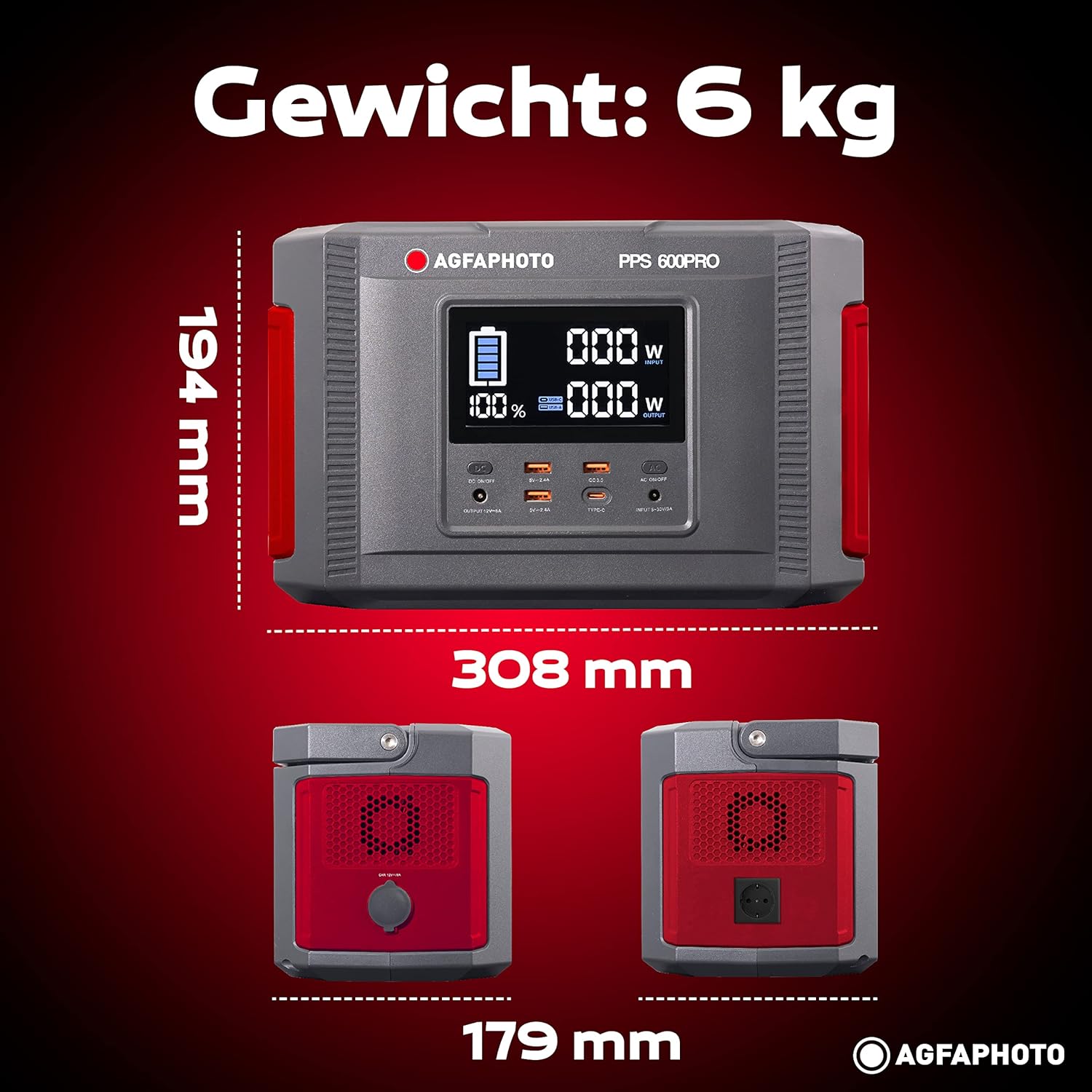
Image: Visual representation of the AgfaPhoto Powerstation PPS 600 Pro's dimensions (308 x 179 x 194 mm) and weight (6 kg).
| תכונה | מִפרָט |
|---|---|
| מותג | AgfaPhoto |
| מספר דגם | 717-854742 (PPS600) |
| קיבולת סוללה | 644 וואט |
| הספק פלט (רציף) | 600 W |
| כוח פלט (שיא) | 1000 W |
| כרך ידtage | 220 וולט |
| משקל פריט | 6.1 קילוגרם |
| מידות (L x W x H) | 308 x 179 x 194 מ"מ |
| מקור כוח | Battery Powered (Solaire, électricité) |
| שימושים מומלצים | Mobile phones, cameras, laptops, tablets |
| רכיבים כלולים | Power cord, USB ports, LCD screen, car cigarette lighter adapter |
| תכונה מיוחדת | עיצוב קומפקטי |
10. אחריות ותמיכה
AgfaPhoto products are manufactured to high-quality standards and are covered by a manufacturer's warranty. For specific warranty terms and conditions, please refer to the warranty card included with your product or visit the official AgfaPhoto webאֲתַר.
For technical support, troubleshooting assistance, or spare parts inquiries, please contact AgfaPhoto customer service. Contact details can typically be found on the product packaging or the official brand webאֲתַר.