
1. הקדמה
This manual provides instructions for the safe and efficient operation of your MEDION P64145 Stereo System. Please read this manual thoroughly before using the device and keep it for future reference. The MEDION P64145 is a compact audio system featuring DAB+ and PLL FM radio, a CD/MP3 player, Bluetooth connectivity, and USB playback.
2. מידע בטיחות
יש להקפיד על אמצעי הזהירות הבאים כדי למנוע נזק למכשיר או פגיעה עצמית:
- אין לחשוף את המכשיר לגשם או לחות.
- אל תחסום פתחי אוורור.
- ודא שכבל החשמל אינו צבט או נדחף עליו.
- השתמש רק בתוספות/אביזרים שצוינו על ידי היצרן.
- נתק את המכשיר מהחשמל במהלך סופות ברקים או כאשר אינו בשימוש לתקופות ארוכות.
- הפנה כל טיפול לצוות שירות מוסמך.
3. תכולת החבילה
ודא שכל הפריטים נמצאים באריזה:
- MEDION P64145 AiO Audio System (MD44125)
- שלט רחוק (עם סוללה)
- כבל חשמל
- מדריך למשתמש
- תעודת אחריות
4. המכשיר נגמרview
פאנל קדמי
The front panel features the LCD display, CD tray, control buttons, and volume knob.

תמונה: חזית view of the MEDION P64145 stereo system, highlighting the central display, CD slot, and various control buttons.
פאנל אחורי וחיבורים
The rear panel includes the power input, antenna connection, and auxiliary ports.

תמונה: אחורי view of the MEDION P64145 stereo system, illustrating its dimensions (120mm height, 377mm width, 220mm depth) and available connection ports including Line In, USB, AUX-In (3.5 mm), and Headphone Jack.
5. התקנה
5.1 חיבור מתח
- Connect the power cable to the AC IN socket on the rear of the unit.
- Plug the other end of the power cable into a wall outlet (100-240V ~ 50/60 Hz).
5.2 חיבור אנטנה
For optimal radio reception, ensure the antenna is fully extended and positioned correctly.
5.3 הפעלה ראשונית
Press the Power button on the unit or remote control to turn on the system. The LCD display will illuminate.
6. הוראות הפעלה
6.1 פעולה בסיסית
- הפעלה/כיבוי: הקש על כּוֹחַ לַחְצָן.
- בקרת עוצמת הקול: סובב את ה כֶּרֶך כפתור או השתמש ב VOL +/- כפתורים בשלט.
- בחירת מקור: הקש על מָקוֹר button to switch between DAB+, FM, CD, Bluetooth, USB, and AUX modes.
6.2 Radio Operation (DAB+/PLL FM)
The system supports both digital DAB+ radio and analog PLL FM radio.

Image: The MEDION P64145 stereo system with 'DAB+' shown on its display, signifying its capability for digital radio reception with high sound quality.
- לִבחוֹר DAB+ or FM מצב באמצעות ה- מָקוֹר לַחְצָן.
- סריקה אוטומטית: In DAB+ mode, the system will automatically scan for available stations upon first use. For FM, press and hold the לִסְרוֹק לַחְצָן.
- כוונון ידני: השתמש ב- TUNE+/- כפתורים כדי לכוונן את התדר באופן ידני.
- הגדרות קבועות מראש של התחנה: Save up to 30 stations by pressing and holding a preset number button (1-30) after tuning to a station. Recall saved stations by pressing the corresponding preset number.
6.3 CD/MP3 Player

Image: A hand inserting a compact disc into the front-loading CD player of the MEDION P64145 stereo system, demonstrating its CD/MP3 playback capability.
- לִבחוֹר CD מצב.
- Insert a CD (audio CD or MP3 CD) into the CD slot. The disc will load automatically.
- לְהִשְׁתַמֵשׁ PLAY/PAUSE, לְהַפְסִיק, SKIP+/- כפתורים לבקרת השמעה.
6.4 הזרמת בלוטות'
הזרמת מוזיקה באופן אלחוטי מהסמארטפון או הטאבלט שלך.

Image: A smartphone screen showing a music playback interface, positioned next to the MEDION P64145 stereo system. A Bluetooth symbol is visible, illustrating the wireless music streaming feature from a mobile device to the stereo system.
- לִבחוֹר בלוטות' mode. The display will show "Pairing" or similar.
- On your mobile device, enable Bluetooth and search for "MEDION P64145" (or similar device name).
- Select the device to pair. Once connected, you can play music from your device through the stereo system.
- The effective range for Bluetooth streaming is up to 10 meters, depending on environmental conditions.
6.5 השמעת USB
- הכנס דיסק און קי המכיל MP3 files לתוך יציאת ה-USB.
- לִבחוֹר USB מצב. המערכת תזהה באופן אוטומטי ותתחיל להשמיע MP3 files.
- Use playback controls to navigate tracks.
6.6 כניסת AUX
- Connect an external audio device (e.g., MP3 player) to the 3.5mm AUX IN port using an audio cable (not included).
- לִבחוֹר AUX מצב.
- שליטה בהשמעה מהמכשיר החיצוני שלך.
6.7 הגדרות סאונד
התאם את פלט השמע להעדפתך.
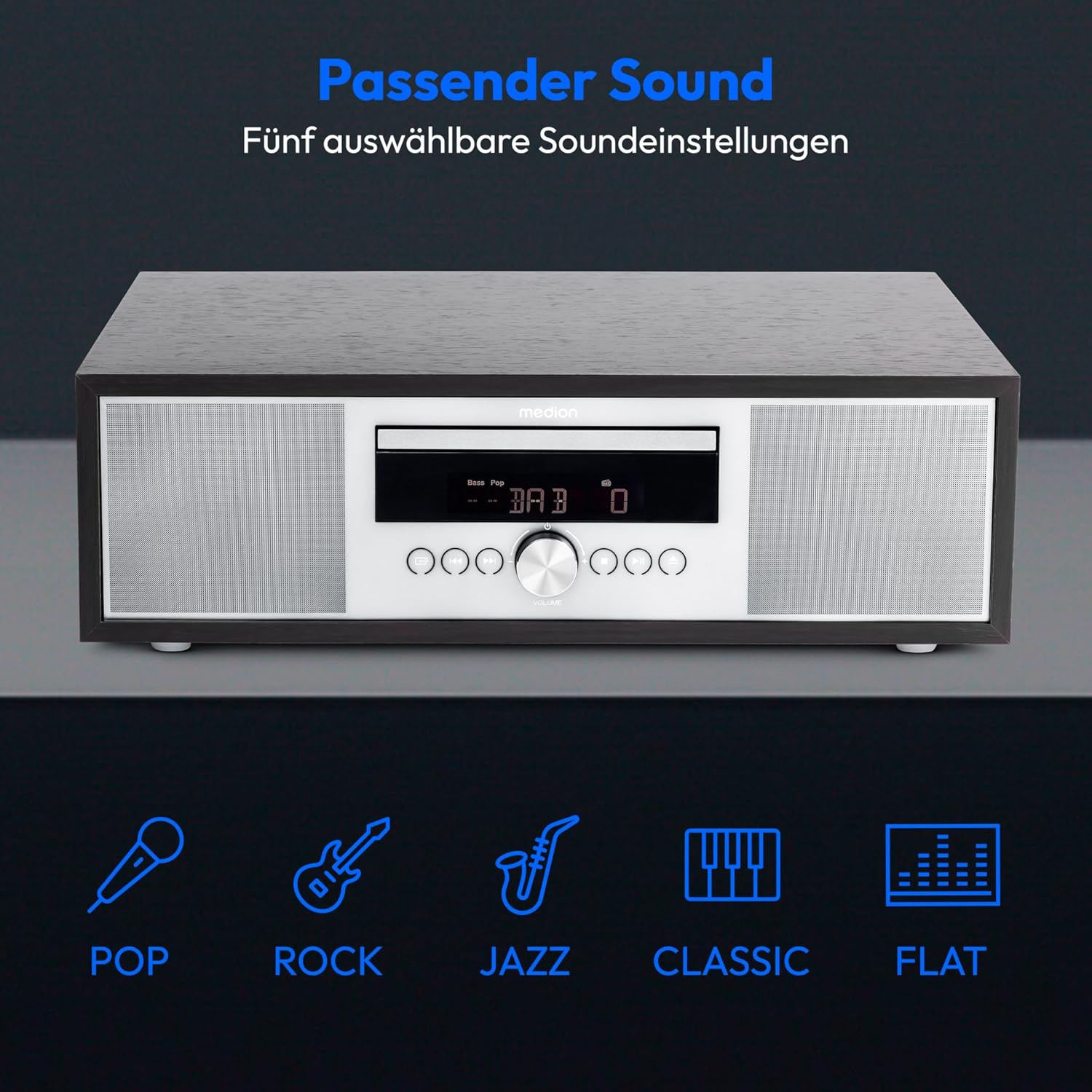
Image: The MEDION P64145 stereo system accompanied by graphical icons for five distinct sound equalization presets: Pop, Rock, Jazz, Classic, and Flat, indicating customizable audio profiles.
- הגדרות אקולייזר קבועות מראש: השתמש ב- EQ button on the remote to cycle through preset sound modes: Pop, Rock, Jazz, Classic, and Flat.
- כוונון בס/טרבל: השתמשו בייעודי BASS+/- ו TREBLE+/- buttons on the remote control to fine-tune the sound.
6.8 שעון מעורר וטיימר שינה
- פונקציית אזעקה: Set an alarm to wake up to radio, CD, USB, or a standard alarm sound. Refer to the detailed instructions in the full manual for setting specific alarm times and sources.
- פונקצית נודניק: כאשר האזעקה נשמעת, לחץ על נִמנוּם כפתור כדי להשתיק אותו זמנית.
- פונקציית שינה אוטומטית: Set a timer for the system to automatically turn off after a specified period. Use the לִישׁוֹן כפתור בשלט.
7. תחזוקה
7.1 ניקוי היחידה
נגבו את היחידה במטלית רכה ויבשה. אין להשתמש בחומרי ניקוי שוחקים או ממסים.
7.2 טיפול בנגן תקליטורים
Handle CDs by their edges. Clean dirty CDs with a soft, lint-free cloth, wiping from the center outwards. Do not use scratched or warped discs.
8. פתרון תקלות
If you encounter issues, consult the following table before contacting support:
| בְּעָיָה | סיבה אפשרית | פִּתָרוֹן |
|---|---|---|
| אין כוח | כבל חשמל לא מחובר; שקע לא פעיל. | בדוק את חיבור כבל החשמל; נסה שקע אחר. |
| אין קול | Volume too low; incorrect source selected; headphones connected. | הגבירו את עוצמת הקול; בחרו את המקור הנכון; נתק את האוזניות. |
| קליטת רדיו גרועה | האנטנה לא מורחבת או ממוקמת בצורה לא נכונה. | Adjust antenna position; try automatic scan again. |
| תקליטור לא מתנגן | CD inserted incorrectly; disc scratched or dirty; unsupported format. | Reinsert CD correctly; clean or replace disc; ensure it's an audio CD or MP3 CD. |
| התאמת Bluetooth נכשלה | Device too far; Bluetooth not enabled on mobile device; system not in pairing mode. | קרב את המכשיר; הפעל את בלוטות'; ודא שהמערכת במצב צימוד בלוטות'. |
9. מפרטים
| תכונה | מִפרָט |
|---|---|
| מספר דגם | P64145 (MD44125) |
| מותג | מדיה |
| צֶבַע | שחור-כסף |
| טכנולוגיית קישוריות | בלוטות', USB |
| תכונות מיוחדות | Bluetooth, DAB+, USB, AUX Input, CD Player, Alarm Function, Sleep Timer |
| מידות המוצר (L x W x H) | 22 ס"מ x 37.7 ס"מ x 12 ס"מ |
| משקל פריט | 3.2 קילוגרם |
| טכנולוגיית טיונר | DAB פלוס |
| תדרי רדיו נתמכים | DAB+/PLL-UKW |
| מקור כוח | Corded Electric (100-240V ~ 50/60 Hz) |
| עוצמת פלט מקסימלית של הרמקול | 2 x 15 וואט RMS |
| סוג תצוגה | LCD |
| מצב פלט קול | סטריאו |
| מכשירים תואמים | סמארטפון, טאבלט, נגן MP3 |
| חוֹמֶר | Stainless Steel (front panel) |
10. מידע על אחריות
Your MEDION P64145 Stereo System comes with a 2-year limited warranty. Please retain your proof of purchase for warranty claims. For detailed terms and conditions, refer to the included warranty card or visit the official MEDION webאֲתַר.
11. תמיכה
For further assistance, technical support, or service inquiries, please visit the official MEDION support website or contact their customer service. Contact details can typically be found on the warranty card or the manufacturer's webאֲתַר.
MEDION הרשמי Webאֲתַר: www.medion.com