
OOYCYOO P 60A
מדריך למשתמש לבקר טעינה סולארי MPPT 60A של OOYCYOO
Model: P 60A
1. הקדמה
This manual provides detailed instructions for the installation, operation, and maintenance of your OOYCYOO MPPT 60A Solar Charge Controller. This device is designed to efficiently manage power flow from your solar panels to your battery bank, ensuring optimal charging and system protection. It supports automatic 12V/24V system voltage identification and is compatible with various battery types.
Key features include a backlit LCD display, a 4-stage battery charging algorithm, and comprehensive protection functions.
2. הוראות בטיחות
- תמיד חברו תחילה את הסוללה, לאחר מכן את הפאנל הסולארי, ולבסוף את המטען. נתק בסדר הפוך.
- Ensure all wiring is correctly polarized to prevent damage.
- Do not connect inverters or inductive loads directly to the controller's load terminals.
- התקן את הבקר באזור מאוורר היטב, הרחק מחומרים דליקים.
- The controller generates heat during operation; ensure adequate airflow. The integrated cooling fan activates when the temperature exceeds 45°C and turns off below 40°C.
- Use appropriate circuit breakers and fuses for all connections.
- This device is for indoor use only. Protect it from water and moisture.
3. המוצר נגמרview
The OOYCYOO MPPT 60A Solar Charge Controller is designed for efficient solar power management. It features an LCD display for real-time data, multiple protection functions, and support for various battery types.
3.1 תכולת החבילה
- 1 x OOYCYOO MPPT 60A Solar Charge Controller
- 1 x חיישן טמפרטורה
- מדריך למשתמש (אנגלית)
3.2 זיהוי רכיבים

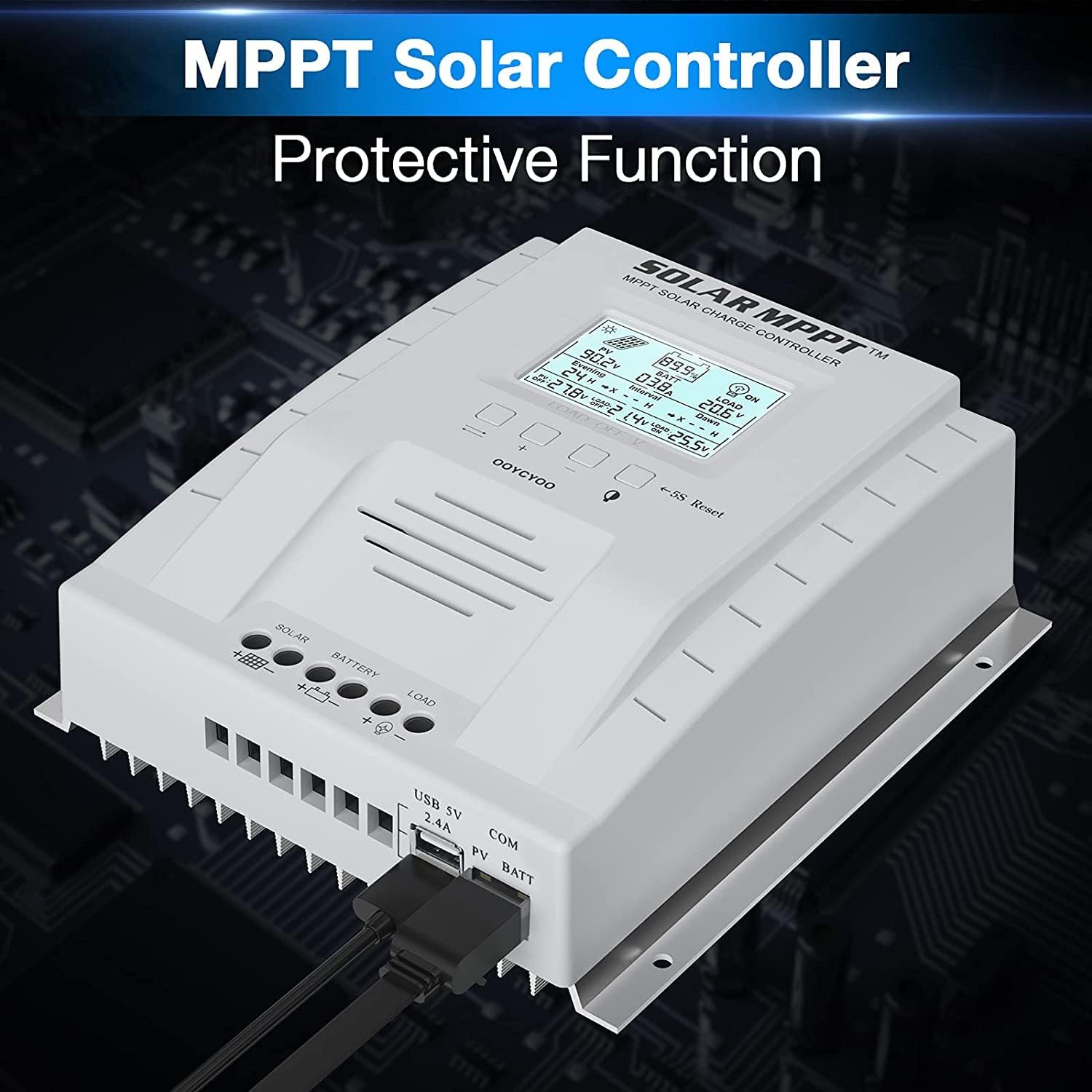
The controller features a clear LCD display on the front for monitoring system status. Below the display are control buttons for navigation and settings. Connection terminals for solar panels, battery, and load are located at the bottom. USB ports and an RS485 communication port are on the side.
4. התקנה והתקנה
Proper installation is crucial for the safe and efficient operation of your solar charge controller. Follow these steps carefully.
4.1 הרכבת הבקר
- Choose a dry, well-ventilated location, protected from direct sunlight, high temperatures, and water.
- ודא שיש מספיק מקום מסביב לבקר לפיזור חום.
- Mount the controller vertically on a wall or stable surface using the provided mounting holes.
4.2 חיבורי חיווט
Follow the connection order precisely to avoid damage to the controller or other components.
- חבר את הסוללה: Connect the positive and negative terminals of the battery to the corresponding battery terminals on the controller. Ensure correct polarity. The controller will automatically detect the system voltage (12V או 24V).
- חבר את הפאנלים הסולאריים: Connect the positive and negative leads from your solar panel array to the corresponding PV terminals on the controller. Ensure correct polarity. Do not exceed the maximum PV input voltage של 100V DC.
- חבר את העומס (אופציונלי): Connect your DC loads to the load terminals on the controller. Note that the load output is for DC loads only. Do not connect inverters or inductive loads directly to these terminals.
- Connect the Remote Temperature Sensor: Plug the temperature sensor into its dedicated port. This sensor helps the controller optimize charging based on battery temperature.

הערה חשובה: Always connect the battery first and disconnect the solar panel last. Incorrect connection order can damage the controller.
5. הוראות הפעלה
Once installed, the controller will begin operation automatically. The LCD display provides real-time system information.
5.1 צג LCD וכפתורים

The backlit LCD displays critical system parameters such as PV voltagה, סוללה כרךtage, charging current, load current, and accumulated energy (KWH). The four buttons below the display are used for navigation and settings adjustment:
- מקש החלפת מצב: משמש למעבר בין מסכי תצוגה או לאישור בחירות.
- '+' (Plus) Key: Increases values or moves forward in menus.
- '-' (Minus) Key: Decreases values or moves backward in menus.
- Manual Switch Load Key: Toggles the load output on/off manually.
- איפוס 5S: לחץ והחזק למשך 5 שניות כדי לשחזר את הגדרות היצרן.
5.2 Battery Charging Algorithm
הבקר משתמש ב-4-stagאלגוריתם טעינה אלקטרוני למיטוב חיי הסוללה והביצועים:
- תשלום בתפזורת: טוען את הסוללה בזרם מרבי עד לרמת הקולtage מגיע ל-boost voltage.
- העלאת חיוב: מטענים בנפח קבועtage for a set period to ensure full charge.
- חיוב לצוף: Maintains the battery at a lower voltage כדי למנוע פריקה עצמית וטעינת יתר.
- Equalization (for specific battery types): טוען יתר על המידה את הסוללה מעת לעת כדי לאזן את עוצמת התאtagולמנוע סולפציה.
5.3 סוגי סוללות נתמכים
The controller is compatible with various battery types, including:
- Lead-Acid (Sealed, Gel, Flooded)
- ליתיום (LFP)
- User-defined parameters for other battery types.
Pre-set charging parameters are available for Sealed, Gel, Flooded, and LI (LFP) batteries. Users can customize parameters for other battery types as needed.
6. פונקציות הגנה
The OOYCYOO MPPT 60A Solar Charge Controller incorporates multiple protection mechanisms to ensure system safety and longevity:
- PV Overcurrent/Overpower Protection
- הגנה מפני קצר חשמלי PV
- PV הגנת קוטביות הפוכה
- Reverse Charging at Night Protection
- הגנת קוטביות הפוכה של הסוללה
- סוללה Overvoltage הגנה
- Battery Over-discharge Protection
- Battery Overtemperature Protection
- Controller Overtemperature Protection
- הגנה מפני טמפרטורה נמוכה על סוללת ליתיום
- עומס הגנת קצר חשמלי
- הגנה על עומס יתר
- TVS High Voltage הגנה חולפת
7. תחזוקה
תחזוקה שוטפת מבטיחה ביצועים אופטימליים ומאריכה את תוחלת החיים של בקר הטעינה הסולארי שלך.
- בדוק חיבורים: בדקו מעת לעת את כל חיבורי החיווט לאיתור הידוק וקורוזיה. הדקו כל חיבור רופף.
- ניקוי הבקר: Keep the controller clean and free of dust. Use a dry cloth to wipe the exterior. Ensure ventilation openings are not obstructed.
- בדוק לאיתור נזק: Check for any signs of physical damage, overheating, or unusual odors.
- בדיקת סוללה: Follow the manufacturer's maintenance guidelines for your specific battery type.
8. פתרון תקלות
סעיף זה עוסק בבעיות נפוצות בהן ייתכן שתיתקלו בבקר הטעינה הסולארי שלכם.
| בְּעָיָה | סיבה אפשרית | פִּתָרוֹן |
|---|---|---|
| הבקר לא נדלק / מסך LCD ריק | אין סוללה מחוברת או עוצמת סוללהtage too low. Reverse polarity connection. | ודא שהסוללה מחוברת תחילה ושיש לה מספיק עוצמהtagה. בדוק את קוטביות הסוללה. |
| אין טעינה מפאנלים סולאריים | Solar panels not connected or reverse polarity. Insufficient sunlight. PV voltagנמוך מדי או גבוה מדי. | Check solar panel connections and polarity. Ensure adequate sunlight. Verify PV voltage is within operating range (e.g., 18V-96V for 12V system, 36V-96V for 24V system). |
| טעינה לא עובדת | Load output disabled. Load short circuit or overload. Battery voltagה נמוך מדי. | Check load output status on LCD. Disconnect load and check for short circuit. Ensure battery is sufficiently charged. |
| בקר התחממות יתר | Poor ventilation. Excessive load or charging current. | Ensure adequate airflow around the controller. Reduce load or charging current if possible. |
| כרך לא מדויקtagקריאות אלקטרוניות | Loose connections. Faulty temperature sensor. | Check all wiring connections. Ensure temperature sensor is properly connected. |
9. מפרטים
מפרט טכני עבור בקר טעינה סולארי OOYCYOO MPPT 60A.
| פָּרָמֶטֶר | עֵרֶך |
|---|---|
| זרם טעינה מדורג | 60A |
| מערכת כרךtage | 12V/24V Auto Identification |
| מקסימום PV Open Circuit Voltage | 100V DC |
| הספק קלט פוטו-וולטאי מקסימלי (מערכת 12V) | 750W |
| הספק קלט פוטו-וולטאי מקסימלי (מערכת 24V) | 1500W |
| DC/DC Transfer Efficiency | עד 98.7% |
| טמפרטורת הפעלה | -20℃ עד +55℃ |
| גודל מסוף | 10 AWG |
| מידות (L*W*H) | 8.3 x 8.4 x 3.4 אינץ' (21.2 x 20.8 x 8.4 ס"מ) |
| מִשׁקָל | 3 פאונד (1.28 ק"ג) |
| סוג תצוגה | תאורת LCD אחורית |
| UPC | 768461886785 |
| מספר דגם | עמוד 60א |


10. אחריות ותמיכה
For warranty information or technical support, please contact your retailer or the manufacturer directly. Refer to the product packaging or purchase documentation for specific contact details.
Ask a question about this manual
Ask about setup, troubleshooting, compatibility, parts, safety, or missing instructions. Manuals+ will review the question and use this page’s manual context to help answer it.