
1. הקדמה
תודה על הרכישהasing the Gevi 4-in-1 Smart Coffee Maker, Model GV9002. This innovative appliance combines a coffee grinder, digital scale, temperature-controlled kettle, and automatic brewer into a single unit, designed to provide a professional-level coffee brewing experience. Please read this manual thoroughly before use to ensure safe operation and optimal performance.
2. הוראות בטיחות חשובות
בעת שימוש במכשירים חשמליים, יש לנקוט תמיד באמצעי זהירות בסיסיים כדי להפחית את הסיכון של שריפה, התחשמלות ו/או פציעה של אנשים, לרבות:
- קרא את כל ההוראות לפני הפעלת המכשיר.
- אל תיגע במשטחים חמים. השתמש בידיות או ידיות.
- כדי להגן מפני אש, התחשמלות ופציעות גופניות, אין לטבול את הכבל, התקעים או המכשיר במים או בנוזל אחר.
- יש צורך בהשגחה צמודה כאשר כל מכשיר נמצא בשימוש על ידי ילדים או בקרבתו.
- נתק מהשקע כאשר אינו בשימוש ולפני הניקוי. הניחו להתקרר לפני הדבקה או הסרה של חלקים ולפני ניקוי המכשיר.
- אין להפעיל כל מכשיר עם כבל או תקע פגומים או לאחר שהמכשיר פגום, או ניזוק בכל דרך שהיא. החזר את המכשיר למתקן השירות המורשה הקרוב לבדיקה, תיקון או התאמה.
- השימוש באביזרים נלווים שאינם מומלצים על ידי יצרן המכשיר עלול לגרום לשריפה, להתחשמלות או לפציעה של אנשים.
- אין להשתמש בחוץ.
- אל תתנו לכבל להיות תלוי על קצה השולחן או השיש, או לגעת במשטחים חמים.
- אין להניח על או ליד מבער גז או חשמלי חם, או בתנור מחומם.
- חבר תמיד תקע תחילה למכשיר ולאחר מכן חבר את הכבל לשקע בקיר. כדי להתנתק, סובב כל פקד למצב "כבוי", ולאחר מכן הוצא את התקע משקע החשמל.
- אל תשתמש במכשיר לשימוש אחר מהשימוש המיועד.
3. רכיבי המוצר
The Gevi 4-in-1 Smart Coffee Maker consists of several integrated parts:
- Main Unit (Base with controls)
- מיכל מים
- הופר שעועית
- Integrated Grinder (Flat cutter type)
- מחזיק מסנן
- קנקן זכוכית
- Digital Scale (Integrated into the base)
- Kettle (Integrated, 850ml capacity)
- טפטפת

4. הגדרה ראשונית
4.1 פירוק
- הסר בזהירות את כל הרכיבים מהאריזה.
- שמור את חומרי האריזה לאחסון או הובלה עתידיים.
- ודא שכל הרכיבים המפורטים קיימים ולא ניזוקו.
4.2 מיקום
Place the coffee maker on a stable, flat, heat-resistant surface, away from water sources and direct heat. Ensure adequate ventilation around the unit.
4.3 ניקוי ראשוני
Before first use, clean all removable parts (hopper, hopper lid, carafe, filter, dripper) with a neutral detergent and a soft sponge. Rinse thoroughly and dry completely. Wipe the exterior of the main unit with a slightly damp בַּד.
4.4 הרכבה
- הנח את היחידה הראשית על משטח יציב.
- Attach the water tank and bean hopper securely.
- Insert the filter holder and place the glass carafe on the heating plate.
5. הוראות הפעלה
5.1 הפעלה/כיבוי
To power on the device, long-press the power button (usually indicated by a circle with a vertical line). Long-press again to power off.
5.2 Grinder Function
The integrated flat cutter grinder offers 51 levels of fineness adjustment, allowing you to customize the grind for various brewing methods, from French Press to Espresso.

5.3 Digital Scale Function
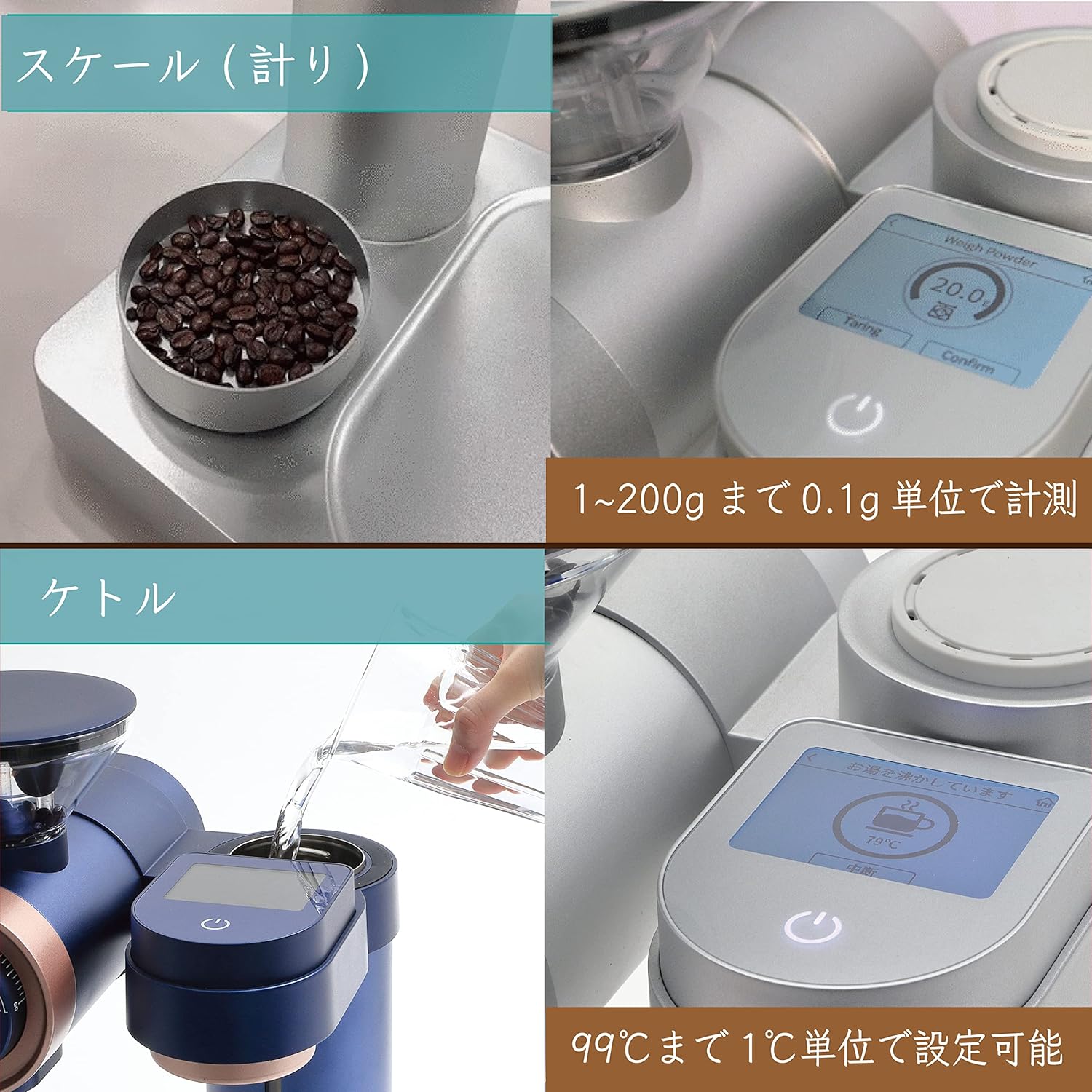
The integrated digital scale can measure coffee beans or grounds with an accuracy of 0.1g, up to a maximum of 2kg. This allows for precise coffee-to-water ratios.
5.4 Kettle Function
The integrated kettle has an 850ml capacity and allows for temperature adjustment from 40°C to 99°C in 1-degree increments. It can also be used independently for other hot water needs.
5.5 Brewer Function
The brewer features three 2.8mm diameter spouts that automatically rotate 360 degrees to ensure even water distribution over the coffee grounds for optimal extraction.

5.6 מצבי חליטה
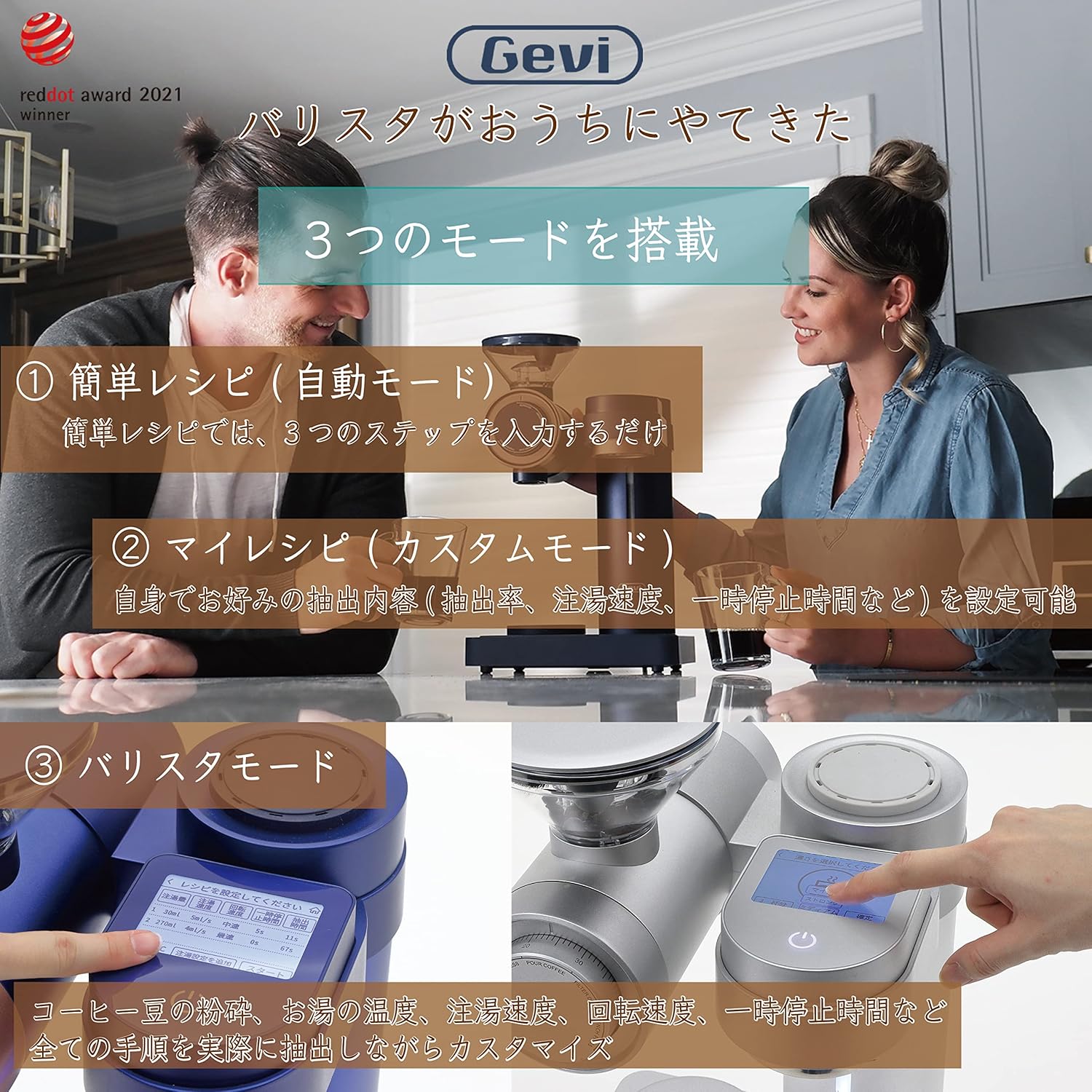
The coffee maker offers three distinct brewing modes:
- Simple Recipe (Automatic Mode): Follows a pre-set 3-step process for quick and easy brewing.
- My Recipe (Custom Mode): Allows users to set preferred extraction rate, pouring speed, and pre-infusion time.
- מצב בריסטה: Provides full customization over all brewing parameters, including coffee bean grind, water temperature, pouring speed, rotation speed, and pre-infusion time.
5.7 Cup Selection
You can select to brew 1 to 4 cups of coffee using the dedicated cup selection button on the control panel.
5.8 פונקציית שמירה על חום
The coffee maker includes a keep warm function to maintain your brewed coffee at an optimal temperature after brewing.
5.9 קישוריות Wi-Fi
The device supports Wi-Fi connectivity, allowing it to connect with a mobile application for additional features, such as accessing and saving custom recipes.
6. תחזוקה וניקיון
ניקוי קבוע מבטיח עמידות לאורך זמן וביצועים אופטימליים של מכונת הקפה שלכם.
6.1 ניקיון יומי
- After each use, clean the hopper, hopper lid, carafe, filter, and dripper using a neutral dishwashing detergent and a soft sponge.
- Rinse all parts thoroughly with clean water and allow them to dry completely before reassembling.
- Wipe the exterior of the main unit with a slightly damp בַּד. אין לטבול את היחידה הראשית במים.
6.2 פונקציית ניקוי
The coffee maker features a dedicated 'Clean' function for internal cleaning. Refer to the on-screen prompts or the mobile application for detailed instructions on using this function.
7. פתרון תקלות
If you encounter any issues with your Gevi 4-in-1 Smart Coffee Maker, please refer to the following common problems and solutions:
- המכשיר לא נדלק: Ensure the power cord is securely plugged into a working electrical outlet. Check if the power button has been long-pressed to activate the unit.
- קפה לא מתבשל: Verify that the water tank is filled to the appropriate level and the carafe is correctly placed on the heating plate. Ensure a brewing mode has been selected and the start button pressed.
- המטחנה לא עובדת: Check if the bean hopper contains coffee beans and is properly seated. Ensure no foreign objects are obstructing the grinder.
- המים לא מתחממים: Confirm that the kettle is properly placed and the desired temperature is set.
עבור בעיות שלא מכוסות כאן, אנא פנו לתמיכת הלקוחות.
8. מפרטים
| מותג | גבי |
| מספר דגם | GV9002 |
| מידות (D x B x H) | 25.4 ס"מ x 26.2 ס"מ x 43.2 ס"מ |
| משקל המוצר | 7.65 ק"ג |
| יְכוֹלֶת | 640 מ"ל |
| חומרים | זכוכית, נירוסטה |
| תכונות | Integrated coffee grinder, digital scale, temperature-controlled kettle, keep warm function |
| סוג מכונת קפה | מכונת קפה לטפטוף |
9. אחריות ותמיכה
9.1 אחריות יצרן
This Gevi product is covered by a 1-year manufacturer's warranty from the date of purchase. Please retain your proof of purchase for warranty claims. The warranty covers defects in materials and workmanship under normal use.
9.2 תמיכת לקוחות
For technical assistance, troubleshooting, or warranty inquiries, please contact Gevi customer support through the official website or the contact information provided with your product. Please have your model number (GV9002) and purchase date ready when contacting support.