
מָבוֹא
תודה על הרכישהasing the Polarlander 9602G 1 Din Car Stereo. This manual provides detailed instructions for the installation, operation, and maintenance of your new multimedia player. Please read this manual thoroughly before use to ensure proper functionality and to prevent damage.
The Polarlander 9602G features a 7-inch retractable HD touchscreen, GPS navigation, Bluetooth connectivity, FM radio, USB/TF/AUX input, Mirror Link for Android/iOS devices, steering wheel control compatibility, and support for DVR and rear view מצלמות.
התקנה והתקנה
1. תכולת החבילה
לפני ההתקנה, אנא ודא שכל הרכיבים נמצאים:
- יחידה ראשית (סטריאו לרכב)
- מדריך למשתמש
- Installation Keys (2)
- כבל חשמל (3)
- שְׁלַט רָחוֹק
- אנטנת GPS
- אֲחוֹרִי View מַצלֵמָה
- DVR
2. תרשים חיווט מעלview
The unit requires a 12V DC power supply. Ensure all connections are secure and correctly matched to your vehicle's wiring harness. Incorrect wiring can cause damage to the unit or vehicle electrical system.
- כּוֹחַ: Connect the yellow wire to the constant 12V supply, the red wire to the accessory 12V supply (switched with ignition), and the black wire to ground.
- רמקולים: Connect the speaker wires to your vehicle's speakers. Ensure correct polarity for optimal sound.
- אנטנת GPS: Connect the GPS antenna to the dedicated port on the rear of the unit and mount it in a location with a clear view של השמיים.
- אֲחוֹרִי View מַצלֵמָה: Connect the camera's video output to the 'CAM IN' port and its power to the reverse light circuit for automatic activation.
- DVR: Connect the DVR to the designated USB port or input.
- בקרת הגה: Connect the steering wheel control wires to your vehicle's steering wheel control interface, if applicable.
3. התקנה פיזית
Install the 1 Din unit into your vehicle's dashboard opening. Secure it using the provided installation keys or mounting hardware. Ensure the retractable screen mechanism has sufficient clearance to operate freely.

Image: Unit dimensions for installation reference. The unit measures approximately 18.8cm (width) x 5cm (height) x 16.5cm (depth) with the screen retracted, and the screen extends to 7 inches.
הוראות הפעלה
1. בקרות בסיסיות
- הפעלה/כיבוי: לחץ על לחצן ההפעלה כדי להפעיל או לכבות את היחידה.
- כֶּרֶך: Use the rotary knob or touchscreen controls to adjust the volume.
- הסרת מסך: The 7-inch screen is retractable. Use the dedicated button or touchscreen option to extend or retract the display.
- מסך מגע: Navigate menus and control functions by touching the screen.
2. ניווט GPS
The unit comes with built-in GPS functionality. Access the navigation application from the main menu. Ensure the GPS antenna is properly installed for accurate positioning.

Image: The car stereo displaying GPS navigation, showing a map with route guidance and traffic information.
3. קישוריות בלוטות'
התאם את הטלפון הנייד שלך באמצעות Bluetooth לשיחות ללא ידיים והזרמת שמע.
- עבור לתפריט הבלוטות' במערכת הסטריאו של הרכב.
- הפעל את Bluetooth בטלפון הנייד שלך וחפש מכשירים זמינים.
- Select 'Topway(3A30)' or similar device name from your phone's list.
- Enter the PIN '0000' if prompted.
- לאחר הצימוד, תוכלו לבצע/לקבל שיחות ולהשמיע מוזיקה באופן אלחוטי.
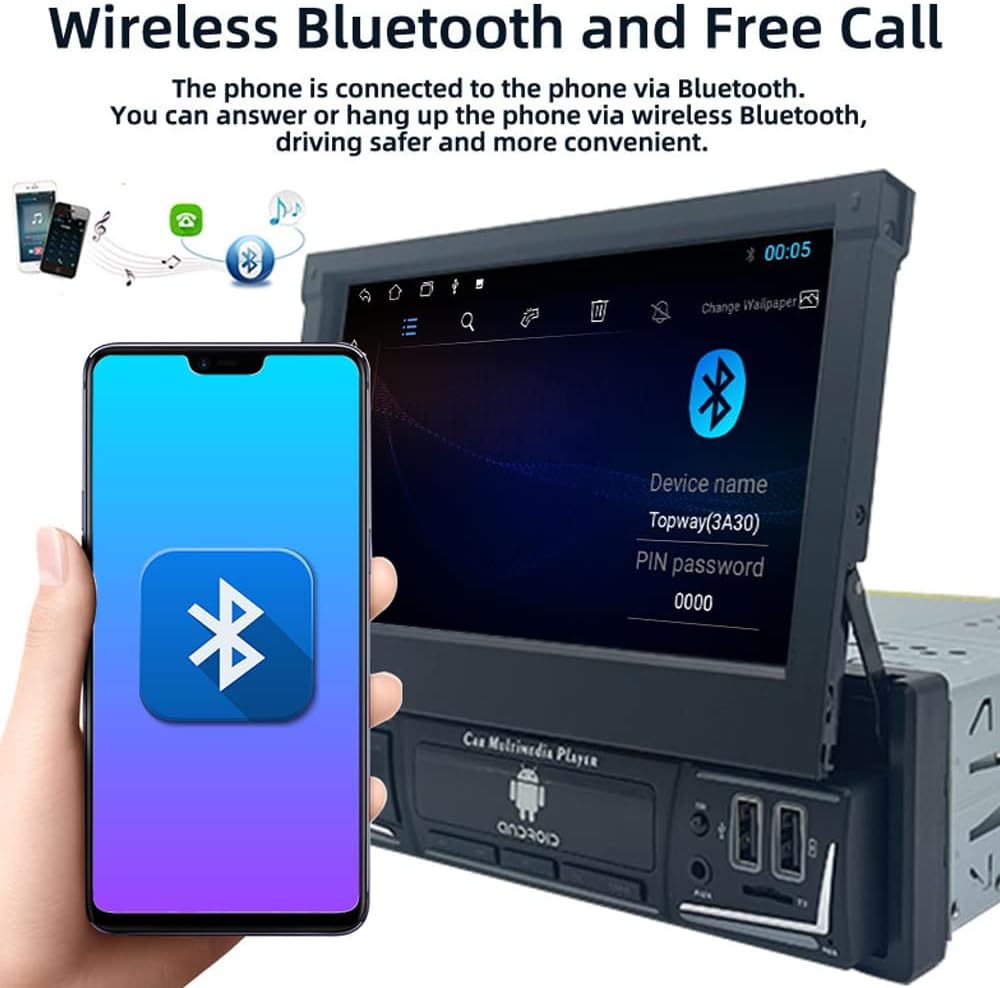
Image: The car stereo displaying the Bluetooth pairing screen, indicating a device name and PIN for connection.
4. רדיו FM
גש לפונקציית רדיו FM כדי להאזין לתחנות המועדפות עליך.
- סריקה אוטומטית: Use the 'AS' button to automatically search and store available stations.
- כוונון ידני: Use the arrow buttons to manually tune to frequencies.
- הגדרות קבועות מראש: Store up to 18 FM stations across three bands (FM1, FM2, FM3).

Image: The car stereo displaying the FM radio interface, showing the current frequency and preset options.
5. Media Playback (USB/SD/AUX)
The unit supports various media sources for audio and video playback.
- USB: Insert a USB flash drive into the USB port. The unit will automatically detect and play compatible media files.
- כרטיס TF: Insert a TF (microSD) card into the TF card slot.
- כניסת AUX: Connect external audio devices using a 3.5mm audio cable to the AUX-in port.

Image: The car stereo displaying music playback, with icons representing USB, SD card, and AUX input options.
6. פונקציית קישור שיקוף
Mirror Link allows you to display your smartphone's screen on the car stereo's display and control it from the stereo.
- Connect your Android or iOS phone to the unit via a USB cable.
- Follow the on-screen prompts to enable Mirror Link.
- For Android, you may need to enable USB debugging in developer options.

Image: The car stereo screen mirroring a smartphone, demonstrating the Mirror Link feature.
7. בקרת הגה
If your vehicle supports steering wheel controls, you can configure them to operate the car stereo.
- גש להגדרות 'בקרת הגה' בתפריט היחידה.
- Follow the on-screen instructions to program each button on your steering wheel to a corresponding function on the stereo.

Image: The car stereo displaying its main menu with app icons, illustrating the use of steering wheel controls to navigate functions.
8. Backlight Button Colors
Customize the backlight color of the physical buttons on the unit.
- Navigate to the 'Settings' menu and find 'Button Backlight' or similar option.
- בחר מבין 7 צבעים זמינים או הגדר אותו למחזור אוטומטי.

תמונה: יחידת הסטריאו של הרכב מוצגתasing its buttons illuminated in various colors, demonstrating the 7-color backlight feature.
9. אחורי View מצלמה ו-DVR
היחידה תומכת בחלק האחורי view camera and DVR for enhanced safety and recording.
- אֲחוֹרִי View מַצלֵמָה: כאשר הרכב מעביר להילוך אחורי, המסך יציג אוטומטית את התמונה האחורית. view הזנת מצלמה.
- DVR: If a DVR is connected, access its functions through the dedicated app on the stereo's interface to record and manage footage.
תַחזוּקָה
- ניקוי המסך: השתמש במטלית רכה ונטולת סיבים כדי לנגב בעדינות את מסך המגע. הימנע מחומרי ניקוי שוחקים או ממסים.
- עדכוני תוכנה: בדקו מעת לעת את הוראות היצרן webבאתר עבור עדכוני תוכנה או קושחה זמינים כדי להבטיח ביצועים אופטימליים וגישה לתכונות חדשות.
- טיפול כללי: הימנעו מחשיפת היחידה לטמפרטורות קיצוניות, לאור שמש ישיר למשך תקופות ממושכות או לחות מוגזמת.
פתרון בעיות
אם נתקלת בבעיות, עיין בבעיות הנפוצות ובפתרונות הבאות:
- אין כוח:
- Check all power connections (yellow, red, black wires) for proper contact and voltage.
- ודא שהפיוז של הרכב לסטריאו תקין.
- אין צליל:
- ודא שחוטי הרמקולים מחוברים כראוי ואינם קצרים.
- בדוק את עוצמת הקול ואת הגדרות ההשתקה.
- אימות בחירת מקור שמע.
- Bluetooth לא מתחבר:
- ודא ש-Bluetooth מופעל גם בסטריאו וגם בטלפון שלך.
- מחק זיווג קודם ונסה לשייך שוב.
- הפעל מחדש את שני המכשירים.
- GPS לא עובד / לא מדויק:
- ודא שאנטנת ה-GPS מחוברת כראוי ושיש לה רשת ברורה view של השמיים.
- Check GPS settings in the unit's menu.
- מסך לא מגיב:
- Perform a soft reset by pressing the reset button (if available) or turning the unit off and on.
- ודא שהמסך נקי וללא לכלוך.
If problems persist, consult a qualified technician or contact customer support.
מפרטים
| מספר דגם | 9602G |
| גודל מסך | 7 Inch Retractable HD Touch Screen |
| ספק כוח | 12V DC |
| קישוריות | Bluetooth, Wi-Fi, USB, Auxiliary |
| סוג בקר | Android, iOS (via Mirror Link) |
| תכונות מיוחדות | Touchscreen, GPS Navigation, FM Radio, Mirror Link, Steering Wheel Control, DVR & Rear View תמיכה במצלמה |
| תדר רדיו | FM 87.5MHz - 108MHz |
| מצב פלט שמע | סטריאו |
| פורמטים נתמכים | MPEG, WAV, WMA (and others via MP5 player) |
| מידות (בערך) | 18.8cm x 5cm x 16.5cm (unit body) |
מידע על אחריות
This product is covered by a manufacturer's warranty against defects in materials and workmanship. The specific terms and duration of the warranty may vary. Please retain your proof of purchase for warranty claims. For detailed warranty information, refer to the documentation included with your purchase or contact the seller.
תמיכת לקוחות
If you require further assistance, have questions not covered in this manual, or need technical support, please contact the seller or manufacturer directly. Provide your product model number (9602G) and purchase details when seeking support.
לפניות כלליות, ניתן לבקר באתר Polarlander brand page on Amazon.