
פאוורדרייב PWD2000P
מדריך למשתמש של ממיר כוח PowerDrive 2000 וואט
Model: PWD2000P
מָבוֹא
This manual provides detailed instructions for the safe and efficient operation, installation, and maintenance of your PowerDrive 2000 Watt Power Inverter, Model PWD2000P. This device converts 12V DC power from your vehicle battery into 110V AC power, allowing you to operate various AC devices and charge electronic devices on the go. Please read this manual thoroughly before using the inverter.
מידע בטיחות חשוב
יש להקפיד תמיד על אמצעי הזהירות הבאים כדי למנוע פגיעה או נזק לממיר או למכשירים המחוברים אליו:
- אין לפתוח את הממיר גasinז. אין בפנים חלקים הניתנים לתחזוקה על ידי המשתמש.
- יש לוודא אוורור נאות סביב הממיר. אין לחסום פתחי אוורור לקירור.
- הרחק את הממיר ממים, לחות וחומרים דליקים.
- חבר את הממיר רק למקור מתח של 12 וולט DC.
- Do not exceed the inverter's rated power output (2000 Watts continuous, 4000 Watts surge).
- Always connect the inverter to the battery before plugging in AC devices.
- Disconnect the inverter from the battery when not in use.
- מוצר זה מכיל כימיקלים הידועים למדינת קליפורניה כגורמים לסרטן ולפגמים מולדים או לנזק רבייה אחר. שטפו ידיים לאחר הטיפול.
רכיבי מוצר
The PowerDrive 2000 Watt Power Inverter comes with the following components:
- PowerDrive 2000 Watt Power Inverter unit
- 39-inch heavy-duty installation cables (red for positive, black for negative)
- מסך LCD נשלף
- סוגרי הרכבה

איור 1: חֲזִית view of the PowerDrive 2000 Watt Power Inverter, showing the digital display, power button, Bluetooth indicator, four AC 120V outlets, one USB-C port, and one USB-A port. The unit features a durable yellow and black casing עם סורגי אוורור.

איור 2: מֵעַלview of the PowerDrive 2000 Watt Power Inverter with key dimensions (14.54" length, 9.8" width, 4.25" height) and included accessories. The image displays the inverter unit, red and black 39-inch battery cables, and a 12-foot remote LCD cable.
התקנה והתקנה
Proper installation is crucial for the inverter's performance and safety. Follow these steps carefully:
- בחר מיקום: Select a dry, well-ventilated area for mounting the inverter. Ensure it is away from direct sunlight, heat sources, and any flammable materials. The mounting brackets can be used to secure the unit.
- הכן את הסוללה: Ensure your vehicle's battery is a 12V DC system. Turn off the vehicle and any accessories.
- חבר כבלים:
- חבר את אָדוֹם (positive) cable to the חיובי (+) הטרמינל של הממיר.
- חבר את שָׁחוֹר (negative) cable to the שלילי (-) הטרמינל של הממיר.
- חבר את הקצה השני של אָדוֹם כבל ל חיובי (+) terminal of the vehicle battery.
- חבר את הקצה השני של שָׁחוֹר כבל ל שלילי (-) terminal of the vehicle battery.
חָשׁוּב: Always connect the inverter terminals first, then the battery terminals. Ensure connections are tight and secure.
- Connect Remote LCD (Optional): If desired, connect the removable LCD screen to the inverter using the provided cable. This allows for remote monitoring and control.
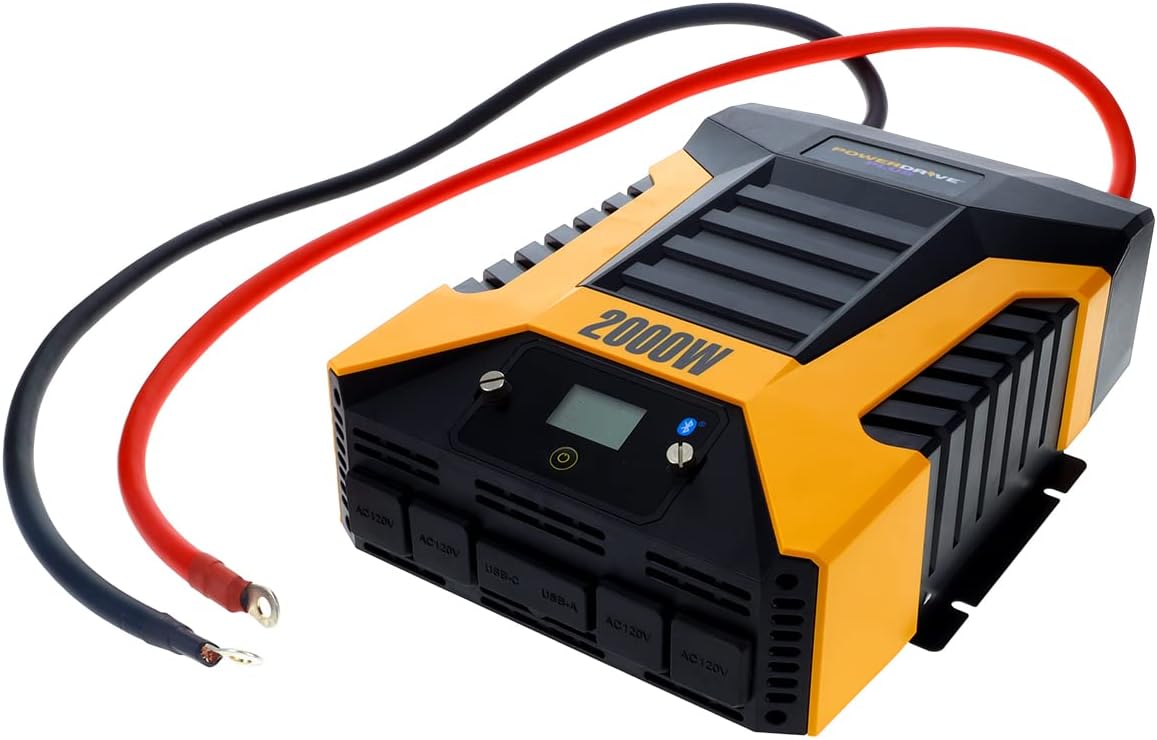
איור 3: The PowerDrive 2000 Watt Power Inverter with the red positive and black negative battery cables securely connected to its terminals, ready for connection to a vehicle battery. This illustrates the correct cable attachment for power input.
הוראות הפעלה
Once installed, the inverter is ready for operation:
- הפעלה: Press the power button on the inverter's front panel or on the remote LCD screen. The digital display will illuminate, showing battery voltage ופלט וואטtage.
- חיבור התקנים: Plug your AC devices into the four 3-prong AC outlets. For charging smartphones and tablets, use the standard USB 2.4 Amp port or the fast-charging USB-C 3.0 Amp נָמָל.
- ניטור: The digital display provides real-time information on battery voltage, output power (watts), and any error codes.
- טכנולוגיית Bluetooth אלחוטית:
- הורד את הקובץ בחינם PowerDrive Plus app from your smartphone's app store (compatible with Android and iOS).
- הפעל את בלוטות' בטלפון החכם שלך וחבר אותו לממיר.
- The app allows you to remotely monitor battery voltage, output power, and product temperature. You can also set up protections like undervoltage and overload, and power the inverter on/off from a distance.
- כיבוי: Press and hold the power button until the display turns off, or use the PowerDrive Plus app. Disconnect devices before turning off the inverter.

איור 4: מקרוב חזית view of the PowerDrive 2000 Watt Power Inverter, highlighting its four AC 120V outlets, one USB-C port, and one USB-A port. These ports provide versatile power options for various electronic devices and appliances.

איור 5: A smartphone screen showing the PowerDrive Plus application interface. The app displays real-time data such as output power (842 watts), battery power percentage (88%), battery voltage (12.6 VDC), and output voltage (120 VAC), along with temperature readings and control options.
תַחזוּקָה
To ensure the longevity and optimal performance of your PowerDrive inverter, follow these maintenance guidelines:
- שמור על ניקיון: נגבו באופן קבוע את החלק החיצוני של הממיר בעזרת מטלית יבשה ורכה. אין להשתמש בחומרי ניקוי נוזליים או ממסים.
- אוורור: Ensure the cooling fan vents are clear of dust and debris. The high-speed cooling fan automatically activates when needed and is designed for quiet operation.
- חיבורי כבלים: Periodically check that all cable connections to the battery and inverter terminals are secure and free from corrosion.
- אִחסוּן: When not in use for extended periods, store the inverter in a cool, dry place, disconnected from the battery.

איור 6: אֲחוֹרִי view of the PowerDrive 2000 Watt Power Inverter, showcasing its two high-speed cooling fans and the robust battery input terminals. Proper airflow through these fans is essential for maintaining optimal operating temperature.
פתרון בעיות
אם נתקלת בבעיות עם הממיר שלך, עיין בבעיות הנפוצות ובפתרונות הבאות:
| בְּעָיָה | סיבה אפשרית | פִּתָרוֹן |
|---|---|---|
| אין יציאת חשמל / הממיר לא נדלק |
|
|
| הממיר נכבה לעתים קרובות |
|
|
| Digital display shows error code | Specific error condition (e.g., over-voltagה, תחת כרךtage, overload, short circuit) | Refer to the PowerDrive Plus app or contact customer support for specific error code interpretations and solutions. Address the underlying issue (e.g., reduce load, check battery). |
מפרט מוצר
| תכונה | פְּרָט |
|---|---|
| מותג | PowerDrive |
| מספר דגם | PWD2000P |
| כוח מתמשך | 2000 וואט |
| כוח נחשול | 4000 וואט |
| קלט כרךtage | 12V DC |
| פלט כרךtage | 110V AC |
| שקעי AC | Four 3-prong outlets |
| יציאות USB | USB 2.4 אחד Amp, One USB-C 3.0 Amp |
| קישוריות | Bluetooth Wireless Technology (PowerDrive Plus App compatible) |
| לְהַצִיג | Digital display (removable LCD screen) |
| הִתקָרְרוּת | מאוורר קירור מהיר |
| משקל פריט | 9 פאונד |
| מידות המוצר | 5.7 x 17 x 12 אינץ' |
אחריות ותמיכה
For warranty information, technical support, or service inquiries, please contact PowerDrive customer service. Keep your purchase receipt as proof of purchase.
For additional resources and frequently asked questions, visit the official PowerDrive website or refer to the PowerDrive Plus app.
Ask a question about this manual
Ask about setup, troubleshooting, compatibility, parts, safety, or missing instructions. Manuals+ will review the question and use this page’s manual context to help answer it.