
מָבוֹא
This manual provides essential information for the safe and efficient use of your SHARP 24EA4E 24-inch HD-Ready LED TV. Please read these instructions thoroughly before operating the television and retain them for future reference. This television is designed for use in living rooms, bedrooms, or guest rooms, offering an elegant design and intuitive operation.
תוכן החבילה
Before beginning installation, ensure all items listed below are present in your package:
- SHARP 24EA4E LED TV Unit
- שְׁלַט רָחוֹק
- 2 סוללות AAA (לשלט רחוק)
- TV Stand Installation Kit
- מדריך להתחלה מהירה

Image: SHARP 24EA4E LED TV with its included stand.
הגדרה
1. התקנה פיזית
Your television can be placed on a flat surface using the included stand or mounted on a wall using a VESA-compatible bracket (not included). The VESA standard for this model is 100 x 100 mm.
- התקנת מעמד: Carefully attach the TV stand to the bottom of the television using the screws provided in the installation kit. Ensure the stand is securely fastened before placing the TV on a stable surface.
- הרכבה על הקיר: If wall mounting, refer to the instructions provided with your VESA 100 x 100 mm wall mount bracket. Ensure proper ventilation around the TV.

תמונה: צד view of the SHARP 24EA4E LED TV, illustrating the stand attachment.
2. חיבור התקנים חיצוניים
The SHARP 24EA4E offers various connection options for your external devices:
- יציאות HDMI (x2): Connect Blu-Ray players, game consoles, satellite boxes, or other HDMI-enabled devices.
- יציאת USB (x1): For playing media (music, movies, photos) from USB storage devices.
- SCART Input: לחיבור מכשירים ישנים יותר.
- Satellite Input (DVB-S/S2): חבר את צלחת הלוויין שלך.
- RF Input (DVB-T/T2/C): Connect your terrestrial antenna or cable TV.
- Headphone Jack (3.5mm Audio): להאזנה פרטית.
- יציאת CI: עבור מודולי גישה מותנית (CAM) לפענוח ערוצים מוצפנים.
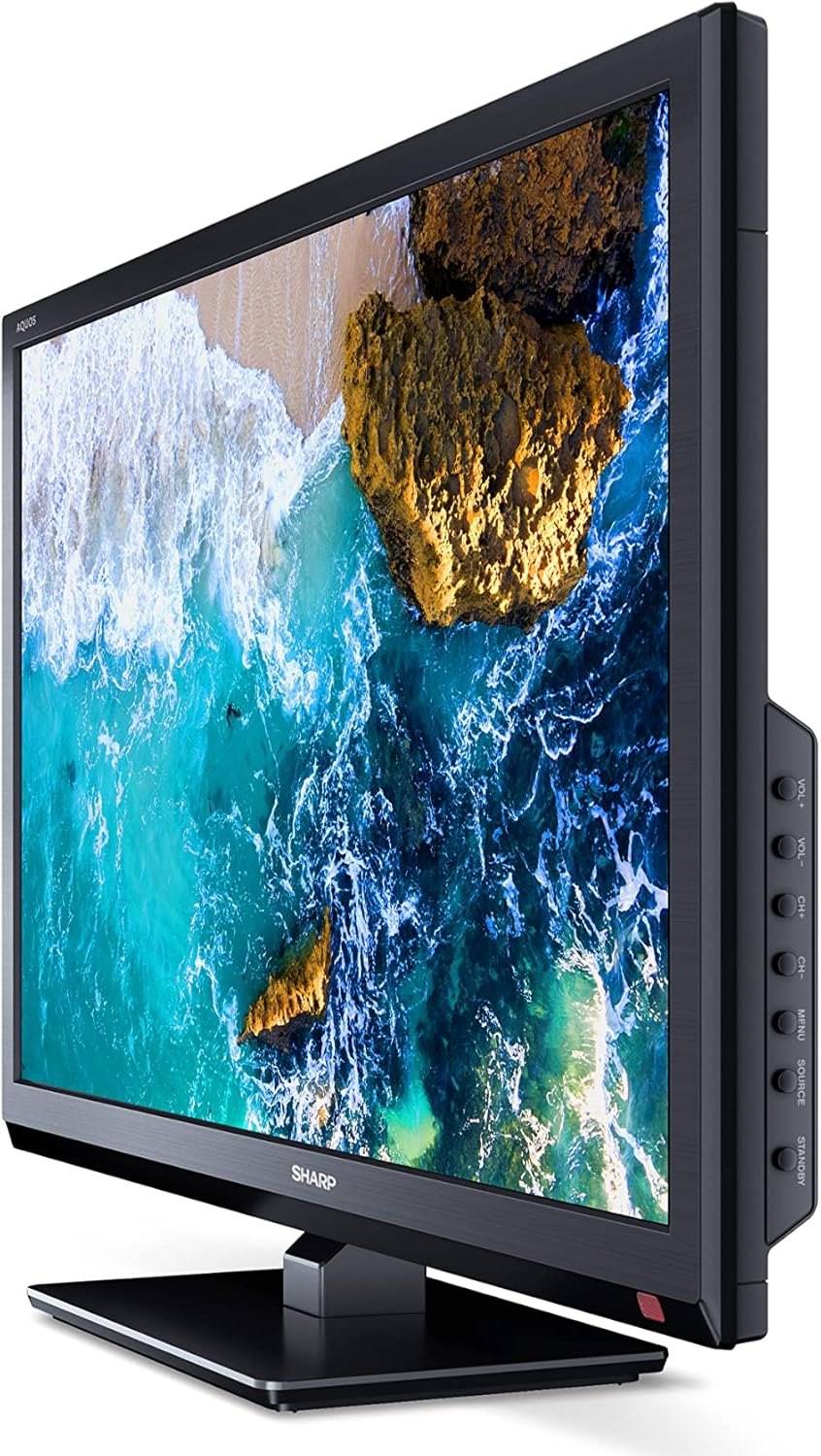
תמונה: צד view of the SHARP 24EA4E LED TV, highlighting the various input ports.
After connecting all desired devices, plug the TV's power cord into a suitable electrical outlet (220V).
הוראות הפעלה
1. First-Time Setup and Channel Scan
Upon first power-on, the TV will guide you through an initial setup process. Follow the on-screen prompts to select your language, country, and perform a channel scan for DVB-T/T2 (terrestrial), DVB-C (cable), or DVB-S/S2 (satellite) signals.
2. פונקציות שלט רחוק
The included infrared remote control allows full operation of your TV. Insert the 2 AAA batteries into the remote control, ensuring correct polarity.
- לחצן הפעלה: מפעיל או מכבה את הטלוויזיה.
- כפתורי ערוצים (CH+/-): משנה ערוצים.
- כפתורי עוצמת קול (VOL+/-): מכוונן את עוצמת הקול.
- לחצן המקור: Selects input sources (HDMI, AV, USB, TV).
- לחצן תפריט: Accesses the TV's main menu for settings adjustments.
- לחצני ניווט: משמש לניווט בתפריטים ובחירת אפשרויות.
- לחצן אישור: מאשר בחירות.
- לחצן יציאה: Exits menus.
- לחצני מספרים (0-9): בחירת ערוצים ישירה.

תמונה: צד view of the SHARP 24EA4E LED TV, showing the physical control buttons on the side panel.
3. הפעלת מדיה דרך USB
ניתן להשמיע מגוון מדיה files directly from a USB storage device:
- Insert your USB drive into the USB port on the TV.
- Select the USB input source using the remote control's Source button.
- נווט דרך ה files and folders using the remote control and select the desired media (music, video, or photo) to play.
תַחזוּקָה
To ensure the longevity and optimal performance of your SHARP 24EA4E TV, follow these maintenance guidelines:
- ניקוי המסך: נגבו בעדינות את המסך בעזרת מטלית רכה ונטולת סיבים. במקרה של סימנים עקשניים, נגבו קלותampשטפו את המטלית במים או בחומר ניקוי מיוחד למסכים. לעולם אל תרסס נוזל ישירות על המסך.
- ניקוי הארון: השתמשו במטלית רכה ויבשה לניגוב ארון הטלוויזיה. הימנעו משימוש בחומרי ניקוי שוחקים או ממסים.
- אוורור: ודאו שפתחי האוורור בגב הטלוויזיה אינם חסומים כדי למנוע התחממות יתר.
- כבל חשמל: בדקו באופן קבוע את כבל החשמל לאיתור נזקים. אם הוא ניזוק, צרו קשר עם אנשי שירות מוסמכים לצורך החלפה.
פתרון בעיות
אם נתקלת בבעיות עם הטלוויזיה שלך, עיין בשלבי פתרון הבעיות הנפוצים הבאים:
| בְּעָיָה | פתרון אפשרי |
|---|---|
| אין כוח | Check if the power cord is securely plugged into both the TV and the wall outlet. Ensure the wall outlet is functional. |
| אין תמונה, אבל יש קול | בדוק את בחירת מקור הקלט. ודא שההתקנים החיצוניים מופעלים ומחוברים כראוי. |
| אין קול, אבל יש תמונה | Check the volume level and mute status. Ensure audio cables are connected correctly for external devices. |
| איכות תמונה ירודה | Check antenna/cable connections. Adjust picture settings in the TV menu. For external devices, check their output resolution. |
| השלט רחוק לא עובד | החלף את סוללות ה-AAA. ודא שאין חסימות בין השלט לחיישן ה-IR של הטלוויזיה. |
אם הבעיה נמשכת לאחר ניסיון פתרונות אלה, אנא פנו לתמיכת הלקוחות של SHARP.
מפרטים
Key technical specifications for the SHARP 24EA4E LED TV:
- דֶגֶם: 24EA4E
- טכנולוגיית תצוגה: LED
- גודל מסך: 24 אינץ' (60 ס"מ באלכסון)
- הַחְלָטָה: 1366 x 768 פיקסלים (מוכן ל-HD)
- יחס גובה-רוחב: 16:9
- קצב רענון: 60 Hz (Active Motion 100)
- יחס ניגודיות: 100000:1
- זמן תגובה: 8 מילישניות
- Viewזווית ing: 178 מעלות
- פלט שמע: 2 x 5W speakers, Dolby Digital, Dolby Digital Plus, Surround Sound
- טכנולוגיית טיונר: DVB-T/T2 (Terrestrial), DVB-C (Cable), DVB-S/S2 (Satellite) - MPEG4 + HEVC/H.265 (10-bit)
- קישוריות: 2 x HDMI, 1 x USB, 1 x SCART, RF Input, Satellite Input, 3.5mm Audio (Headphone Jack), CI Port
- מַעֲרֶכֶת הַפעָלָה: לינוקס
- צריכת חשמל: 17 Watts (in SDR mode)
- כרך ידtage: 220V
- מידות (עם מעמד): 56 ס"מ (W) x 38.5 ס"מ (H) x 14 ס"מ (D)
- מִשׁקָל: 3.8 ק"ג
- תקן VESA: 100 x 100 מ"מ

Image: Diagram showing the dimensions of the SHARP 24EA4E LED TV.
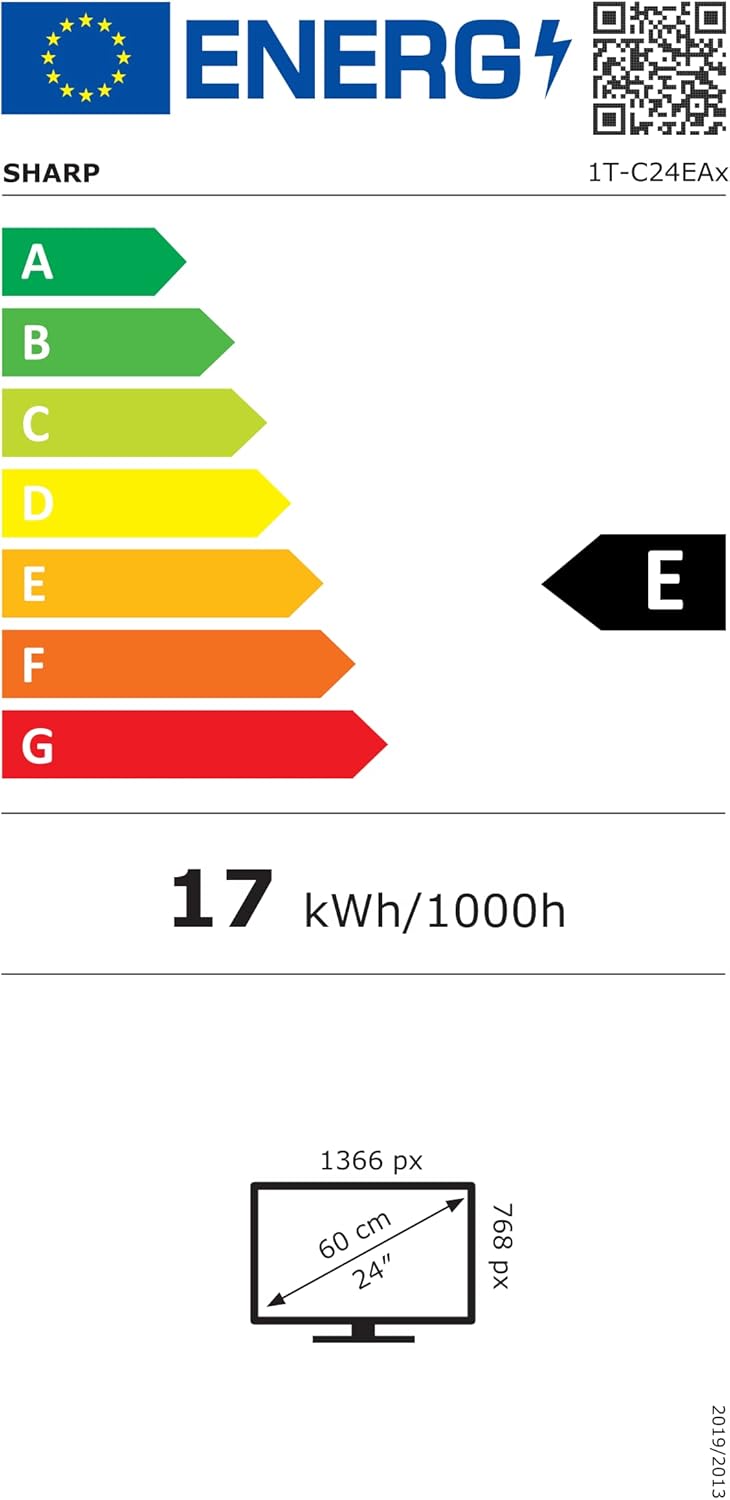
Image: EU Energy Label for the SHARP 24EA4E LED TV, indicating Energy Class E and 17 kWh/1000h consumption.
למידע נוסף על המוצר, עיינו במאגר הנתונים הרשמי של האיחוד האירופי EPREL: https://eprel.ec.europa.eu/qr/1242293
אחריות ותמיכה
Your SHARP 24EA4E LED TV comes with a manufacturer's warranty. The minimum guaranteed product support is 2 years, and the minimum guaranteed availability of spare parts is 8 years from the date of market introduction.
For warranty claims, technical assistance, or further support, please contact your retailer or visit the official SHARP support webאתר. שמור את הוכחת הרכישה שלך לצורך אימות האחריות.