
1. הקדמה
This manual provides essential information for the proper installation, operation, and maintenance of your SUNMI T2s Lite 15.6-inch Android Point of Sale (POS) system. Please read this manual thoroughly before using the device to ensure optimal performance and safety. Keep this manual for future reference.
2. מידע בטיחות
- אין לחשוף את המכשיר לטמפרטורות קיצוניות, ללחות או לאור שמש ישיר.
- הימנע מנפילה או הכפיפה של המכשיר למכות חזקות.
- השתמשו רק במתאם החשמל המצורף למכשיר. שימוש במתאם לא נכון עלול לגרום נזק או שריפה.
- אל תנסה לפרק או לתקן את המכשיר בעצמך. פנה לאנשי שירות מוסמכים.
- הרחק את המכשיר ממים או מנוזלים אחרים.
- יש לוודא אוורור נאות סביב המכשיר במהלך הפעולה.
3. תכולת החבילה
ודא שכל הפריטים נמצאים בחבילה:
- SUNMI T2s Lite POS Terminal
- מתאם מתח
- כבל חשמל
- מדריך התחלה מהירה (אם רלוונטי)
- תעודת אחריות (אם רלוונטי)
אם פריטים כלשהם חסרים או ניזוקים, אנא צרו קשר עם הספק שלכם באופן מיידי.
4. המוצר נגמרview
The SUNMI T2s Lite is an integrated Android-based POS system designed for retail environments. It features a 15.6-inch capacitive touchscreen display and various connectivity options.
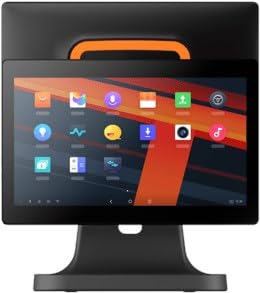
איור 4.1: חֲזִית view of the SUNMI T2s Lite POS system. This image displays the main 15.6-inch touchscreen, which is the primary interface for operating the device. The design is compact and suitable for various retail settings.
4.1 מרכיבי מפתח
- מסך מגע בגודל 15.6 אינץ': High-resolution (1920x1080) capacitive touch interface.
- לחצן הפעלה: Located typically on the side or rear for turning the device on/off.
- יציאות USB: For connecting peripherals such as barcode scanners, external printers, or cash drawers.
- יציאת אתרנט: עבור חיבור רשת קווית.
- קלט כוח: לחיבור מתאם החשמל.
- מצלמה קדמית: For specific applications requiring image capture.
5. התקנה
5.1 פריקה ומיקום
- הוציאו בזהירות את המכשיר ואת כל האביזרים מהאריזה.
- Place the POS terminal on a stable, flat surface in a well-ventilated area.
- Ensure there is sufficient space around the device for cable connections and heat dissipation.
5.2 חיבור חשמל
- חבר את כבל החשמל למתאם החשמל.
- Plug the power adapter into the power input port on the back of the SUNMI T2s Lite.
- חבר את הקצה השני של כבל החשמל לשקע חשמלי מוארק.
5.3 Initial Boot and Network Connection
- Press and hold the power button until the screen lights up. The device will boot into the Android operating system.
- פעל לפי ההנחיות שעל המסך להגדרה ראשונית, כולל בחירת שפה ואזור זמן.
- חיבור Wi-Fi: עבור אל הגדרות > רשת ואינטרנט > Wi-Fi, בחר את הרשת שלך והזן את הסיסמה.
- חיבור Ethernet: Connect an Ethernet cable from your router/switch to the Ethernet port on the device. The device should automatically connect to the wired network.
5.4 חיבור ציוד היקפי
- התקני USB: Plug USB peripherals (e.g., barcode scanner, external printer, cash drawer) into the available USB ports. The system will typically recognize them automatically.
- מכשירי בלוטות': עבור אל הגדרות > מכשירים מחוברים > בלוטות', enable Bluetooth, and pair with your desired device.
6. הוראות הפעלה
6.1 הפעלה/כיבוי
- כדי להפעיל: לחץ והחזק את לחצן ההפעלה עד שהמסך נדלק.
- כדי לכבות: Press and hold the power button until a power menu appears. Select "Power off" and confirm. Alternatively, a short press of the power button will put the device to sleep.
6.2 שימוש במסך מגע
- בֶּרֶז: To select an item or activate a button.
- הקש והחזק: To open context menus or drag items.
- לִגנוֹב: To scroll through lists or navigate between screens.
- צביטה-להגדלה: כדי להגדיל או להקטין תמונות או web דפים.
6.3 ניווט מערכת הפעלה אנדרואיד
- מסך הבית: The central hub for your applications and widgets.
- מגירת אפליקציות: גישה לכל היישומים המותקנים.
- לוח הודעות: החלק מטה מהחלק העליון של המסך אל view התראות והגדרות מהירות.
- הגדרות: Configure Wi-Fi, Bluetooth, display, sound, and other system options.
6.4 Basic POS Functions
The specific POS functions will depend on the software application installed on your device. Refer to the documentation provided with your POS software for detailed instructions. Generally, you will:
- Launch your POS application from the home screen or app drawer.
- היכנס עם אישורי המשתמש שלך.
- Process transactions using the touchscreen and connected peripherals (e.g., scanning items, accepting payments).
- Print receipts if an external or integrated printer is configured.
7. תחזוקה
7.1 ניקוי ההתקן
- תמיד יש לכבות ולנתק את המכשיר מהחשמל לפני ניקוי.
- השתמש במטלית רכה נטולת מוך מעט דampened with water or a mild, non-abrasive cleaner to wipe the screen and exterior surfaces.
- אין לרסס נוזלים ישירות על המכשיר.
- הימנעו משימוש בכימיקלים חזקים, ממסים או חומרים שוחקים.
7.2 עדכוני תוכנה
Regularly check for and install system and application updates to ensure optimal performance, security, and access to new features. You can usually find system updates in הגדרות > מערכת > עדכון מערכת.
7.3 אחסון
When not in use for extended periods, store the device in a cool, dry place, away from direct sunlight and extreme temperatures. If storing for a long time, ensure the battery is charged to about 50% to prolong its lifespan.
8. פתרון תקלות
סעיף זה עוסק בבעיות נפוצות שאתה עשוי להיתקל בהן. עבור בעיות מורכבות יותר, צור קשר עם תמיכת הלקוחות.
- המכשיר לא נדלק:
- ודא שמתאם החשמל מחובר היטב למכשיר ולשקע חשמל תקין.
- ודא ששקע החשמל תקין.
- נסה להחזיק את כפתור ההפעלה למשך 10-15 שניות כדי לאלץ הפעלה מחדש.
- מסך המגע לא מגיב:
- הפעל מחדש את המכשיר.
- ודא שהמסך נקי וחף מפסולת או נוזלים.
- בעיות חיבור לרשת (Wi-Fi/Ethernet):
- Check if the Wi-Fi is enabled and you are connected to the correct network with the right password.
- For Ethernet, ensure the cable is properly connected and your router/switch is working.
- הפעל מחדש את הנתב/מודם שלך.
- Peripherals (e.g., printer, scanner) not working:
- ודא שהציוד ההיקפי מחובר כראוי ליציאה הנכונה.
- Check if the peripheral has its own power supply and is turned on.
- Verify that the necessary drivers or software for the peripheral are installed and configured within your POS application.
9. מפרטים
The following are key technical specifications for the SUNMI T2s Lite:
| תכונה | מִפרָט |
|---|---|
| מותג | SUNMI |
| יַצרָן | סונמי |
| רזולוציית תצוגה מקורית | 1920x1080 פיקסלים |
| טכנולוגיית קישוריות | Bluetooth, Ethernet, USB, WLAN |
| תיאור המצלמה | חֲזִיתִי |
| ASIN | B0B53FLFT8 |
10. אחריות ותמיכה
The SUNMI T2s Lite POS system comes with a standard manufacturer's warranty. Please refer to the warranty card included in your package for specific terms and conditions, including warranty period and coverage details.
For technical support, service, or warranty claims, please contact your authorized SUNMI dealer or the customer support channel specified in your purchase documentation. Ensure you have your product model number (T2s Lite) and ASIN (B0B53FLFT8) ready when contacting support.