
CIRYCASE Tripod 30Q
CIRYCASE Flexible Mini Tripod User Manual
Model: Tripod 30Q
1. המוצר נגמרview
The CIRYCASE Flexible Mini Tripod is a versatile accessory designed for smartphones, cameras, and GoPro devices. It features flexible legs, a 360° rotatable ball head, and includes a wireless Bluetooth remote control for convenient photo and video capture. Its compact and lightweight design makes it suitable for various shooting scenarios, from stable desktop use to wrapping around objects for unique angles.

Image 1.1: The CIRYCASE Flexible Mini Tripod with a smartphone and Bluetooth remote.
2. תכולת החבילה
אנא ודא שכל הפריטים המפורטים להלן כלולים בחבילה שלך:
- 1 × Smartphone Tripod
- 1 × Bluetooth Remote Control
- 1 × Phone Clip
- 1 × מדריך למשתמש
3. מדריך התקנה
3.1 חיבור המכשיר
- עבור סמארטפונים: Screw the phone clip onto the 1/4" screw thread on the tripod's ball head. Ensure it is securely tightened. Insert your smartphone into the clip, ensuring it is held firmly.
- For Cameras/GoPro: Directly screw your camera or GoPro onto the 1/4" screw thread on the tripod's ball head. Ensure it is securely tightened.
3.2 כוונון החצובה
The flexible legs allow for various configurations:
- Standard Tripod: Extend the legs to form a stable base on flat surfaces.
- Wrap-Around: Bend the flexible legs to wrap around objects such as poles, branches, or fences for unique mounting options.
- Handheld/Selfie Stick: Keep the legs together to use the tripod as a comfortable handle for handheld shooting or as a short selfie stick.

Image 3.1: The flexible legs allow for versatile mounting options.
4. הוראות הפעלה
4.1 צימוד שלט רחוק באמצעות בלוטות'
Follow these steps to pair the Bluetooth remote control with your smartphone:
- Locate the ON-OFF button on the Bluetooth remote control and slide it to the "ON" position. A blue indicator light will start flashing. If the blue light flashes slowly, the remote is in pairing mode.
- בטלפון החכם שלך, פתח את הגדרות ה-Bluetooth.
- חפש available devices and select "AB Shutter3" from the list.
- Once connected, the indicator light on the remote will turn off, indicating successful pairing.
The remote allows you to take photos or record videos from up to 10 meters (33 feet) away, reducing camera shake.

Image 4.1: Bluetooth remote control pairing steps.
4.2 כוונון זוויות צילום
The tripod features a 360° rotatable metal ball head. Loosen the locking knob to adjust your device to any desired angle, including horizontal and vertical orientations. Tighten the knob to secure the position firmly.

Image 4.2: The tripod's adjustable head allows for 90-degree and 360-degree rotation.
5. תאימות
The CIRYCASE Flexible Mini Tripod offers broad compatibility with various devices:
- סמארטפונים: Compatible with mobile phones with a width of 2.16" - 3.38" (5.49 - 8.59 cm). This includes models such as iPhone 14 Pro Max/14 Pro/14 Plus/13 Pro Max/13/12/11/XS Max/XR/XS/X/SE/8 Plus/7, Samsung Galaxy S22 Ultra/S21+/S22, Huawei, Xiaomi, LG, HTC, SONY, and more.
- מצלמות: Features a built-in 1/4" screw thread, making it compatible with DSLR cameras, sports cameras (like GoPro), and digital cameras.
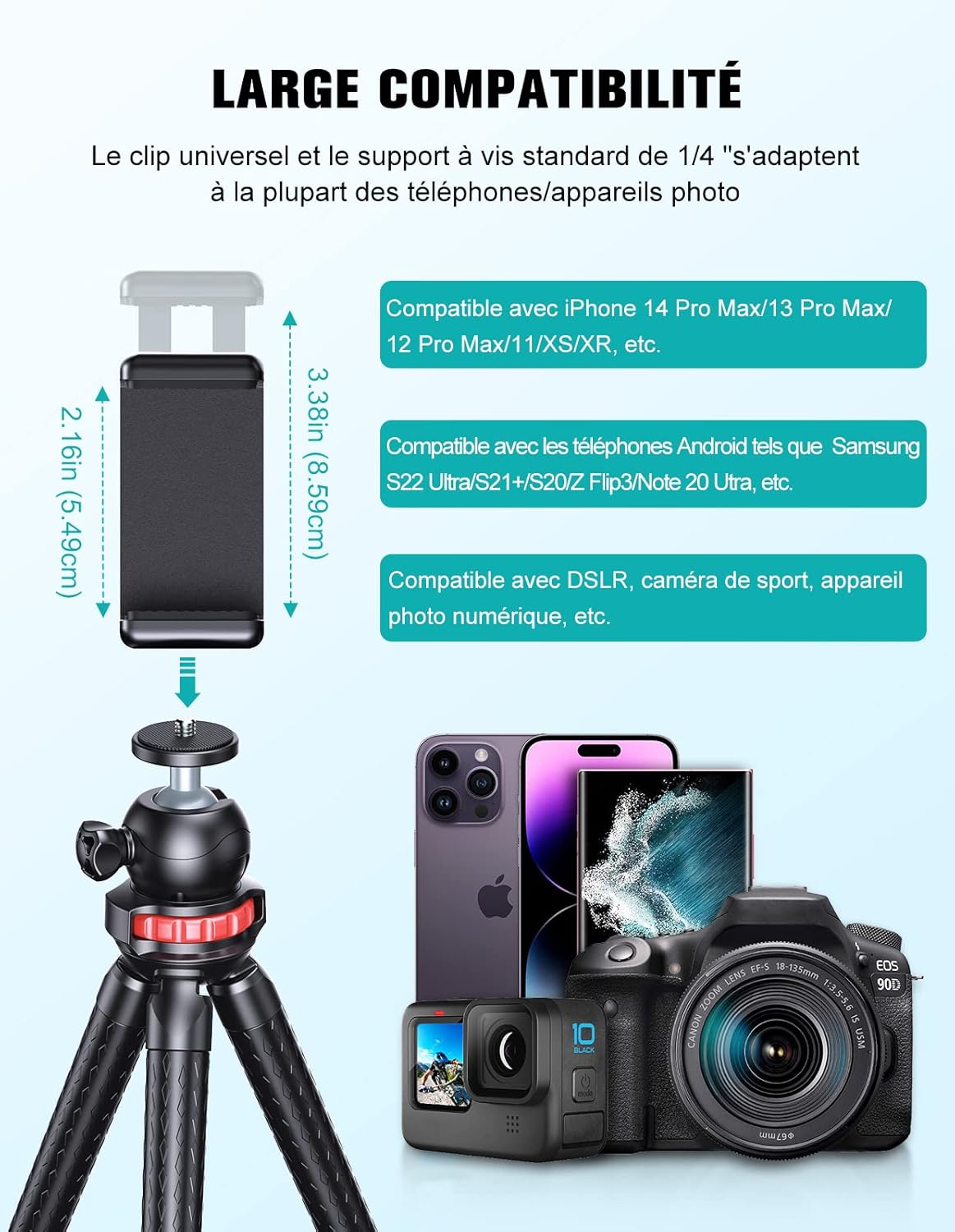
Image 5.1: Universal compatibility with smartphones and cameras.
6. תחזוקה
To ensure the longevity and optimal performance of your CIRYCASE Flexible Mini Tripod, follow these maintenance guidelines:
- ניקוי: נגבו את החצובה במטלית רכה ויבשה כדי להסיר אבק ולכלוך. עבור סימנים עקשניים, השתמשו במטלית רכה ויבשה.amp מטלית ולאחר מכן יבשו היטב. הימנעו מכימיקלים חזקים או חומרי ניקוי שוחקים.
- אִחסוּן: אחסנו את החצובה במקום קריר ויבש, הרחק מאור שמש ישיר וטמפרטורות קיצוניות.
- טיפול: While the legs are flexible, avoid excessive force or bending them beyond their natural range to prevent damage to the internal structure.
- חשיפה למים: The tripod is not waterproof. Avoid exposing it to water or high humidity.
7. פתרון תקלות
If you encounter any issues with your CIRYCASE Flexible Mini Tripod, please refer to the following common problems and solutions:
| בְּעָיָה | סיבה אפשרית | פִּתָרוֹן |
|---|---|---|
| שלט בלוטות' לא מתחבר. |
|
|
| החצובה לא יציבה. |
|
|
| Phone clip not holding device securely. |
|
|
8. מפרטים
| תכונה | פְּרָט |
|---|---|
| דֶגֶם | Tripod 30Q |
| מותג | CIRYCASE |
| צֶבַע | שָׁחוֹר |
| חוֹמֶר | High-quality aluminum alloy, high-density rubber |
| משקל פריט | 361 גרם |
| מידות המוצר (L x W x H) | 20 x 10.2 x 4.6 ס"מ |
| גובה מינימלי | 15 סנטימטרים |
| גובה מקסימלי | 152 Centimeters (when used as selfie stick/extended) |
| סוג ראש חצובה | Ball Head (360° Rotatable) |
| טווח מרחוק Bluetooth | עד 10 מטר (33 רגל) |
| Phone Clip Width Range | 2.16 אינץ' - 3.38 אינץ' (5.49 - 8.59 ס"מ) |
| הרכב הסוללה (שלט רחוק) | ליתיום-יון (1 כלול) |
| עמידות במים | לא עמיד למים |
9. אחריות ותמיכה
CIRYCASE products are designed for durability and performance. For any warranty claims or technical support, please contact CIRYCASE customer service through the retailer where the product was purchased or refer to the contact information provided on the product packaging or official CIRYCASE webאֲתַר.
אנא שמור את הוכחת הרכישה שלך לצורכי אחריות.