
1. הקדמה
This manual provides comprehensive instructions for the installation, operation, and maintenance of your REVODATA 5MP POE Starlight IP Camera, model I706-P-FC-HS. This camera is designed for indoor security surveillance, offering high-resolution imaging, full-color night vision, and flexible power options. Please read this manual thoroughly before using the product to ensure proper setup and functionality.
2. תכולת החבילה
ודא שכל הפריטים המפורטים להלן כלולים בחבילה שלך. אם פריטים חסרים או פגומים, אנא צור קשר עם תמיכת הלקוחות.
- x מצלמה 1
- סט ברגים x 1
- מדריך למשתמש x 1

Image: Contents of the product package, showing the camera, user manual, and mounting screws.
3. המוצר נגמרview
3.1 תכונות עיקריות
- 5MP HD Image: Equipped with a 1/3-inch 5.0 megapixel CMOS sensor, providing clear and smooth video at up to 25 frames per second.
- Full Color Starlight Night Vision: Offers 24-hour color monitoring, presenting color images even in low-light environments.
- Mini 4mm Lens: Compact design with a 4mm lens, suitable for discreet installation.
- תמיכה ב-POE: Supports 48V 802.3af Power Over Ethernet (POE) for simplified wiring, or can be powered by a 12V 2A power supply (not included) as a non-POE network camera.
- H.265/H.264 Compression: Utilizes advanced video compression to save storage space and bandwidth.
- זיהוי תנועה: Features motion detection with alarm notification capabilities.
- P2P Remote View: Allows remote viewing and playback of surveillance footage via mobile clients (iOS, Android) using the "Linklemo" app or VMS software for Windows computers.
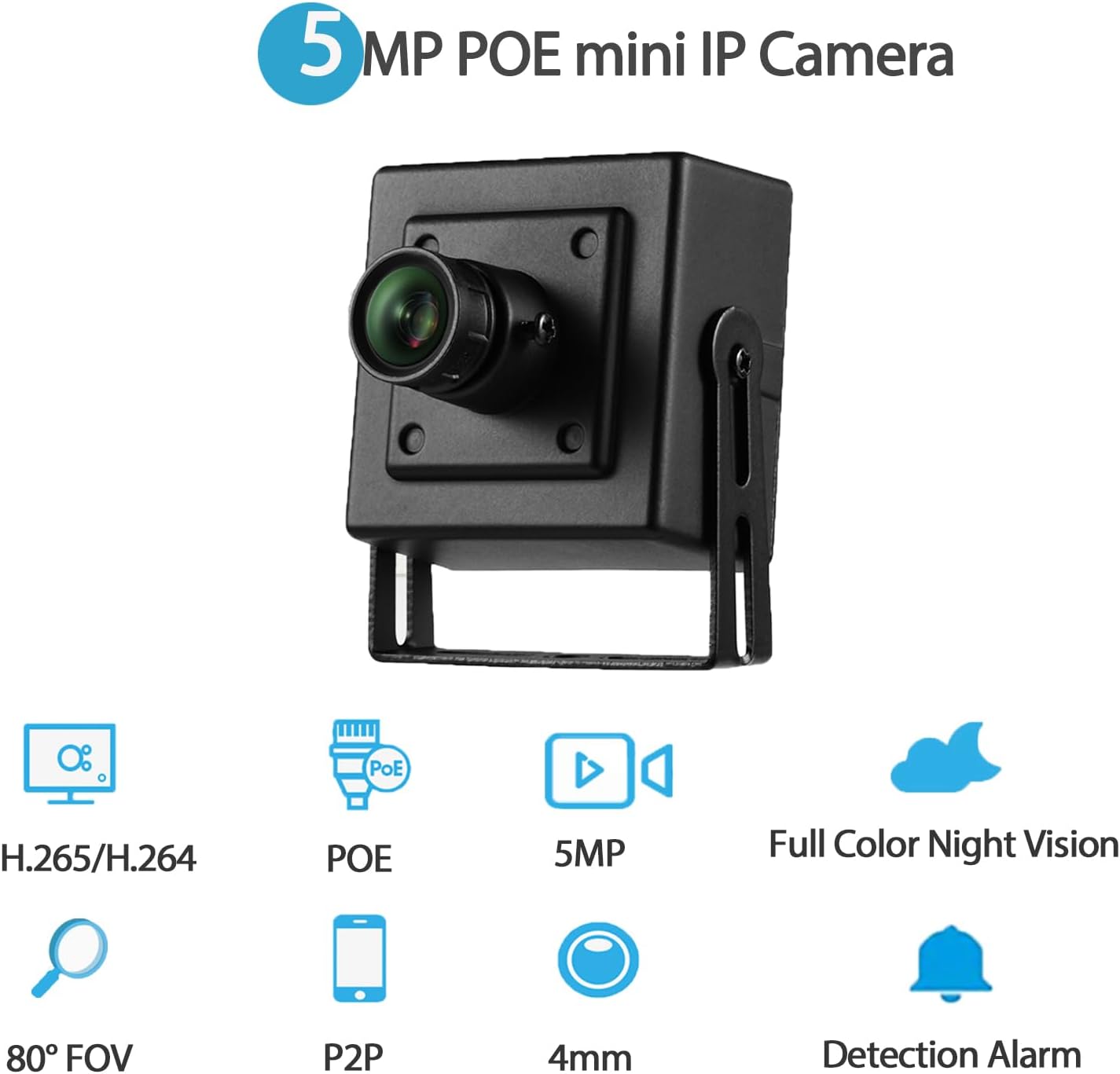
תמונה: מעלview of the camera's main features, including 5MP resolution, POE, full-color night vision, and motion detection.
3.2 רכיבי המצלמה
- Metal Shell: Durable housing for the camera.
- עדשת 4 מ"מ: Fixed focal length lens for a wide field of view.
- סוגרי הרכבה: Adjustable brackets for flexible installation.
- חור בורג: להרכבה בטוחה.
- יציאת RJ45: For Ethernet connection and POE power (48V version).
- יציאת מתח DC: Auxiliary power input (supports 12V 2A).
תמונה: מפורט view of the camera's physical components and dimensions.
4. הוראות התקנה
4.1 התקנה פיזית
- בחר מיקום: בחר מיקום פנימי המספק את הרצוי viewing angle and is within reach of an Ethernet cable. The camera is suitable for various indoor environments such as bedrooms, garages, living rooms, offices, and study rooms.
- התקן את המצלמה: Use the included screws and mounting brackets to securely attach the camera to a wall or other suitable surface. Adjust the bracket to achieve the optimal camera orientation.
4.2 הפעלת המצלמה
המצלמה תומכת בשתי אפשרויות צריכת חשמל:
- Power Over Ethernet (POE): Connect an Ethernet cable from a 48V 802.3af POE-enabled switch or NVR directly to the camera's RJ45 port. This method provides both power and data connectivity through a single cable.
- Auxiliary DC Power: If POE is not available, connect a 12V 2A DC power adapter (not included) to the camera's DC power port. An Ethernet cable will still be required for data transmission.

Image: Illustration of POE connectivity, simplifying power and data wiring.
4.3 חיבור רשת
Connect the camera to your local network using an Ethernet cable plugged into the RJ45 port. Ensure your network provides internet access for remote viewתכונות.
5. הוראות הפעלה
5.1 התקנת תוכנה
אֶל view and manage your camera, install the appropriate software:
- אפליקציה לנייד: Download and install the "Linklemo" app from the App Store (iOS) or Google Play Store (Android).
- תוכנות מחשב: For Windows computers, use the VMS software. Note that VMS software is not available for MAC OS or Linux.
שלט אחד Viewינג (P2P)
The camera supports P2P (Peer-to-Peer) cloud functionality, allowing you to view פו חיtage and playback recordings remotely from your mobile device or computer.
- Open the "Linklemo" app or VMS software.
- Follow the on-screen instructions to add your camera using its unique ID or QR code.
- Once added, you can access the camera's live feed and recorded data from anywhere with an internet connection.

תמונה: דוגמהamples of remote viewing through the Linklemo mobile app and VMS desktop software.

Image: P2P remote viewעל גבי מספר מכשירים.
5.3 Motion Detection Setup
The camera can be configured to detect motion and send alerts.
- Access the camera settings through the "Linklemo" app or VMS software.
- Navigate to the motion detection settings.
- Enable motion detection and configure sensitivity, detection zones, and notification preferences (e.g., push notifications to your phone).

Image: Motion detection alarm notification on a smartphone.
5.4 מצבי ראיית לילה
The camera features full-color starlight night vision, providing clear color images even in very low light conditions (minimum illumination: 0.01Lux @(F1.2,AGC ON)).

Image: Full-color night vision capability in a low-light outdoor setting.

Image: Real picture comparison of day and night vision.
6. תחזוקה
- ניקוי: נגבו בעדינות את עדשת המצלמה ואת גוף המצלמה בעזרת מטלית רכה ויבשה. הימנעו משימוש בכימיקלים חזקים או בחומרים שוחקים שעלולים לפגוע במצלמה.
- עדכוני קושחה: בדקו מעת לעת את הוראות היצרן website or the "Linklemo" app for available firmware updates to ensure optimal performance and security.
- ניהול כבלים: Ensure all cables are securely connected and not exposed to potential damage or interference.
7. פתרון תקלות
| בְּעָיָה | סיבה אפשרית | פִּתָרוֹן |
|---|---|---|
| אין פיד תמונות/וידאו | No power; Network connection issue; Incorrect software settings. | Check power supply (POE or 12V adapter). Verify Ethernet cable connection. Ensure camera is added correctly in Linklemo app/VMS. |
| איכות תמונה ירודה | עדשה מלוכלכת; תאורה לא מספקת; בעיות רוחב פס של הרשת. | Clean the camera lens. Ensure adequate lighting for optimal performance. Check network speed and reduce video quality settings if necessary. |
| זיהוי תנועה לא עובד | Settings not configured; Sensitivity too low; Network issues preventing notifications. | Verify motion detection is enabled and configured in the app/software. Adjust sensitivity. Check network connectivity for notifications. |
| Cannot connect remotely | No internet access; P2P service issues; Firewall restrictions. | Ensure the camera and your viewing device have internet access. Check P2P status in the app. Configure router/firewall to allow camera traffic if necessary. |
8. מפרטים
| שם הדגם | I706-P-FC-HS |
| רזולוציית לכידת וידאו | 5 מגה פיקסל (2560x1920) |
| עֲדָשָׁה | 4 מ"מ |
| קצב פריימים | 25 פריימים לשנייה |
| ראיית לילה | Full Color Starlight Night Vision (Min illumination: 0.01Lux @(F1.2,AGC ON)) |
| דחיסת וידאו | H.265/H.264 |
| קישוריות | Ethernet (LAN) |
| מקור כוח | 48V 802.3af POE or 12V 2A DC (adapter not included) |
| סוג בקר | אנדרואיד, iOS, Windows |
| סוג הרכבה | מתקן קיר |
| שימוש בפנים/חוץ | מקורה |
| שדה של View | 80 מעלות |
| חוֹמֶר | מַתֶכֶת |
| מידות המוצר | 1.77 x 1.57 x 2.09 אינץ' |
| משקל פריט | 6.4 אונקיות |
| דירוג הגנה בינלאומי | IP67 (Note: Product description states Indoor/Outdoor Usage: Indoor, but IP67 rating suggests outdoor capability. Follow manufacturer's primary recommendation for indoor use.) |
9. אחריות ותמיכה
For warranty information and technical support, please refer to the official REVODATA webבאתר או צרו קשר ישירות עם שירות הלקוחות שלהם. פרטים בדרך כלל מסופקים על אריזת המוצר או בערוצי התמיכה הרשמיים של היצרן.
Manufacturer: REVODATA