
מָבוֹא
תודה על הרכישהasing the Max Power MPD15EQ Portable Rechargeable PA Speaker. This manual provides important information regarding the setup, operation, and maintenance of your speaker. Please read it thoroughly before using the product to ensure proper function and to maximize its lifespan.
הוראות בטיחות
- אל תחשוף את היחידה לגשם או לחות כדי למנוע סכנות שריפה או הלם.
- אין לפתוח את מארז הרמקול. אין בפנים חלקים הניתנים לתיקון על ידי המשתמש. יש לפנות לכל טיפול וטכנאי מוסמך.
- יש לוודא אוורור נאות. אין לחסום פתחי אוורור.
- השתמש רק במתאם החשמל שסופק עם היחידה.
- Keep the speaker away from heat sources, direct sunlight, and strong magnetic fields.
- נקה רק עם מטלית יבשה.
תוכן החבילה
- Max Power MPD15EQ PA Speaker
- מיקרופון קווי
- שְׁלַט רָחוֹק
- מתאם מתח
- מדריך למשתמש (מסמך זה)
המוצר נגמרview
Familiarize yourself with the various parts of your MPD15EQ speaker.
פאנל קדמי
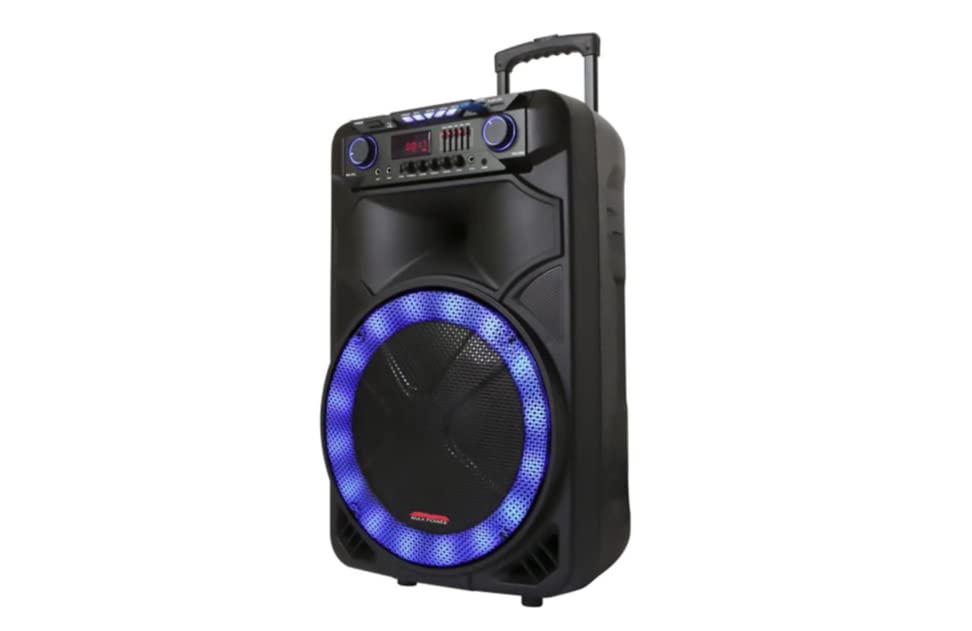
תיאור תמונה: This image displays the front of the Max Power MPD15EQ speaker. It features a large 15-inch woofer at the bottom, a 5-inch horn tweeter above it, and a control panel with an LED display screen. The speaker grille covers the woofer and tweeter, and the overall design is robust and portable.
- 15" Woofer: Provides powerful bass frequencies.
- 5" Horn Tweeter: Delivers clear high frequencies.
- מסך LED: מציג את המצב הנוכחי, פרטי הרצועה וההגדרות.
- לוּחַ בַּקָרָה: Buttons and knobs for various functions (volume, EQ, mode, etc.).
- LED Light On/Off Switch: שולט בתאורת ה-LED המשולבת.
לוח אחורי (למשלample - specific details not provided in source)
The rear panel typically includes input/output ports and the power connection.
- קלט כוח: For connecting the power adapter to charge the battery or operate the unit.
- יציאת USB: להשמעת אודיו מכונני USB.
- חריץ לכרטיס SD: להשמעת אודיו מכרטיסי SD.
- כניסת מיקרופון: לחיבור המיקרופון החוטי.
- קלט עזר: לחיבור התקני שמע חיצוניים באמצעות כבל 3.5 מ"מ או RCA.
הגדרה
טעינת הסוללה
The MPD15EQ features a built-in rechargeable battery. Before first use, fully charge the speaker for approximately 6-8 hours.
- Connect the supplied power adapter to the speaker's power input port.
- חבר את מתאם החשמל לשקע רגיל בקיר.
- The LED display or an indicator light will show the charging status.
- לאחר טעינה מלאה, נתק את ספק הכוח.
הפעלה ראשונית
- Ensure the speaker is fully charged or connected to power.
- Locate the power switch (usually on the rear or control panel) and turn it to the "ON" position.
- The LED display will illuminate, indicating the speaker is ready for use.
הוראות הפעלה
חיבור בלוטות'
- Turn on the MPD15EQ speaker.
- Press the "MODE" button on the control panel until "BLUETOOTH" or "BT" appears on the LED display.
- הפעל את Bluetooth בטלפון החכם, בטאבלט או במכשיר שמע אחר שלך.
- חפש available devices and select "MPD15EQ" from the list.
- Once paired, you will hear a confirmation sound, and you can now play audio wirelessly.
שימוש במיקרופון קווי
- Connect the supplied wired microphone to the "MIC IN" port on the speaker.
- Adjust the microphone volume knob (if available) on the control panel to your desired level.
- דבר לתוך המיקרופון.
הפעלת כרטיס USB/SD
- הכנס כונן הבזק מסוג USB או כרטיס SD (טעון מראש עם קבצי שמע MP3) files) into the respective port.
- The speaker should automatically switch to USB/SD mode and begin playing. If not, press the "MODE" button.
- Use the playback controls (Play/Pause, Next, Previous) on the control panel or remote control.
5-Band Graphic EQ Adjustment
The MPD15EQ features a 5-band graphic equalizer to fine-tune your audio output.
- Locate the EQ sliders on the control panel.
- Each slider corresponds to a specific frequency band. Adjust them up or down to boost or cut those frequencies.
- Experiment with the settings to achieve your preferred sound profile.
נורות לד
The speaker includes integrated LED lights. Use the "LED Light On/Off Switch" to activate or deactivate them.
שימוש בשלט רחוק
The included remote control allows for convenient operation from a distance. It typically includes buttons for power, mode selection, volume, track control, and EQ presets.
תַחזוּקָה
ניקוי
- תמיד כבו את הרמקול ונתק אותו מהחשמל לפני ניקויו.
- השתמש במטלית רכה ויבשה כדי לנגב את המשטחים החיצוניים.
- Do not use liquid cleaners, aerosols, or abrasive chemicals.
אִחסוּן
- יש לאחסן את הרמקול במקום קריר ויבש, הרחק מאור שמש ישיר וטמפרטורות קיצוניות.
- If storing for extended periods, charge the battery periodically (e.g., every 3 months) to maintain battery health.
פתרון בעיות
| בְּעָיָה | סיבה אפשרית | פִּתָרוֹן |
|---|---|---|
| אין כוח | סוללה ריקה; כבל חשמל לא מחובר; כבוי. | Charge the battery; Check power cable connection; Turn power switch ON. |
| אין קול | עוצמת קול נמוכה מדי; מצב קלט שגוי; המכשיר לא משויך (Bluetooth). | Increase master volume; Select correct input mode (Bluetooth, USB, AUX); Re-pair Bluetooth device. |
| המיקרופון לא עובד | Microphone not connected; Microphone volume low; Microphone switch off. | Ensure microphone is securely plugged in; Increase microphone volume; Check microphone's ON/OFF switch. |
| חיבור בלוטות' לא יציב | המכשיר רחוק מדי; הפרעות; סוללה חלשה. | Move device closer to speaker; Avoid obstacles; Ensure speaker battery is charged. |
מפרטים
- וופר: Single 15"
- ציוץ: Single 5" Horn
- תגובת תדירות: 40-20KHz
- עַכָּבָּה: 4 אוהם
- רְגִישׁוּת: 93dB
- מידות (ב x D x H): 19 אינץ' x 16.75 אינץ' x 32 אינץ'
- מִשׁקָל: בערך 38 פאונד
- סוֹלְלָה: מובנה נטענת
- קישוריות: Bluetooth, USB, SD Card, Microphone Input, Auxiliary Input
- EQ: 5 להקות גרפיקה
- לְהַצִיג: מסך LED
- אביזרים כלולים: Wired Microphone, Remote Control
אחריות ותמיכה
Max Power products are designed for reliability and performance. For warranty information or technical support, please refer to the warranty card included with your purchase or visit the official Max Power webאתר. שמור את הוכחת הרכישה שלך לצורך תביעות אחריות.
מידע ליצירת קשר: Please refer to the packaging or official webאתר לקבלת פרטי הקשר העדכניים ביותר של שירות לקוחות.
סרטוני מוצר רשמיים
No official product videos from the seller were available for embedding at this time. If available, they would appear here with detailed descriptions.