
1. הקדמה
This manual provides essential information for the safe and efficient operation of your Dual DL-32HD-008 LED TV. Please read these instructions carefully before using the television and retain them for future reference. This 32-inch (81 cm) HD LED TV features a 1366 x 768 resolution, multiple connectivity options including HDMI and USB, and an integrated DVB-T/C/S2 tuner.

Image 1.1: The Dual DL-32HD-008 LED TV.
2. מידע בטיחות
יש להקפיד תמיד על אמצעי זהירות בסיסיים בעת שימוש בטלוויזיה זו כדי להפחית את הסיכון לשריפה, התחשמלות ופציעה.
- אל תחשוף את הטלוויזיה לגשם או לחות.
- אל תפתחו את הטלוויזיהasinז; הפנה את כל הטיפולים לצוות מוסמך.
- ודא אוורור נאות סביב הטלוויזיה.
- הרחק את הטלוויזיה מאור שמש ישיר, מקורות חום ושדות מגנטיים חזקים.
- נתק את הטלוויזיה מהחשמל במהלך סופות ברקים או כאשר אינה בשימוש למשך תקופות ארוכות.
3. תכולת החבילה
ודא שכל הפריטים נמצאים בקופסה:
- Dual DL-32HD-008 LED TV
- רגלי מעמד (2 יחידות)
- שְׁלַט רָחוֹק
- מדריך למשתמש (מסמך זה)
4. התקנה
4.1. התקנת מעמד
To install the stand feet:
- הנח בזהירות את הטלוויזיה כשפניה כלפי מטה על משטח רך ושטוח כדי למנוע נזק למסך.
- יישרו כל רגלית של המעמד עם החריצים המתאימים בתחתית הטלוויזיה.
- אבטח את הרגליים באמצעות הברגים המצורפים.

Image 4.1: TV with stand feet installed.
4.2. הרכבה על הקיר
The TV supports VESA 100 x 100 mm wall mounts. A wall mount kit is not supplied. Please consult a professional for wall mounting to ensure safety and proper installation.
4.3. חיבור התקנים חיצוניים
הטלוויזיה מציעה מגוון יציאות לחיבור התקנים חיצוניים:
- יציאות HDMI: Connect Blu-ray players, game consoles, or set-top boxes. This model includes 1 HDMI 1.4 port and 1 HDMI ARC port.
- יציאת USB 2.0: For media playback or PVR (Personal Video Recorder) functionality.
- קלט אנטנה: Connect your terrestrial, cable, or satellite antenna for DVB-T/C/S2 reception.
- חריץ CI+: עבור מודולי גישה מותנית (CAM) לפענוח ערוצים מוצפנים.

Image 4.2: Rear panel with connectivity ports.
4.4. Power Connection and First-Time Setup
- חבר את כבל החשמל לטלוויזיה ולאחר מכן לשקע בקיר.
- לחץ על כפתור ההפעלה בשלט רחוק או בטלוויזיה.
- Follow the on-screen instructions for the initial setup, including language selection, channel scanning, and network configuration (if applicable).
5. הפעלה
5.1. שלט רחוק מעלview
Familiarize yourself with the remote control buttons for optimal TV operation.

תמונה 5.1: שלט רחוק.
5.2. פונקציות טלוויזיה בסיסיות
- כּוֹחַ: הקש על כּוֹחַ כפתור כדי להפעיל או לכבות את הטלוויזיה.
- כֶּרֶך: השתמש ב- VOL +/- כפתורים לכוונון עוצמת הקול.
- עָרוּץ: השתמש ב- CH +/- לחצנים לשינוי ערוצים.
- קֶלֶט: הקש על קֶלֶט button to select different input sources (HDMI, USB, TV).
- תַפרִיט: הקש על תַפרִיט button to access the main menu for settings adjustments.
5.3. פעולת טיונר
Your TV supports DVB-T (terrestrial), DVB-C (cable), and DVB-S2 (satellite) signal formats. After initial setup, channels will be scanned and stored. Use the EPG כפתור ל view the Electronic Program Guide.
5.4. USB PVR Function
Connect a USB storage device to the USB 2.0 port to record TV programs. Refer to the on-screen menu for PVR setup and operation instructions.
6. תחזוקה
6.1. ניקוי המסך
נגבו בעדינות את המסך בעזרת מטלית רכה ונטולת סיבים. במקרה של סימנים עקשניים, נגבו קלותampשטפו את המטלית במים או בחומר ניקוי מיוחד למסכים. לעולם אל תרסס נוזל ישירות על המסך.
6.2. ניקוי ה-Casing
השתמשו במטלית רכה ויבשה לניקוי הטלוויזיהasinז. הימנעו משימוש בחומרי ניקוי שוחקים או ממסים.
7. פתרון תקלות
אם נתקלת בבעיות, עיין בבעיות הנפוצות ובפתרונות הבאות:
| בְּעָיָה | סיבה אפשרית | פִּתָרוֹן |
|---|---|---|
| אין כוח | כבל החשמל מנותק; אין חשמל מהשקע. | בדוק את חיבור כבל החשמל; בדוק את השקע עם מכשיר אחר. |
| אין תמונה, אבל יש קול | נבחר מקור קלט שגוי; כבל פגום. | לִלְחוֹץ קֶלֶט to select correct source; check HDMI/AV cable connections. |
| אין קול, אבל יש תמונה | עוצמת הקול מושתקת או נמוכה מדי; בעיה במערכת שמע חיצונית. | בטל השתקה או הגברת עוצמת הקול; בדוק חיבורי שמע חיצוניים. |
| השלט רחוק לא עובד | סוללות התרוקנו או הוכנסו בצורה שגויה; חסימה. | Replace batteries (CR2032 type); ensure clear path to TV's IR sensor. |
| איכות תמונה ירודה | אות חלש; הגדרות תמונה שגויות. | Check antenna connection; adjust picture settings in the menu. |
8. מפרטים
Detailed technical specifications for the Dual DL-32HD-008 LED TV:
| תכונה | מִפרָט |
|---|---|
| שם הדגם | DL-32HD |
| גודל מסך | 32 אינץ '(81 ס"מ) |
| טכנולוגיית תצוגה | LED |
| הַחְלָטָה | 720p (1366 x 768) |
| קצב רענון | 60 הרץ |
| יחס גובה-רוחב | 16:9 |
| יחס ניגודיות | 1200:1 |
| בהירות מרבית | 180 Candelas per square meter |
| זמן תגובה | 8 מילישניות |
| Viewזווית | 178 מעלות |
| מצב פלט שמע | לְהַקִיף |
| תיאור הרמקול | 2 x 8 Watts Speakers |
| סך כל יציאות HDMI | 2 (1x HDMI 1.4, 1x HDMI ARC) |
| סך כל יציאות USB | 2 (USB 2.0) |
| סוג טיונר | DVB-T, DVB-C, DVB-S2 |
| תקן VESA להרכבה | 100 x 100 מ"מ |
| צריכת חשמל | 65 Watts (On), 0.5 Watts (Standby) |
| קו כרךtage | 100-240 וולט AC 50-60 הרץ |
| מידות פריט (D x W x H) | 19P x 73.2W x 47.8H ס"מ |
| משקל הפריט (ללא מעמד) | 3.5 קילוגרם |
| משקל הפריט (עם מעמד) | 4.5 קילוגרם |
| סוג סוללה בשלט רחוק | CR2032 |
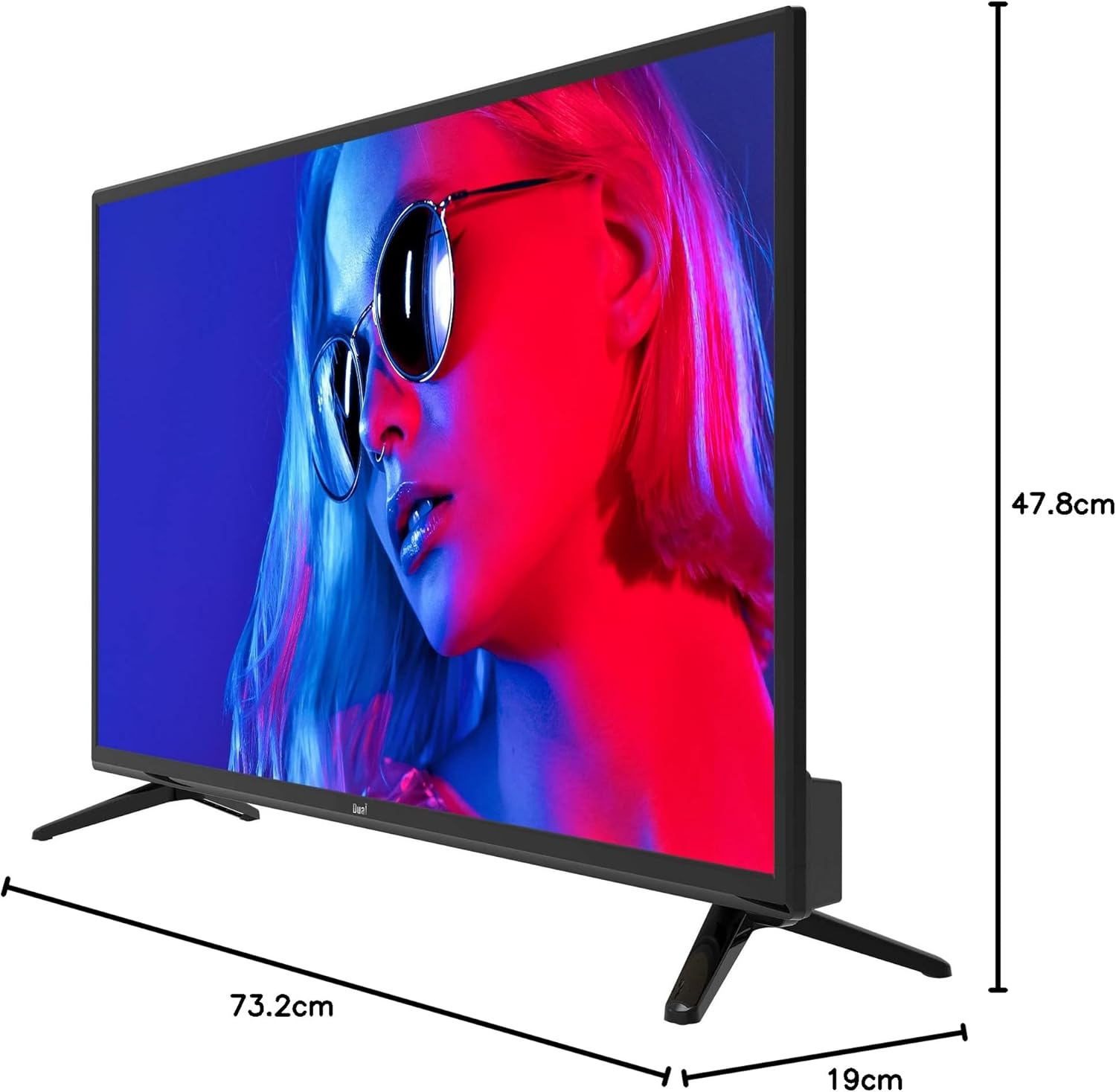
Image 8.1: TV dimensions.
8.1. תווית אנרגיה

Image 8.2: EU Energy Label. For more details, visit the official EPREL database: דף המוצר של EPREL
9. אחריות ותמיכה
9.1. מידע על אחריות
This product comes with a Limited Warranty. Please refer to the warranty card included in your package for specific terms and conditions.
9.2. Spare Parts and Software Updates
Information regarding the availability of spare parts and guaranteed software updates for this model is currently not available. Please contact your retailer or the manufacturer for further inquiries.
9.3. תמיכת לקוחות
For technical assistance or customer service, please contact your point of purchase or visit the official Dual webאתר למשאבי תמיכה.