
מָבוֹא
Thank you for choosing the BOBLOV W3 WiFi Body Camera. This manual provides detailed instructions for the proper setup, operation, and maintenance of your device. Please read this manual thoroughly before using the camera to ensure optimal performance and to prevent damage.
תוכן החבילה
ודא שכל הפריטים המפורטים להלן כלולים בחבילה שלך:
- 1x מצלמת גוף BOBLOV W3
- 1x 64GB Micro SD Card (pre-installed in camera)
- 1x כבל טעינה USB-C
- מברג אחד
- מדריך למשתמש אחד (מסמך זה)
- 1x Back Magnets Clip
- 1x Brooch
המוצר נגמרview
הכירו את רכיבי המצלמה ובקרותיה:

תְמוּנָה: BOBLOV W3 Body Camera with labels indicating the Power/Video Button, Audio/WiFi Button, Microphone, Reset button, Brooch attachment point, Back Magnetic Clip, and USB-C Charging Interface. The image also shows the dimensions of the camera.
- Power/Video Button: Used to power on/off the device and start/stop video recording.
- Audio/WiFi Button: Used to start/stop audio recording and activate/deactivate WiFi function.
- פון Wi you מיקרופון ללכידת אודיו.
- איפוס: Small button to reset the device (requires a pin).
- Brooch: Attachment point for the included brooch clip.
- Back Magnetic Clip: Removable clip for magnetic attachment.
- ממשק טעינה: יציאת USB-C לטעינה והעברת נתונים.
הגדרה
1. טעינת המצלמה
Before initial use, fully charge the camera. The built-in 1450mAh battery takes approximately 3 hours to fully charge.
- Connect the provided USB-C charging cable to the camera's charging interface.
- חבר את הקצה השני של הכבל לספק כוח USB (לא כלול) או ליציאת USB של מחשב.
- נורית חיווי הטעינה תידלק במהלך הטעינה ותכבה כאשר המכשיר טעון במלואה.
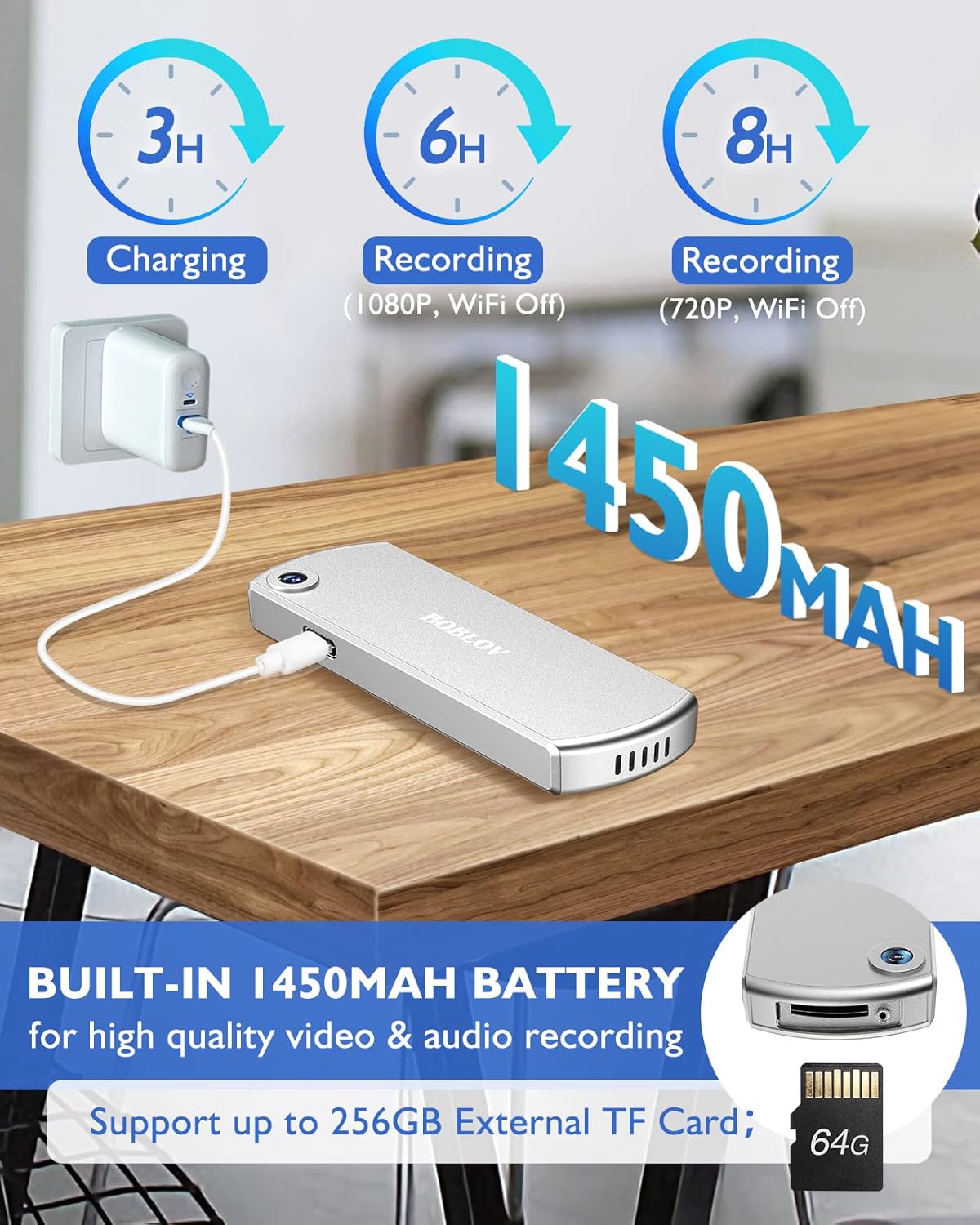
תְמוּנָה: The BOBLOV W3 Body Camera being charged via a USB-C cable, highlighting the 1450mAh battery and charging times: 3 hours for full charge, 6 hours recording (1080P, WiFi Off), and 8 hours recording (720P, WiFi Off).
2. Inserting/Expanding Memory Card
The W3 Body Camera uses an external Micro SD card. A 64GB card is included and pre-installed.
- אתר את חריץ כרטיס הזיכרון במצלמה.
- Use the included screwdriver to carefully unscrew the cover of the card slot.
- Insert or replace the Micro SD card (up to 256GB) into the slot with the contacts facing down.
- Securely fasten the card slot cover with the screwdriver.
3. חיבור המצלמה
The camera offers two attachment options: a back magnetic clip and a brooch.
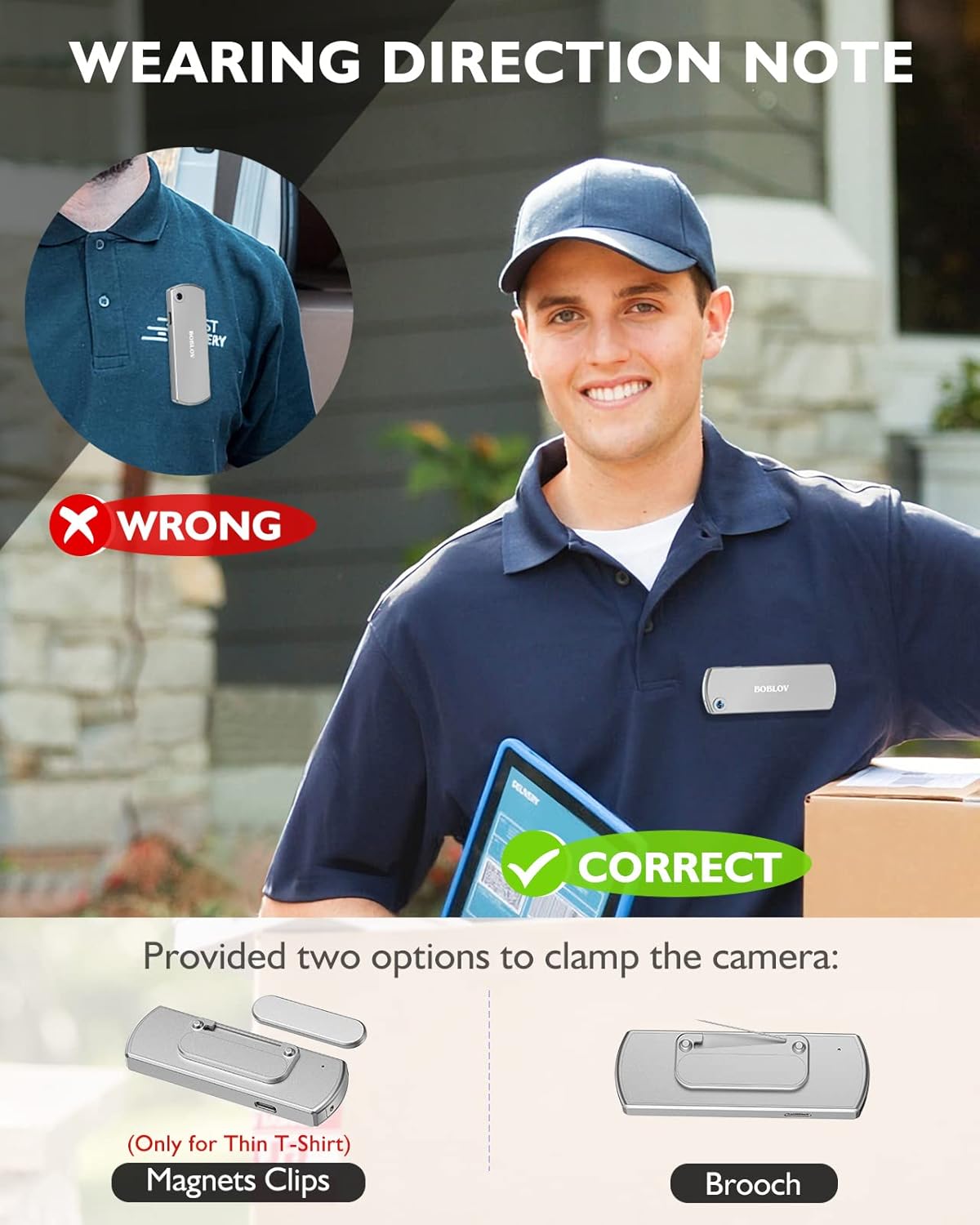
תְמוּנָה: Illustration demonstrating correct and incorrect ways to wear the BOBLOV W3 Body Camera. It shows that magnetic clips are suitable for thin T-shirts, while a brooch provides a more secure attachment for other clothing types.
- קליפ מגנטי: Attach the magnetic clip to the back of the camera. This is suitable for thin fabrics like T-shirts. Ensure the camera is securely held.
- Brooch: For more secure attachment or thicker clothing, use the provided brooch. Attach it to the camera's designated brooch point and then pin it to your clothing.
הוראות הפעלה
1. הפעלה/כיבוי
- הפעלה: לחץ והחזק את Power/Video Button למשך מספר שניות עד שנורית החיווי נדלקת.
- כיבוי: לחץ והחזק את Power/Video Button again for a few seconds until the indicator light turns off.
2. הקלטת וידאו
- While the camera is powered on, press the Power/Video Button once to start video recording. The indicator light will flash to indicate recording is in progress.
- הקש על Power/Video Button again to stop video recording. The indicator light will return to a steady state.
- The camera supports 1080P and 720P video recording. With WiFi off, it can record for approximately 6 hours at 1080P or 8 hours at 720P on a full charge.
- Videos are saved in 5-minute fragments by default. The camera supports loop recording, overwriting older files כאשר כרטיס הזיכרון מלא.
3. הקלטת שמע
- While the camera is powered on, press the Audio/WiFi Button once to start audio recording.
- הקש על Audio/WiFi Button שוב כדי להפסיק את הקלטת השמע.
4. WiFi Function and App Connectivity
The BOBLOV W3 features WiFi connectivity, allowing you to manage files and change settings via a smartphone app.
- הפעלת WiFi: לחץ והחזק את Audio/WiFi Button for a few seconds to turn on the WiFi function. The WiFi indicator light will flash.
- הורד אפליקציה:
- For Android devices, download the DHiHZ אפליקציה.
- For iOS devices, download the Mini-XRcam אפליקציה.
- חיבור למצלמה: On your smartphone, go to WiFi settings and connect to the camera's WiFi network (usually named "BOBLOV_W3_XXXX"). The default password is typically "12345678".
- השתמש באפליקציה: פתח את האפליקציה שהורדת כדי view פו חיtagה, הקלטות השמעה, הורדה files, והתאם את הגדרות המצלמה.
- ביטול ה-WiFi: לחץ והחזק את Audio/WiFi Button שוב כדי לכבות את ה-WiFi.

תְמוּנָה: The BOBLOV W3 Body Camera wirelessly connected to a smartphone, illustrating the WiFi function for managing files, changing settings, and accessing features like video, audio, preview, playback, and download through the dedicated Android (DHiHZ) and iOS (Mini-XRcam) applications.
5. חיבור למחשב
You can connect the camera to a computer to manage recorded files ושנה הגדרות.
- Ensure the camera is powered ON before connecting to the PC.
- חברו את המצלמה למחשב באמצעות כבל ה-USB-C המצורף.
- The camera will appear as a removable disk drive on your computer.
- You can then access, copy, delete, or upload recorded files. Some settings may also be configurable via a configuration file on the camera's storage.

תְמוּנָה: The BOBLOV W3 Body Camera connected to a laptop via a USB-C cable, demonstrating how to manage recorded files and change settings. Icons for Playback, Delete, Upload, and Settings are shown, with a note to ensure the camera is powered ON for connection.
תַחזוּקָה
- ניקוי: Use a soft, dry cloth to clean the camera body. Do not use liquid cleaners or solvents.
- אִחסוּן: אחסן את המצלמה במקום קריר ויבש, הרחק מאור שמש ישיר וטמפרטורות קיצוניות.
- טיפול בסוללה: כדי להאריך את חיי הסוללה, הימנעו מפריקה מלאה של הסוללה לעתים קרובות. טען את המצלמה באופן קבוע, גם אם אינה בשימוש למשך פרקי זמן ממושכים.
- כרטיס זיכרון: Periodically back up important recordings from the Micro SD card to a computer. Format the Micro SD card regularly (e.g., once a month) to maintain optimal performance and prevent data corruption.
- עמידות במים: The camera has an IP65 waterproof rating, meaning it is protected against dust and low-pressure water jets. It is not designed for submersion.
פתרון בעיות
| בְּעָיָה | סיבה / פתרון אפשרי |
|---|---|
| המצלמה לא נדלקת. | Battery may be depleted. Charge the camera for at least 3 hours. If the issue persists, try resetting the camera using a pin in the reset hole. |
| Camera gets hot when WiFi is on. | This is normal behavior for the camera when the WiFi function is active due to increased power consumption. |
| Cannot connect to WiFi via smartphone app. | Ensure WiFi is enabled on the camera. Check if you have downloaded the correct app (DHiHZ for Android, Mini-XRcam for iOS). Verify the WiFi password (default is "12345678"). Try restarting both the camera and your phone. |
| Camera stops recording unexpectedly. | The memory card may be full. The camera supports loop recording, but if the card is corrupted or too slow, it might cause issues. Try formatting the card or using a different high-speed Micro SD card. Battery may be low. |
| לא ניתן לגשת files במחשב. | Ensure the camera is powered ON before connecting to the PC. Try a different USB-C cable or USB port. |
מפרטים
| תכונה | פְּרָט |
|---|---|
| מותג | בובלב |
| שם הדגם | W3 |
| מספר דגם | B-W3 |
| טכנולוגיית קישוריות | Wi-Fi |
| תכונות מיוחדות | קַל מִשְׁקָל |
| מכשירים תואמים | Android/iOS Phone |
| מקור כוח | מופעל על סוללה |
| רזולוציית לכידת וידאו | 1080p |
| צֶבַע | כֶּסֶף |
| סוג הרכבה | מתקן משטח |
| גורם צורה | קוֹמפָּקטִי |
| חומר המארז | מַתֶכֶת |
| סוג התראה | תנועה בלבד |
| מקור אור | אינפרא אדום |
| דירוג עמיד למים | IP65 |
| שיטת בקרה | אפליקציה |
| מהtage | 3.7 וואט-שעה |
| ראיית לילה | צבע לילה |
| מידות פריט | 9 x 3 x 1.5 ס"מ |
| קיבולת סוללה | 1450mAh (מובנה) |
| Recording Time (1080P, WiFi Off) | כ. 6 שעות |
| Recording Time (720P, WiFi Off) | כ. 8 שעות |
| זמן טעינה | כ. 3 שעות |
| זיכרון חיצוני | Micro SD Card, up to 256GB (64GB included) |
| משקל נטו | 60 גרם / 2 אונקיות |
אחריות ותמיכה
BOBLOV provides a two-year warranty for high-value products, including the W3 Body Camera. For any technical assistance, troubleshooting, or warranty claims, please contact BOBLOV customer service.
Please refer to the official BOBLOV website or your purchase documentation for the most up-to-date contact information and warranty details.