
1. הקדמה
This manual provides essential information for the proper setup, operation, and maintenance of your Motast P32 Smart Watch. Please read it thoroughly to ensure optimal performance and longevity of your device.

Figure 1: Motast P32 Smart Watch promotional banner.

איור 2: חזית view of the Motast P32 Smart Watch displaying various fitness metrics.
2. התקנה
2.1 מה בקופסה
- 1 x Motast P32 Smart Watch
- 1 x כבל טעינה מגנטי
2.2 טעינת המכשיר
Before first use, fully charge your smart watch. Connect the magnetic charging cable to the charging pins on the back of the watch. Ensure the pins align correctly. Connect the USB end of the cable to a standard USB power adapter (not included).

Figure 3: Magnetic charging cable attached to the smart watch.
2.3 התקנה וצימוד של אפליקציה
The Motast P32 Smart Watch uses the GloryFit app for full functionality. Download the app by scanning the QR code provided in the watch's manual or searching for 'GloryFit' in your smartphone's app store (compatible with Bluetooth 4.0, iOS 9.0+ or Android 5.0+).
Once installed, open the GloryFit app and follow the on-screen instructions to pair your smart watch via Bluetooth. The app will automatically detect the watch for pairing. Confirm the pairing on both your phone and the watch.

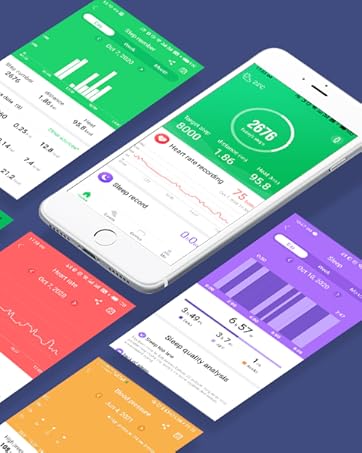
Figure 4: The GloryFit app interface on a smartphone, showing various data and settings.
3. הפעלת השעון החכם
3.1 ניווט בסיסי
- מסך מגע: החלק למעלה, למטה, שמאלה או ימינה כדי לנווט בין תפריטים ותכונות. הקש כדי לבחור.
- כפתור צד: Press the side button to wake the screen, return to the previous menu, or turn the watch on/off (long press).
3.2 תצוגה ובהירות
The Motast P32 features a 1.69-inch TFT color display with a resolution of 240 x 280 pixels. The brightness can be adjusted through 4 levels to suit various lighting conditions, ensuring clear visibility indoors and outdoors.

Figure 5: The 1.69-inch full touch screen display of the smart watch.
3.3 פרצופי שעון
Customize your watch's appearance by choosing from multiple pre-installed watch faces or downloading additional options via the GloryFit app. You can also personalize the dial with your own photos.
4. תכונות
4.1 מעקב כושר
The smart watch tracks various fitness metrics including steps, calories burned, and distance. It supports 24 sports modes such as walking, running, cycling, swimming, skipping, yoga, basketball, and football. GPS tracking is available through connection with your smartphone.

Figure 6: Fitness tracking with GPS connectivity via the GloryFit App.

Figure 7: The smart watch supports 24 different sport modes.
4.2 ניטור בריאות
The Motast P32 includes a Heart Rate Monitor, Blood Pressure Monitor, Blood Oxygen Monitor (SpO2), and Sleep Monitor. These features help you understand your health trends. Note: The data provided by this device is for reference only and cannot be used for medical diagnosis or treatment.

Figure 8: 24/7 Heart Rate Monitor and Sleep Monitor in action.
איור 9: מעלview of health monitoring features including Heart Rate, Blood Pressure, SpO2, Step Counter, and Calories Counter.
4.3 פונקציות חכמות
- התראות: Receive call, SMS, and app messages (WhatsApp, Facebook, Messenger, Instagram, etc.) directly on your wrist.
- בקרת מוזיקה: שלוט בהשמעת מוזיקה בטלפון החכם שלך (הפעלה, השהייה, דילוג על רצועות).
- בקרת מצלמה: השתמש בשעון שלך כמצמד מרחוק למצלמת הסמארטפון שלך.
- תצוגת מזג אוויר: קבל עדכוני מזג אוויר בזמן אמת כאשר אתה מחובר לטלפון שלך.
- תזכורת בישיבה: קבל התראות לתנועה לאחר תקופות של חוסר פעילות.
- שעון מעורר ושעון עצר: כלי ניהול זמן חיוניים.
- מצא טלפון/שעון: Locate your paired smartphone or watch.

Figure 10: Call and SMS alerts displayed on the smart watch.

Figure 11: Remote camera control feature.

Figure 12: Music control functionality.

Figure 13: Weather display on the smart watch.

איור 14: תכונת תזכורת לישיבה.
4.4 עמידות במים
The Motast P32 Smart Watch has an IP68 waterproof rating, making it suitable for daily activities like washing hands, exercising, and playing in the rain. It can also be worn during swimming. Note: Do not use in water hotter than 38°C, such as showers, saunas, or hot springs.

Figure 15: The IP68 waterproof rating allows for use during various water activities.

Figure 16: The smart watch is designed to withstand water exposure.
5. תחזוקה
5.1 ניקוי
Regularly clean your smart watch and strap with a soft, dry cloth. If necessary, use a slightly damp מטלית עם סבון עדין, ולאחר מכן יבשו היטב. הימנעו מכימיקלים חזקים או מחומרים שוחקים.
5.2 החלפת רצועה
The Motast P32 uses a standard 22mm strap with quick-release pins, allowing for easy replacement. To remove a strap, locate the small pin on the underside where the strap connects to the watch body. Pull the pin inwards and gently detach the strap. To attach a new strap, align the pins with the holes on the watch body, pull the pin inwards, and slide the strap into place until the pin locks securely.
6. פתרון תקלות
- שעון לא נדלק: ודא שהשעון טעון במלואו. חבר אותו לכבל הטעינה המגנטי ולמקור חשמל.
- לא ניתן להתאים לסמארטפון: Make sure Bluetooth is enabled on your phone and the watch is within range. Restart both devices and try pairing again through the GloryFit app.
- קריאות בריאות לא מדויקות: ודאו שהשעון צמוד לפרק כף היד, ברוחב אצבע אחת מעצם שורש כף היד. הימנעו מתנועה מוגזמת במהלך המדידות. זכרו, הנתונים הם לעיון בלבד.
- התראות שלא מופיעות: Check the notification settings in the GloryFit app to ensure all desired app notifications are enabled. Also, verify your phone's notification settings.
- חיי סוללה קצרים: Reduce screen brightness, disable unnecessary features, and ensure the watch is not constantly searching for a Bluetooth connection if not paired.
7. מפרטים
| שם הדגם | P32 |
| מותג | מוטסט |
| גודל מסך | 1.69 אינץ' |
| צוּרָה | מַלבֵּנִי |
| הרכב תא הסוללה | ליתיום פולימר |
| תקן תקשורת אלחוטית | בלוטות' |
| טכנולוגיית קישוריות | GPS (via smartphone) |
| תכונות מיוחדות | Fitness Tracker (Pedometer, Calories, Distance), GPS tracking, Heart Rate Monitor, Blood Pressure Monitor, 24 Sports Modes, IP68 Waterproof, Sleep Monitor, Blood Oxygen Monitor, Call Notifications, SMS and APP Messages, Music & Camera Control, Brightness Adjustment, Weather Display, Sedentary Reminder, Gmail, Alarm Clock, Stopwatch, Find Phone, Find watch. |
| מַעֲרֶכֶת הַפעָלָה | GloryFit (compatible with Bluetooth 4.0, iOS 9.0+ or Android 5.0+ smart phones) |
| מידות המוצר | 1.57 x 1.18 x 0.39 אינץ' |
| משקל פריט | 0.282 אונקיות |
| זמן המתנה של הטלפון (עם גלישה) | 15 ימים |
| מה יש בקופסה | 1 x Smartwatch |
8. סרטון מוצר רשמי
סרטון 1: נגמרview of the Motast P32 Smart Watch features, including its 1.69-inch touch screen, fitness tracking, and health monitoring capabilities.
9. אחריות ותמיכה
For warranty information and customer support, please refer to the documentation included with your product or visit the official Motast webאֲתַר. שמור את קבלה הרכישה שלך לתביעות אחריות.