
1. הקדמה
תודה על הרכישהasing the Muse M-308 BT Bluetooth Speaker. This manual provides essential information for the safe and correct use of your device. Please read it thoroughly before use and keep it for future reference.
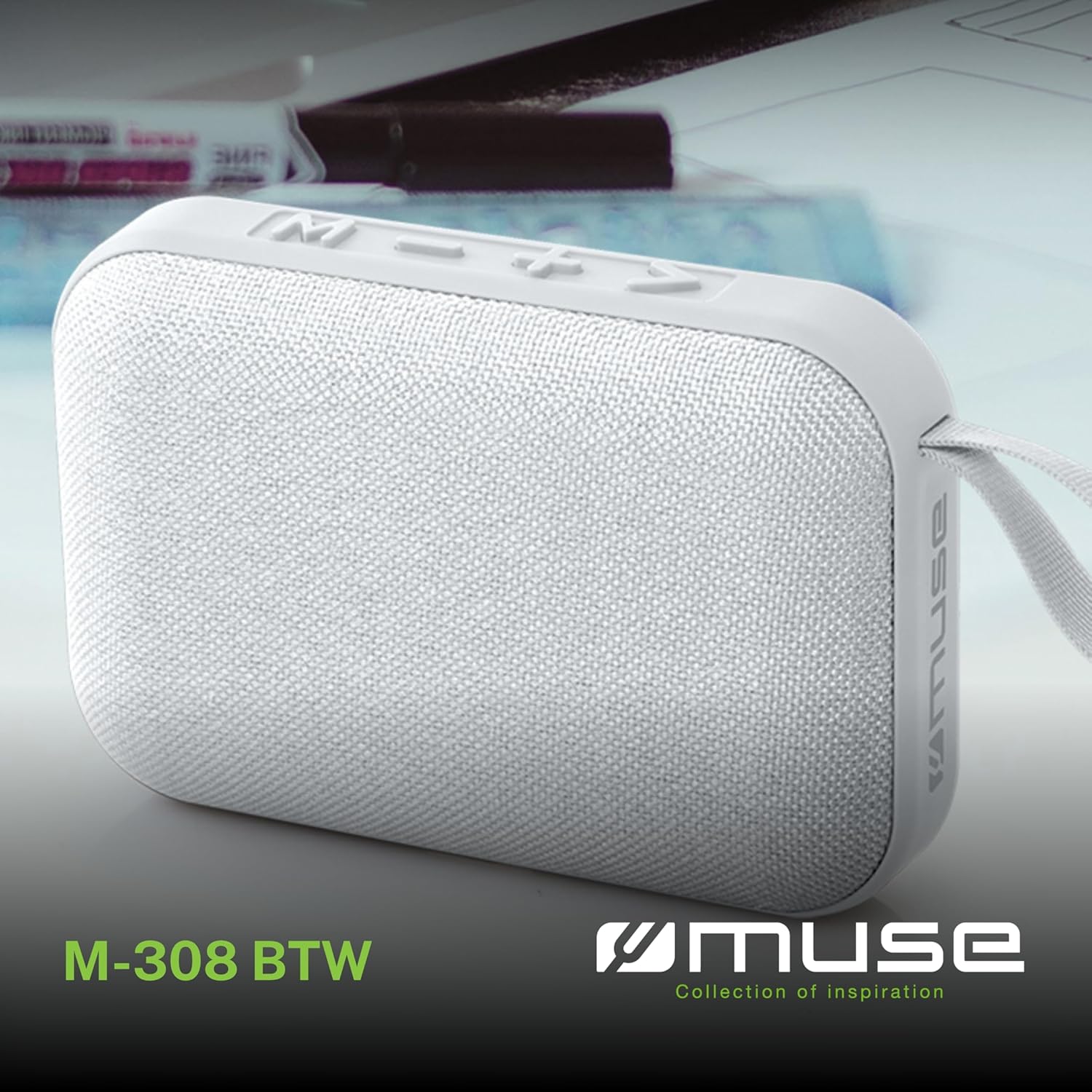
תמונה 1.1: חזית view of the Muse M-308 BT Bluetooth Speaker.
2. תכונות מוצר
- קישוריות בלוטות': הזרמת אודיו באופן אלחוטי ממכשירים תואמים.
- פונקציית דיבורית: Integrated microphone for taking calls.
- השמעת מדיה: Supports music playback from USB and MicroSD (TF) cards.
- התאמה סטריאו: Connect two M-308 BT speakers for enhanced stereo sound.
- מחוון LED: Provides visual feedback for Bluetooth pairing and charging status.
- קומפקטי וקל משקל: Designed for portability, weighing approximately 200g.
- סוללה נטענת מובנית: 1200mAh capacity for up to 10 hours of playback.
- כוח פלט: 5 Watts for clear audio.

Image 2.1: Key features of the Muse M-308 BT speaker.

Image 2.2: Additional functionalities of the Muse M-308 BT speaker.
3. תכולת החבילה
ודא שכל הפריטים נמצאים בעת הוצאת המזוודה:
- Muse M-308 BT Bluetooth Speaker
- כבל טעינה USB
- מדריך למשתמש (מסמך זה)
4. בקרות וחיבורים
הכירו את בקרות הרמקול ופתחי החיבור:

Image 4.1: Top panel with various connections.
- יציאת USB: להשמעת מוזיקה מדיסק און קי (USB).
- יציאת מיקרו USB: לטעינת הרמקול.
- Micro SD (TF) Card Slot: להשמעת מוזיקה מכרטיס Micro SD.
- מתג הדלק / כבה: To power the speaker on or off.

Image 4.2: Side panel with control buttons.
- M Button (Mode): Press to switch between Bluetooth, USB, and Micro SD modes.
- - Button (Volume Down / Previous Track):
- לחיצה קצרה: הנמכת עוצמת הקול.
- Long press: Go to the previous track.
- + Button (Volume Up / Next Track):
- לחיצה קצרה: הגברת עוצמת הקול.
- Long press: Go to the next track.
- > Button (Play / Pause / Call):
- Short press: Play or pause music.
- Short press (during incoming call): Answer call.
- Long press (during incoming call): Reject call.
- Short press (during call): End call.
5. התקנה
5.1 טעינת הרמקול
- חבר את כבל הטעינה USB המצורף ליציאת ה-Micro-USB ברמקול.
- חבר את הקצה השני של כבל ה-USB לספק כוח USB (לא כלול) או ליציאת ה-USB של המחשב.
- נורית ה-LED תידלק כדי להראות את מצב הטעינה. היא תכבה או תשנה צבע לאחר טעינה מלאה.
5.2 הפעלה/כיבוי
- כדי להפעיל את המכשיר, הסט את מתג ההפעלה/כיבוי למצב 'ON'. תשמע הנחיה קולית.
- כדי לכבות, הסט את מתג ההפעלה/כיבוי למצב 'כבוי'.
5.3 זיווג בלוטות '
- Ensure the speaker is powered on and in Bluetooth mode (indicated by a flashing LED). If not, press the 'M' button to switch to Bluetooth mode.
- הפעל את Bluetooth בטלפון החכם, בטאבלט או במכשיר תואם אחר שלך.
- חפש available Bluetooth devices and select "M-308 BT" from the list.
- לאחר הצימוד, נורית ה-LED תפסיק להבהב ותישאר קבועה, ותשמעו צליל אישור.
- The speaker will automatically connect to the last paired device when powered on, if it is within range.
5.4 Stereo Pairing (TWS Function)
To pair two M-308 BT speakers for true wireless stereo sound:
- ודא ששני הרמקולים דולקים ונמצאים במצב צימוד Bluetooth (נורית הלד מהבהבת).
- On one of the speakers (this will be the primary speaker), double-press the 'M' button. The speaker will search for another M-308 BT speaker.
- Once connected, both speakers will emit a confirmation tone, and the LED on the primary speaker will flash slowly, while the LED on the secondary speaker will remain solid.
- כעת, חברו את המכשיר שלכם לרמקול הראשי באמצעות Bluetooth כמתואר בסעיף 5.3.
6. הוראות הפעלה
6.1 נגינה
- מצב Bluetooth: After successful pairing, start playing music on your connected device. The audio will stream through the speaker.
- מצב USB/Micro SD: Insert a USB flash drive or Micro SD card into the respective port. The speaker will automatically switch to the corresponding mode and begin playing music. If it doesn't, press the 'M' button to cycle through modes.
6.2 בקרת עוצמת הקול
- לחץ על כפתור '+' כדי להגביר את עוצמת הקול.
- לחץ על כפתור '-' כדי להנמיך את עוצמת הקול.
6.3 ניווט במסלול
- Long press the '+' button to skip to the next track.
- Long press the '-' button to go back to the previous track.
6.4 שיחות ללא ידיים
- When a call comes in, the music will pause. Press the '>' button to answer the call.
- To end a call, press the '>' button again.
- To reject an incoming call, long press the '>' button.
7. תחזוקה
- הרחק את הרמקול מטמפרטורות קיצוניות, אור שמש ישיר ולחות.
- Do not expose the speaker to water or other liquids. This model is not water-resistant.
- נקו את הרמקול בעזרת מטלית רכה ויבשה. אין להשתמש בחומרי ניקוי שוחקים או ממסים.
- אל תנסה לפרק או לתקן את הרמקול בעצמך. פעולה זו תגרום לביטול האחריות.
- כאשר הסוללה אינה בשימוש למשך תקופות ממושכות, יש לטעון אותה לפחות פעם בשלושה חודשים כדי לשמור על תקינותה.
8. פתרון תקלות
| בְּעָיָה | סיבה אפשרית | פִּתָרוֹן |
|---|---|---|
| הרמקול לא נדלק. | הסוללה התרוקנה. | טען את הרמקול באמצעות כבל ה-USB המצורף. |
| לא ניתן לבצע צימוד דרך בלוטות'. | Bluetooth is not enabled on your device or speaker is not in pairing mode. Speaker is too far from the device. | Ensure Bluetooth is active on both devices. Make sure the speaker is in Bluetooth pairing mode (flashing LED). Move the speaker closer to your device (within 10 meters). |
| אין קול. | Volume is too low. Speaker is not connected. Incorrect mode selected. | Increase the volume on both the speaker and your connected device. Re-pair the Bluetooth connection. Press the 'M' button to cycle through modes (Bluetooth, USB, Micro SD). |
| Music playback from Micro SD card is erratic or "screaming". | מושחת files on Micro SD card. Incompatible file פוּרמָט. | ודא אודיו files are in a compatible format (e.g., MP3). Try using a different Micro SD card or reformatting the current one and reloading files. |
| Speaker switches between modes (e.g., SD and BT) unexpectedly. | Interference or a temporary software glitch. | Power off the speaker, wait a few seconds, then power it back on. Ensure no other devices are causing interference. If the issue persists, try removing the Micro SD card if it's inserted. |
9. מפרטים
| שם הדגם | M-308 BT |
| מותג | מוּזָה |
| טכנולוגיית קישוריות | בלוטות', קווי |
| טכנולוגיית תקשורת אלחוטית | בלוטות' |
| רמקול כוח פלט מרבי | 5 וואט |
| מצב פלט שמע | סטריאו |
| סוג רמקול | רמקול Bluetooth נייד |
| תכונות מיוחדות | בלוטות' |
| מכשירים תואמים | סמארטפון, טאבלט |
| מקור כוח | סוֹלְלָה |
| חיי סוללה | 10 שעות |
| קיבולת סוללה | 1200 מיליampשעה אחת |
| מידות המוצר (D x W x H) | 118D x 30B x 76H millimeters (11.8 x 3 x 7.6 cm) |
| משקל פריט | 200 גרם |
| חוֹמֶר | Plastic rubber material |
| Is Water Resistant | לֹא |
| רכיבים כלולים | כבל טעינה USB |
Image 9.1: Dimensions of the Muse M-308 BT speaker.
10. אחריות ותמיכה
The Muse M-308 BT Bluetooth Speaker comes with a אחריות לשנה מתאריך הרכישה.
For technical support, warranty claims, or further assistance, please contact your retailer or visit the official MUSE webאתר ליצירת קשר.