
1. הקדמה
Thank you for choosing the Awei TC-7 Wired Earphones. These in-ear earphones are designed for clear audio and convenient communication, featuring a Type-C connector for modern devices and an inline microphone with control buttons. Please read this manual carefully to ensure proper use and maintenance of your earphones.
2. תכולת החבילה
- Awei TC-7 Wired Earphones
- Multiple sizes of Ear Cushions (Small, Medium, Large)

איור 2.1: The Awei TC-7 earphones include ear caps in various sizes to ensure a comfortable and secure fit for different users.
3. המוצר נגמרview
The Awei TC-7 earphones feature a durable design with a Type-C plug for direct connection to compatible devices. The inline remote control allows for easy management of audio playback and calls.

איור 3.1: A close view of the Awei TC-7 earphones, showcasing their in-ear design for optimal sound delivery.

איור 3.2: The inline remote control features multi-function buttons for managing audio and calls.

איור 3.3: The integrated HD microphone is designed to pick up clear audio, even in noisy environments.
4. התקנה
- בחר כריות אוזניים: Choose the ear cushion size (Small, Medium, or Large) that provides the most comfortable and secure fit for your ears. A proper fit enhances sound quality and noise isolation.
- התחבר למכשיר: Insert the USB-C plug of the earphones into the Type-C port of your smartphone, tablet, laptop, or other compatible device.
- פלט שמע: Ensure your device's audio output is set to the connected earphones. This is usually automatic upon connection.
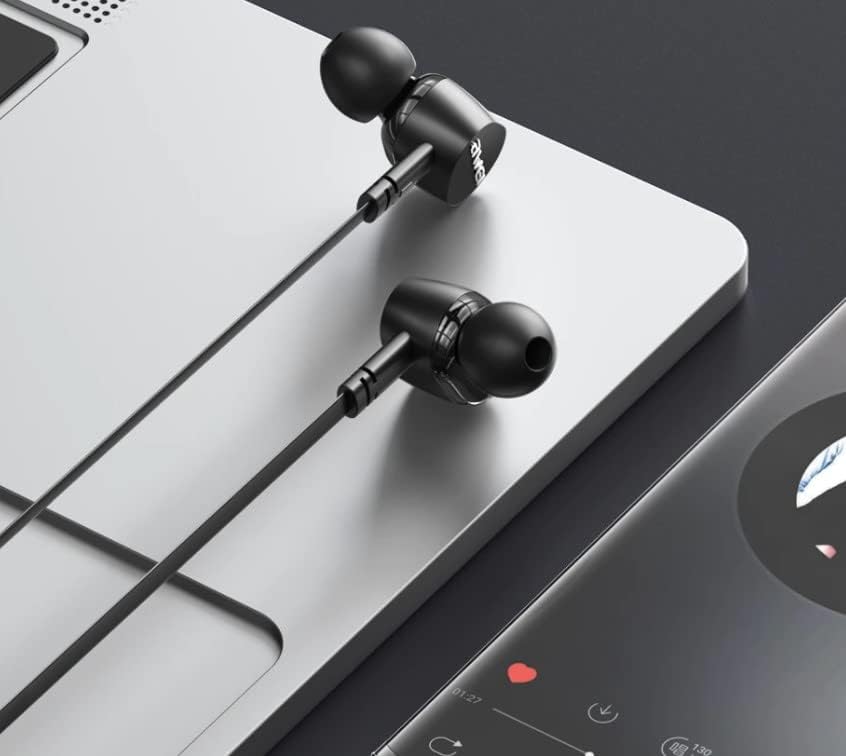
איור 4.1: The earphones are compatible with various devices featuring a USB-C port, such as laptops and smartphones.
5. הוראות הפעלה
The Awei TC-7 earphones feature an inline remote with buttons for convenient control of your audio and calls.
5.1. בקרת השמעת מוזיקה
- הפעל/השהה: לחץ פעם אחת על הכפתור המרכזי.
- הרצועה הבאה: לחץ פעמיים במהירות על כפתור המרכז.
- רצועה קודמת: לחץ על הלחצן המרכזי שלוש פעמים במהירות.
- הגבר קול: לחץ על כפתור '+'.
- להנמיך קול: לחץ על כפתור '-'.
5.2. ניהול שיחות
- מענה/סיום שיחה: לחץ על הלחצן האמצעי פעם אחת במהלך שיחה נכנסת או שיחה פעילה.
- דחה שיחה: לחץ והחזק את הלחצן המרכזי למשך כ-2 שניות במהלך שיחה נכנסת.
6. תחזוקה
Proper care will extend the lifespan of your Awei TC-7 earphones.
- ניקוי כריות אוזניים: Regularly remove the ear cushions and clean them with a soft, damp ודאו שהם יבשים לחלוטין לפני חיבורם מחדש.
- טיפול בכבלים: The cable is designed to be tangle-free. Avoid excessive pulling or sharp bending to prevent internal damage.
- אִחסוּן: When not in use, store the earphones in a clean, dry place, away from extreme temperatures.
- עמידות במים: The earphones are rated as waterproof. However, avoid prolonged submersion and ensure the USB-C port is dry before connecting to a device after exposure to water.
7. פתרון תקלות
If you encounter issues with your Awei TC-7 earphones, please refer to the following common solutions:
| בְּעָיָה | סיבה אפשרית | פִּתָרוֹן |
|---|---|---|
| אין קול מהאוזניות | Earphones not properly connected; device volume too low; incorrect audio output setting on device. | Ensure the USB-C plug is fully inserted. Increase device volume. Check device audio settings to confirm output is set to earphones. |
| המיקרופון לא עובד | Microphone port blocked; incorrect input setting on device; application permissions. | Ensure the microphone area is clear. Check device sound settings for microphone input. Verify application permissions for microphone access. |
| הכפתורים לא מגיבים | Loose connection; device incompatibility; software glitch. | Reconnect the earphones. Test with another compatible device if possible. Restart your device. |
8. מפרטים
| תכונה | פְּרָט |
|---|---|
| שם הדגם | TC-7 |
| טכנולוגיית קישוריות | חוטי |
| שקע אוזניות | USB-C |
| מיקום אוזניים | אין אוזן |
| טווח תדרים | 20 הרץ - 20 קילוהרץ |
| תכונות נוספות | Microphone Included, Inline Control |
| חוֹמֶר | פּלָסטִי |
| רמת עמידות במים | אֲטִימוּת |
| תכונות כבלים | סבך חינם |
| מכשירים תואמים | Smartphones, Laptops, Tablets, Desktops with USB-C |
9. אחריות ותמיכה
למידע על אחריות ותמיכת לקוחות, אנא עיינו בתיעוד שסופק בנקודת הרכישה או צרו קשר עם הקמעונאי שלכם. שמרו את הוכחת הרכישה שלכם לכל תביעת אחריות.