
Xetron XT-LMG-10X-EU
מדריך למשתמש של מד סעפת דיגיטלי של Xetron HVAC
Model: XT-LMG-10X-EU
1. הקדמה
The Xetron LMG-10X Digital Manifold Gauge is an advanced tool designed for HVAC and refrigeration systems. It provides precise measurements for pressure, temperature, vacuum, and automatically calculates superheat and subcooling. This manual will guide you through the setup, operation, and maintenance of your device.

Figure 1: Xetron LMG-10X Digital Manifold Gauge with included accessories.
2. מידע בטיחות
Always read and understand all safety warnings and instructions before using the device. Failure to follow these instructions may result in electric shock, fire, or serious injury.
- ודא שכל החיבורים מאובטחים לפני ההפעלה.
- אין לחשוף את המכשיר לטמפרטורות קיצוניות או לאור שמש ישיר למשך תקופות ממושכות.
- Use only specified accessories and probes.
- הרחק את המכשיר ממים ומנוזלים אחרים.
- הפנה את השירות לצוות מוסמך בלבד.
3. תכולת החבילה
ודא שכל הפריטים המפורטים להלן נמצאים בחבילה שלך:
- 1 x Xetron Digital Manifold Gauge (LMG-10X)
- 2 x Clamp בדיקות טמפרטורה
- 1 x תיק נשיאה
- מדריך למשתמש אחד (מסמך זה)

Figure 2: What's in the box - Xetron Digital Manifold and Clamp Temperature Probes.
4. התקנה
4.1. הפעלה ראשונית
- Insert batteries into the compartment on the back of the unit (if not pre-installed).
- לחץ והחזק את לחצן ההפעלה (⏻) כדי להפעיל את המכשיר.
- The LCD screen will illuminate and display the initial measurement interface.
4.2. Connecting Probes and Hoses
חבר את clamp temperature probes to the designated ports on the manifold. Ensure a secure connection. Refrigerant hoses (not included) can be connected to the 1/4" SAE threaded connectors at the bottom of the unit.
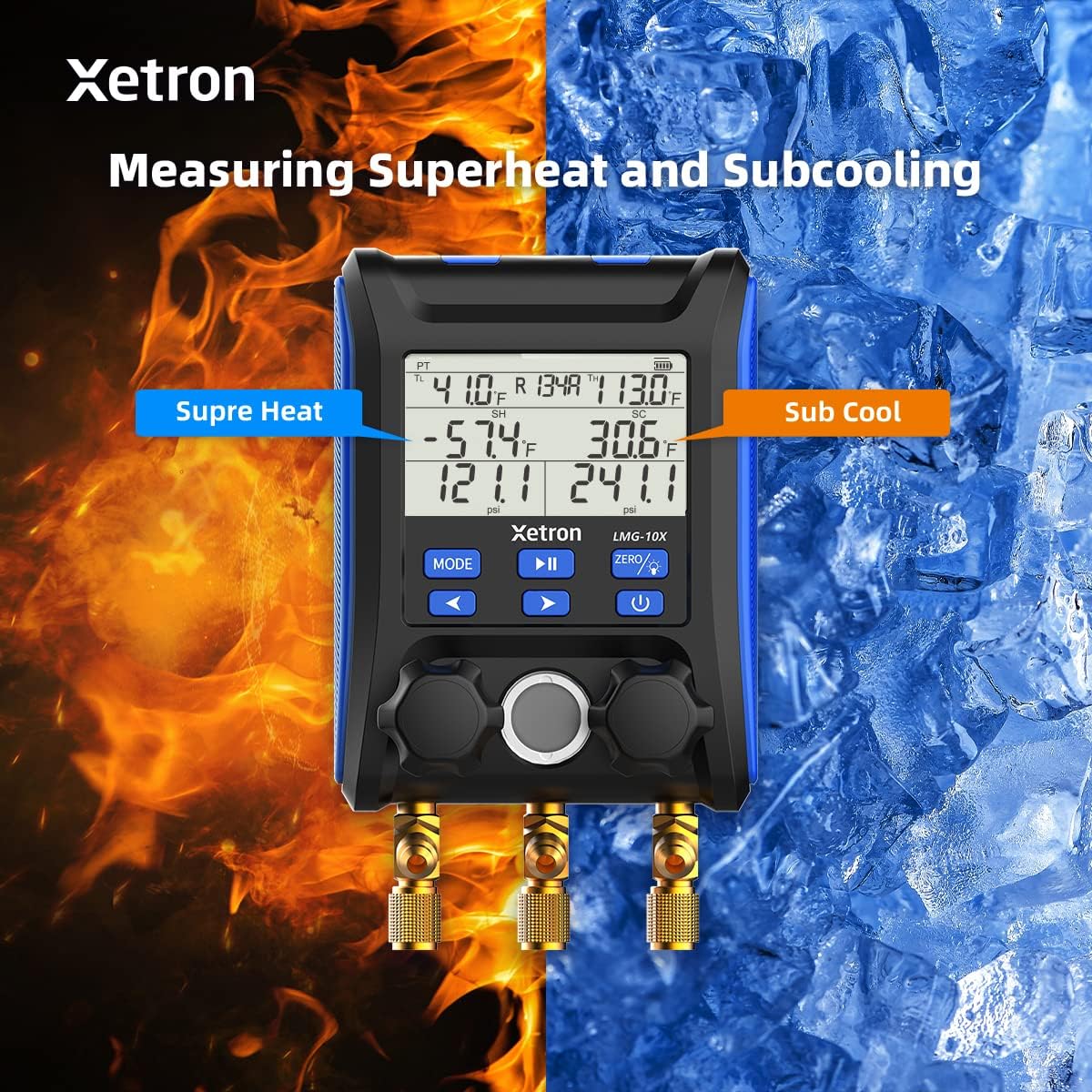
Figure 3: Connecting the Xetron LMG-10X to an HVAC system.
5. הוראות הפעלה
5.1. Pressure and Temperature Measurement Mode
This mode displays real-time pressure and temperature readings, along with calculated saturation temperatures (VSAT, LSAT).

Figure 4: Interface for Pressure and Temperature Measurement Mode.
5.2. Superheat and Subcooling Measurement
The device automatically calculates superheat (SH) and subcooling (SC) values based on the selected refrigerant and measured parameters.

Figure 5: Display showing Superheat and Subcooling measurements.
5.3. Pressure Hold Test Mode
To enter Pressure Hold Test mode, briefly press the MODE כפתור ואחריו PLAY/PAUSE button from VAC mode. This mode allows you to monitor pressure changes over time.

Figure 6: Interface for Pressure Hold Test Mode.
5.4. Unit Settings and Auto Shutdown
The device allows for conversion of various measurement units and configuration of automatic shutdown settings.

Figure 7: Temperature Unit Setting.
Figure 8: Pressure Unit Setting.
Figure 9: Auto Shutdown OFF.
Figure 10: Auto Shutdown ON.
6. Built-in Refrigerant Database
The Xetron LMG-10X comes with a comprehensive database of 88 types of refrigerants, allowing for accurate calculations and measurements across various systems.

Figure 11: Partial list of supported refrigerants.
7. תחזוקה
7.1. ניקיון
נגב את המכשיר עם רך, דamp מטלית. אין להשתמש בחומרי ניקוי שוחקים או ממסים. יש לוודא שהמכשיר יבש לפני האחסון.
7.2. אחסון
Store the device in its carrying case in a cool, dry place when not in use. Remove batteries if storing for extended periods to prevent leakage.
8. פתרון תקלות
| בְּעָיָה | סיבה אפשרית | פִּתָרוֹן |
|---|---|---|
| המכשיר לא נדלק. | סוללות חלשות או מתות; סוללות שהוכנסו בצורה שגויה. | החליפו סוללות; ודאו שהקוטביות נכונה. |
| קריאות לא מדויקות. | Probes not properly connected; incorrect refrigerant selected. | Check probe connections; verify selected refrigerant matches system. |
| התצוגה עמומה או מהבהבת. | כוח סוללה נמוך. | החלף סוללות. |
9. מפרטים
- דֶגֶם: XT-LMG-10X-EU
- מידות (L x W x H): 37 x 30 x 10 ס"מ (14.57 x 11.81 x 3.94 אינץ ')
- משקל פריט: 1.2 ק"ג (2.65 פאונד)
- חוֹמֶר: אקרילוניטריל בוטאדיאן סטירן (ABS)
- Refrigerant Database: 88 סוגים
- פונקציות: Pressure & Temperature Measurement, Vacuum Measurement, Pressure Hold Test, Automatic Shutdown, Temperature Compensation
10. אחריות ותמיכה
Xetron offers a one-year warranty for the LMG-10X Digital Manifold Gauge. For any questions or support needs, please contact Xetron customer service. We are committed to providing lifetime customer service.
For further assistance, please visit the official Xetron webאתר או צור קשר עם ערוצי התמיכה שלהם.
Ask a question about this manual
Ask about setup, troubleshooting, compatibility, parts, safety, or missing instructions. Manuals+ will review the question and use this page’s manual context to help answer it.