
PALOVUE iSound
PALOVUE Wireless Earbuds User Manual
Model: iSound
Your guide to setting up, operating, and maintaining your PALOVUE iSound Wireless Earbuds.
1. הקדמה
The PALOVUE iSound Wireless Earbuds are designed to provide a superior audio experience with advanced features for daily use. Equipped with Qualcomm CSR and Bluetooth 5.0 technology, these earbuds offer a stable and crystal-clear connection, supporting aptX HD sound quality. The CVC 8.0 Noise Cancelling technology with 4 built-in microphones ensures clear calls by effectively reducing ambient noise. Their ergonomic design and multiple ear-tip sizes provide a comfortable and secure fit for extended wear.
The iSound earbuds feature convenient one-step reconnection and intuitive one-touch operation. With up to 24 hours of playtime using the compact charging case, they are ideal for on-the-go listening. Further customization and control are available through the PALOVUE iSound APP.

Image: PALOVUE iSound Wireless Earbuds resting in their open charging case, showcasinהעיצוב השחור והחלקלק שלהם.
2. מה בקופסה
Upon opening your PALOVUE iSound package, you will find the following components:
- נרתיק טעינה אלחוטי
- PALOVUE iSound Earbuds (Left and Right)
- Ear Tips (multiple sizes for a customizable fit)
- כבל טעינה (USB-C)
- שְׁרוֹך
- תיבת אריזה
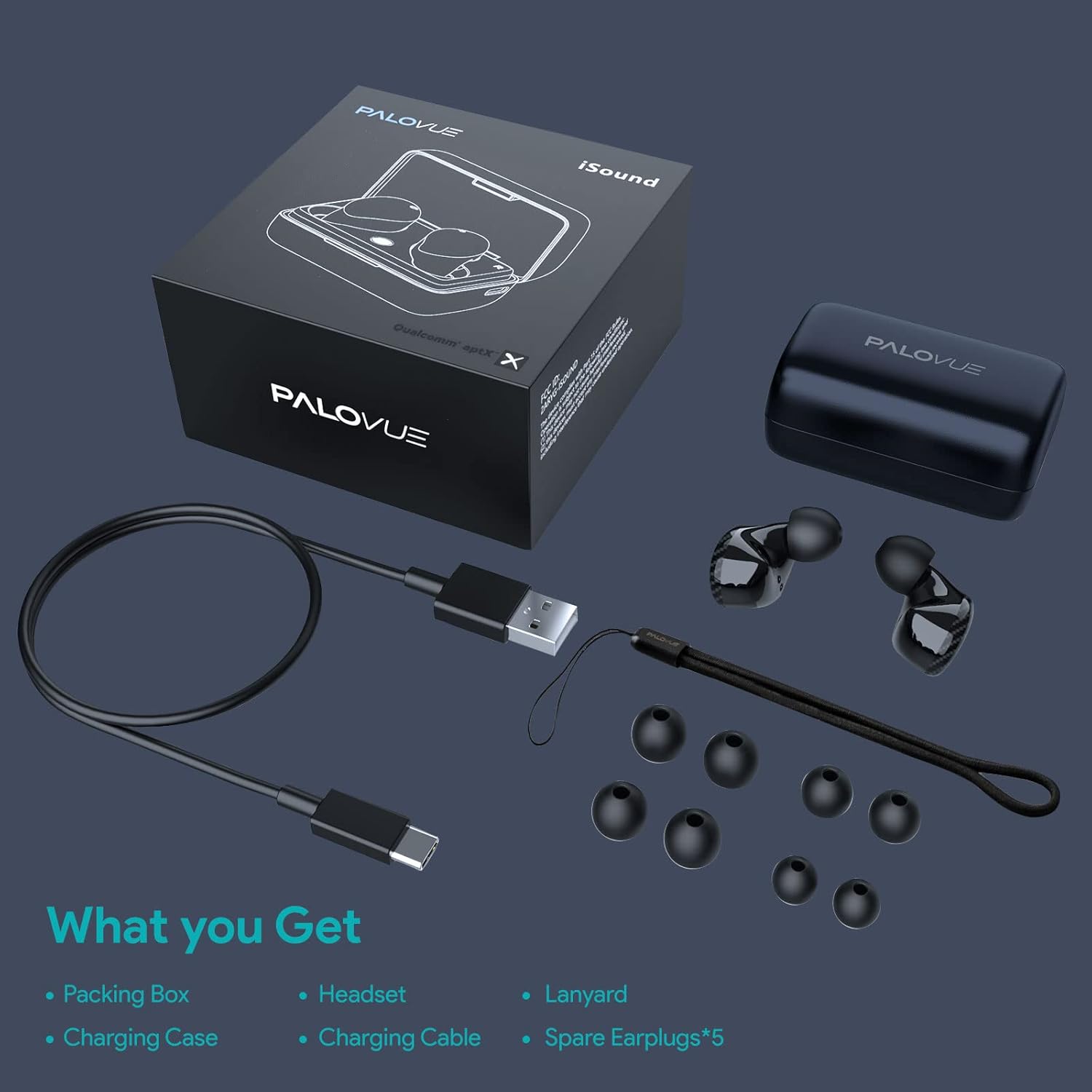
Image: A flat lay showing all items included in the PALOVUE iSound package: the packing box, charging case, earbuds, charging cable, lanyard, and five pairs of spare ear tips.
3. מדריך התקנה
3.1 טעינה ראשונית
Before first use, ensure both the earbuds and the charging case are fully charged. Place the earbuds into the charging case. Connect the provided USB-C cable to the charging case and a power source. The indicator lights on the case will show charging status. A full charge typically takes approximately 2 hours for the case.
3.2 צימוד עם המכשיר שלך
The PALOVUE iSound earbuds feature one-step reconnection for convenience.
- פתחו את מארז הטעינה. האוזניות יידלקו אוטומטית ויכנסו למצב צימוד.
- בטלפון החכם או במכשיר התומך ב-Bluetooth שלך, עבור אל הגדרות ה-Bluetooth.
- חפש "PALOVUE iSound" in the list of available devices and select it to connect.
- לאחר החיבור, תשמעו אישור קולי, והאוזניות יהיו מוכנות לשימוש.
- לשימושים עתידיים, פשוט פתחו את מארז הטעינה, והאוזניות יתחברו אוטומטית למכשיר האחרון שצומד.
Video: A detailed guide demonstrating the connection and operation of the PALOVUE iSound earbuds, including initial pairing steps and touch control functions.
4. הפעלת האוזניות
4.1 פקדי מגע
The PALOVUE iSound earbuds feature intuitive touch controls on each earbud. The specific functions can be customized via the PALOVUE iSound APP.
| פְּעוּלָה | אוזניה שמאלית | Earbud נכון |
|---|---|---|
| הקשה אחת | הורדת עוצמת הקול | הגברת עוצמת הקול |
| הקש פעמיים | השמעה/השהיה של מוזיקה, מענה/סיום שיחה | השמעה/השהיה של מוזיקה, מענה/סיום שיחה |
| לחיצה ארוכה | Previous Song, Reject Call | Next Song, Reject Call |
Video: A short demonstration of the touch controls for the PALOVUE iSound earbuds, showing how to adjust volume, skip tracks, and manage calls.
4.2 Using the PALOVUE iSound APP
Enhance your experience by downloading the PALOVUE iSound APP. The app allows you to:
- Customize touch control functions (e.g., volume, track control, call management).
- Adjust equalizer (EQ) settings for personalized sound profiles (Male Vocals, Electronic, Jazz, Rock, Classical, Female Vocals, Original, Customize).
- Check battery levels of each earbud.
- Access device information and firmware updates.

Image: A woman wearing PALOVUE iSound earbuds, illustrating their comfortable fit and suitability for daily use.

תמונה: פיצוץ view diagram of the PALOVUE iSound earbud, detailing its internal structure and emphasizing Qualcomm AptX and Deep Bass sound capabilities.
5. תחזוקה
To ensure the longevity and optimal performance of your PALOVUE iSound Wireless Earbuds, follow these maintenance guidelines:
- ניקוי: Regularly clean the earbuds and charging case with a soft, dry, lint-free cloth. Do not use abrasive cleaners or solvents. Gently remove any earwax or debris from the ear tips and speaker mesh using a small, soft brush or cotton swab.
- אִחסוּן: כאשר אינן בשימוש, אחסנו את האוזניות בנרתיק הטעינה שלהן כדי להגן עליהן מפני אבק, לכלוך ונזק פיזי.
- טיפול בסוללה: Avoid fully depleting the battery frequently. For long-term storage, charge the earbuds and case to about 50% to preserve battery health.
- עמידות במים: The earbuds are rated IPX4 for water resistance, meaning they are protected against splashing water from any direction. They are designed for sports and can withstand sweat and light rain, but they are not suitable for swimming or submersion in water. Ensure the earbuds are dry before placing them back in the charging case.
Video: A short promotional video highlighting the compact size and powerful features of the iSound True Wireless Earbuds, including their IPX4 water resistance.
6. פתרון תקלות
If you encounter issues with your PALOVUE iSound Wireless Earbuds, try the following solutions:
6.1 בעיות זיווג
- האוזניות לא מתחברות: Ensure Bluetooth is enabled on your device. Place earbuds back in the case, close it, wait a few seconds, then open it again to re-initiate pairing mode.
- רק אוזניה אחת עובדת: Try placing both earbuds back in the charging case, closing the lid, and then reopening it. Ensure both earbuds have sufficient charge.
- אוזניות לא מופיעות ברשימת Bluetooth: Turn off Bluetooth on your device, then turn it back on. Restart your device if necessary.
6.2 בעיות באיכות הצליל
- ווליום נמוך: Increase the volume on both your earbuds (via touch control) and your connected device.
- צליל מעוות: Ensure the earbuds are within Bluetooth range of your device. Check for obstructions between the earbuds and your device.
- איכות שיחה ירודה: Ensure the microphones are not obstructed. CVC 8.0 Noise Cancelling technology helps, but extreme noise environments can still affect clarity.
6.3 Battery and Charging Issues
- האוזניות לא נטענות: Ensure the charging contacts on the earbuds and inside the case are clean and dry. Try a different charging cable or power adapter.
- המארז לא נטען: ודא שכבל הטעינה ומקור הכוח פועלים כראוי.
6.4 How to Reset Your Earbuds
אם אתם חווים בעיות מתמשכות, איפוס להגדרות היצרן עשוי לפתור אותן:
- הכנס את שני האוזניות לתוך מארז הטעינה.
- Press and hold the reset button on the charging case (usually located inside or near the charging port) until the indicator lights on the earbuds flash red and green alternately.
- Release the button and wait until only the green light flashes, indicating the reset is complete.
- הוציאו את האוזניות מהמארז ונסו לזווג אותן מחדש למכשיר שלכם.
Refer to the "PALOVUE iSound Connection operation guide" video in the Setup section for a visual demonstration of the reset process.
7. מפרטים
| תכונה | פְּרָט |
|---|---|
| מותג | PALOVUE |
| שם הדגם | אני נשמע |
| טכנולוגיית קישוריות | אלחוטי (בלוטות' 5.0) |
| טכנולוגיית תקשורת אלחוטית | בלוטות' |
| ערכת שבבים | Qualcomm CSR QCC3020 |
| בקרת רעש | CVC 8.0 Noise Cancellation (for calls) |
| מיקרופונים | 4 Mics |
| סוג בקרה | בקרת מגע |
| מיקום אוזניים | אין אוזן |
| גורם צורה | אין אוזן |
| חיי סוללה (אוזניות) | עד 6 שעות (בערך) |
| זמן משחק כולל (עם כיסוי) | עד 24 שעות |
| זמן טעינה (מארז) | 2 שעות |
| טווח בלוטות' | עד 10 מטרים (32.8 רגל) |
| רמת עמידות במים | IPX4 (עמיד בפני התזה) |
| חוֹמֶר | Silicone (Ear Tips) |
| משקל פריט | 1.76 אונקיות |
| מכשירים תואמים | סמארטפונים, טאבלטים, מחשבים ניידים, מחשבים שולחניים, טלוויזיות חכמות, מערכות שמע לרכב |
8. אחריות ותמיכה
PALOVUE products typically come with a manufacturer's warranty. Please refer to the warranty card included in your product packaging for specific terms and conditions, including warranty period and coverage details. For technical support, troubleshooting assistance, or warranty claims, please contact PALOVUE customer service through their official webאתר או פרטי הקשר המופיעים בתיעוד המוצר שלך.
You can also visit the official PALOVUE store on Amazon for more information and support: PALOVUE Amazon Store.