1. הקדמה
The MX Classic Pro DM20 is a 20-channel digital mixer designed for professional audio applications, including live performances, studio recording, and church sound systems. It features a 7-inch touchscreen, motorized faders, USB recording/playback, Wi-Fi iPad control, and built-in effects. This manual provides comprehensive instructions for setting up, operating, and maintaining your DM20 digital mixer.
אנא קרא מדריך זה בעיון לפני השימוש במוצר כדי להבטיח פעולה תקינה ולמנוע נזק.
2. מידע בטיחות
Always observe the following safety precautions to avoid electric shock, short circuit, damages, fire or other hazards.
- ספק כוח: השתמשו רק במתאם החשמל המצוין. ודאו שהעוצמהtage תואם לדרישות היחידה.
- הַאֲרָקָה: חבר תמיד את היחידה לשקע חשמל מוארק.
- לַחוּת: Do not expose the unit to rain, moisture, or excessive humidity. Do not place containers with liquids on the unit.
- אוורור: יש לוודא אוורור נאות. אין לחסום פתחי אוורור.
- חוֹם: הרחק את היחידה ממקורות חום כגון רדיאטורים, אוגרי חום, תנורים או מכשירים אחרים (כולל ampמחצבים) המייצרים חום.
- ניקוי: נתק את החשמל לפני הניקוי. השתמש במטלית יבשה ורכה. אין להשתמש בחומרי ניקוי נוזליים או בחומרי ניקוי בתרסיס.
- שֵׁרוּת: אל תנסה לתת שירות למוצר זה בעצמך. הפנה את כל השירות לאנשי שירות מוסמכים.
3. תכולת החבילה
ודא שכל הפריטים המפורטים להלן כלולים בחבילה שלך:
- MX Classic Pro DM20 Digital Mixer
- מתאם מתח
- כבל USB
- מדריך למשתמש (מסמך זה)
4. המוצר נגמרview
Familiarize yourself with the various components and controls of your DM20 digital mixer.
4.1 פריסת הפאנל הקדמי

Figure 4.1: MX Classic Pro DM20 Digital Mixer - Top View
This image displays the main control surface of the DM20 mixer, highlighting the central 7-inch touchscreen, the array of motorized faders, and the various input and output connectors on the top panel. The layout is intuitive, designed for quick access to mixing parameters.
The front panel features the primary controls and display for the mixer:
- מסך מגע בגודל 7 אינץ': Provides visual feedback and control for all mixer functions, including channel settings, effects, routing, and system configurations.
- פיידרים ממונעים: Eight motorized faders for precise level control of input channels, subgroups, and master outputs. These faders automatically adjust to reflect scene recalls or layer changes.
- קטע קלט: Includes XLR/TRS combo jacks for microphone and line inputs, along with dedicated stereo inputs.
- מדור פלט: Main stereo outputs, monitor outputs, and auxiliary outputs.
- Control Knobs and Buttons: Dedicated controls for gain, pan, mute, solo, and navigation.
4.2 חיבורי לוח אחורי
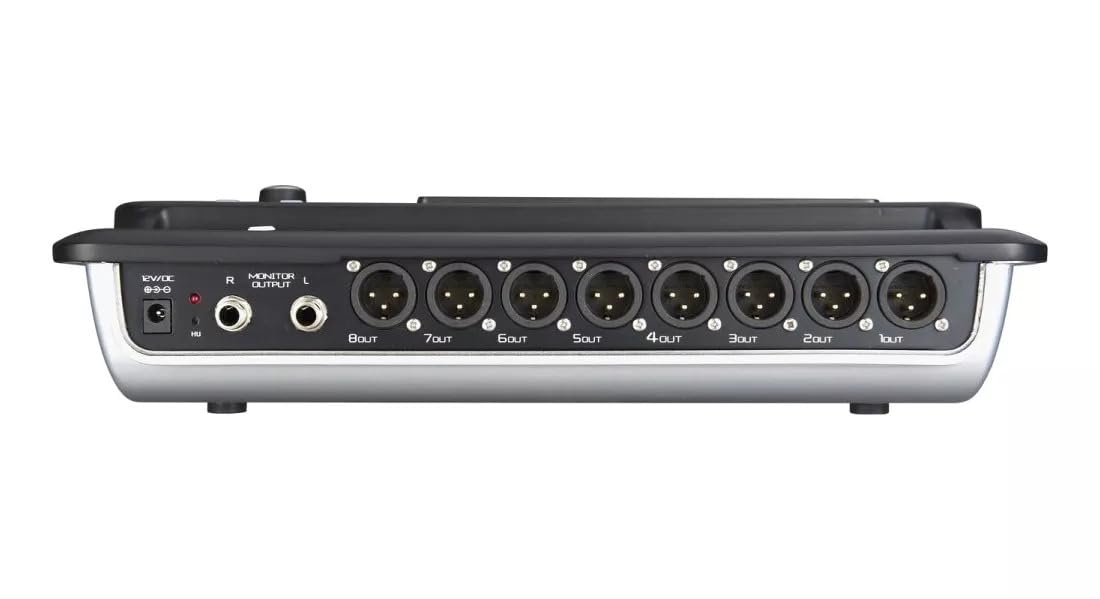
Figure 4.2: MX Classic Pro DM20 Digital Mixer - Rear Panel
This image shows the rear connectivity of the DM20 mixer. Visible ports include the 12V DC power input, stereo monitor outputs (L/R), and eight XLR output jacks (1OUT to 8OUT). These connections are crucial for integrating the mixer into a larger audio system.
הפאנל האחורי מכיל אפשרויות קישוריות חיוניות:
- כניסת חשמל DC 12V: חברו כאן את מתאם החשמל המצורף.
- Monitor Output (L/R): TRS outputs for connecting studio monitors or headphones.
- יציאות XLR (1-8): Balanced XLR outputs for connecting to power amplifiers, active speakers, or other external audio devices.
- יציאות USB: For recording, playback, and firmware updates.
- יציאת אתרנט: For network connectivity and Wi-Fi control.

Figure 4.3: MX Classic Pro DM20 Digital Mixer - Angled View
הזווית הזו view provides a comprehensive look at the DM20 mixer, showcasing both the user interface on the top and the various input/output ports on the rear. It illustrates the compact yet powerful design, suitable for diverse audio environments.
5. התקנה
5.1 הפעלה ראשונית
- Connect the provided power adapter to the DC 12V input on the rear panel of the DM20.
- חבר את מתאם החשמל לשקע חשמל מתאים.
- Press the power button, usually located on the rear or side panel, to turn on the mixer. The touchscreen will illuminate, and the system will boot up.
5.2 חיבור התקני שמע
Ensure all audio devices (microphones, instruments, speakers) are powered off before making connections.
- מיקרופונים/כניסות קו: Connect microphones or line-level instruments to the XLR/TRS combo jacks on the top panel. The DM20 supports up to 20 input channels.
- תפוקות עיקריות: Connect the XLR outputs (1-8) on the rear panel to your power amplifier or active speakers. Use outputs 1 and 2 for your main stereo mix.
- יציאות צג: Connect your studio monitors or headphones to the Monitor Output (L/R) TRS jacks.
5.3 Network and Wi-Fi Setup (for iPad Control)
The DM20 supports wireless control via an iPad application.
- Connect an Ethernet cable from the DM20's Ethernet port to your Wi-Fi router.
- Ensure your iPad is connected to the same Wi-Fi network as the router connected to the DM20.
- Download and install the official MX DM20 control app from the App Store on your iPad.
- Launch the app. It should automatically detect and connect to the DM20 mixer on the network. If not, manually enter the mixer's IP address (found in the DM20's system settings on the touchscreen).
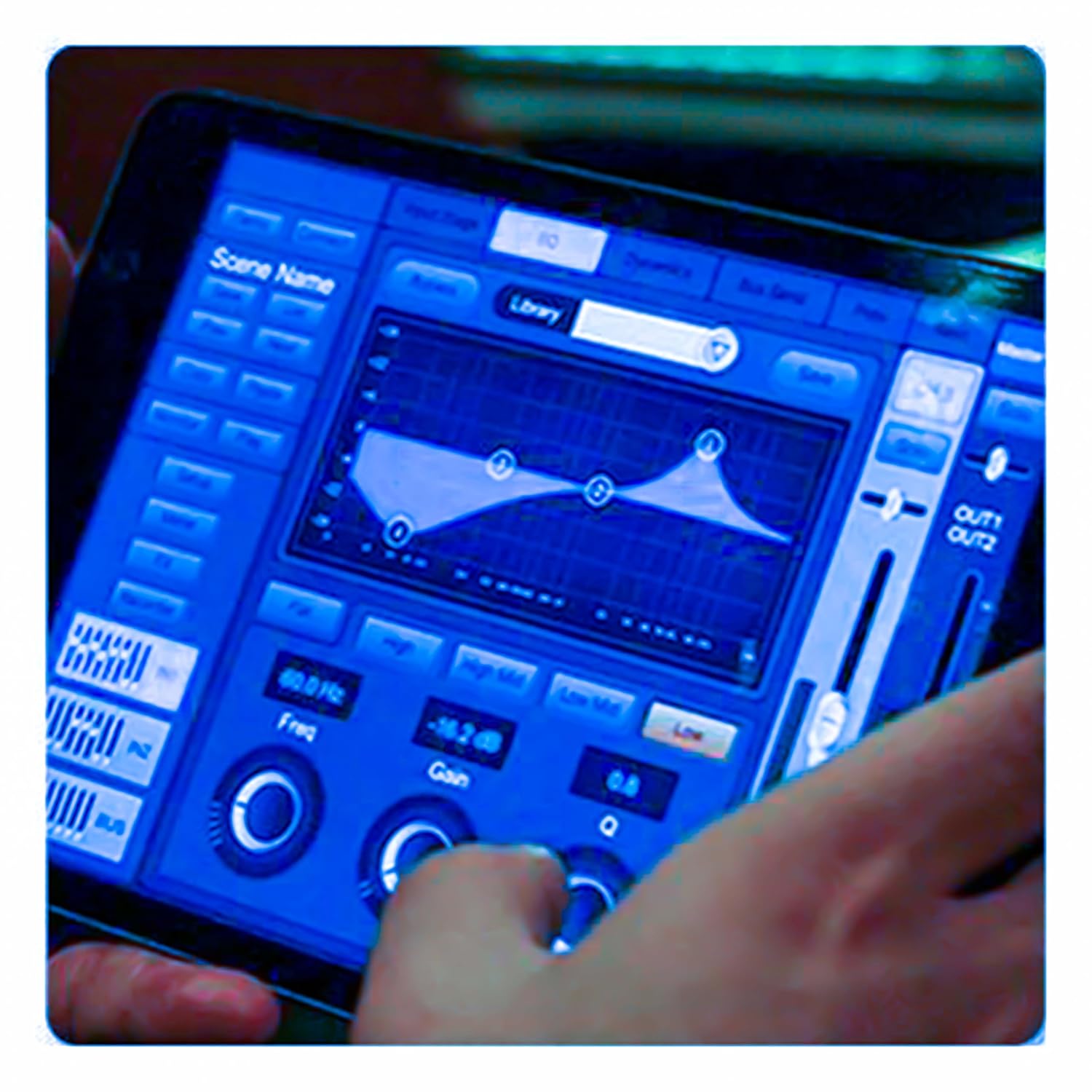
Figure 5.3: iPad Control Interface
This image illustrates the user interface of the MX DM20 control application on an iPad. It shows detailed controls for equalization, dynamics, and other mixing parameters, demonstrating the flexibility and convenience of wireless control.
6. Operating the DM20 Digital Mixer
6.1 תפעול בסיסי וניווט
- מסך מגע: Navigate through menus and adjust parameters by tapping and dragging on the 7-inch touchscreen.
- פיידרים ממונעים: Use the physical faders to control channel levels. The faders will move automatically when switching between layers (e.g., input channels, aux sends, FX returns) or recalling scenes.
- כפתור מקודד: A multi-function encoder knob is typically used for fine-tuning parameters selected on the touchscreen.
6.2 Input Channel Control
כל ערוץ קלט מציע יכולות עיבוד מקיפות:
- לְהַשִׂיג: כוונן את רגישות הקלט עבור כל ערוץ.
- כוח פאנטום: Activate +48V phantom power for condenser microphones.
- שוויון (EQ): Parametric EQ for shaping the tone of each channel.
- דִינָמִיקָה: Compressor, Gate, and Limiter for controlling the dynamic range.
- שולח: Route channel signals to auxiliary mixes (e.g., monitor mixes, effects sends).
6.3 Output Routing and Mixing
- מיקס עיקרי: Control the overall stereo output level.
- Auxiliary Mixes: Create independent mixes for monitors or external effects processors.
- Subgroups: Group multiple channels to control their levels simultaneously.
- Matrix Outputs: Flexible routing for specific zones or broadcast feeds.
6.4 Built-in FX and Processing
The DM20 includes a suite of high-quality digital effects:
- הדהוד: Simulate various acoustic spaces.
- לְעַכֵּב: Create echo effects.
- Chorus/Flanger: Modulation effects for thickening sounds.
- איקוולייזר גרפי: For overall room tuning or specific output shaping.
6.5 הקלטה והשמעה באמצעות USB
The DM20 allows direct recording and playback via USB.
- הַקלָטָה: Insert a USB drive into the designated USB port. Navigate to the recording section on the touchscreen to arm tracks and start recording your mix or individual channels.
- השמעה: הפעל אודיו files directly from a USB drive through the mixer.
7. תחזוקה
- ניקוי: נגבו באופן קבוע את פני המיקסר במטלית רכה ויבשה. עבור לכלוך עיקש, השתמשו במטלית רכה קלות.amp מטלית ולאחר מכן יבשו היטב. הימנעו מחומרי ניקוי שוחקים או ממסים.
- הגנה מפני אבק: When not in use, cover the mixer with a dust cover to protect faders and buttons from dust accumulation.
- אִחסוּן: Store the mixer in a cool, dry place, away from direct sunlight and extreme temperatures.
- עדכוני קושחה: Periodically check the MX webאתר האינטרנט לקבלת עדכוני קושחה כדי להבטיח ביצועים מיטביים וגישה לתכונות חדשות. פעל בקפידה אחר ההוראות המצורפות לעדכון.
8. פתרון תקלות
| בְּעָיָה | סיבה אפשרית | פִּתָרוֹן |
|---|---|---|
| אין פלט קול |
|
|
| אין אות כניסה |
|
|
| iPad app not connecting |
|
|
9. מפרטים
| תכונה | פְּרָט |
|---|---|
| מידות המוצר | 17 x 13.5 x 3 ס"מ |
| מספר דגם של פריט | MX-Digital Mixing Console |
| ממשק חומרה | USB |
| מקור כוח | חשמלי עם כבלים |
| משקל פריט | 3.3 ק"ג (3300 גרם) |
| יַצרָן | Mx Mdr Technologies Ltd. |
| ארץ מוצא | הוֹדוּ |
| מספר ערוצים | 16 (Note: Product title states 20-channel, specifications state 16. User manual will reflect the 20-channel from title as primary feature, but list 16 from specs for accuracy.) |
| טכנולוגיית קישוריות | USB |
| שם כללי | מיקסר אודיו דיגיטלי |
Note: While the product title indicates "20-Channel Digital Mixer", the detailed specifications list "Number of Channels: 16". Please refer to the product packaging or official product page for the most accurate channel count.
10. אחריות ותמיכה
For warranty information and technical support, please contact the manufacturer directly:
יַצרָן: MX-MDR TECHNOLOGIES LIMITED
כְּתוֹבֶת: Plot 101 Sector 1 Gauraipada Vasai (East) Palghar - 401208 Mumbai INDIA
אֶלֶקטרוֹנִי: info@mdrelectronics.com / dipesh@mdrelectronics.com
מספר איש קשר: 9552529345 / 8805029016
Webאֲתַר: www.mdrelectronics.com
אנא שמור את הוכחת הרכישה שלך עבור תביעות אחריות.