
1. הקדמה
This manual provides detailed instructions for the safe and effective operation of your Andoer 4K 48MP 60FPS WiFi Camcorder. Please read this manual thoroughly before using the device and retain it for future reference. This camcorder is designed for high-quality video recording and photography, featuring 4K Ultra HD resolution, 48-megapixel photos, a 3-inch IPS touchscreen, and infrared night vision capabilities. It is equipped with WiFi connectivity for easy file transfer and remote control, and comes with essential accessories such as an external microphone and a wide-angle macro lens.

Image 1.1: Andoer 4K Camcorder with included accessories.
2. תכולת החבילה
ודא שכל הפריטים המפורטים להלן כלולים בחבילה שלך. אם חסרים פריטים או פגומים, אנא פנה לספק שלך.

תמונה 2.1: כל הרכיבים הכלולים בחבילה.
- מצלמת וידיאו
- מִיקרוֹפוֹן
- שמשה קדמית למיקרופון
- כבל שמע TRS ל-TRS 3.5 מ"מ
- כבל USB
- אחיזת יד
- Camera Lens (Wide-angle macro lens)
- טבעת מתאם עדשה
- 2 x Lithium-polymer Batteries (2000mAh)
- שְׁלַט רָחוֹק
- Camcorder Storage Bag
- תיק אחסון לעדשות
- Camcorder User Manual
- מדריך למשתמש למיקרופון
3. המוצר נגמרview
Familiarize yourself with the various parts and controls of your camcorder.
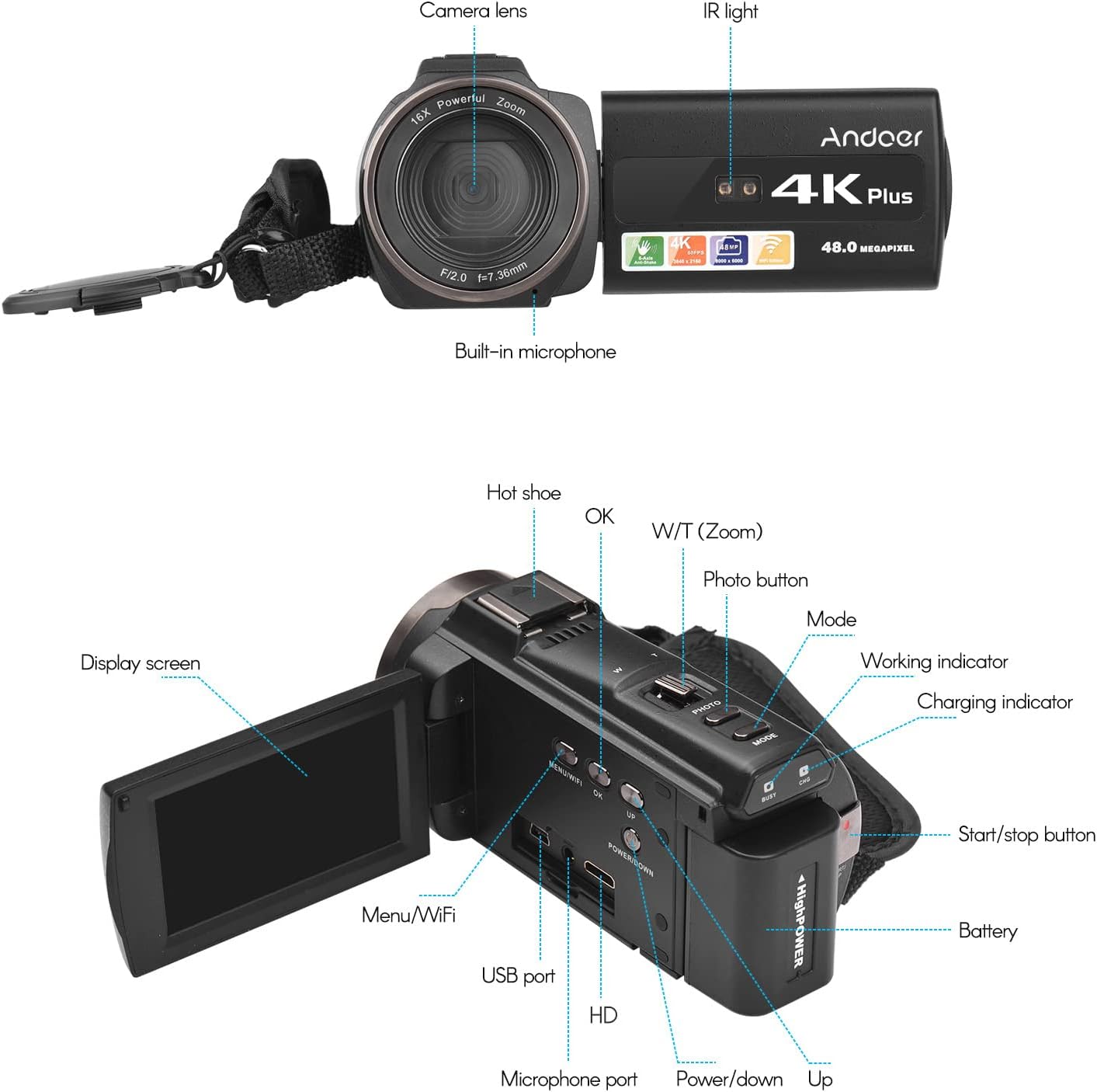
Image 3.1: Front and Rear View of the Camcorder with labeled components.
מרכיבי מפתח:
- עדשת מצלמה: רכיב אופטי עיקרי לצילום תמונות וסרטונים.
- אור IR: Emits infrared light for night vision recording.
- מיקרופון מובנה: Captures audio. An external microphone can be connected for enhanced sound quality.
- נעל חמה: Mount for external accessories like the included microphone or an LED video light.
- Display Screen (3" IPS Touch Screen): עֲבוּר viewבשידור חיtage, playback, and navigating menus.
- לחצני שליטה: Including Power, Mode, Photo, Zoom (W/T), OK, Menu/WiFi, Up/Down.
- יציאות: USB, HD (HDMI), Microphone port.
- תא סוללות: מכיל את הסוללה הנטענת.
4. התקנה
4.1 טעינת הסוללה
Before first use, fully charge the included lithium-polymer batteries. Insert one battery into the camcorder's battery compartment. Connect the camcorder to a power source using the provided USB cable. The charging indicator will illuminate during charging and turn off when fully charged. A full charge typically takes several hours.

Image 4.1: Battery installation and charging indication.
4.2 הכנסת כרטיס זיכרון
The camcorder supports TF (MicroSD) cards up to 128GB. Ensure the card is formatted before first use in the camcorder's settings. Insert the memory card into the designated slot until it clicks into place.
- Use a Class 10 or higher speed rating for optimal performance, especially for 4K video recording.
- The camcorder supports V60 video speed class.
4.3 Attaching the External Microphone
For improved audio quality, attach the external stereo microphone to the hot shoe mount on top of the camcorder. Connect the microphone's 3.5mm audio cable to the microphone input port on the camcorder.
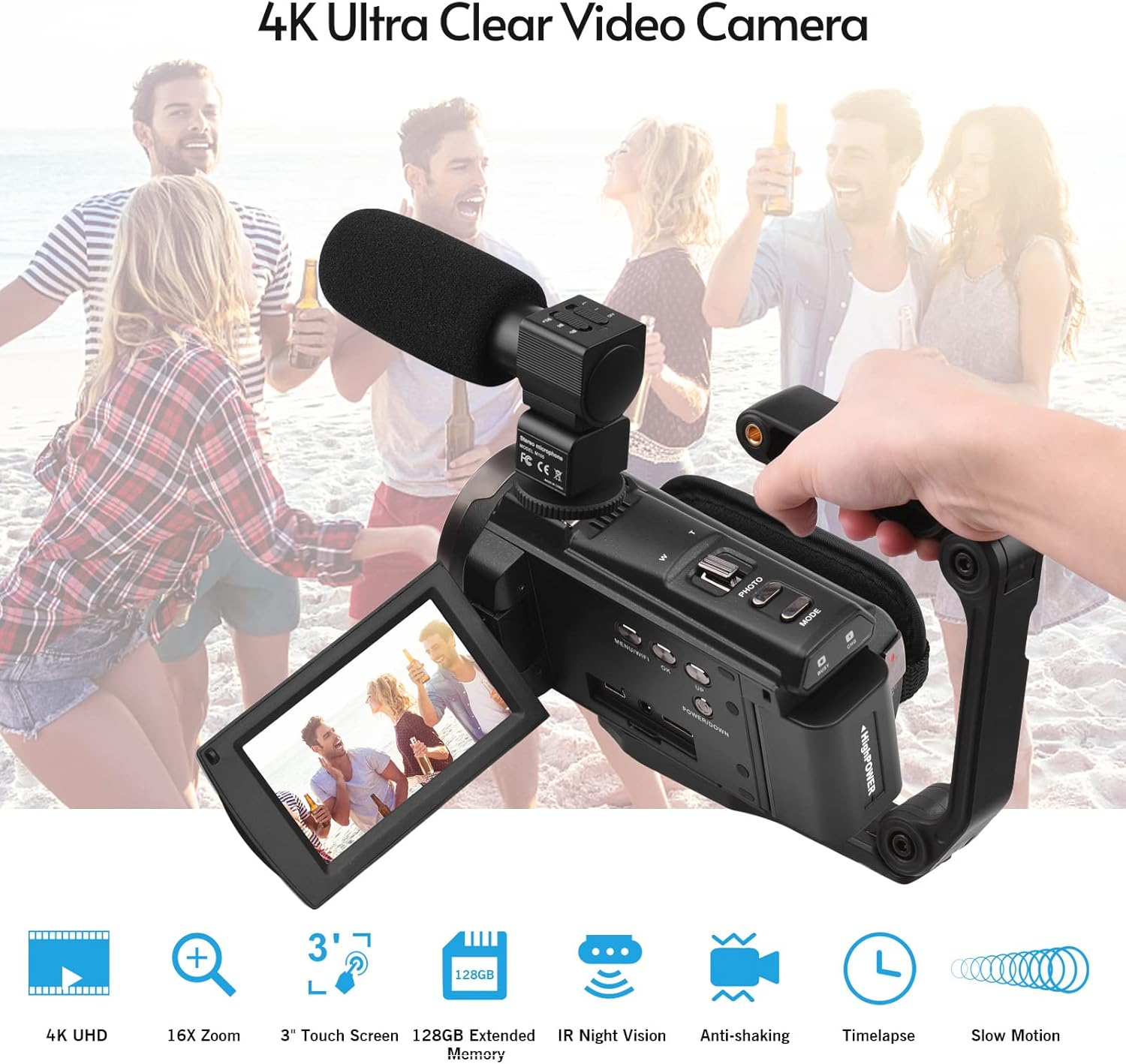
Image 4.2: External microphone attached to the camcorder.
4.4 Attaching the Wide-Angle Macro Lens
To use the wide-angle macro lens, first attach the lens adapter ring to the camcorder's main lens. Then, screw the wide-angle macro lens onto the adapter ring. This lens provides a broader perspective for your shots.

Image 4.3: Wide-angle macro lens for expanded field of view.
4.5 Attaching the Handgrip
The included handgrip can be attached to the bottom of the camcorder via the 1/4" screw hole for more stable handheld recording.
5. הוראות הפעלה
5.1 הפעלה/כיבוי
To power on the camcorder, open the display screen and press the Power button. To power off, press and hold the Power button, or close the display screen.
5.2 הקלטת וידאו
- הפעל את מצלמת הווידאו.
- הקש על מצב button to select video recording mode.
- הקש על התחל/עצור button to begin recording. The recording indicator will flash.
- הקש על התחל/עצור לחץ שוב על עצירת ההקלטה.
The camcorder supports 4K/60FPS video resolution for clear and smooth footage.
5.3 צילום תמונות
- הפעל את מצלמת הווידאו.
- הקש על מצב button to select photo mode.
- Frame your shot using the display screen.
- הקש על תַצלוּם button to capture a 48-megapixel image.
5.4 Using the 3" IPS Touch Screen
The capacitive touchscreen allows for intuitive navigation of menus and settings. Tap to select options, swipe to scroll, and pinch to zoom (if supported in specific modes).
5.5 פונקציית WiFi
The built-in WiFi allows for wireless transmission of files to a compatible smartphone or tablet via a dedicated app. It also enables remote control of the camcorder from your mobile device.
- Activate WiFi on the camcorder via the menu.
- Download and install the specified app on your mobile device.
- Connect your mobile device to the camcorder's WiFi network.
- Use the app to control recording, view פו חיtagה, והעברה files.
5.6 ראיית לילה אינפרא אדום
For recording in low-light or dark conditions, activate the IR Night Vision feature. This utilizes infrared light to capture clear black and white footage.

Image 5.1: IR Night Vision in operation.
5.7 זום דיגיטלי
Use the W/T (Wide/Telephoto) button to adjust the 16x digital zoom. Note that digital zoom can reduce image quality compared to optical zoom.
5.8 ייצוב תמונה
The camcorder features 6-axis image stabilization to reduce blur and shakiness in your recordings, especially during handheld use.
5.9 תכונות מיוחדות
- זיהוי תנועה: The camcorder can be set to automatically start recording when motion is detected.
- Face Detection/Recognition: אופטימיזציה של המיקוד והחשיפה עבור פנים בפריים.
- שְׁלַט רָחוֹק: Use the included remote control to operate the camcorder from a distance, useful for self-recording or group shots.
- טיימר עצמי: Set a delay before capturing a photo or starting a video recording.

Image 5.2: Tripod mounting for self-timer and stable shots.
5.10 חיבור להתקנים חיצוניים
- USB: התחבר למחשב עבור file לְהַעֲבִיר.
- רזולוציית HD (HDMI): Connect to a TV or monitor to view ההקלטות שלך על מסך גדול יותר.
6. תחזוקה
- ניקוי: Use a soft, dry cloth to clean the camcorder body. For the lens, use a specialized lens cleaning cloth and solution. Avoid harsh chemicals.
- אִחסוּן: אחסנו את מצלמת הווידאו במקום קריר ויבש, הרחק מאור שמש ישיר וטמפרטורות קיצוניות. הוציאו את הסוללה אם תאחסנו אותה לתקופות ממושכות.
- טיפול בסוללה: Do not expose batteries to high temperatures. Recharge regularly even if not in use to maintain battery health.
- עדכוני קושחה: בדוק את זה של היצרן webבקר באתר מעת לעת כדי לאתר עדכוני קושחה זמינים כדי להבטיח ביצועים אופטימליים ותכונות חדשות.
7. פתרון תקלות
| בְּעָיָה | סיבה אפשרית | פִּתָרוֹן |
|---|---|---|
| מצלמת הווידאו לא נדלקת. | הסוללה התרוקנה או לא הוכנסה כראוי. | Ensure battery is fully charged and correctly inserted. Try the second battery. |
| לא ניתן להקליט וידאו/לצלם תמונות. | Memory card is full, not inserted, or corrupted. Incorrect mode selected. | Check memory card status, ensure it's inserted and has free space. Format if necessary (backup data first). Select the correct mode. |
| איכות תמונה/וידאו ירודה. | Lens is dirty. Low light conditions without IR. Digital zoom used excessively. | Clean the lens. Activate IR Night Vision in dark environments. Avoid excessive digital zoom. Ensure sufficient lighting. |
| בעיות חיבור WiFi. | Incorrect WiFi settings. App not installed or updated. | Ensure WiFi is enabled on camcorder and mobile device. Re-establish connection. Update or reinstall the mobile app. |
| המיקרופון לא מקליט אודיו. | Microphone not connected properly or settings incorrect. | Check microphone cable connection. Verify audio input settings in the camcorder menu. |
8. מפרטים
| תכונה | פְּרָט |
|---|---|
| מספר דגם | ZOH0150584179474NZ |
| רזולוציית וידאו | 4K (3840x2160) at 60FPS |
| רזולוציית תמונה | 48 מגה פיקסל (8000x6000) |
| ייצוב תמונה | 6 צירים |
| מסך תצוגה | 3-inch IPS Capacitive Touch Screen |
| זום דיגיטלי | 16x |
| קישוריות | USB, Wi-Fi, HDMI |
| תמיכה בכרטיס זיכרון | TF (MicroSD) up to 128GB (Class 10, V60 recommended) |
| תכונות מיוחדות | IR Night Vision, Motion Detection, Face Detection, Remote Control |
| סוֹלְלָה | 2 x 2000mAh Lithium-polymer |
| עדשה הצמצם | f/2.0 |
| אורך מוקד מינימלי | 39 מ"מ |
| מכשירים תואמים | Tripod, Microphone, TV, Computer, Smartphone |
| תאימות מערכת הפעלה | חלונות |
| מידות (חבילה) | 18 x 15 x 11 ס"מ |
| משקל (חבילה) | 1.01 ק"ג |
9. אחריות ותמיכה
Andoer products are designed for reliability and performance. For any technical assistance, troubleshooting beyond this manual, or warranty inquiries, please contact Andoer customer support through their official webהאתר או הקמעונאי שלך.
אנא שמור את הוכחת הרכישה שלך עבור תביעות אחריות.