
1. הקדמה
The Zelotes F17 Vertical Wireless Mouse is designed for enhanced comfort and productivity, featuring an ergonomic vertical design that promotes a natural hand posture. This manual provides comprehensive instructions for setting up, operating, maintaining, and troubleshooting your new mouse.

Image: The Zelotes F17 Vertical Wireless Mouse, showcasinהעיצוב הארגונומי שלו ומקלט ה-USB הכלול.
2. תכולת החבילה
אנא ודא שכל הפריטים נמצאים בחבילה שלך:
- 1 x Zelotes Wireless Vertical Mouse
- 1 x מקלט USB
- 1 x מדריך הוראות
3. מדריך התקנה
Follow these steps to set up your Zelotes F17 Vertical Wireless Mouse:
- התקן סוללות: The mouse requires two AA batteries (not included). Locate the battery compartment on the underside of the mouse. Open the cover, insert the batteries according to the polarity indicators, and close the cover.
- אחזור מקלט USB: The USB receiver is conveniently stored next to the battery compartment. Gently pull it out.
- חבר מקלט USB: Plug the USB receiver into an available USB port on your computer (Laptop, PC, Mac).
- הפעלה: Locate the On/Off switch on the underside of the mouse and slide it to the 'On' position. The mouse is plug-and-play, requiring no driver installation.

Image: The underside of the Zelotes F17 mouse, illustrating the battery compartment and the integrated storage slot for the USB receiver.
Video: A demonstration of the Zelotes F17 Vertical Wireless Mouse in use, highlighting its ergonomic grip and functionality.
4. הוראות הפעלה
The Zelotes F17 mouse features 6 buttons and adjustable DPI settings for optimal control.
4.1 Ergonomic Grip
The vertical design allows your hand to rest in a natural handshake position, reducing wrist and forearm strain during prolonged use.
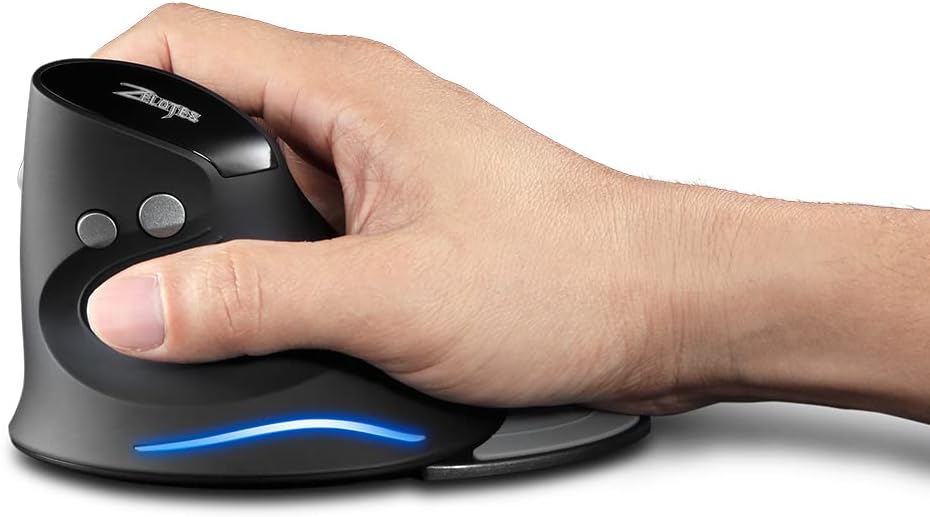
Image: A hand demonstrating the natural, ergonomic grip on the Zelotes F17 vertical mouse.
4.2 פונקציות כפתורים
- לחיצה שמאלית: פונקציית לחיצה ראשית סטנדרטית.
- מקש ימני: פונקציית לחיצה משנית סטנדרטית.
- גלגל גלילה: Scroll up or down, and click for middle-button functionality.
- לחצן DPI: עובר בין הגדרות DPI (1200/1600/2400 DPI).
- כפתורי קדימה/אחורה: Located on the thumb side, these buttons allow for quick navigation in web דפדפנים או file חוקרים.
4.3 DPI מתכוונן
Press the DPI button (located near the scroll wheel) to switch between 1200, 1600, and 2400 DPI settings. This allows you to adjust the mouse sensitivity to suit your task, whether it's precise graphic design or fast-paced gaming.
4.4 Detachable Palm Rest
The Zelotes F17 includes a detachable palm rest for additional wrist support. You can easily attach or remove it based on your preference and comfort needs.

Image: The Zelotes F17 mouse with its detachable palm rest separated, illustrating the modular design.
5. תחזוקה
To ensure the longevity and optimal performance of your Zelotes F17 mouse, follow these maintenance guidelines:
- ניקוי: השתמשו במטלית רכה ויבשה כדי לנגב את פני השטח של העכבר. במקרה של לכלוך עיקש, נגבו מעטampשטפו את המטלית במים או בתמיסת ניקוי עדינה. הימנעו מכימיקלים חזקים או מחומרים שוחקים.
- החלפת סוללה: When the mouse's performance degrades or the LED illumination dims, it's time to replace the AA batteries. Refer to Section 3.1 for battery installation instructions.
- אִחסוּן: When not in use for extended periods, turn off the mouse to conserve battery life. Store the USB receiver in its dedicated slot on the underside of the mouse to prevent loss.
6. פתרון תקלות
If you encounter issues with your Zelotes F17 mouse, try the following solutions:
| בְּעָיָה | סיבה אפשרית | פִּתָרוֹן |
|---|---|---|
| העכבר לא מגיב | Low battery; USB receiver disconnected; Mouse is off. | Replace batteries; Re-insert USB receiver; Turn mouse On. |
| תנועת סמן לא יציבה | חיישן אופטי מלוכלך; משטח לא מתאים; סוללה חלשה. | נקה את החיישן האופטי; השתמש על משטח חלק ולא מחזיר אור; החלף סוללות. |
| תאורת LED לא עובדת | Low battery; Mouse is off. | Replace batteries; Turn mouse On. |
| הגדרת ה-DPI לא משתנה | תקלה בכפתור DPI. | Ensure the mouse is powered on and connected. If the issue persists, contact customer support. |
7. מפרטים
Key technical specifications for the Zelotes F17 Vertical Wireless Mouse:
| תכונה | פְּרָט |
|---|---|
| מידות המוצר | 4.33 x 3.39 x 3.15 אינץ' |
| משקל פריט | 3.53 אונקיות |
| מספר דגם של פריט | F17 |
| מותג | zelotes |
| צֶבַע | שָׁחוֹר |
| טכנולוגיית קישוריות | USB (אלחוטי 2.4 גיגה-הרץ) |
| תכונה מיוחדת | Ergonomic Design, Removable Wrist Rest, LED Illumination |
| טכנולוגיית זיהוי תנועה | אוֹפּטִי |
| הגדרות DPI | 1200/1600/2400 DPI |
| מספר כפתורים | 6 |
| מקור כוח | 2 x סוללות AA (לא כלול) |
| תְאִימוּת | Win11, Win10, Win8, Win7, Mac OS |

Image: A diagram illustrating the dimensions of the Zelotes F17 Vertical Wireless Mouse.
8. אחריות ותמיכה
For warranty information or technical support, please refer to the contact details provided on the product packaging or the official Zelotes webאתר. שמור את קבלת הרכישה כהוכחת קנייה.