
1. התקנה
1.1 פתיחת האריזה ותכולת האריזה
Carefully remove the television and all components from the packaging. Verify that all items listed below are present:
- LG 70-Inch Class UQ9000 Series 4K Smart TV
- שלט קסם
- סוללות שלט רחוק (AA x 2)
- מעמד טלוויזיה
- כבל חשמל
- מדריך להתחלה מהירה
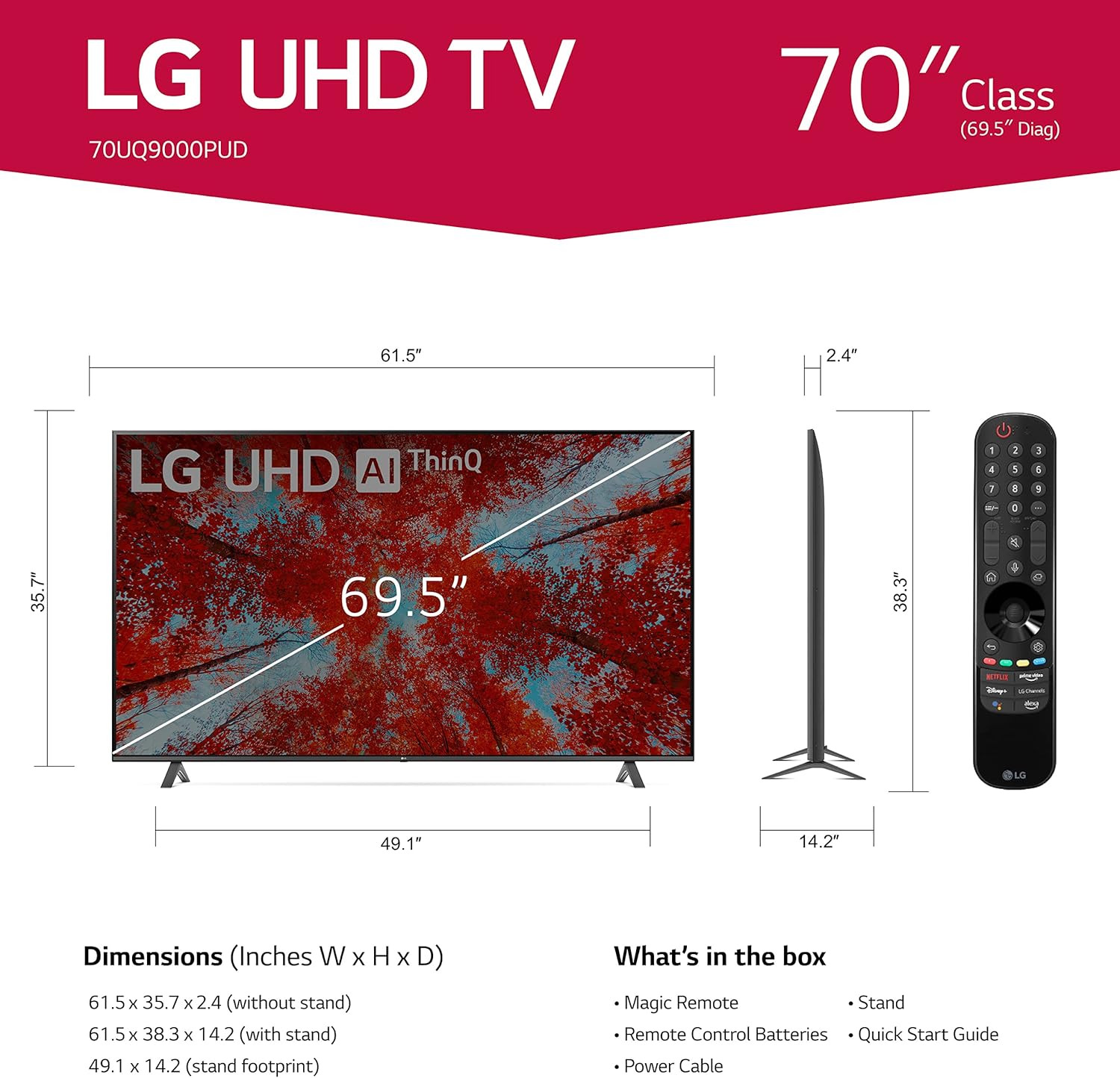
Image 1.1: LG 70UQ9000PUD TV with dimensions, Magic Remote, and a list of included accessories.
1.2 התקנה פיזית
The television can be installed using the included stand or mounted on a wall.
התקנת מעמד:
- Attach the stand components to the bottom of the TV using the provided screws.
- Ensure the stand is securely fastened before placing the TV on a stable, flat surface.
התקנה על קיר:
For wall mounting, use a VESA compatible mount with a 400 x 400 mm standard. Consult a professional for wall mounting to ensure proper and safe installation.
1.3 חיבור התקנים חיצוניים
Connect your external devices to the TV's ports. The LG 70UQ9000PUD features multiple connectivity options:
- יציאות HDMI (x3): For connecting devices such as gaming consoles, Blu-ray players, and set-top boxes.
- יציאות USB (x2): For connecting USB storage devices or other compatible peripherals.
- יציאת LAN: עבור חיבור אינטרנט קווי.
- יציאת שמע דיגיטלית אופטית: לחיבור למערכות שמע חיצוניות.
- כניסת אנטנה/כבל: לחיבור אנטנה או אות טלוויזיה בכבלים.
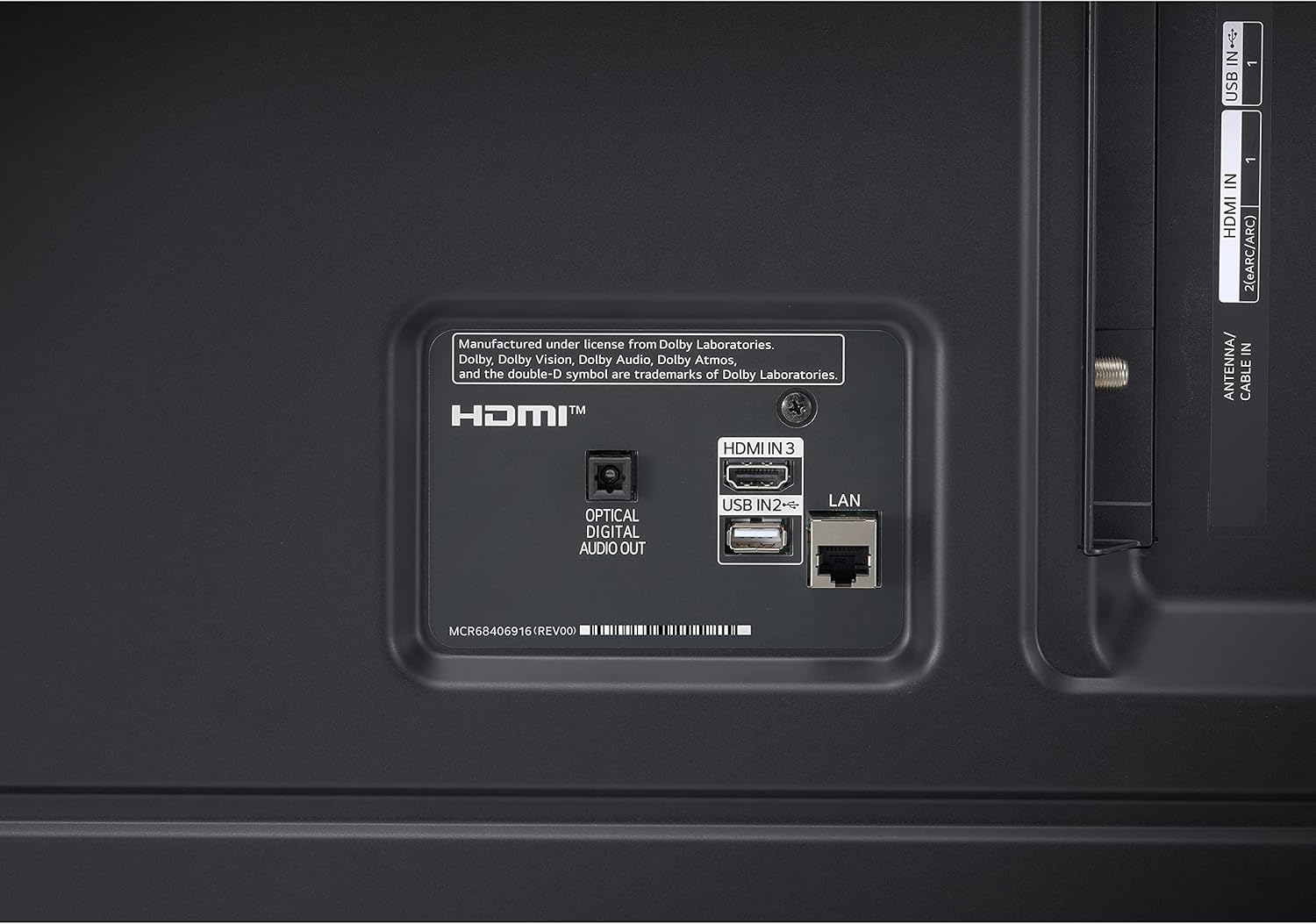
Image 1.2: Rear panel connections showing HDMI, USB, LAN, and Optical Digital Audio Out ports.
1.4 הפעלה ראשונית והגדרות בסיסיות
- חבר את כבל החשמל לטלוויזיה ולשקע חשמל.
- לחץ על כפתור ההפעלה בשלט רחוק או בטלוויזיה.
- Follow the on-screen instructions to complete the initial setup, including language selection, network connection (Wi-Fi or LAN), and channel scanning.
2. הוראות הפעלה
2.1 שימוש בשלט רחוק הקסם
The LG Magic Remote allows for intuitive control of your TV. It supports point, click, scroll, and voice commands.

Image 2.1: The LG Magic Remote, designed for easy navigation and voice control.
תכונות עיקריות:
- מצביע: Point the remote at the screen to move the on-screen cursor.
- לחיצה: לחץ על גלגלת הגלילה (לחצן אישור) כדי לבחור פריטים.
- גְלִילָה: Use the scroll wheel to move through menus and web דפים.
- שליטה קולית: Press and hold the microphone button to activate voice commands for searching content or controlling TV functions.

Image 2.2: Using the Magic Remote for intuitive control, including voice commands.
2.2 תכונות טלוויזיה חכמה (webOS with ThinQ AI)
The LG UQ9000 Series TV runs on webOS, providing a user-friendly interface for accessing various smart features and applications. ThinQ AI integrates artificial intelligence for enhanced control and personalized experiences.
Video 2.1: This video demonstrates the LG webממשק מערכת הפעלה, הצגהasing user profiles and personalized recommendations for a customized viewניסיון.
Key Smart Features:
- המלצות מותאמות אישית: webOS learns your viewing habits to suggest content.
- אפליקציות סטרימינג מובנות: Access popular services like Netflix, Prime Video, Apple TV app, Disney+, HBO Max, and over 300+ free LG Channels.
- Alexa מובנה: Use voice commands to control your TV and smart home devices.
Video 2.2: This video highlights various LG UHD TV features, including the α5 Gen5 AI Processor 4K, AI Brightness, and AI Sound, enhancing picture and audio quality.
2.3 שיפור תמונה וקול
The TV incorporates advanced technologies to optimize your viewחווית האזנה והקשבה.
- מעבד α5 Gen5 AI 4K: משפר את איכות התמונה והצליל באמצעות בינה מלאכותית.
- שדרוג 4K: הופך תוכן ברזולוציה נמוכה יותר לאיכות קרובה ל-4K לקבלת פרטים חדים יותר.
- בקרת בהירות בינה מלאכותית: מתאים אוטומטית את בהירות המסך בהתאם לתאורת הסביבה בחדר.
- HDR Format Support: Compatible with HDR10 and HLG for improved contrast and color.
- מצב יוצר סרטים: שומר על הצבעים, ההגדרות וקצבי הפריימים המקוריים של הבמאי לחוויית קולנוע אותנטית.
- AI Sound Pro: Automatically up-mixes 2-channel audio into virtual 5.1.2 channel sound for an immersive audio experience.

Image 2.3: AI Brightness Control automatically adjusts screen brightness to match room conditions.
2.4 תכונות משחקים
The TV offers features designed to enhance the gaming experience.
- משחקי ענן: Access games directly from the cloud (GeForce Now compatible, subscription and compatible controller may be required).
- אופטימיזציית משחקים ולוח מחוונים: Centralized settings for quick adjustments to game-specific parameters.
- HGiG: Delivers realistic HDR gaming with optimized tone mapping.

Image 2.4: Game Optimizer and Dashboard for quick adjustment of gaming settings.
2.5 התראת ספורט
Receive real-time updates for your favorite teams and matches, ensuring you never miss important sports moments.

Image 2.5: Sports Alert feature providing real-time updates for ongoing matches.
3. תחזוקה
3.1 ניקוי הטלוויזיה
- מָסָך: נגבו בעדינות את המסך בעזרת מטלית מיקרופייבר רכה ויבשה. במקרה של סימנים עקשניים, נגבו קלותampשטפו את המטלית במים או בחומר ניקוי מיוחד למסכים. הימנעו מכימיקלים חזקים.
- מסגרת ומעמד: השתמש במטלית רכה ויבשה כדי לנגב אבק ממסגרת הטלוויזיה ומעמדה.
- אוורור: ודאו שפתחי האוורור בגב הטלוויזיה אינם חסומים כדי למנוע התחממות יתר.
3.2 עדכוני תוכנה
The TV may receive regular software updates to improve performance, add new features, and enhance security. It is recommended to allow these updates to install when prompted to ensure optimal functionality.
3.3 החלפת סוללה בשלט רחוק
The Magic Remote requires two AA batteries. Replace them when the remote's performance diminishes.
- פתח את מכסה תא הסוללה בגב השלט הרחוק.
- הסר את הסוללות הישנות.
- הכניסו שתי סוללות AA חדשות, תוך הקפדה על קוטביות נכונה (+/-).
- סגור את מכסה תא הסוללות.
4. פתרון תקלות
If you encounter issues with your LG 70UQ9000PUD TV, refer to the following common troubleshooting steps:
- אין כוח: ודא שכבל החשמל מחובר היטב הן לטלוויזיה והן לשקע החשמל. בדוק אם השקע פועל על ידי חיבור מכשיר אחר.
- אין תמונה/קול: ודא שנבחר מקור הקלט הנכון. בדוק את כל חיבורי הכבלים (HDMI, אנטנה וכו') לאיתור רופפות או נזק.
- השלט הרחוק לא עובד: החלף את הסוללות בשלט הקסם. ודא שאין חסימות בין השלט לטלוויזיה.
- בעיות חיבור לרשת: For Wi-Fi, restart your router and modem. For wired connections, ensure the LAN cable is properly connected. You can also try resetting network settings on the TV.
- בעיות איכות תמונה: כוונן את הגדרות התמונה (בהירות, ניגודיות, צבע) בתפריט הטלוויזיה. ודא שמקור התוכן הוא באיכות גבוהה.
For more detailed troubleshooting or persistent issues, consult the full electronic manual available through the TV's settings or contact LG customer support.
5. מפרטים
| תכונה | מִפרָט |
|---|---|
| מספר דגם | 70UQ9000PUD |
| מותג | LG |
| גודל מסך | 69.5 אינץ' (מחלקה 70 אינץ') |
| טכנולוגיית תצוגה | LED |
| הַחְלָטָה | 4K (3840 x 2160) |
| קצב רענון | 60 הרץ |
| מעבד | מעבד α5 Gen5 AI 4K |
| מַעֲרֶכֶת הַפעָלָה | webOS |
| עוזר קולי | Alexa מובנה |
| טכנולוגיית קישוריות | Bluetooth 5.0, Wi-Fi |
| יציאות HDMI | 3 |
| יציאות USB | 2 |
| מידות המוצר (D x W x H) | 14.2" D x 61.5" W x 38.3" H |
| תקן VESA להרכבה | 400 x 400 מ"מ |
| צריכת חשמל | 22 וואט |
| סוללות שלט רחוק | 2 סוללות AA |
| UPC | 195174030073 |
6. מידע על אחריות
This LG TV is covered by a Manufacturer’s Warranty. For specific details regarding warranty coverage, duration, and terms, please refer to the warranty card included with your product or visit the official LG webאתר. שמור את הוכחת הרכישה שלך לצורך תביעות אחריות.
7. תמיכת לקוחות
For further assistance, technical support, or service inquiries, please contact LG Customer Support. You can find contact information on the official LG webבאתר או בתיעוד המצורף לטלוויזיה שלך.
משאבים מקוונים: בקר בתמיכה של LG website for FAQs, software downloads, and detailed product manuals.
תמיכה טלפונית: Refer to your product documentation for regional customer service numbers.