
1. הקדמה
תודה על הרכישהasing the PUSOKEI Digital Alarm Clock Bluetooth Speaker. This device combines a digital alarm clock, Bluetooth 5.0 speaker, FM radio, and memory card player into a compact and portable unit. Please read this manual carefully to ensure proper use and optimal performance.
תכולת החבילה:
- 1 x PUSOKEI Digital Alarm Clock Bluetooth Speaker
- 1 x כבל טעינה מיקרו USB
- 1 x מדריך למשתמש
2. מידע בטיחות
- אין לחשוף את המכשיר לטמפרטורות קיצוניות, לאור שמש ישיר או לחות גבוהה.
- הימנע מנפילה או הכפיפה של המכשיר למכות חזקות.
- אין לפרק או לנסות לתקן את המכשיר בעצמך. פנה לאנשי שירות מוסמכים.
- הרחק את המכשיר ממים ומנוזלים אחרים.
- Use only the provided or a certified Micro USB cable for charging.
3. המוצר נגמרview
Familiarize yourself with the main components and controls of your PUSOKEI Digital Alarm Clock Bluetooth Speaker.

תמונה 3.1: חֲזִית view of the device, highlighting the speaker, LED display, and control buttons.
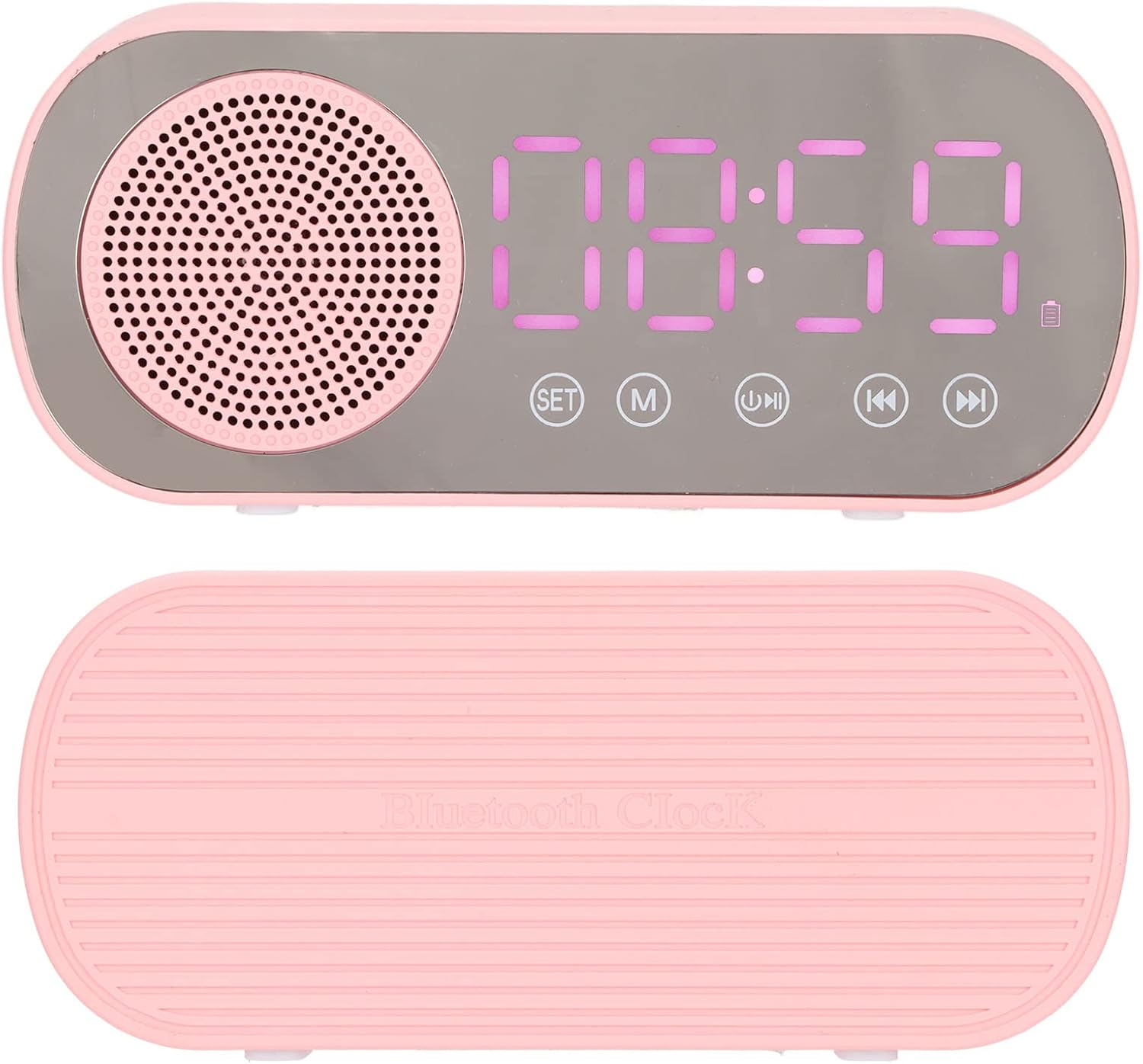
תמונה 3.2: למעלה ולמטה views of the alarm clock, showing its compact design.

תמונה 3.3: אֲחוֹרִי view of the device, illustrating the Micro USB charging port and the TF (memory card) slot.
לחצני שליטה:
- מַעֲרֶכֶת: Used to enter time/alarm setting mode and confirm selections.
- M (מצב): Switches between Bluetooth, FM Radio, and Memory Card playback modes.
- הפעל/השהה: מנגן או משהה אודיו. במצב FM, לחץ לחיצה ארוכה כדי לסרוק אוטומטית ולשמור תחנות.
- קודם/הנמכת עוצמת הקול: לחיצה קצרה לרצועה/תחנה הקודמת. לחיצה ארוכה להנמכת עוצמת הקול.
- הבא/הגברת עוצמת הקול: לחיצה קצרה לרצועה/תחנה הבאה. לחיצה ארוכה להגברת עוצמת הקול.
4. התקנה
4.1 טעינת המכשיר
Before first use, fully charge the alarm clock. Connect the supplied Micro USB cable to the charging port on the back of the device and the other end to a USB power adapter (5V=1A recommended) or a computer USB port. The charging indicator will illuminate and turn off once fully charged.
4.2 קביעת השעה
- לחץ והחזק את מַעֲרֶכֶת עד שספרות השעות יתחילו להבהב.
- השתמש ב- קוֹדֵם ו הַבָּא כפתורים לכוונון השעה.
- לִלְחוֹץ מַעֲרֶכֶת שוב כדי לעבור לכוונון דקות. השתמשו קוֹדֵם ו הַבָּא כדי להתאים את הדקות.
- לִלְחוֹץ מַעֲרֶכֶת one more time to confirm the time setting.
5. הוראות הפעלה
5.1 Setting Alarms (Dual Alarm Function)
המכשיר תומך בשתי אזעקות עצמאיות.

תמונה 5.1: The dual alarm function allows setting two different wake-up times.
- הקש על מַעֲרֶכֶת button once (short press) to enter Alarm 1 setting mode. The alarm icon and hour digits will flash.
- השתמש ב- קוֹדֵם ו הַבָּא לחצו על הכפתורים כדי לכוונן את השעה. מַעֲרֶכֶת כדי לאשר.
- כוונן את הדקות באמצעות קוֹדֵם ו הַבָּא. לִלְחוֹץ מַעֲרֶכֶת כדי לאשר.
- Repeat steps 1-3 for Alarm 2 by pressing מַעֲרֶכֶת twice (short presses) to enter Alarm 2 setting mode.
- כדי להפעיל/להשבית אזעקה, לחצו לחיצה קצרה על מַעֲרֶכֶת button until the desired alarm icon flashes, then press the הפעל/השהה button. The alarm icon will appear/disappear on the display.
5.2 השמעת בלוטות'

תמונה 5.2: Enjoy wireless music streaming from your phone via Bluetooth.
- הקש על M (מצב) button until 'BT' appears on the display, indicating Bluetooth mode. The device will enter pairing mode.
- On your smartphone or other Bluetooth-enabled device, search for 'PUSOKEI' in the Bluetooth settings.
- Select 'PUSOKEI' to pair. Once connected, you will hear a confirmation sound.
- You can now play music from your device. Use the הפעל/השהה, קוֹדֵם, ו הַבָּא לחצנים לשליטה בהפעלה.
פעולת רדיו FM 5.3

תמונה 5.3: The built-in FM radio allows access to local broadcasts.
- הקש על M (מצב) button until 'FM' appears on the display.
- כדי לסרוק אוטומטית ולשמור תחנות זמינות, לחצו והחזיקו את המקש הפעל/השהה כפתור. המכשיר יסרוק וישמור תחנות באופן אוטומטי.
- לאחר סיום הסריקה, השתמש ב- קוֹדֵם ו הַבָּא כפתורים כדי לנווט בין תחנות ה-FM השמורות.
5.4 Memory Card Playback
The device supports memory cards (TF cards) up to 32GB (not included).
- Insert a memory card with MP3 audio files into the TF card slot on the back of the device.
- הקש על M (מצב) button until the device automatically switches to memory card playback mode.
- השתמש ב- הפעל/השהה, קוֹדֵם, ו הַבָּא לחצנים לשליטה בהפעלה.
6. תחזוקה
- ניקוי: נגבו את המכשיר במטלית רכה ויבשה. אין להשתמש בחומרי ניקוי שוחקים או ממסים.
- טיפול בסוללה: כדי להאריך את חיי הסוללה, הימנעו מפריקה מלאה של הסוללה לעתים קרובות. טען את המכשיר באופן קבוע, גם אם אינו בשימוש למשך פרקי זמן ממושכים.
- אִחסוּן: אחסן את המכשיר במקום קריר ויבש כאשר אינו בשימוש.
7. פתרון תקלות
| בְּעָיָה | סיבה אפשרית | פִּתָרוֹן |
|---|---|---|
| המכשיר לא נדלק. | סוללה חלשה. | טען את המכשיר באמצעות כבל Micro USB. |
| אין קול מהרמקול. | Volume too low; device not connected properly (Bluetooth); incorrect mode. | Increase volume. Re-pair Bluetooth device. Ensure correct mode (BT, FM, TF). |
| התאמת Bluetooth נכשלה. | המכשיר לא במצב צימוד; רחוק מדי מהמקור; הפרעות. | Ensure device is in BT mode and flashing. Move closer to the source device. Turn off other Bluetooth devices. |
| קליטת רדיו FM גרועה. | אות חלש; הפרעות סביבתיות. | Try repositioning the device. Perform auto-scan again. |
| האזעקה לא נשמעת. | אזעקה לא מופעלת; עוצמת הקול נמוכה מדי. | Ensure the alarm icon is visible on the display. Increase the device volume. |
| חיי סוללה קצרים. | Frequent use at high volume; aging battery. | Reduce volume. Ensure full charge before use. Battery life naturally decreases over time. |
8. מפרטים
| תכונה | פְּרָט |
|---|---|
| סוג מוצר | Digital Alarm Clock Bluetooth Speaker |
| מספר דגם | PUSOKEIoi23d8mgzx1614 |
| חוֹמֶר | ABS (Acrilonitrilo Butadieno Estireno) |
| מידות המוצר (L x W x H) | כ-116 x 51 x 33 מ"מ (4.6 x 2 x 1.3 אינץ') |
| גרסת בלוטות' | 5.0 |
| סוג סוללה | Built-in Lithium Battery, 3.7V |
| קיבולת סוללה | 1600 מיליאמפר/שעה |
| קלט כוח | 5V=1A |
| כוח פלט רמקול | 2W |
| תגובת תדר | 80-20KHz |
| יחס אות שמע לרעש | >85dB |
| תדר רדיו FM | 87.5 מגהרץ - 108 מגהרץ |
| תמיכה בכרטיס זיכרון | TF Card, up to 32GB (not included) |
| סוג תצוגה | Digital LED with Mirror Screen |
| תכונות מיוחדות | Dual Alarms, FM Radio, Bluetooth Speaker, Memory Card Playback |