
מָבוֹא
This manual provides detailed instructions for the installation, operation, and maintenance of your darkFlash DLC29 All Mesh PC Case. Designed as an ATX Mid Tower, this case prioritizes high cooling performance and broad compatibility for various PC components. Please read this manual thoroughly before beginning assembly to ensure proper setup and optimal performance.

Image: The darkFlash DLC29 PC case with its mesh panels detached, illustrating the internal chassis and the full mesh design of the side and top panels.
תכונות מפתח
- עיצוב מודרני מסוגנן: Features fine mesh panels on all sides for efficient airflow and dust filtration. Includes an integrated GPU supporter.
- תמיכה בלוח אם: Compatible with ATX, M-ATX, and ITX motherboard form factors.
- תאימות רכיבים: Supports Graphics Processing Units (GPUs) up to 330mm in length and CPU coolers up to 165mm in height. Designed for bottom-mounted ATX power supplies.
- Powerful Cooling System: Accommodates up to 6 fans simultaneously. Supports liquid coolers in sizes 120mm, 140mm, 240mm, 280mm, and 360mm for enhanced thermal management.
- Multifunctional I/O Panel: Conveniently located on the top, featuring 2x USB 3.0 ports, 2x USB 2.0 ports, HD Audio jacks, and Power/Reset buttons.
- Sufficient Internal Space: Case dimensions are 385mm (L) x 210mm (W) x 478mm (H). Offers flexible storage options with 4 or 5 (2.5-inch) drive bays and 2 or 1 (3.5-inch) drive bays. Provides 9 expansion slots.

Image: An illustration demonstrating the airflow pattern within the DLC29 case, with blue arrows indicating cool air intake from the front and sides, and orange arrows showing warm air exhaust from the top.
מפרטים
| מותג | כהה פלאש |
| שם הדגם | DLC29 |
| מספר דגם של פריט | HU-XI-58 |
| סוג מקרה | מגדל אמצע |
| חוֹמֶר | מַתֶכֶת |
| צֶבַע | שָׁחוֹר |
| מידות המוצר (LxWxH) | 11.02 x 18.11 x 22.05 אינץ' (385 x 210 x 478 מ"מ) |
| משקל פריט | 14.97 פאונד |
| תאימות לוח אם | ATX, M-ATX, ITX |
| אורך GPU מקסימלי | 330 מ"מ |
| מקסימום גובה מצנן מעבד | 165 מ"מ |
| סוג הרכבה של ספק כוח | Bottom Mount (ATX) |
| שיטת קירור | אוויר, מים |
| תמיכת מעריצים | Up to 6 fans (120mm/140mm) |
| תמיכת רדיאטור | 120 מ"מ, 140 מ"מ, 240 מ"מ, 280 מ"מ, 360 מ"מ |
| Drive Bays (2.5" SSD) | 4 או 5 |
| Drive Bays (3.5" HDD) | 2 או 1 |
| חריצי הרחבה | 9 |
| יציאות קלט / פלט קדמיות | 2x USB 3.0, 2x USB 2.0, HD Audio, Power, Reset |

Image: Technical drawing displaying the external dimensions of the darkFlash DLC29 case, including its width (210mm), depth (385mm), and height (478mm).
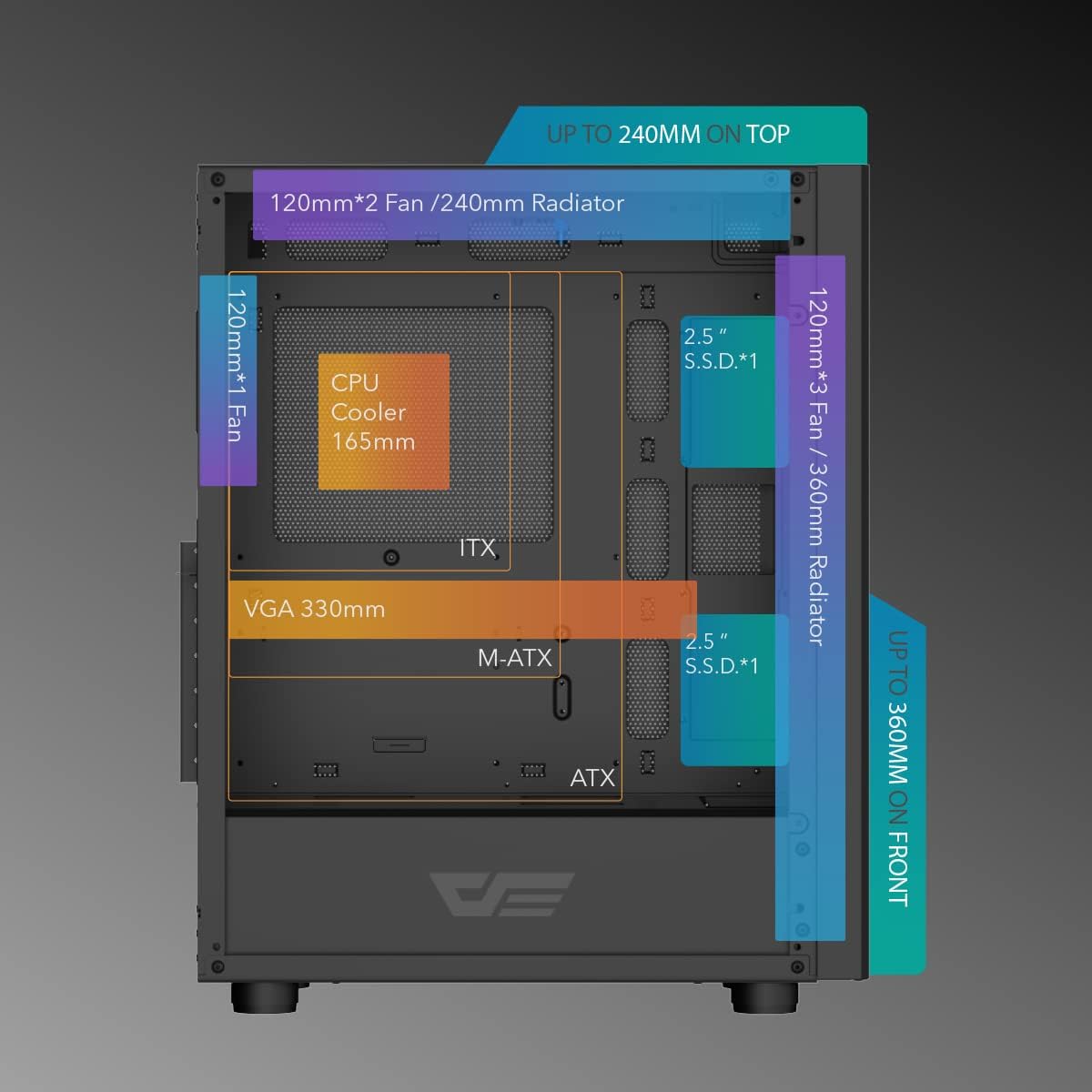
Image: An internal diagram of the DLC29 case, highlighting compatible component sizes such as CPU cooler height (165mm), VGA length (330mm), and various fan/radiator configurations for the front, top, and rear.

תמונה: א view of the rear interior of the DLC29 case, detailing the mounting locations for 2.5-inch SSDs, 3.5-inch HDDs, and the dedicated compartment for the ATX power supply.
התקנה והתקנה
This section outlines the general steps for assembling your PC components within the darkFlash DLC29 case. For specific component installation, refer to your component's individual manuals.
- פריקת אריזה: Carefully remove the PC case from its packaging. Inspect for any damage during transit.
- הסרת לוח: Remove the side panels to access the interior. The mesh panels are typically secured with thumbscrews or a clip mechanism.
- התקנת לוח אם: Install the standoffs (if not pre-installed) according to your motherboard's form factor (ATX, M-ATX, ITX). Secure the motherboard into place.
- CPU and CPU Cooler Installation: Install your CPU and then the CPU cooler (air or liquid) onto the motherboard before or after installing the motherboard into the case, depending on the cooler's size and case access. Ensure the CPU cooler height does not exceed 165mm.
- התקנת כרטיס מסך (GPU): Insert your GPU into the appropriate PCIe slot. Ensure the GPU length does not exceed 330mm. Utilize the included GPU supporter for stability if needed.
- התקנת יחידת אספקת חשמל (PSU): Mount the ATX power supply in the bottom compartment of the case.
- התקנת התקן אחסון: Install 2.5-inch SSDs and 3.5-inch HDDs into their designated bays. The case offers flexible configurations for these drives.
- התקנת מאוורר ורדיאטור: Install additional cooling fans (up to 6) or liquid cooling radiators (120mm/140mm/240mm/280mm/360mm) in the designated front, top, and rear mounting points.
- ניהול כבלים: Route all power and data cables through the provided cutouts and tie-down points behind the motherboard tray to ensure clean aesthetics and unobstructed airflow.
- אסיפה סופית: Reattach the side panels. Connect all external peripherals.

Image: An exploded diagram of the DLC29 case, illustrating how the front, top, and side mesh panels can be detached from the main chassis for easier component installation and maintenance.
הוראות הפעלה
Operating the darkFlash DLC29 PC case involves basic interaction with its front I/O panel.
- הפעלה/כיבוי: Press the power button located on the top I/O panel to turn your system on or off. A short press typically powers on, while a longer press may initiate a forced shutdown.
- לחצן איפוס: Use the reset button for a quick system restart if necessary.
- יציאות USB: Utilize the 2x USB 3.0 and 2x USB 2.0 ports for connecting peripherals such as keyboards, mice, external drives, and other USB-compatible devices.
- שקעי שמע HD: Connect your headphones or microphone to the dedicated HD Audio jacks for audio input and output.
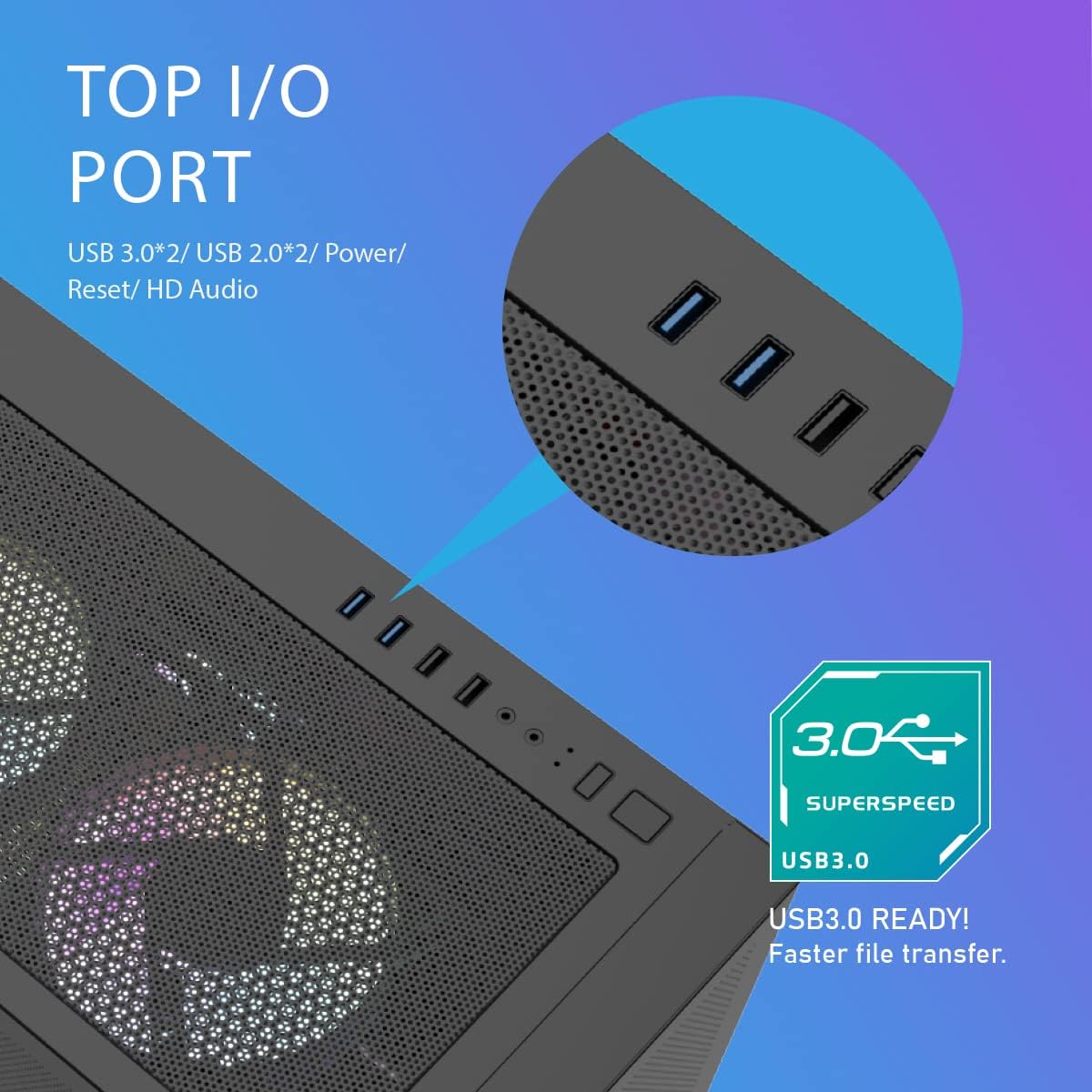
תמונה: מפורט view of the top I/O panel of the DLC29 case, showing the arrangement of the USB 3.0, USB 2.0, HD Audio ports, and power/reset buttons.
תַחזוּקָה
Regular maintenance helps ensure the longevity and optimal performance of your darkFlash DLC29 PC case and the components within.
- ניקוי מסנן אבק: The mesh panels act as dust filters. Periodically remove the panels and gently clean them using compressed air or a soft brush to remove accumulated dust. This maintains optimal airflow.
- ניקוי פנים: With the system powered off and unplugged, use compressed air to clear dust from internal components such as CPU coolers, GPU fans, and power supply vents.
- בדיקת ניהול כבלים: Occasionally inspect cable routing to ensure no cables have come loose or are obstructing airflow.
- ניקוי חיצוני: נגב את המשטחים החיצוניים עם רך, דamp מטלית. הימנעו מחומרי ניקוי שוחקים או ממסים.
פתרון בעיות
This section addresses common issues you might encounter with your PC case. For complex system issues, consult a qualified technician or your component manufacturers' support.
- המערכת לא נדלקת:
- ודא שספק הכוח מחובר כראוי לשקע בקיר ושהמתג של ספק הכוח נמצא במצב 'פועל'.
- Verify all internal power cables (24-pin motherboard, CPU, GPU) are securely seated.
- Check that the front panel power switch cable is correctly connected to the motherboard's F_PANEL header.
- בעיות התחממות יתר:
- Confirm all case fans are spinning and oriented correctly for optimal airflow (intake at front/bottom, exhaust at rear/top).
- Clean dust filters and internal components as described in the Maintenance section.
- Ensure CPU cooler and GPU heatsinks are free of dust and fans are functioning.
- יציאות קלט/פלט קדמיות שאינן פועלות:
- Check that the USB and HD Audio cables from the front panel are correctly connected to the corresponding headers on your motherboard.
- Ensure motherboard drivers are installed and up to date.
- רעש מוגזם:
- Identify the source of the noise (fans, hard drives).
- Ensure all fans are securely mounted and free from cable obstruction.
- If using traditional hard drives, ensure they are properly secured in their bays to minimize vibration.
אחריות ותמיכה
For warranty information, technical support, or service inquiries regarding your darkFlash DLC29 PC Case, please refer to the official darkFlash webאתר או צרו קשר ישירות עם תמיכת הלקוחות שלהם. שמרו את הוכחת הרכישה שלכם לצורך תביעות אחריות.
דארקפלאש רשמי Webאֲתַר: darkFlash Store on Amazon