
AOLION WGXB004005
מדריך למשתמש למתאם אוזניות סטריאו של AOLION
Model: WGXB004005
מָבוֹא
The AOLION Stereo Headset Adapter is designed to enhance your gaming experience on Xbox One controllers. This adapter allows you to connect most wired stereo gaming headsets with a 3.5mm audio jack (CTIA plug standard) directly to your Xbox controller, providing convenient control over game sound and voice chat.
תוכן החבילה
- 1 × AOLION Stereo Headset Adapter
- 1 × מדריך למשתמש
המוצר נגמרview
The adapter features intuitive controls for managing your audio experience during gameplay.

איור 1: חזית view of the headset adapter showing control buttons.
- Game Balance Button: Adjusts the balance towards game audio.
- Chat Balance Button: Adjusts the balance towards voice chat audio.
- לחצן השתקת מיקרופון: מפעיל/מכבה את המיקרופון.
- לחצן הגברת עוצמת הקול: Increases overall volume.
- לחצן להורדת עוצמת הקול: Decreases overall volume.
- שקע שמע 3.5 מ"מ: For connecting your stereo gaming headset.
- מחבר USB: For connecting to the Xbox controller.
תְאִימוּת
This headset adapter is compatible with a wide range of Xbox One controllers and stereo gaming headsets:
- Xbox Controllers: Xbox One, Xbox One S, Xbox One X, Xbox Elite Wireless Controller Series 1, Xbox Elite Wireless Controller Series 2, Xbox Series S, and Xbox Series X Controllers.
- אוזניות: Most wired stereo gaming headsets featuring a 3.5mm audio jack (using the CTIA plug standard).

Figure 2: The adapter is compatible with multiple Xbox controller models.

Figure 3: The adapter supports standard 3.5mm CTIA headsets.
הגדרה
Setting up your AOLION Stereo Headset Adapter is a simple plug-and-play process.
- Connect the Adapter to the Controller: Align the USB connector of the headset adapter with the expansion port at the bottom of your Xbox controller. Gently push until it clicks securely into place.
- חבר את האוזניות שלך: Plug your wired stereo gaming headset's 3.5mm audio jack into the corresponding port on the bottom of the headset adapter.
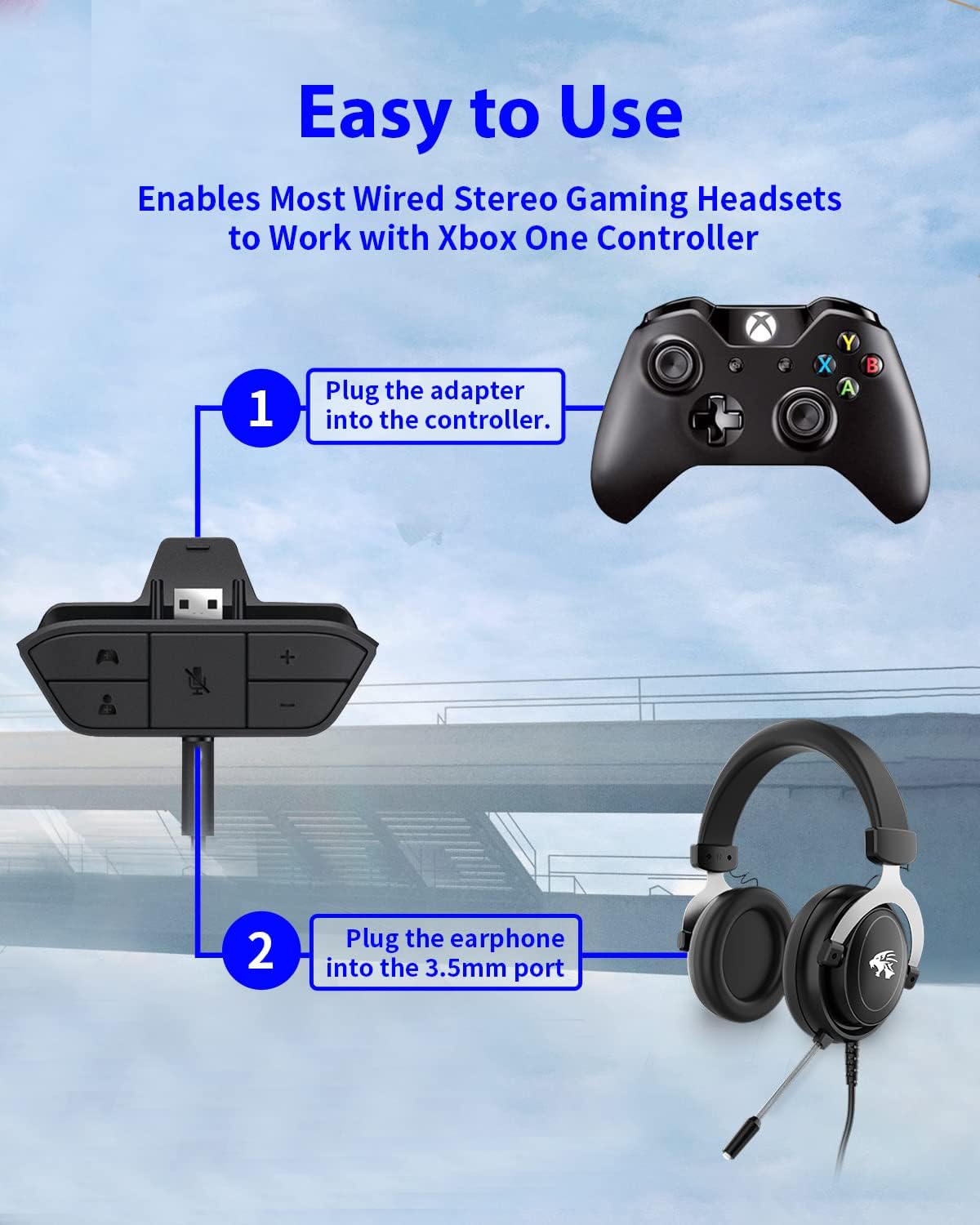
Figure 4: Step-by-step connection guide for the headset adapter.
Video 1: Demonstration of connecting the headset adapter to an Xbox controller.
הערה חשובה: For optimal performance and to resolve potential audio issues, it is recommended to update your Xbox controller's firmware after connecting the adapter. This can typically be done through your Xbox console's settings (Settings > Devices & connections > Accessories > Select your controller > ... > Controller settings > Update firmware).
הוראות הפעלה
Once connected, use the buttons on the adapter to control your audio:
- עוצמת הקול מעלה/הנמכת (+/-): Press the '+' button to increase the overall volume of both game and chat audio. Press the '-' button to decrease it.
- Microphone Mute (Microphone Icon): Press this button to mute or unmute your microphone. An indicator light (if present) or on-screen notification may confirm the mute status.
- Game/Chat Balance (Controller Icon / Person Icon):
- הקש על סמל בקר button to increase game audio volume and decrease chat audio volume.
- הקש על סמל אדם button to increase chat audio volume and decrease game audio volume.
איור 5: מפורט view of the adapter's control buttons.
תַחזוּקָה
To ensure the longevity and optimal performance of your headset adapter, follow these simple maintenance guidelines:
- שמרו על ניקיון המתאם, ללא אבק ולכלוך. השתמשו במטלית רכה ויבשה לניקוי.
- הימנע מחשיפת המתאם לטמפרטורות קיצוניות, לחות או אור שמש ישיר.
- אל תנסה לפרק או לתקן את המתאם בעצמך, שכן פעולה זו תגרום לביטול האחריות.
- אחסנו את המתאם במקום בטוח כאשר אינו בשימוש כדי למנוע נזק פיזי.
פתרון בעיות
If you encounter issues with your AOLION Stereo Headset Adapter, please refer to the following common solutions:
| בְּעָיָה | סיבה / פתרון אפשרי |
|---|---|
| No audio or poor audio quality (buzzing, peaking) |
|
| המיקרופון לא עובד |
|
| Game/Chat balance not working |
|
אם הבעיה נמשכת לאחר שניסית את השלבים הבאים, אנא צור קשר עם תמיכת הלקוחות.
מפרטים
| תכונה | פְּרָט |
|---|---|
| מספר דגם | WGXB004005 |
| מותג | AOLION |
| מידות המוצר (L x W x H) | 3.15 x 1.57 x 0.79 אינץ' (8 x 4 x 2 ס"מ) |
| צֶבַע | שָׁחוֹר |
| סוג מחבר | Auxiliary (3.5mm CTIA standard) |
| מכשירים תואמים | Xbox One, One S, One X, Elite 1, Elite 2, Series S, Series X Controllers; 3.5mm CTIA Stereo Headsets |
אחריות ותמיכה
AOLION stands behind the quality of its products. This Stereo Headset Adapter comes with:
- אחריות להחזר כספי ל-60 יום: If you are not entirely satisfied with your purchase within 60 days, you may be eligible for a full refund.
- 24-Month אחריות: We provide a 24-month warranty against manufacturing defects from the date of purchase.
For any questions, concerns, or warranty claims, please contact us through Amazon. We are committed to responding to your inquiries within 12 hours to ensure your complete satisfaction.
Ask a question about this manual
Ask about setup, troubleshooting, compatibility, parts, safety, or missing instructions. Manuals+ will review the question and use this page’s manual context to help answer it.