
1. הקדמה
Thank you for choosing the HISTTON Fanless Mini PC J4125. This compact and robust industrial-grade mini computer is designed for stable and efficient operation in various environments. Featuring a fanless design for silent performance and dust protection, it is equipped with an Intel Celeron J4125 processor, ample RAM, and versatile connectivity options. This manual provides essential information for setting up, operating, maintaining, and troubleshooting your device.

Image 1.1: The HISTTON Fanless Mini PC J4125, a compact black device with a ribbed top for heat dissipation, featuring various ports on its front and back panels.
2. תכולת החבילה
אנא סמן את התיבה עבור הפריטים הבאים:
- 1 x HISTTON Mini PC (J4125)
- 1 x מתאם חשמל
- 1 x מדריך למשתמש
- 1 x כבל HDMI
- 1 x מתקן VESA
- 1 x סט ברגים
- 1 x כבל SATA
3. המוצר נגמרview
3.1 תכונות עיקריות
- מעבד: Intel Celeron J4125 (4 Cores 4 Threads, 2.00GHz Base, 2.70GHz Turbo)
- גרָפִיקָה: Intel UHD Graphics 600
- מַעֲרֶכֶת הַפעָלָה: Pre-installed Windows 11 Pro (64-bit, activated)
- זֵכֶר: DDR4 RAM (Single SODIMM slot, up to 32GB supported)
- אִחסוּן: 1x mSATA SSD slot, 1x SATA 3.0 for 2.5-inch HDD/SSD
- קישוריות: Dual Gigabit RJ45 LAN, Dual-band Wi-Fi (2.4G+5.0G), Bluetooth 4.0
- פלט וידאו: 1x HDMI, 1x VGA (Dual display support)
- יציאות: 2x USB 3.0, 2x USB 2.0, 2x RS232 COM, 1x 3.5mm Mic/SPK out
- מאפיינים מיוחדים: Fanless design, RTC wake up, Wake on LAN, Auto Power on (BIOS setting), Network boot
3.2 לוחות קדמיים ואחוריים
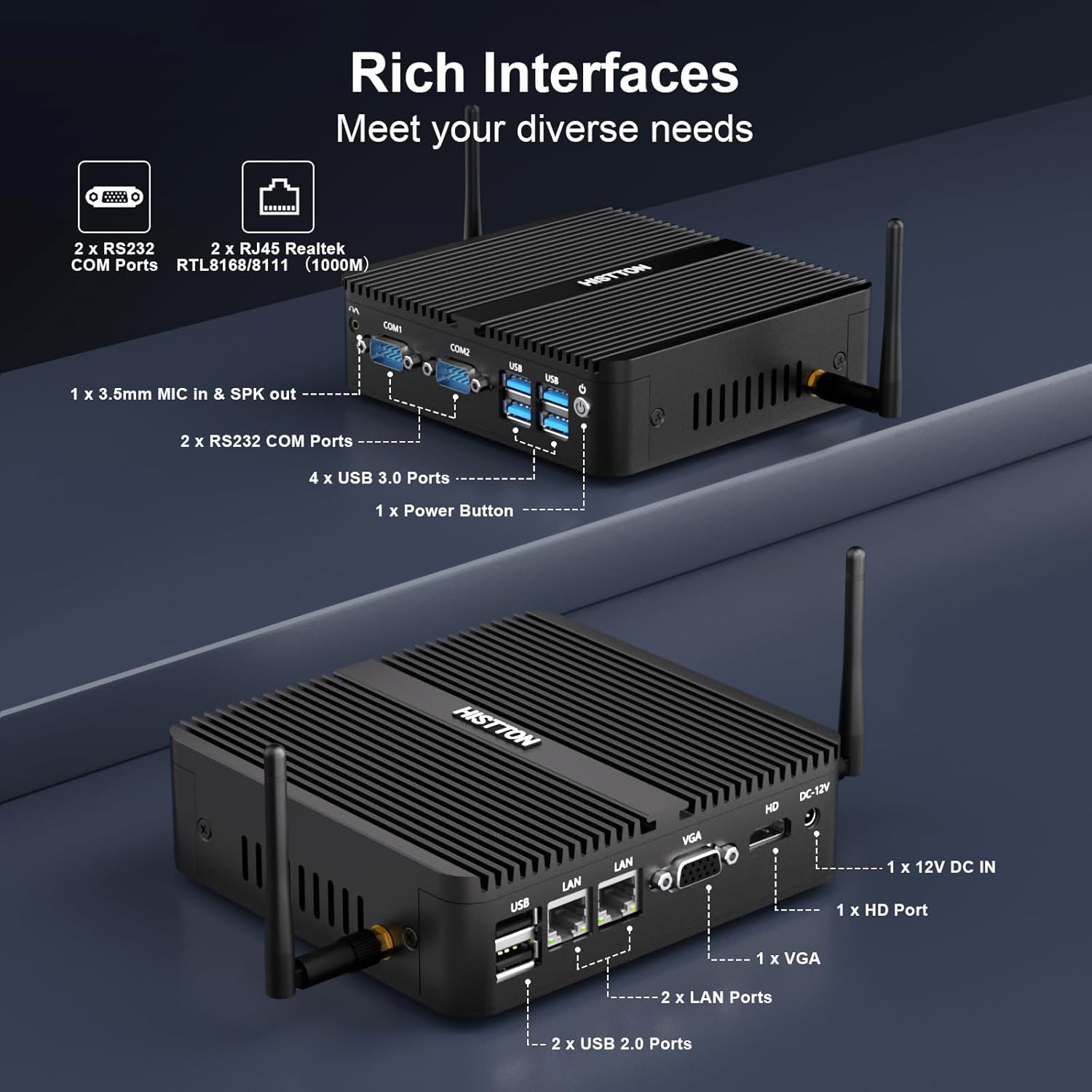
תמונה 3.1: מפורט view of the HISTTON Mini PC's front and rear panels, highlighting the various input/output ports including USB, COM, LAN, HDMI, and VGA.
- פאנל קדמי: Power button, 2x USB 3.0 ports, 2x USB 2.0 ports, 2x RS232 COM ports (COM1, COM2), 3.5mm audio jack (Mic/SPK out).
- לוח אחורי: DC-12V power input, 1x HDMI port, 1x VGA port, 2x Gigabit RJ45 LAN ports, Wi-Fi antenna connectors.
3.3 Internal Components and Expandability
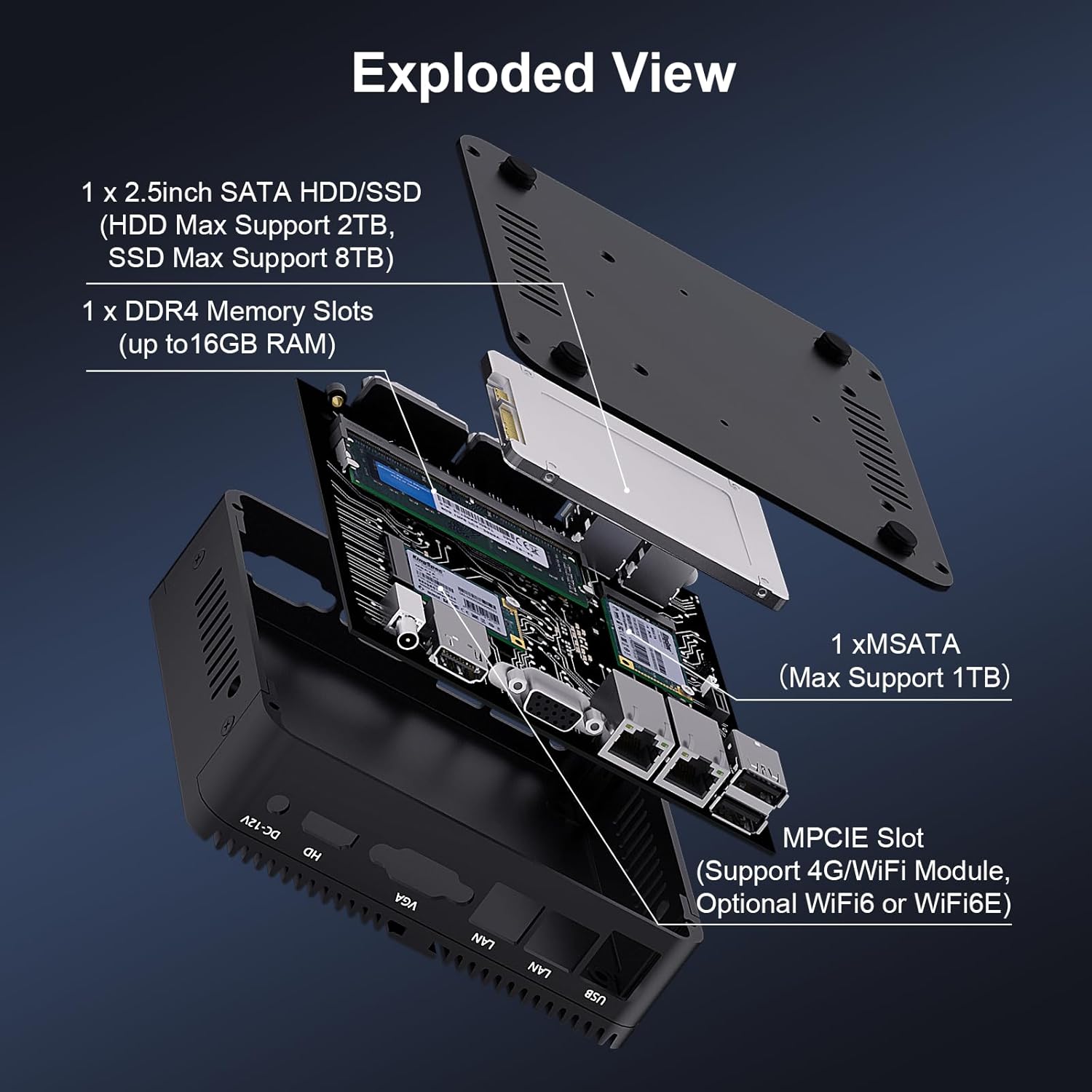
תמונה 3.2: פיצוץ view of the HISTTON Mini PC, showing the internal layout including the mSATA SSD slot, DDR4 memory slot, and space for a 2.5-inch SATA drive.
- אַיִל: Single SODIMM slot for DDR4 memory, supporting up to 32GB.
- SSD: 1x mSATA slot (Max Support 1TB).
- HDD/SSD: 1x SATA 3.0 port for a 2.5-inch HDD (Max Support 2TB) or SSD (Max Support 8TB).
- אַלחוּט: MPCIE slot for 4G/WiFi module (Optional WiFi6 or WiFi6E).
4. הוראות התקנה
4.1 חיבור ציוד היקפי
- Connect your monitor(s) to the HDMI and/or VGA ports on the rear panel.
- Connect your keyboard and mouse to the USB ports on the front panel.
- Attach the Wi-Fi antennas to the connectors on the rear panel.
- For wired network access, connect an Ethernet cable to one of the RJ45 LAN ports.
- Connect the power adapter to the DC-12V input port on the rear panel, then plug it into a power outlet.
4.2 הפעלה
Press the power button on the front panel to turn on the Mini PC. The power indicator light will illuminate.
4.3 התקנת מתקן VESA (אופציונלי)
The Mini PC supports VESA mounting, allowing you to attach it to the back of a compatible monitor or to a wall mount. Use the provided VESA mount and screws to secure the Mini PC. Ensure the monitor's VESA holes are compatible with the mount.
Video 4.1: An official product video demonstrating the physical features of the HISTTON Fanless Mini PC and its VESA mounting process.
5. הוראות הפעלה
5.1 התקנה ראשונית של Windows
Upon first boot, follow the on-screen instructions to complete the Windows 11 Pro setup, including language, region, network connection, and user account creation.
5.2 הגדרת תצוגה כפולה
The Mini PC supports dual display output via its HDMI and VGA ports. Connect two monitors and configure display settings within Windows (Right-click on desktop > Display settings) to extend or duplicate your desktop.

Image 5.1: The HISTTON Mini PC connected to two monitors, demonstrating its dual display capability via HDMI and VGA ports.
5.3 הגדרות BIOS
To access the BIOS, press the DEL key repeatedly during startup. The BIOS allows configuration of advanced features such as:
- RTC Wake Up: Schedule the PC to power on at a specific time.
- התעוררות ברשת LAN: Power on the PC remotely via a network signal.
- הפעלה אוטומטית: Automatically power on the PC when power is restored after an outage.
- אתחול רשת: Boot the PC from a network server.
6. תחזוקה
6.1 ניקוי
Regularly clean the exterior of the Mini PC with a soft, dry cloth. Avoid using liquid cleaners or abrasive materials. As it is fanless, internal dust accumulation is minimized, but ensure the ribbed chassis remains clear of obstructions for optimal heat dissipation.
6.2 עדכוני תוכנה
עדכנו את מערכת ההפעלה ומנהלי ההתקנים של Windows כדי להבטיח ביצועים ואבטחה מיטביים. ניתן לגשת ל-Windows Update דרך הגדרות > Windows Update.
7. פתרון תקלות
| בְּעָיָה | סיבה אפשרית | פִּתָרוֹן |
|---|---|---|
| המיני מחשב לא נדלק. | אין חשמל, מתאם חשמל פגום, חיבור רופף. | Check power cable connection. Ensure power adapter is working. Try a different power outlet. |
| אין תצוגה על הצג. | Loose video cable, incorrect input source on monitor, monitor off. | Ensure video cables (HDMI/VGA) are securely connected. Select correct input source on monitor. Turn on monitor. |
| אין קישוריות רשת. | Loose Ethernet cable, Wi-Fi disabled, driver issue. | Check Ethernet cable connection. Ensure Wi-Fi is enabled and connected to a network. Reinstall network drivers if necessary. |
| ביצועים איטיים. | יותר מדי יישומים פועלים, שטח אחסון נמוך, מנהלי התקנים מיושנים. | סגור יישומים מיותרים. פנה שטח דיסק. עדכן מנהלי התקנים ו-Windows. |
8. מפרטים
| תכונה | פְּרָט |
|---|---|
| מותג | היסטון |
| מספר דגם | J4125 |
| מַעֲרֶכֶת הַפעָלָה | Windows 11 Pro |
| דגם מעבד | סלרון J4125 |
| מהירות מעבד | 2 GHz (up to 2.7 GHz Turbo) |
| מעבד גרפי | Intel UHD Graphics 600 |
| זיכרון RAM מותקן | 16 GB DDR4 (מקסימום 32GB) |
| קיבולת אחסון זיכרון | SSD 512 גיגה-בייט |
| תיאור הדיסק הקשיח | HDD, SSD (1x mSATA, 1x 2.5-inch SATA) |
| ממשק פלט וידאו | HDMI, VGA |
| טכנולוגיית קישוריות | Ethernet, HDMI, LAN, Wi-Fi, Bluetooth |
| טכנולוגיה אלחוטית | Bluetooth 4.0, Dual-band Wi-Fi (2.4G+5.0G) |
| מידות פריט | 5.31 x 5 x 1.54 אינץ' (13.5 x 12.6 x 4.0 ס"מ) |
| משקל פריט | 0.6 קילוגרם |
| סך כל יציאות USB | 4 (2x USB 3.0, 2x USB 2.0) |
| יציאות COM | 2x RS232 |
| יציאות LAN | 2x Gigabit RJ45 |
9. אחריות ותמיכה
HISTTON provides customer support for your Mini PC. If you encounter any issues or have questions, please refer to the following contact methods:
- תמיכת אמזון: Log in to your Amazon account, navigate to "Your Orders," and select "Ask Product Question" for assistance.
- תמיכה לאחר המכירה: For direct technical assistance, you may send an email to the HISTTON After-Sales Team at minipc_service@yeah.net.
אנא שמור את הוכחת הרכישה שלך עבור תביעות אחריות.