
אחד לכולם URC 3661
One For All URC 3661 Universal Remote Control
מדריך למשתמש
המוצר נגמרview
The One For All URC 3661 is a universal remote control designed to consolidate multiple remote controls into a single, easy-to-use device. It is compatible with a wide range of electronic devices, including televisions, set-top boxes, audio systems, DVD players, and Blu-ray players. This remote features backlit keys for improved visibility in low-light conditions and includes a learning function to copy commands from original remotes.

איור 1: זוויתי view of the URC 3661 Universal Remote Control.
הגדרה
1. התקנת סוללה
The URC 3661 remote control requires two (2) AA batteries for operation. Follow these steps to install them:
- אתר את תא הסוללות בגב השלט הרחוק.
- החלק את מכסה הסוללה כלפי מטה והרם אותו.
- הכנס שתי סוללות AA, וודא שהקוטבים החיוביים (+) והשליליים (-) מיושרים עם הסימונים בתוך התא.
- החזר את מכסה הסוללה למקומו על ידי החלקתו בחזרה עד שיישמע נקישה.
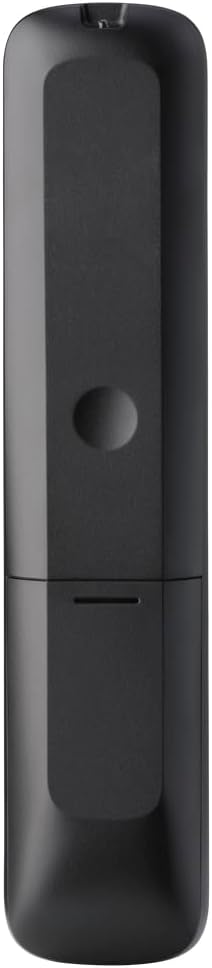
איור 2: אחורה view of the remote, highlighting the battery compartment.
2. תכנות שלט רחוק
The URC 3661 can be programmed using direct code entry, auto code search, or the learning function. It is recommended to try direct code entry first.
הזנת קוד ישיר:
- הפעל את המכשיר שברצונך לשלוט בו (למשל, טלוויזיה, נגן DVD).
- לחץ והחזק את הגדרה button until the LED light under the device key (e.g., TV, DVD) blinks twice and stays lit.
- Press the device key you want to program (e.g., TVנורית ה-LED תישאר דולקת.
- Enter the 4-digit or 5-digit setup code for your brand and device. Refer to the code list provided with your remote or visit the One For All website for the most up-to-date codes.
- After entering the code, the LED will blink twice and turn off if the code is valid. If it blinks once and stays lit, the code is invalid; re-enter the code.
- בדוק את השלט על ידי לחיצה על כּוֹחַ button. If the device turns off, try other functions like volume or channel. If it works, programming is complete. If not, try the next code for your brand or use the Auto Code Search.
חיפוש קוד אוטומטי:
- הפעל את המכשיר שברצונך לשלוט בו.
- לחץ והחזק את הגדרה עד שנורית ה-LED תהבהב פעמיים ותמשיך להאיר.
- Press the device key you want to program.
- כוון את השלט אל המכשיר ולחץ על כּוֹחַ לחץ שוב ושוב (בערך כל 3 שניות) עד שהמכשיר יכבה.
- לאחר כיבוי המכשיר, לחצו מיד על הלחצן הגדרה button to save the code. The LED will blink twice and turn off.
- Test the remote. If it doesn't work correctly, repeat the process.
פונקציית למידה:
The learning function allows the URC 3661 to copy functions directly from your original remote control, which is useful for commands not available via direct code entry or auto search.
- Place the URC 3661 and your original remote on a flat surface, facing each other, about 1-2 inches apart.
- לחץ והחזק את הגדרה עד שנורית ה-LED תהבהב פעמיים ותמשיך להאיר.
- Press the button on the URC 3661 that you want to teach a function to (e.g., a specific input button). The LED will blink rapidly.
- Press and hold the corresponding button on your original remote control until the LED on the URC 3661 blinks twice, indicating successful learning.
- חזרו על הפעולה עבור כל הכפתורים הרצויים.
- כדי לצאת ממצב למידה, לחצו על הגדרה button. The LED will blink twice and turn off.
הפעלת השלט הרחוק
The URC 3661 is designed for intuitive operation. Familiarize yourself with the button layout and their primary functions.

איור 3: חזית view of the URC 3661 with button layout.
פונקציות מפתח:
- Device Keys (TV, STB, AUDIO, BLURAY, DVD, STREAM): Select the device you wish to control. The LED under the selected device key will illuminate.
- כּוֹחַ: מפעיל או מכבה את המכשיר שנבחר.
- VOL +/-: מכוון את עוצמת הקול.
- CH +/-: משנה ערוצים.
- Navigation Pad (UP, DOWN, LEFT, RIGHT, OK): משמש לניווט ובחירה בתפריטים.
- תפריט: פותח את התפריט הראשי של המכשיר.
- מַדְרִיך: Displays the electronic program guide (if supported by the device).
- מידע: מציג מידע על התוכנית או הקלט הנוכחיים.
- בית: Returns to the device's home screen.
- יְצִיאָה: Exits menus or applications.
- Playback Controls (PLAY, PAUSE, STOP, REWIND, FAST FORWARD, SKIP): שליטה בהפעלת מדיה.
- מקשי מספרים (0-9): For direct channel entry or numerical input.
- App Shortcut Keys (Netflix, Prime Video, YouTube): גישה ישירה לשירותי סטרימינג פופולריים.
- תאורה אחורית: The keys are backlit for easy use in dark environments. The backlight activates automatically when a button is pressed.
תַחזוּקָה
ניקוי השלט:
To maintain the remote's appearance and functionality, clean it regularly:
- השתמש במטלית רכה ויבשה כדי לנגב את פני השטח של השלט.
- עבור לכלוך עיקש, מעט דחוףampשטפו את המטלית במים או בחומר ניקוי עדין ולא שוחק. הימנעו מלחות מוגזמת.
- Do not use harsh chemicals, solvents, or abrasive cleaning agents, as these can damage the remote's finish or internal components.
החלפת סוללה:
Replace batteries when the remote's performance degrades or the LED indicator blinks unusually. Refer to the "Battery Installation" section under Setup for detailed instructions.
פתרון בעיות
If you encounter issues with your URC 3661 remote control, try the following troubleshooting steps:
| בְּעָיָה | סיבה אפשרית | פִּתָרוֹן |
|---|---|---|
| Remote does not operate the device. | Incorrect device selected. הסוללות חלשות או שהן הוכנסו בצורה שגויה. קוד שגוי מתוכנת. | Ensure the correct device key (TV, DVD, etc.) is pressed. בדוק את כיוון הסוללה והחלף אותה במידת הצורך. Re-program the remote using a different code or the Auto Code Search/Learning function. |
| חלק מהלחצנים לא עובדים. | Incomplete programming. Device does not support the function. | Use the Learning function to copy specific commands from your original remote. Verify if the original remote has that function. |
| LED blinks once and stays lit during code entry. | Invalid code entered. | Ensure you are entering the correct 4 or 5-digit code. Try another code from the list or use Auto Code Search. |
| Remote LED does not light up. | סוללות מתות. | החליפו את הסוללות בסוללות AA חדשות. |
For further assistance, visit the official One For All support webאתר או עיינו במדריך המקוון המקיף.
מפרטים
| תכונה | פְּרָט |
|---|---|
| מספר דגם | שב"ט 3661 |
| מותג | אחד בשביל כולם |
| מידות המוצר | 0.39 x 0.39 x 0.39 אינץ' |
| משקל פריט | 6.7 אונקיות |
| סוללות נדרשות | 2 סוללות AA |
| מספר מרבי של מכשירים נתמכים | עד 6 מכשירים |
| מכשירים תואמים | Television, Set-top Box, Audio, Blu-ray, DVD, Streaming devices |
| תכונה מיוחדת | Universal, Learning Function, Backlit Keys |

Figure 4: Product packaging indicating compatibility with up to 6 devices.
אחריות ותמיכה
Warranty information for the One For All URC 3661 Universal Remote Control is typically provided with your purchase documentation. Please refer to the warranty card or leaflet included in the product packaging for details regarding coverage, terms, and conditions.
For technical support, frequently asked questions, or to find the latest programming codes, please visit the official One For All website. Contact information for customer service may also be found on the manufacturer's webבאתר או בתיעוד המוצר שלך.
One For All Official Webאֲתַר: www.oneforall.com