
1. הקדמה
This manual provides detailed instructions for the setup, operation, and maintenance of your ITECH Fusion 2 S Smartwatch and accompanying Wireless Headphones. The ITECH Fusion 2 S is designed to help you monitor your health and fitness goals, offering features such as heart rate tracking, step counting, sleep monitoring, and multi-sport modes. The included wireless headphones provide an integrated audio experience.
2. תכולת החבילה
אנא ודא שכל הפריטים נמצאים בחבילה שלך:
- ITECH Fusion 2 S Smartwatch
- אוזניות אלחוטיות
- USB Charging Cable (for smartwatch)
- USB Charging Cable (for headphones)
- מדריך למשתמש (מסמך זה)

Image: The ITECH Fusion 2 S Smartwatch and Wireless Headphones displayed within their retail packaging.
3. המכשיר נגמרview
3.1. ITECH Fusion 2 S Smartwatch

Image: The ITECH Fusion 2 S Smartwatch with a grey camouflage band shown alongside the matching wireless headphones.
The smartwatch features a touch screen display, a side button for navigation, and sensors on the rear for health monitoring. The display shows time, date, activity data, and notifications.

Image: A close-up of the ITECH Fusion 2 S Smartwatch display, highlighting features such as heart rate monitor, apps and notifications, multi-sports modes, water resistance, calorie tracker, music remote, pedometer, sleep monitor, hydration reminder, and extended 14-day battery life.
3.2. Wireless Headphones
The wireless headphones are over-ear style with cushioned earcups and an adjustable headband. Controls for audio playback and calls are located on the earcup.

תמונה: צד view of the ITECH Wireless Headphones, illustrating features like powerful sound quality, convenient controls, comfort for hours, and a go-anywhere design.

תמונה: מפורט view of the ITECH Wireless Headphones, emphasizing noise isolating fit, built-in microphone, Bluetooth wireless technology, and up to 8 hours of playback.

Image: A diagram of the ITECH Wireless Headphones highlighting the flexible headband, comfortable ear cushion, foldable design, and convenient controls, along with key technical specifications.
4. התקנה
4.1. טעינת המכשירים שלך
Before first use, fully charge both your smartwatch and wireless headphones.
- שעון חכם: Connect the USB charging cable to the charging port on the back of the smartwatch and to a USB power source. The battery icon on the screen will indicate charging status.
- אוזניות אלחוטיות: Connect the USB charging cable to the charging port on the headphones and to a USB power source. An indicator light will show charging status and turn off when fully charged.
4.2. הפעלה/כיבוי
- שעון חכם: To power on, press and hold the side button until the screen illuminates. To power off, navigate to the 'Settings' menu on the smartwatch, then select 'Power Off'.
- אוזניות אלחוטיות: כדי להפעיל את המכשיר, לחץ והחזק את לחצן ההפעלה עד שנורית החיווי תהבהב. כדי לכבות את המכשיר, לחץ והחזק את לחצן ההפעלה שוב עד שנורית החיווי תכבה.
4.3. Pairing the Smartwatch with Your Smartphone
The ITECH Fusion 2 S Smartwatch is compatible with both iPhone and Android devices.
- הורד את ה iTECH Wearables אפליקציה מ-Apple App Store או Google Play Store.
- ודא שה-Bluetooth מופעל בטלפון החכם שלך.
- Open the iTECH Wearables app and follow the on-screen instructions to create an account and pair your smartwatch.
- The app will guide you through connecting the smartwatch via Bluetooth. Confirm the pairing request on both your phone and smartwatch.
4.4. Pairing the Wireless Headphones
- ודא שהאוזניות כבויות.
- לחץ והחזק את לחצן ההפעלה עד שנורית החיווי תהבהב במהירות, המציינת מצב צימוד.
- On your smartphone or other Bluetooth-enabled device, go to Bluetooth settings and search for available devices.
- Select "ITECH Headphones" (or similar name) from the list to connect. The indicator light will change to a steady blue when successfully paired.
5. הפעלת השעון החכם
5.1. ניווט
- מסך מגע: החלק שמאלה/ימינה, למעלה/למטה כדי לנווט בין תפריטים ותכונות. הקש כדי לבחור.
- כפתור צד: לחץ כדי לחזור למסך הבית או להעיר את המכשיר.
5.2. פרצופים לצפות
Customize your smartwatch display by changing watch faces. On the home screen, press and hold the display, then swipe left or right to browse available watch faces. Tap to select your preferred design.
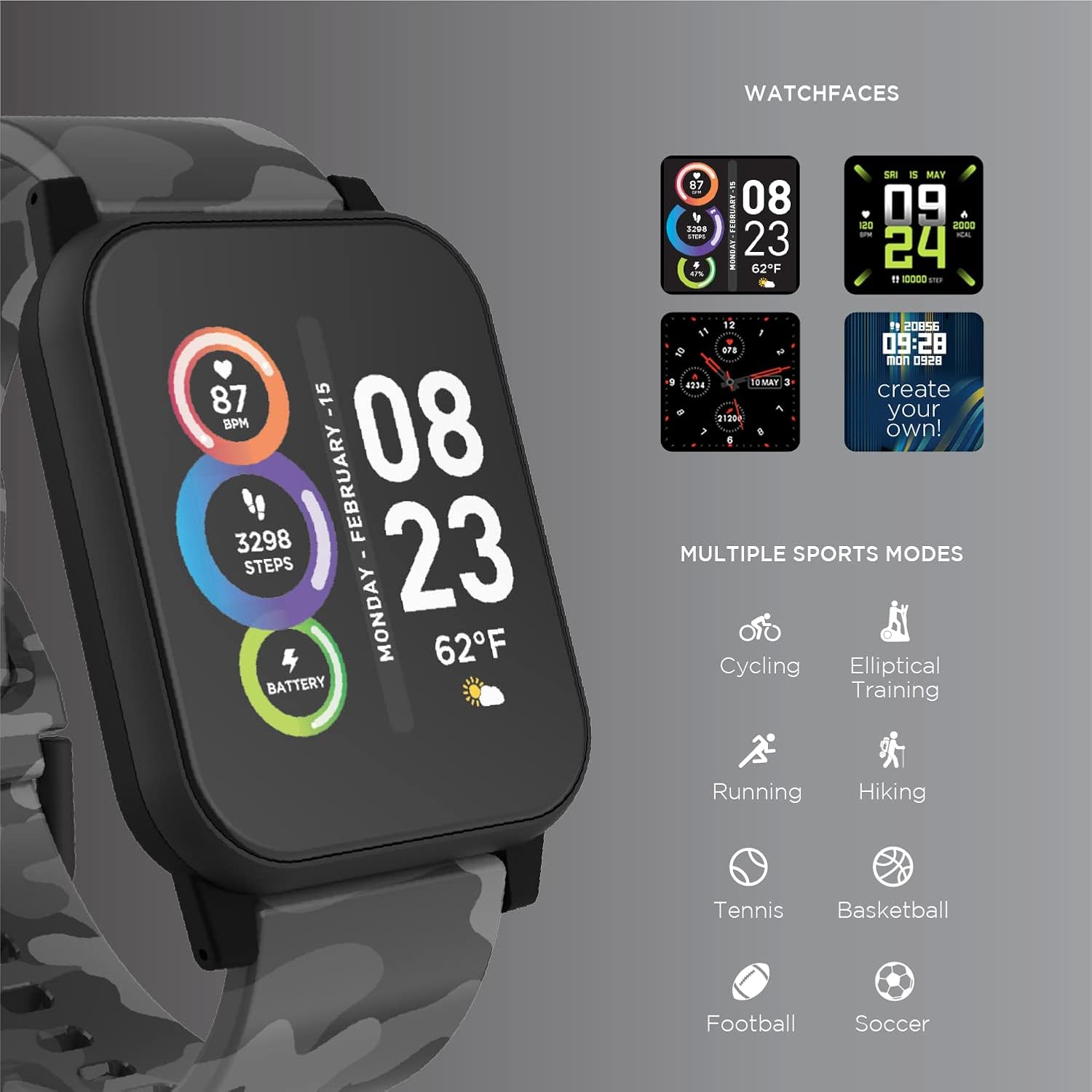
Image: The ITECH Fusion 2 S Smartwatch display showing various customizable watch faces and icons representing multiple sports modes including cycling, elliptical training, running, hiking, tennis, basketball, football, and soccer.
5.3. תכונות ליבה
- מד דופק: Access the heart rate feature on your smartwatch to measure your heart rate using the built-in optical sensor. Ensure the watch is snug on your wrist for accurate readings.
- מד צעדים (Pedometer): The smartwatch automatically tracks your daily steps, distance, and calories burned. View your progress on the device or in the iTECH Wearables app.
- צג שינה: Wear your smartwatch to bed to track your sleep patterns, including light and deep sleep stages. Data is synchronized with the app for detailed analysis.
- מצבי ריבוי ספורט: Select from various sports modes (e.g., running, cycling, hiking) to track specific workout data, including duration, distance, and calories.
- הודעות הודעה: Receive notifications for calls, texts, and app alerts directly on your smartwatch when connected to your smartphone.
- מעקב קלוריות: Monitors calories burned throughout the day based on your activity level.
- תזכורת לחות: Set reminders to drink water at regular intervals through the app.
- שלט מוזיקה: Control music playback on your smartphone directly from your smartwatch (play, pause, skip tracks).
5.4. שילוב אפליקציה
עבור מקיף view of your health and fitness data, regularly sync your smartwatch with the iTECH Wearables app. The app allows you to set goals, view historical data, customize settings, and manage notifications.
6. Operating the Wireless Headphones
6.1. בקרות
The headphones feature intuitive controls for media playback and call management:
- לחצן הפעלה: לחץ לחיצה ממושכת להפעלה/כיבוי. לחיצה קצרה להפעלה/השהיה.
- לחצני עוצמת הקול: לחץ על '+' כדי להגביר את עוצמת הקול, על '-' כדי להנמיך את עוצמת הקול.
- בקרת מסלול: Press and hold '+' for next track, '-' for previous track.
- ניהול שיחות: Short press power button to answer/end calls. Press and hold to reject calls.
6.2. תכונות אודיו
- איכות צליל עוצמתית: Designed to deliver clear and rich audio.
- בידוד רעשים: The over-ear design helps to reduce external noise for an immersive listening experience.
- מיקרופון מובנה: מאפשר שיחות ללא ידיים.
6.3. חיי סוללה
The wireless headphones provide up to 8 hours of playback on a single charge, depending on usage and volume levels.

Image: A person wearing the ITECH Fusion 2 S Smartwatch on their wrist and the matching wireless headphones, demonstrating typical use.
7. תחזוקה
7.1. ניקיון
- שעון חכם: Wipe the screen and band with a soft, dampמטלית נטולת סיבים. הימנעו משימוש בכימיקלים חזקים או בחומרים שוחקים.
- אוזניות: Gently wipe earcups and headband with a soft, dry cloth. Do not immerse in water.
7.2. Water Resistance (Smartwatch)
The ITECH Fusion 2 S Smartwatch is IP67 water resistant. This means it is protected against dust and can withstand immersion in water up to 1 meter for up to 30 minutes. It is suitable for daily use and light splashes, but not recommended for swimming, showering, or prolonged water immersion.
7.3. אחסון
Store your devices in a cool, dry place away from direct sunlight and extreme temperatures when not in use.
8. פתרון תקלות
If you encounter issues with your ITECH Fusion 2 S devices, please refer to the following common solutions:
- המכשיר לא נדלק: Ensure the device is fully charged. Try connecting it to a different USB power source.
- Smartwatch not pairing with phone: Ensure Bluetooth is enabled on your phone and the smartwatch is within range. Restart both devices and try pairing again through the iTECH Wearables app.
- אוזניות לא מתחברות: Ensure headphones are in pairing mode (rapidly flashing indicator light). Check your device's Bluetooth settings and try reconnecting.
- Inaccurate heart rate/step readings: ודאו שהשעון החכם צמוד לפרק כף היד, לא צמוד מדי או רפוי מדי. נקו את החיישן בגב השעון.
- התראות שלא מופיעות: Check app permissions on your smartphone to ensure the iTECH Wearables app has access to notifications. Verify notification settings within the app.
- Audio issues with headphones: Ensure headphones are fully charged and properly paired. Check volume levels on both the headphones and the connected device.
If problems persist, consider performing a factory reset (refer to the smartwatch settings menu or contact customer support for headphones). For further assistance, please contact Itech customer support.
9. מפרטים
| תכונה | פְּרָט |
|---|---|
| מידות המוצר | 22.86 x 5.08 x 22.86 ס"מ; 621 גרם |
| מספר דגם של פריט | 900366B-40-G57 |
| מַעֲרֶכֶת הַפעָלָה | Android (Compatible with iPhone and Android) |
| תכונות מיוחדות | Heart Rate Monitor, Step Counter, Sleep Monitor, Message Notifications, Multi-Sport Modes |
| טכנולוגיית קישוריות | USB |
| תקן תקשורת אלחוטית | בלוטות' |
| הרכב תא הסוללה | ליתיום יון |
| GPS | נָכוֹן |
| Smartwatch Shape | מְרוּבָּע |
| Smartwatch Screen Size | 1.3 אינץ' |
| מותג | איטק |
| שם הדגם | Fusion 2 Bundle |
| עמידות במים | IP67 |
| Headphones Playback Time | עד 8 שעות |
| Headphones Driver Diameter | 40 מ"מ |
| Headphones Connection Type | Bluetooth® 5.0 |
| עכבת אוזניות | 32 אוהם ±15% |
| תגובת תדר לאוזניות | 20Hz - 20KHz |
10. אחריות ותמיכה
Your ITECH Fusion 2 S Smartwatch and Wireless Headphones are covered by a manufacturer's warranty. Please refer to the warranty card included in your package or visit the official Itech webבאתר לקבלת תנאי האחריות המפורטים.
For technical support, troubleshooting assistance, or warranty claims, please contact Itech customer service through their official webאתר או פרטי הקשר המופיעים בתיעוד המוצר שלך.