1. הקדמה
The XDUOO Link V2 is a compact and portable Digital-to-Analog Converter (DAC) and headphone amplifier designed to enhance the audio quality from your mobile phone or computer. It integrates a low-power decoding chip and headphone amplifier chip, providing high-resolution audio playback up to 32bit/384kHz PCM and DSD256.
This device is specifically engineered to improve the sound quality of music playback, offering a superior listening experience compared to standard mobile audio outputs.
2. תכונות מוצר
- תמיכה באודיו ברזולוציה גבוהה: Conforms to Hi-Res Audio standards, supporting up to 32bit/384kHz PCM and DSD256 audio input. Features a Signal-to-Noise Ratio (SNR) of 125dB for clear audio.
- High-Performance Decoding Chip: Equipped with a CS43131 decoding chip, capable of processing audio at significantly higher resolutions than typical mobile devices, revealing more audio details.
- USB DAC for PC: Functions as a plug-and-play USB DAC for computers running MAC, WINDOWS 7/8/10/11, or LINUX operating systems, utilizing UAC2.0 drivers.
- Adaptive Power Adjustment: Features a professional power amplifier that intelligently adjusts output power based on headphone impedance, supporting headphones up to 600Ω without over-driving.
- צריכת חשמל נמוכה: Designed for low power draw, ensuring minimal impact on the connected mobile device's battery life.
- עיצוב קומפקטי ונייד: Constructed with a CNC-machined aluminum alloy shell, weighing only 13g, making it highly portable.
- ללא סוללה מובנית: Operates directly from the connected device's power, eliminating the need for internal battery charging.
3. תכולת החבילה
אנא ודא שכל הפריטים נמצאים בחבילה:
- 1 x XDUOO Link V2 DAC Headphone Ampחיים יותר
- 1 x מדריך למשתמש
4. הוראות התקנה
4.1 Connecting to a Mobile Phone
- Ensure your mobile phone has a Type-C USB port. The Link V2 is exclusively designed for Type-C connections.
- Connect the Type-C end of the Link V2 cable to your mobile phone's Type-C port.
- Plug your 3.5mm headphones into the 3.5mm output port of the Link V2.
- The device is plug-and-play and should be recognized automatically by your phone.
4.2 Connecting to a Computer (PC/MAC/LINUX)
- Connect the Type-C end of the Link V2 cable to an available USB port on your computer. An appropriate USB adapter (not included) may be required for standard USB-A ports.
- Plug your 3.5mm headphones into the 3.5mm output port of the Link V2.
- Your computer's operating system (Windows 7/8/10/11, MAC, LINUX) should automatically detect the Link V2 as an audio output device, utilizing its integrated UAC2.0 driver.
- Select the Link V2 as your preferred audio output device in your computer's sound settings.
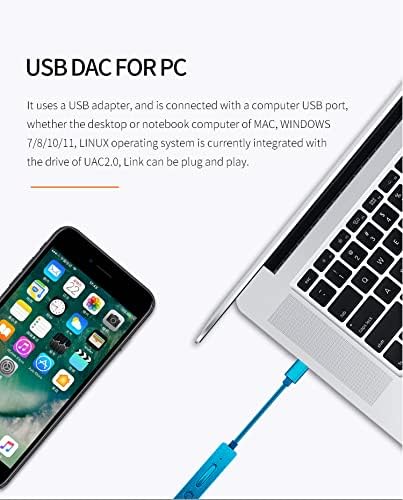
Image: The XDUOO Link V2 connected to a smartphone and a laptop, demonstrating its use as a USB DAC for both mobile and PC devices.
5. הוראות הפעלה
5.1 השמעת אודיו
- Once connected to your mobile phone or computer and with headphones plugged in, begin playing audio from your device.
- The Link V2 will automatically process the digital audio signal and output enhanced analog audio to your headphones.
- Adjust the volume directly from your connected mobile phone or computer. The Link V2 does not have independent volume controls.
5.2 Adaptive Power Adjustment
The Link V2 features an adaptive power adjustment mechanism. It intelligently detects the impedance of your connected headphones and adjusts its output power accordingly. This ensures optimal performance and prevents potential damage to your headphones from excessive power.
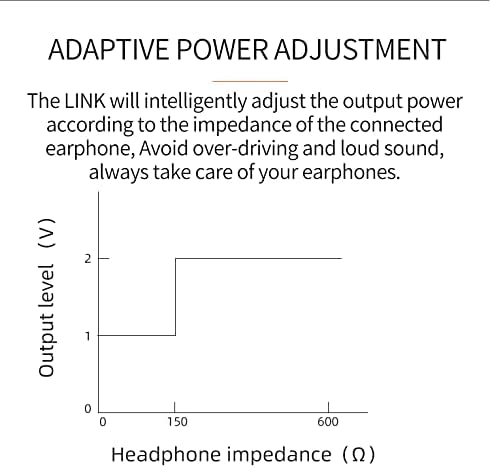
Image: A graph illustrating the Link V2's adaptive power adjustment, showing output level (V) increasing with headphone impedance (Ω) at specific thresholds to maintain optimal performance.
5.3 Important Usage Notes
- The Link V2 is primarily designed for improving music sound quality. Its functionality for answering phone calls or watching videos is not guaranteed and may vary by device.
- Ensure the Type-C connection is secure to prevent audio interruptions.
6. תחזוקה
To ensure the longevity and optimal performance of your XDUOO Link V2, follow these maintenance guidelines:
- ניקוי: Use a soft, dry cloth to wipe the device. Avoid using liquid cleaners, solvents, or abrasive materials.
- אִחסוּן: יש לאחסן את המכשיר במקום קריר ויבש, הרחק מאור שמש ישיר וטמפרטורות קיצוניות.
- טיפול: טפלו במכשיר בזהירות. הימנעו מהפלתו או מחשיפתו לפגיעות חזקות.
- לַחוּת: Keep the device away from water and high humidity. Moisture can damage internal components.
7. פתרון תקלות
If you encounter issues with your XDUOO Link V2, please refer to the following common troubleshooting steps:
- אין פלט קול:
- Ensure the Link V2 is securely connected to your mobile phone or computer's Type-C port.
- Verify that your headphones are fully plugged into the Link V2's 3.5mm output port.
- Check the volume level on your connected device (phone/computer) and ensure it is not muted.
- If using with a computer, confirm that the Link V2 is selected as the default audio output device in your sound settings.
- Test with different headphones to rule out headphone issues.
- איכות סאונד ירודה:
- ודא את מקור השמע file is of high quality. The Link V2 enhances, but cannot create, quality from a poor source.
- בדוק אם יש חיבורים רופפים.
- נסה להפעיל מחדש את המכשיר המחובר.
- התקן לא מזוהה:
- For mobile phones, ensure your phone supports external DACs via its Type-C port.
- For computers, try connecting to a different USB port.
- הפעל מחדש את המחשב.
- Compatibility Issue with Non-Type-C Phones:
- The Link V2 is designed exclusively for mobile phones with a Type-C USB port. It will not function with phones using other port types.
8. מפרטים
| מִפרָט | עֵרֶך |
|---|---|
| דֶגֶם | LINK V2 |
| כוח פלט | 80mW @ 32 אוהם |
| גוֹדֶל | 60 מ"מ x 13 מ"מ x 7.2 מ"מ (2.36 x 0.51 x 0.04 אינץ') |
| תגובת תדר | 20Hz ~ 20KHz (±0.5dB) |
| הַפרָדָה | ≥77dB |
| עיוות הרמוני | 0.0018% @ 1kHz |
| ממשק קלט | TYPE-C USB |
| S/N (Signal-to-Noise Ratio) | 125dB |
| יציאת פלט | יציאת אוזניות 3.5 מ"מ |
| Supported PCM Sampתדירות ling | 16~32bit 44.1kHz~384kHz |
| Supported DSD Sampתדירות ling | DSD64/128/256 |
| שבב DAC | CS43131 |
| אורך כבל נתונים | 90 מ"מ |
| מִשׁקָל | 13 גרם (0.529 אונקיות) |
| חוֹמֶר | Plastic (with Aluminum Alloy shell) |
| צֶבַע | אָפוֹר |
9. אחריות ותמיכה
For warranty information, technical support, or service inquiries, please refer to the warranty card included with your product or visit the official XDUOO webאתר. שמור את קבלת הרכישה כהוכחת קנייה לתביעות אחריות.