
1. הקדמה
The RCYAGO BLE-9909 is a multi-parameter smart tester designed for precise measurement of pH, Total Dissolved Solids (TDS), Electrical Conductivity (EC), Salinity, and Temperature. This device integrates Bluetooth connectivity, allowing seamless data synchronization with the YINMIK mobile application for enhanced data management and analysis. It is suitable for various applications including domestic drinking water, hydroponics, laboratory testing, and aquariums.

Figure 1: RCYAGO BLE-9909 Smart Tester in operation.
2. תכונות מוצר
- מדידה מרובת פרמטרים: Measures pH, TDS (ppm), EC (conductivity), Salinity (ppt), and Temperature.
- קישוריות בלוטות': Compatible with the YINMIK mobile application for real-time data transmission and control.
- Cloud-Based Data Management: Enables easy saving, management, and sharing of test data, preventing data loss.
- כיול אוטומטי: Features a 5-point calibration method for pH (Asian standard: pH 4.00, pH 6.86, pH 9.18; EU standard: pH 7.00, pH 10.01) ensuring high accuracy.
- High Sensitivity Glass Probe: Provides a full measurement range of 0-14 pH with 0.01 pH resolution.
- תצוגה מקיפה: Large LCD screen displays multiple parameters simultaneously. App control allows for backlight adjustment.
- Customizable Limits: The mobile application allows setting upper and lower limits for pH and EC. Abnormal values are highlighted in red.
3. רכיבי המוצר
Familiarize yourself with the components of your BLE-9909 tester:

איור 2: התפוצץ view of the BLE-9909 tester and its components.
- 3*1.5V Button Battery: מקור מתח למכשיר.
- תצוגה עם תאורה אחורית: LCD screen for reading measurements.
- Data Hold/Temperature Unit Conversion Key: Button to hold readings or switch temperature units.
- Function Conversion/Calibration Key: Button to switch measurement modes or initiate calibration.
- מקש הפעלה/כיבוי: כפתור הפעלה.
- Immersion Line: Indicates the minimum immersion depth for accurate readings.
- כובע מגן: Covers and protects the electrodes when not in use.
- High-Precision Probe: Contains the sensors for measurement.

איור 3: מפורט view of the BLE-9909 electrodes.
- TDS/EC/Salinity Sensor: Measures Total Dissolved Solids, Electrical Conductivity, and Salinity.
- External Reference: Reference electrode for stable measurements.
- חיישן טמפרטורה: Measures the temperature of the solution.
- Glass PH Sensor: High-sensitivity sensor for pH measurements.
4. התקנה
4.1 התקנת סוללה
- Unscrew the battery compartment cap at the top of the device (refer to Figure 2).
- הכניסו שלוש סוללות כפתור 1.5V, תוך הקפדה על קוטביות נכונה.
- Securely screw the battery compartment cap back on.
4.2 Mobile App Connection (YINMIK App)
The BLE-9909 connects to your smartphone via Bluetooth for advanced features and data management.
- Download the "YINMIK" mobile application from your device's app store (iOS App Store or Google Play Store).
- ודא שה-Bluetooth מופעל בטלפון החכם שלך.
- Turn on the BLE-9909 tester by pressing the "ON/OFF" key.
- Open the YINMIK app. The app will automatically search for and connect to the BLE-9909 device.
- Once connected, the app will display real-time measurement data.

Figure 4: Bluetooth data synchronization with the YINMIK mobile app.
5. הוראות הפעלה
5.1 לקיחת מדידות
- הסר את מכסה המגן מהאלקטרודה.
- שטפו את האלקטרודה במים מזוקקים ונגבו בעדינות בעזרת טישו נקי.
- Immerse the electrode into the solution to be tested, ensuring the immersion line is covered.
- Gently stir the solution and wait for the reading to stabilize on the LCD screen.
- Read the displayed values. The device will show pH, TDS/EC/Salinity, and Temperature.
- לאחר המדידה, יש לשטוף היטב את האלקטרודה במים מזוקקים ולהחזיר את מכסה המגן.
5.2 החלפת מצבי מדידה
Press the "MODE/CAL" key to cycle through different measurement parameters (pH, TDS, EC, Salinity). The active parameter will be indicated on the display.
5.3 Data Hold and Temperature Unit Conversion
Press the "HOLD/TEMP" key to hold the current reading on the display. Press it again to release. Long-press the "HOLD/TEMP" key to switch between Celsius (°C) and Fahrenheit (°F) temperature units.
6. כיול
Regular calibration ensures the accuracy of your pH measurements. The BLE-9909 supports a 5-point pH calibration.
6.1 Required Calibration Solutions
- Asian Standard: pH 4.00, pH 6.86, pH 9.18
- תקן האיחוד האירופי: pH 7.00, pH 10.01
6.2 הליך כיול
- Prepare the calibration buffer solutions (e.g., pH 6.86, pH 4.00, pH 9.18 for Asian standard).
- Turn on the tester and ensure it is in pH measurement mode.
- שוטפים את האלקטרודה במים מזוקקים ומייבשים.
- Immerse the electrode into the first calibration solution (e.g., pH 6.86).
- Press and hold the "MODE/CAL" key until "CAL" appears on the display. The device will automatically recognize the buffer solution.
- Wait for the reading to stabilize and for the device to confirm calibration for that point.
- Remove the electrode, rinse with distilled water, and blot dry.
- Repeat steps 4-6 for the remaining calibration solutions in sequence.
- Once all points are calibrated, the device will automatically exit calibration mode.
פֶּתֶק: For best accuracy, calibrate regularly, especially after prolonged storage or if readings appear inconsistent.
7. Data Management and App Features
The YINMIK mobile application provides comprehensive data management and additional control features.
- תצוגת נתונים בזמן אמת: View all measured parameters simultaneously on your phone screen.
- רישום נתונים: Automatically save measurement data to the cloud, accessible anytime.
- נתונים היסטורייםview: Browse past measurements, including time and date stamps.
- אזעקות הניתנות להתאמה אישית: Set upper and lower limits for pH and EC. The app will display values in red if they exceed these limits (see Figure 5).
- בקרת תאורה אחורית: Adjust the backlight of the device's LCD screen directly from the app.
- שיתוף נתונים: Easily share your test results.
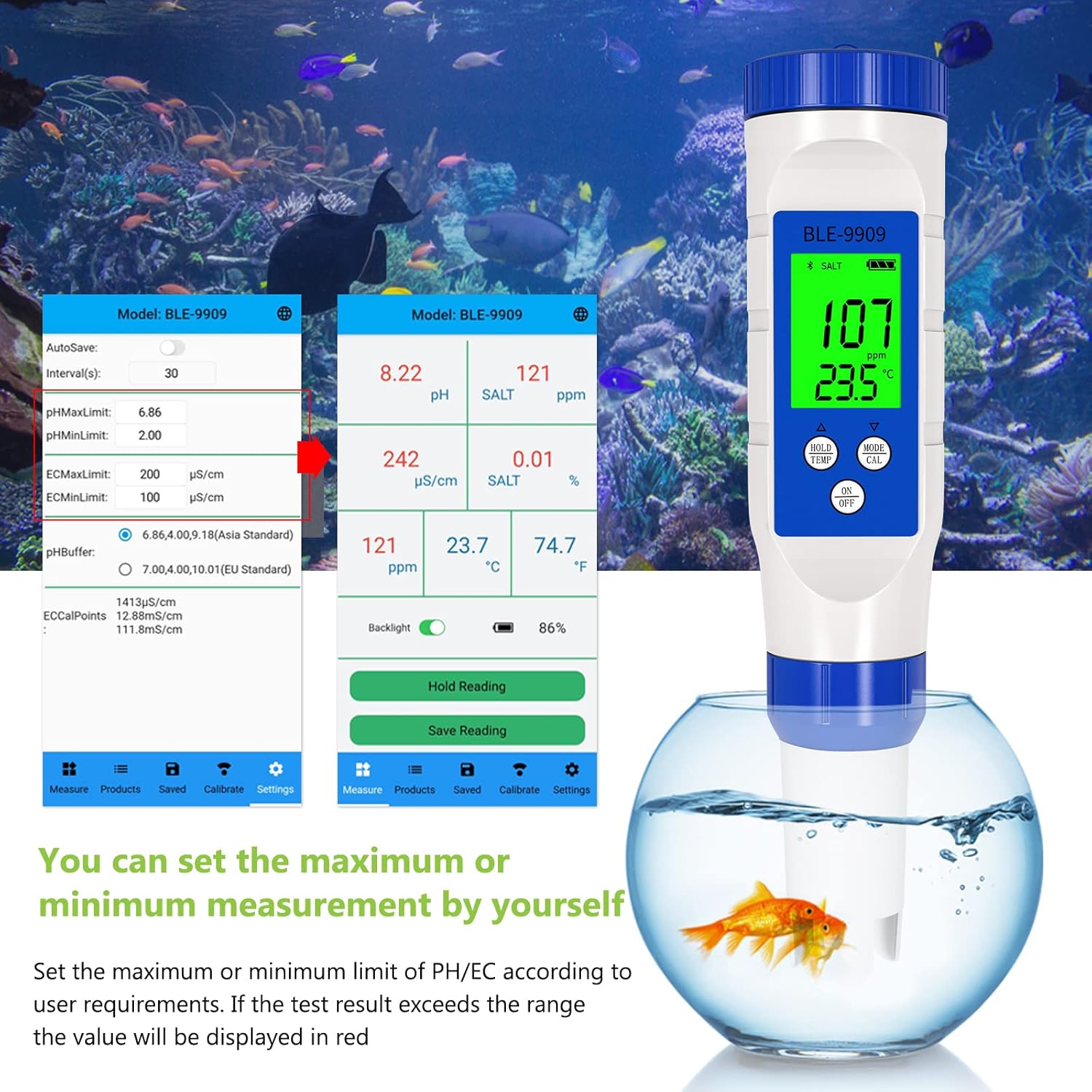
Figure 5: Setting custom measurement limits within the YINMIK app.
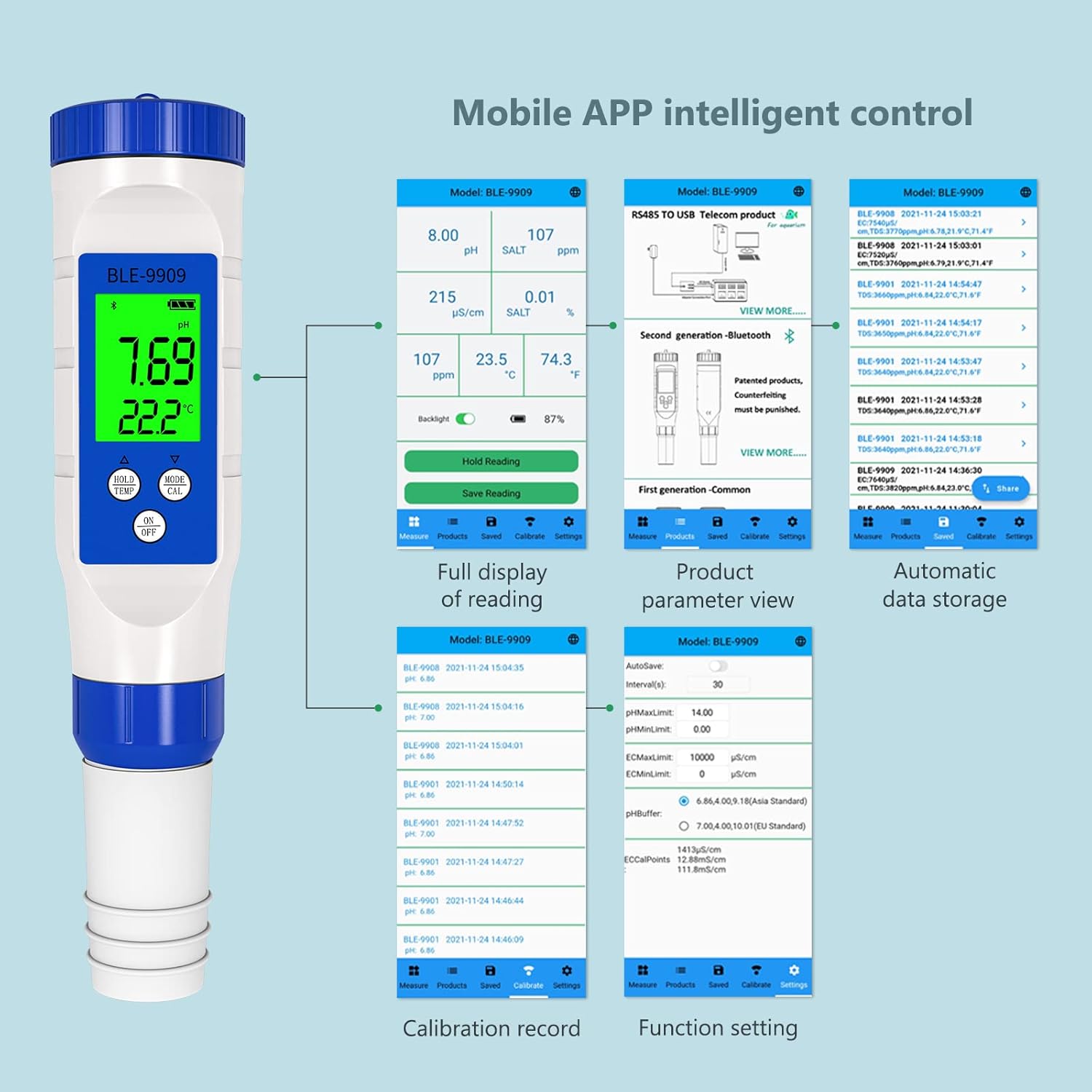
איור 6: מעלview of YINMIK app features including data display, settings, and historical records.
8. תחזוקה
8.1 ניקוי אלקטרודות
After each use, rinse the electrode thoroughly with distilled or deionized water to prevent contamination and buildup. Do not wipe the glass bulb, as this can cause static electricity and damage the sensor. Gently blot dry with a lint-free tissue.
8.2 אחסון
Always replace the protective cap after use. Ensure the sponge inside the cap remains moist with a few drops of pH storage solution or 3M KCl solution to keep the electrode hydrated. Never store the electrode dry or in distilled water, as this can shorten its lifespan.
8.3 החלפת סוללה
When the display becomes dim or the device fails to power on, replace the batteries as described in Section 4.1.
9. פתרון תקלות
| בְּעָיָה | סיבה אפשרית | פִּתָרוֹן |
|---|---|---|
| קריאות לא מדויקות | Electrode not calibrated; dirty electrode; expired calibration solution; damaged electrode. | Calibrate the device (Section 6); clean the electrode (Section 8.1); use fresh calibration solutions; replace electrode if damaged. |
| המכשיר לא נדלק | סוללות חלשות או מתות; התקנה שגויה של הסוללה. | Replace batteries (Section 8.3); ensure correct battery polarity (Section 4.1). |
| בעיות בחיבור בלוטות' | Bluetooth off on phone; app not open; device too far from phone; interference. | Ensure Bluetooth is on; open YINMIK app; bring device closer to phone; restart both device and app. |
| Readings fluctuate excessively | Electrode not fully immersed; air bubbles on electrode; solution not stable; damaged electrode. | Ensure immersion line is covered; gently tap electrode to remove bubbles; wait for solution to stabilize; replace electrode if necessary. |
10. מפרטים
| פָּרָמֶטֶר | עֵרֶך |
|---|---|
| מספר דגם | BLE-9909 |
| מותג | RCYAGO |
| מידות | 23.8 x 8 x 5.21 ס"מ |
| מִשׁקָל | 168 גרם |
| טווח מדידת pH | 0.00 - 14.00 pH |
| רזולוציית pH | 0.01 pH |
| טווח מדידת טמפרטורה | Typically 0-60°C |
| מקור כוח | 3 x 1.5V Button Batteries |
| קישוריות | Bluetooth (YINMIK Mobile App) |
11. אחריות ותמיכה
For warranty information, technical support, or service inquiries, please contact RCYAGO customer service through the official website or your point of purchase. Please have your model number (BLE-9909) and purchase date available when contacting support.
יַצרָן: RCYAGO
First Available Date on Amazon.es: 24 בדצמבר 2021